
Hackolade Studio
Hackolade Studio is a data modeling and schema design tool for relational and NoSQL databases, APIs, and data exchange formats.
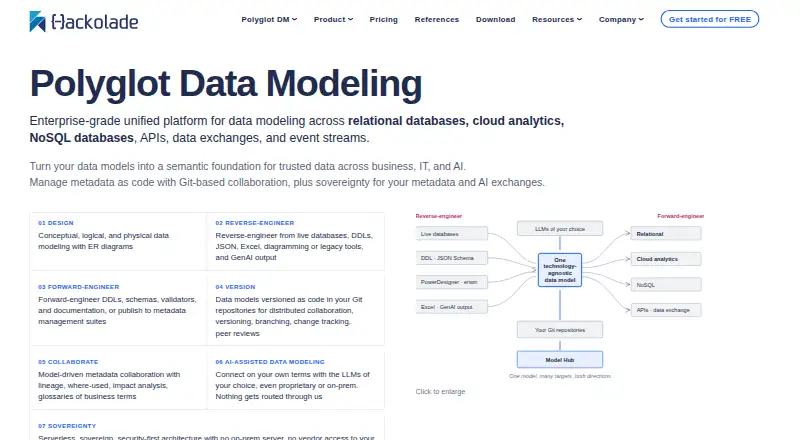
What Hackolade Studio is
Hackolade Studio is a data modeling and schema design tool for relational and NoSQL databases, APIs, and data exchange formats. It supports conceptual, logical, and physical models through ER diagrams and hierarchical schema views, with the maker describing more than 45 physical targets. Studio can reverse-engineer supported sources and generate DDLs, schemas, validators, and documentation. It is available on Linux, macOS, Windows, and the web, with SQL export and forward engineering also listed. The free Community edition allows up to 50 objects per model, but excludes advanced forward and reverse engineering, Git, and Collibra integrations. A 14-day evaluation unlocks Professional and Workgroup features without restrictions and does not require a credit card. Workgroup adds Git repository integration for versioning, branching, change tracking, collaboration, and peer review, with listed workflows for GitHub, Bitbucket, Azure DevOps, and GitLab. Workgroup costs €175 per user per month or €1,750 per year, with support included.
Good
- Models relational and NoSQL databases, APIs, and exchange formats.
- Supports conceptual, logical, and physical modeling.
- Generates DDLs, schemas, validators, and documentation.
- Workgroup adds Git-based collaboration and peer review.
- AI is off by default; models stay local or in Git.
Watch out
- Community models are limited to 50 objects.
- Community omits advanced forward and reverse engineering.
- Community excludes Git and Collibra integrations.
- Collibra integration requires an optional upgrade.
Who it suits
Hackolade Studio suits analysts, data architects, designers, developers, and DBAs who need to model database schemas. The maker describes its Personal edition as suitable for startups and individual developers.
Verdict
Hackolade Studio combines schema modeling with engineering tools and a broad set of stated targets. The Community edition has clear limits; paid Workgroup includes Git collaboration and support.
Plans and prices
From Hackolade Studio's own pricing page, checked 20 Sep 2026.
| Plan | Price | What it gives you |
|---|---|---|
| Workgroup Edition Trial | Priced on request | 14 days |
| Workgroup Edition Floating Seats Subscription | Priced on request | Unlimited PCs |
| Community Edition | Free | 50 model objects · browser-based · no forward/reverse engineering · no HTML documentation |
| 14-day trial | Free | All Professional and Workgroup features · no credit card · 14 days |
| Workgroup Edition monthly subscription | $175 a month | Polyglot Data Modeling · support included · automatic monthly renewal unless canceled · per dedicated seat and per month |
| Workgroup dedicated monthly | €175 a month | Per dedicated seat · includes support · Automatically each month until cancelled |
| Workgroup Edition annual subscription | $1,750 a year | Polyglot Data Modeling · support included · automatic annual renewal unless canceled · per dedicated seat and per year |
| Workgroup dedicated annual | €1,750 a year | Per dedicated seat · includes support · two months free versus monthly · Automatically each year until cancelled |
| Floating Seats Subscription | Priced on request | Install on unlimited PCs · simultaneous users limited to subscribed floating seats |
| Workgroup floating | Priced on request | Unlimited PC installations · simultaneous users limited by subscribed seats |
The facts
Each one read from Hackolade Studio's own pages, with the date it was checked.
What it does
- AI and data handling
- The maker says AI is off by default, customers choose the model or provider, and data models stay local or in Git repositories rather than on Hackolade servers.checked 29 Sep 2026
- API generation
- An ER model can generate CRUD-oriented OpenAPI or Swagger schemas and documentation using configurable templates.checked 14 Oct 2026
- CLI
- The command-line interface supports reverse engineering, forward engineering, model comparison, API generation, documentation, Excel, data dictionaries, obfuscation and polyglot conversions in CI or scheduled jobs.checked 14 Oct 2026
- Collibra integration
- An optional add-on uses Collibra Core and Import APIs to publish and synchronize Hackolade model assets, including nested and polymorphic structures.checked 14 Oct 2026
- Community limits
- The free Community edition limits each model to 50 objects and omits advanced forward and reverse engineering and Git and Collibra integrations.checked 29 Sep 2026
- Current release
- The download page lists Hackolade Studio version 8.13.4.checked 14 Oct 2026
- Custom properties
- Organizations can add custom properties and validation controls through JSON configuration files, including fields for governance such as PII or GDPR tracking.checked 14 Oct 2026
- Database objects
- Stored procedures, functions, triggers and sequences are represented as physical properties and can be reverse- or forward-engineered when supported by a target.checked 14 Oct 2026
- Documentation output
- The application generates human-readable HTML, Markdown and PDF reports plus machine-readable schema formats.checked 14 Oct 2026
- Engineering
- Studio can reverse-engineer supported sources and generate DDLs, schemas, validators, and documentation.checked 29 Sep 2026
- Excel round trip
- Users can export selected model objects and properties to Excel, edit them in a spreadsheet, and import the changes.checked 14 Oct 2026
- Forward engineering
- Models can produce DDL, JSON Schema, YAML, Avro, Parquet, Protobuf, OpenAPI, Excel, dbt and documentation artifacts.checked 14 Oct 2026
- Founder
- Hackolade identifies Pascal Desmarets as its founder and CEO.checked 14 Oct 2026
- Git collaboration
- The Workgroup edition adds Git repository integration for versioning, branching, change tracking, collaboration, and peer review.checked 29 Sep 2026
- Git integrations
- Workgroup provides native Git repository workflows with versioning, branching, change tracking, collaboration and peer review, supporting GitHub, GitLab, Bitbucket and Azure DevOps.checked 14 Oct 2026
- Installation
- Desktop installation does not require administrator rights but does require write access to the chosen installation directory.checked 14 Oct 2026
- Integrations
- The edition comparison lists GitHub, Bitbucket, Azure DevOps, and GitLab workflow integrations; Collibra integration requires an optional upgrade.checked 29 Sep 2026
- Intended users
- The maker describes the product for analysts, data architects, designers, developers, and DBAs, and calls the Personal edition suitable for startups and individual developers.checked 29 Sep 2026
- Licence
- Studio is commercially licensed proprietary software; the EULA grants use rights but not redistribution rights.checked 14 Oct 2026
- Limit: collaboration hosting
- The CTO Club notes that Studio is not a traditional SaaS service with built-in hosted real-time collaboration.checked 14 Oct 2026
- Limit: community edition
- The 7wData review identifies the 50-object Community limit and absence of full governance capabilities such as lineage and metadata search.checked 14 Oct 2026
Where it runs
- Browser deployment
- The browser edition runs client-side, stores models locally or in the user's Git repositories, and does not use a Hackolade application server.checked 14 Oct 2026
The company
- Company facts
- LinkedIn lists Hackolade as a privately held Brussels IT-services company founded in 2015 with 11–50 employees.checked 14 Oct 2026
- Legal maker
- The EULA identifies IntegrIT SA/NV, doing business as Hackolade, registered in Beersel, Belgium.checked 14 Oct 2026
The full review of Hackolade Studio
Overview
Hackolade Studio is a data modeling and schema design tool spanning relational and NoSQL databases, APIs, and data exchange formats. It is best suited to data professionals who need to model across different targets and carry designs into engineering work. Its breadth is compelling, but the free edition’s 50-object ceiling and missing engineering features make it a limited way to evaluate larger projects.
Key features
Model across data structures
Conceptual, logical, and physical modeling lets teams move from broad data definitions toward target-specific designs. ER diagrams suit relational structures; hierarchical schema views accommodate schemas that do not fit naturally into tables and relationships. The maker says Studio supports more than 45 physical targets, a useful range for teams working across varied data systems.
Connect models to engineering work
Studio can reverse-engineer supported sources and generate DDLs, schemas, validators, and documentation. That makes it more than a diagramming tool: models can inform implementation and documentation. The free Community edition omits advanced forward and reverse engineering, so users who need those workflows must look beyond the free tier.
Team workflow and data handling
Workgroup adds Git repository integration for versioning, branching, change tracking, collaboration, and peer review. The edition comparison names GitHub, Bitbucket, Azure DevOps, and GitLab workflow integrations; Collibra requires an optional upgrade. AI is off by default, customers choose the model or provider, and the maker says models stay local or in Git repositories rather than on Hackolade servers. These controls may suit teams with specific data-handling preferences, while the Collibra upgrade adds a possible extra cost.
Pricing
Hackolade offers a free Community edition, a 14-day evaluation, and paid Workgroup subscriptions. The trial includes Professional and Workgroup features without restrictions and requires no credit card, making it the clearest way to assess the fuller workflow before subscribing.
- Community Edition: Free, with a limit of 50 objects per model. It suits small models and initial exploration, but excludes advanced forward and reverse engineering as well as Git and Collibra integrations.
- Workgroup Edition Trial: 14 days at no listed price. It provides unrestricted Professional and Workgroup features, useful for evaluating team capabilities before paying.
- Workgroup Edition Monthly Subscription: €175 a month, charged automatically monthly unless cancelled. It includes polyglot data modeling and support; the monthly term avoids an annual commitment but renews automatically.
- Workgroup Edition Annual Subscription: €1,750 a year, charged automatically annually unless cancelled. It includes polyglot data modeling and support; the annual charge is lower than twelve monthly payments at the stated monthly rate, but requires a yearly commitment.
- Workgroup Edition Floating Seats Subscription: Custom pricing; installs on unlimited PCs.
- Floating Seats Subscription: Custom pricing; installs on unlimited PCs, with simultaneous users limited to the subscribed floating seats.
Workgroup includes support, with subscription questions directed to [email protected]. The floating-seat terms distinguish installation count from concurrent use, so teams should size seats for how many people need access at once.
Platforms
Hackolade Studio is available on Linux, macOS, Windows, and the web. The download page offers SHA-256 checksum files for the current Windows and Linux applications, a practical integrity check for those downloads.
Who it's for
The product is aimed at analysts, data architects, designers, developers, and DBAs. Its modeling breadth and engineering outputs suit professionals dealing with multiple data structures or targets; Workgroup is the stronger fit when Git-based collaboration and support matter. The Community edition can serve smaller models, but its cap and feature exclusions make it a poor fit for substantial engineering work.
Pros and cons
- Pro: Conceptual through physical modeling, plus ER and hierarchical views, accommodates different stages and shapes of data design.
- Pro: Reverse engineering and generated DDLs, schemas, validators, and documentation connect design to implementation tasks.
- Pro: Workgroup’s Git workflow supports versioning, branching, peer review, and collaboration for teams.
- Con: Community’s 50-object cap per model and missing advanced engineering can block meaningful larger-project work without a paid plan.
- Con: Workgroup starts at €175 a month, automatically renewing monthly unless cancelled; annual subscribers also face automatic renewal.
- Con: Collibra integration requires an optional upgrade, so it is not included in the core Workgroup workflow.
Alternatives
Compare database design tools if you want to weigh more options before choosing a modeling workflow.
- MySQL is a freemium option with a Community Edition described for SQL and NoSQL applications, including replication and high-availability components and connectors; choose it when those database capabilities are the priority rather than Hackolade’s broad modeling workflow.
- DbSchema is worth considering if saving and loading design files or schema synchronization are the deciding needs in its Pro plan.
- pgModeler is an alternative to consider for PostgreSQL modeling.
- Schemity offers browser-based schema design and sharing by link in its free Lite plan; choose it for a lightweight browser workflow.
- Database Workbench is an alternative if you want a database tool centered on one or more database systems.
- ChartDB offers a free web and self-hosted plan capped at one user, one database, 10 tables per diagram, and two private diagrams; choose it for a smaller diagramming workflow within those limits.
- DB Designer is browser-based, with a free Starter plan limited to two database models and 10 tables per model; consider it for compact web-based modeling.
- DrawSQL is another freemium diagramming option, but its trial is not free; consider it if a diagramming-focused alternative better matches your workflow.
Verdict
Choose Hackolade Studio if you are a data professional or team that needs to model across diverse targets and connect designs to engineering work, especially with Git collaboration in Workgroup. Look elsewhere if the Community edition’s tight model cap is enough to rule it out, or if Workgroup’s recurring cost and renewal terms outweigh the value of its broader workflow.
Getting started
- Visit https://hackolade.com/.
- Choose the free Community edition or begin the 14-day evaluation.
- Use the evaluation without a credit card to access Professional and Workgroup features.
- Select a Workgroup subscription if you need its Git workflows and included support.
- Install on Linux, macOS, or Windows, or use the web platform.
Limits worth knowing
The free Community edition allows 50 objects per model and excludes advanced forward and reverse engineering, Git integration, and Collibra integration. The evaluation lasts 14 days; Workgroup monthly and annual subscriptions are €175 a month and €1,750 a year, respectively.
Questions
Is Hackolade Studio free?
Yes. Its Community edition is free and allows up to 50 objects per model.
What does the paid Workgroup subscription cost?
The monthly subscription is €175 a month, and the annual subscription is €1,750 a year. Both include polyglot data modeling and support.
Is there a free trial?
Yes. The 14-day evaluation provides Professional and Workgroup features without restrictions and does not require a credit card.
Which platforms does it support?
Hackolade Studio is available for Linux, macOS, Windows, and the web.
Which collaboration integrations are listed?
Workgroup workflow integrations include GitHub, Bitbucket, Azure DevOps, and GitLab. Collibra integration requires an optional upgrade.
How does Hackolade describe its AI and model data handling?
The maker says AI is off by default and customers choose the model or provider. It says models stay local or in Git repositories rather than on Hackolade servers.
Alternatives to Hackolade Studio
- 1

MySQL
Free planAPILinuxmacOSSelf-hosted7.9Free plan - 2
Schemity
Free planWebAPILinuxmacOS7.7Free plan - 3
Database Workbench
Free planLinuxmacOSWindows7.5€199 one-time - 4

DbSchema
Free planLinuxmacOSWindows7.0From $29.40 a month - 5
pgModeler
Free planLinuxmacOSWindows6.9From $59.90 a month - 6

ChartDB
Free planWebSelf-hosted6.8From $25 a month