DRIVETHRUiQ
DRIVETHRUiQ is a cloud platform for drive-thru operators that provides live service information and analytics.
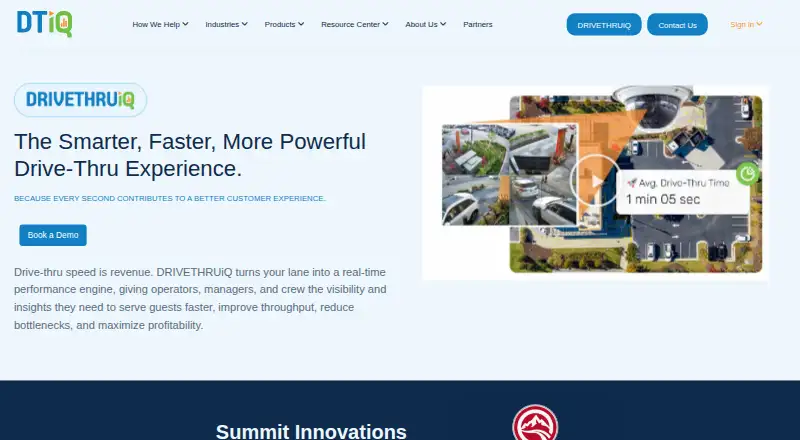
What DRIVETHRUiQ is
DRIVETHRUiQ is a cloud platform for drive-thru operators that provides live service information and analytics. Its timer screen shows service times, goal status, bottlenecks, parked cars, car counts, and alerts when targets are at risk. Operators can choose AI computer-vision detection, which can follow customer journeys, identify car reversals, and support multi-lane layouts, or loop-based detection for simpler single- or dual-lane sites. The Panorama analytics suite provides dashboards, charts, more than 80 reports, hourly trends, alerts, leaderboards, and data exports. A ranking screen compares stores across a district, region, or enterprise. Customers using VIDEOiQ, DATAiQ, and DRIVETHRUiQ can combine drive-thru performance with store KPIs, synchronized video, and POS data through 360iQ. Listed POS connections include Aloha, Brink, Clover, Oracle Simphony, QU, Revel, Square, and Toast. The platform also offers headsets and speaker posts, and is intended for operators from a single high-volume restaurant to businesses with hundreds of locations.
Good
- Live screen tracks times, goals, bottlenecks, and car counts.
- Vision detection can support multi-lane layouts.
- Panorama includes more than 80 reports.
- Listed POS integrations include Square and Toast.
Watch out
- Real-time goal notifications require a Multi-View license.
- Missed-goal notifications require Multi-View or higher.
- No price is listed.
Who it suits
DRIVETHRUiQ suits quick-service restaurants and other operators that want to monitor drive-thru performance across one or many locations. It may also fit teams that need lane detection, service analytics, or POS-connected reporting.
Verdict
DRIVETHRUiQ brings live lane information, detection options, and cloud reporting together for drive-thru operations. Check its license requirements for notifications and the listed POS integrations against your setup.
The facts
Each one read from DRIVETHRUiQ's own pages, with the date it was checked.
What it does
- 360iQ connection
- For customers using VIDEOiQ, DATAiQ, and DRIVETHRUiQ, the 360iQ platform combines service-point performance, store KPIs, synchronized video, and POS data.checked 29 Sep 2026
- Computer vision
- Computer vision detection can monitor pre-lane activity, track customer journeys through wait bays, recognize car reversals, and support multi-lane layouts.checked 29 Sep 2026
- Detection options
- The platform offers AI computer-vision detection and loop-based detection for simpler lane layouts.checked 30 Sep 2026
- Hardware
- DRIVETHRUiQ offers headsets and speaker posts, and its speaker posts are compatible with loop-based and vision-based installations.checked 29 Sep 2026
- Industries
- DTiQ describes its solutions for quick-service restaurants, convenience stores, and retail brands.checked 29 Sep 2026
- Integrations
- For customers using VIDEOiQ, DATAiQ, and DRIVETHRUiQ, the 360iQ platform combines drive-thru service-point performance with store KPIs, synchronized video, and POS data.checked 30 Sep 2026
- Intended customers
- DTiQ describes DRIVETHRUiQ for both a single high-volume restaurant and operators with hundreds of locations.checked 30 Sep 2026
- License limits
- Real-time Panorama push notifications for meeting service goals require a Multi-View license; notifications for missed goals require Multi-View or higher.checked 30 Sep 2026
- Loop detection
- Loop-based detection tracks the pre-warn area, order point, cash window when applicable, and present window, and is described as suitable for simpler single- or dual-lane locations.checked 29 Sep 2026
- Panorama reporting
- The cloud-based Panorama analytics suite offers custom dashboards, more than 80 reports, hourly trends, leaderboards, anomaly alerts, and data export.checked 29 Sep 2026
- Purpose
- DRIVETHRUiQ gives drive-thru operators real-time performance visibility and insights to improve service speed, throughput, and profitability.checked 30 Sep 2026
- Reporting
- Panorama is a cloud analytics suite accessible on any device, with custom dashboards, charts, more than 80 reports, hourly trends, alerts, and exports.checked 30 Sep 2026
- Scale
- The product page says DRIVETHRUiQ is intended for operators ranging from a single high-volume restaurant to businesses with hundreds of locations.checked 29 Sep 2026
- Security
- DTiQ's technical overview says store-to-cloud data is encrypted and its private cloud is hosted in SSAE 16 and SOC-audited Tier 3 facilities.checked 30 Sep 2026
- Support
- The operations manual directs customers to DTiQ support and provides a Panorama cloud-reporting support email.checked 30 Sep 2026
- Timer
- Its timer screen shows live service times, goal status, bottlenecks, parked cars, car counts, and alerts when targets are at risk.checked 30 Sep 2026
- Timer screen
- Its timer screen shows live service times, goal matching, bottlenecks, parked cars, customer journey times, car counts, and alerts when targets are at risk.checked 29 Sep 2026
The company
- Company background
- DTiQ says it has served more than 37,000 locations and combines AI-powered video analytics with human expertise.checked 29 Sep 2026
- Headquarters
- Marlborough, Massachusetts, United Stateschecked 28 Sep 2026
- Headquarters information
- DTiQ lists addresses in Marlborough, Massachusetts; Las Vegas, Nevada; Gliwice, Poland; and Braeside, Australia, without identifying one as headquarters.checked 29 Sep 2026
- Team motivation
- A dynamic ranking screen compares performance across a district, region, or enterprise and ranks stores by selected brand priorities.checked 29 Sep 2026
- Team rankings
- The ranking screen compares store performance across a district, region, or enterprise to motivate teams.checked 30 Sep 2026
Where it runs
- POS compatibility
- DTiQ lists POS integrations including Aloha, Brink, Clover, Oracle Simphony, QU, Revel, Square, and Toast.checked 30 Sep 2026
- POS integrations
- DTiQ says it integrates with many POS systems and lists examples including Aloha by NCR, Brink by PAR, Square, Toast, and Oracle Simphony.checked 29 Sep 2026
The full review of DRIVETHRUiQ
DRIVETHRUiQ is cloud software for measuring and improving drive-thru operations. It is aimed at quick-service restaurants, convenience stores, and retail brands that need lane-level oversight at one busy site or across a large estate. Its central advantage is the combination of live service monitoring and deep reporting, while detection method and notification licensing are important buying decisions.
Overview
The platform follows the customer journey through a drive-thru, supporting lane management, kitchen coordination, arrival detection, and throughput analysis. Managers see service conditions as they develop, while multi-site teams can compare locations and investigate trends later in the cloud. DTiQ positions it for anything from a single high-volume restaurant to businesses with hundreds of locations.
Hardware is part of the offering: headsets and speaker posts are available, and the speaker posts work with either loop-based or computer-vision installations. Store-to-cloud data is encrypted, with the private cloud hosted in SSAE 16 and SOC-audited Tier 3 facilities.
Key features
Live lane and team visibility
The timer screen surfaces current service times, progress against goals, bottlenecks, parked cars, customer journey times, and car counts. Alerts flag targets at risk, giving supervisors a prompt to intervene instead of waiting for a later report. A separate ranking screen orders stores across a district, region, or enterprise against selected brand priorities. That can focus attention on network-wide standards, although its usefulness depends on having clear priorities for teams to pursue.
Detection for different layouts
Computer vision covers pre-lane activity, customer movement through wait bays, car reversals, and multi-lane configurations. DTiQ says vision installations can be fitted without cutting concrete, which is valuable for complex sites or locations where construction disruption is unacceptable. Loop-based detection follows the pre-warn area, order point, cash window when applicable, and present window; it is intended for simpler single- or dual-lane setups. The choice is therefore practical rather than cosmetic: vision suits complicated layouts, while loops may be the more direct fit for a straightforward lane.
Panorama and connected data
Panorama is a cloud analytics suite accessible on any device. It supports custom dashboards, charts, more than 80 reports, hourly trends, leaderboards, anomaly alerts, and data export, giving operations teams both routine scorecards and ways to investigate unusual performance. Customers using VIDEOiQ, DATAiQ, and DRIVETHRUiQ can use 360iQ to combine drive-thru service-point results with store KPIs, synchronized video, and POS data.
POS and notifications
DTiQ lists compatibility with Aloha by NCR, Brink by PAR, Clover, Oracle Simphony, QU, Revel, Square, and Toast, which can help operators align service data with existing transaction systems. Real-time Panorama push notifications for meeting service goals require a Multi-View license; notifications for missed goals require Multi-View or higher. Those license thresholds should be checked before assuming every alert workflow is included.
Pricing
DRIVETHRUiQ is paid software with custom pricing rather than a published self-serve rate. That suits operators expecting a configured deployment, but it makes direct budget comparison difficult until a proposal covers sites, hardware, detection, integrations, and Panorama licensing. The Multi-View requirement for goal notifications is a material term: organizations that depend on proactive alerts should confirm which license level is included.
Platforms
DRIVETHRUiQ is delivered through the web as a cloud deployment. Panorama is accessible on any device, supporting managers who need reports and dashboards away from a fixed operations workstation.
Who it's for
It is a strong fit for quick-service restaurant groups, convenience-store operators, and retail brands managing measurable drive-thru service. A single high-volume restaurant can use the live timer and lane detection, while larger businesses gain cross-location rankings, standardized reports, anomaly alerts, and optional 360iQ connections. Loop detection is the sensible starting point for simpler single- or dual-lane sites; multi-lane or unusually complex layouts are better candidates for vision. Operators who only need basic ordering or a small mobile point-of-sale tool should look at narrower alternatives instead.
Pros and cons
- Pro: Live times, bottlenecks, parked cars, journey data, and risk alerts support intervention during service.
- Pro: Vision and loop detection cover both complex multi-lane sites and simpler layouts.
- Pro: Panorama combines custom dashboards with more than 80 reports, trends, alerts, and exports.
- Pro: The 360iQ connection can bring service, KPI, video, and POS data together for existing VIDEOiQ and DATAiQ customers.
- Con: Pricing is custom, so prospective buyers cannot assess cost from a public rate card.
- Con: Goal notifications depend on Multi-View licensing or higher, adding a licensing checkpoint for alert-led operations.
- Con: The broader feature set and hardware choices may be excessive for a small operator seeking only basic drive-thru ordering.
Alternatives
For a wider comparison of category options, see Restaurant Drive-Thru Software.
- SoundHound is a freemium Android and iOS app with a free, ad-supported plan and a one-time $6.99 USD ad-free option; choose it instead for consumer voice and music use rather than multi-site lane analytics.
- Solink Drive-Thru AI is a paid Android, iOS, and web alternative for buyers considering another drive-thru-focused platform.
- PAR Ordering is paid Android, iOS, and web software with pricing supplied after a demo; pick it when an ordering-focused PAR conversation is the priority.
- Qu Drive-Thru is paid Android and iOS software with pricing on request, suitable for teams evaluating another dedicated drive-thru option.
- Dine Out Pro Drive-Thru Software offers paid Android and web plans with staff-account, terminal, POS billing, KOT/TAB ordering, web, and offline-online features; choose it when those restaurant workflow functions matter more than enterprise lane analytics.
- Fingermark Eyecue is paid Android, iOS, and web software with custom pricing and a personalized demo and deployment consultation.
- Graivy ServThru is paid web software with pricing supplied through a demo request.
- Huex AIDA is a paid web alternative.
Verdict
Choose DRIVETHRUiQ if you need live drive-thru control, configurable lane detection, and reporting that scales from one high-volume restaurant to hundreds of locations. Its main reason to look elsewhere is the custom, license-dependent purchase: smaller operators or teams seeking a simpler ordering tool may get a cleaner fit from a narrower alternative.
Alternatives to DRIVETHRUiQ
- 1

SoundHound
Free planAndroidiOSWebAPI8.1$5.99 one-time - 2
Toast
Free planAndroidiOSWebAPI7.6From $69 a month - 3
Solink Drive-Thru AI
AndroidiOSWeb6.6 - 4
Qu Drive-Thru
AndroidiOS6.0 - 55.9From $475 a month
- 6

Fingermark Eyecue
AndroidiOSWeb5.9