Solink Drive-Thru AI
Solink Drive-Thru AI helps quick-service restaurants monitor drive-thru performance using existing cameras.
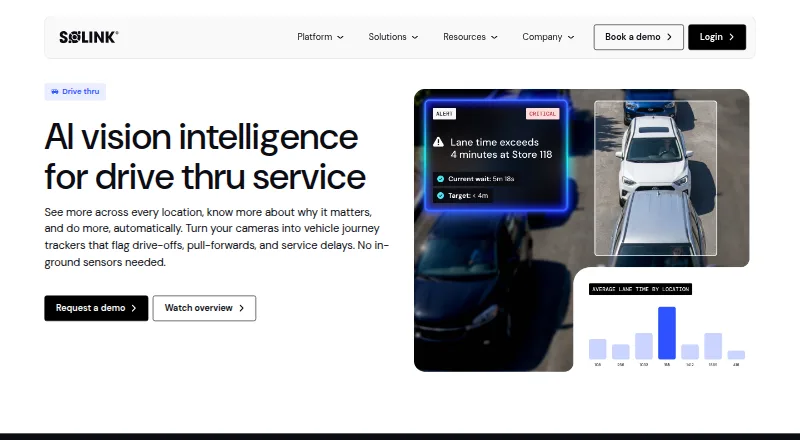
What Solink Drive-Thru AI is
Solink Drive-Thru AI helps quick-service restaurants monitor drive-thru performance using existing cameras. Configurable detection zones can follow vehicles from lane entry and queueing through the menu board, service windows, and pull-forward. The system measures time from order to handoff, flags drive-offs and pull-forwards, and helps pinpoint stations or employees that may be slowing service. Queue depth and arrival patterns by daypart can inform staffing, while video can help teams review greetings, employee placement, and attention. Solink says the product supports single-lane and merge-lane layouts without structural changes or in-ground sensors. A web-based Service Display Monitor combines live lane video with real-time data. The platform lists more than 375 integrations, including POS, drive-thru timers, and labour data; users can also access a simplified mobile version on iOS and Android. Solink says its AI can correlate video with business data and flag events for human oversight or act autonomously. Pricing is available on request. The company lists SOC 2 Type 2 and GDPR compliance and says its platform is NDAA-compliant.
Good
- Uses existing cameras without in-ground sensors.
- Tracks time from order to handoff.
- Supports single-lane and merge-lane layouts.
- Lists more than 375 integrations.
- Includes onboarding and ongoing support for every site.
Watch out
- Pricing is available only on request.
- A simplified mobile version is available on iOS and Android.
- AI can act autonomously, according to Solink.
Who it suits
It is aimed at quick-service restaurant operators who want to monitor drive-thru service, including multi-site operations. It may suit teams looking to review lane times, demand patterns, and employee workflows using existing cameras.
Verdict
Solink Drive-Thru AI focuses on lane activity, service timing, and staffing signals for quick-service restaurants. Operators should request a demo and pricing details to assess fit for their setup.
The facts
Each one read from Solink Drive-Thru AI's own pages, with the date it was checked.
What it does
- AI and workflow
- Solink says its AI agents can correlate video with business data and flag or act on events with human oversight or autonomously.checked 29 Sep 2026
- AI data use
- Solink says it does not use personally identifiable information of employees or patrons to train its models.checked 30 Sep 2026
- Availability
- Solink’s mobile app help page says users can access a simplified version of the platform on iOS and Android devices.checked 29 Sep 2026
- Cameras and sensors
- The product runs on existing cameras, which can act as timers without requiring in-ground sensors.checked 29 Sep 2026
- Compliance
- Solink lists SOC 2 Type 2 and GDPR and states that its software platform is NDAA-compliant.checked 30 Sep 2026
- Drive-offs
- It monitors drive-offs and car stacks in real time and can compare lost vehicles with average ticket value.checked 30 Sep 2026
- Drive-thru configuration
- Solink says Drive-Thru AI supports single-lane and merge-lane configurations without structural changes.checked 29 Sep 2026
- Existing equipment
- Solink says Drive-Thru AI runs on existing cameras and does not require in-ground sensors or a hardware overhaul.checked 30 Sep 2026
- Guest experience
- It can help confirm guests are greeted and flag distracted employees for coaching.checked 29 Sep 2026
- Integrations
- Solink lists more than 375 business-tool integrations, including POS, access control, labour, and drive-thru timers; its listed timer integrations include Acrelec Qtimer.checked 30 Sep 2026
- Intended customers
- The launch announcement describes Drive-Thru AI as an extension of Solink’s platform for quick-service restaurant operators, including multi-site operations.checked 30 Sep 2026
- Lane configurations
- Drive-Thru AI supports single-lane and merge-lane configurations without structural changes, with detection zones adaptable to different layouts.checked 30 Sep 2026
- Lane coverage
- Configurable camera detection zones provide visibility from lane entry and vehicle stack through the menu board, service windows, and pull-forward.checked 30 Sep 2026
- Pricing
- The pricing page opened redirected to a pricing review page and displayed no plan prices; the product page directs prospective customers to request a demo.checked 30 Sep 2026
- Product
- Solink Drive-Thru AI uses existing cameras to track vehicles across the drive-thru journey and flag drive-offs, pull-forwards, and service delays.checked 29 Sep 2026
- Purpose
- Solink Drive-Thru AI gives quick-service restaurants real-time performance monitoring across the drive-thru journey using existing cameras.checked 30 Sep 2026
- Security
- Solink says cloud data is encrypted in transit and at rest, user accounts support MFA and SSO, and recording appliances operate behind customer-managed firewalls without required inbound ports.checked 30 Sep 2026
- Service display
- The Service Display Monitor is a web-based kitchen display that pairs live lane video with real-time data.checked 30 Sep 2026
- Service metrics
- The product tracks lane times from order to handoff, detects pull-forwards before an order is complete, and helps identify which station or employee is slowing service.checked 30 Sep 2026
- Speed of service
- It tracks lane times from order to handoff and helps identify which station or employee is slowing service.checked 29 Sep 2026
- Staffing
- It shows queue depth and arrival patterns by daypart to help managers match staffing to demand.checked 29 Sep 2026
The company
- Company history
- Solink says it was founded in 2010.checked 29 Sep 2026
- Founded
- 2010checked 28 Sep 2026
- Headquarters
- Ottawa, Ontario, Canadachecked 28 Sep 2026
The full review of Solink Drive-Thru AI
Overview
Solink Drive-Thru AI is a camera-based monitoring and analytics platform for quick-service restaurant drive-thrus. It is best suited to operators, especially multi-site teams, who need to understand lane flow alongside service and staffing. Its central advantage is turning existing camera coverage into operational signals without in-ground sensors; the trade-off is custom pricing and a demo-led buying process.
Key features
Lane flow and service timing
Configurable camera zones track vehicles from lane entry and queue through the menu board, service windows and pull-forward. Solink measures time from order to handoff, detects pull-forwards before an order is complete, and can point managers toward the station or employee slowing service. That makes the platform more useful for diagnosing where service breaks down than for timing alone.
It also flags vehicles that leave the queue and can compare those losses with average ticket value. That gives managers a way to put a potential revenue impact beside a drive-off pattern, though the value of the comparison depends on the business data connected to the platform.
Staffing and guest experience
Queue depth and arrival patterns by daypart help teams align staffing with demand. Managers can also review shift productivity, check employee placement and greetings, and identify distracted employees for coaching. These signals suit operators who want to address service consistency across shifts; they are less compelling for buyers looking only for a basic drive-thru timer.
Video, data and workflow
The platform uses existing cameras as timers, avoiding required in-ground sensors or a hardware overhaul. Single-lane and merge-lane layouts are supported without structural changes, with detection zones adapted to the setup. Existing camera coverage still needs to be suitable for the areas an operator wants to monitor.
Solink says its AI agents can correlate video with business data, then flag or act on events with human oversight or autonomously. More than 375 integrations include POS, drive-thru timers and labour data, which can make the signals more useful in context. The web-based Service Display Monitor pairs live lane video with real-time data for kitchen coordination.
Solink states that it does not use personally identifiable information of employees or patrons to train its models. Its platform lists SOC 2 Type 2 and GDPR compliance and is described as NDAA-compliant. Every site receives onboarding and ongoing support, a practical benefit for operators rolling out the system across locations.
Pricing
Solink Drive-Thru AI is paid software with custom pricing. The product invites buyers to request a demo, so it is not a self-serve purchase with a published plan to compare. Operators should assess the quoted cost against their site count, camera coverage, integrations and support needs.
There are no published lower-cost tiers, seat counts, quotas, trial terms or renewal terms to weigh. That makes direct budget comparison harder, particularly for a single-site operator who may not need the breadth of a platform built for monitoring the full drive-thru journey.
Platforms
Solink lists Android, iOS and web platforms. Its mobile app provides a simplified version of the platform on iOS and Android, while the Service Display Monitor is web-based. Deployment is hybrid.
Who it's for
This is a strong fit for quick-service restaurant operators who need to diagnose service bottlenecks, track drive-offs and align staffing with changing arrival patterns. Multi-site teams can use its lane and shift signals to support consistent operational review, and existing-camera operation may suit locations seeking to avoid new in-ground sensors or a hardware overhaul.
It is a weaker fit for buyers who want a clearly priced, self-serve product, or whose need is limited to a simple timer without staffing, guest-experience and business-data context. Operators should also consider whether their current camera coverage can capture the relevant lane zones.
Pros and cons
- Pros: Existing cameras can provide lane timing without in-ground sensors, reducing the need for a hardware overhaul.
- Pros: Lane times, pull-forwards, drive-offs and staffing patterns bring several operational questions into one monitoring workflow.
- Pros: More than 375 integrations, including POS and labour data, can connect video events with business context.
- Pros: Onboarding and ongoing support at every site suit operators managing deployment across locations.
- Cons: Custom pricing and a demo-led process make it difficult to assess affordability before engaging with Solink.
- Cons: The mobile app is a simplified version, so it is not a full substitute for the broader platform experience.
- Cons: The product's value depends on useful camera coverage and, for contextual analysis, relevant connected business data.
Alternatives
Browse Restaurant Drive-Thru Software for a wider category comparison. Choose SoundHound instead if a freemium option and mobile platforms are the priority: its free plan is ad-supported, while SoundHound∞ costs 6.99 USD as a one-time fee for an ad-free experience.
PAR Ordering is another paid option on Android, iOS and web; contact PAR for a demo and pricing details. Qu Drive-Thru is a paid Android and iOS alternative with pricing on request. Both are worth considering when comparing paid drive-thru products, though neither provides published pricing.
Dine Out Pro Drive-Thru Software offers paid Android and web plans. Its Premium Plan includes four staff accounts, one to two terminals, POS billing, KOT and TAB ordering, a web module and offline-online mode; its Basic Plan includes two staff accounts and an Android module. Consider it when those account and ordering provisions better match the setup you need.
DRIVETHRUiQ is a paid web alternative. Fingermark Eyecue is a paid option for Android, iOS and web, with custom pricing and a personalized demo and deployment consultation. Berry AI Drive-Thru Timer is a paid web alternative with pricing and setup by contact. Hi Auto is another paid alternative.
Verdict
Choose Solink Drive-Thru AI if you run a quick-service restaurant and need camera-based visibility into lane performance, staffing signals and service delays, particularly across multiple sites. Its strongest reason to buy is the combination of existing-camera monitoring and operational context; its main reason to look elsewhere is the lack of published pricing, compounded by a demo-led sales path.
Getting started
- Visit https://solink.com/solutions/drive-thru-service/.
- Request a demo to discuss the product and pricing.
- Configure detection zones for the drive-thru layout.
- Connect the system to existing cameras and relevant business-data integrations.
- Arrange onboarding and ongoing support for the site.
Questions
How is Solink Drive-Thru AI priced?
Pricing is available on request; the product page invites visitors to request a demo.
What devices can access Solink?
The listed platforms are Android, iOS and web. Solink describes its mobile app as a simplified version of the platform.
Does it require new cameras or in-ground sensors?
Solink says the product runs on existing cameras and does not require in-ground sensors or a hardware overhaul.
What integrations are available?
Solink lists more than 375 integrations, including POS, drive-thru timers and labour data.
Which drive-thru layouts does it support?
It supports single-lane and merge-lane configurations without structural changes, with detection zones adaptable to different layouts.
What security and privacy details does Solink provide?
Solink lists SOC 2 Type 2 and GDPR compliance and says its software platform is NDAA-compliant. It also says employee or patron personally identifiable information is not used to train its models.
Alternatives to Solink Drive-Thru AI
- 1

SoundHound
Free planAndroidiOSWebAPI8.1$5.99 one-time - 2
Toast
Free planAndroidiOSWebAPI7.6From $69 a month - 3
Qu Drive-Thru
AndroidiOS6.0 - 45.9From $475 a month
- 5

Fingermark Eyecue
AndroidiOSWeb5.9 - 6
Zairo
AndroidiOSWeb5.9