DOSBox Cheat Engine
DOSBox Cheat Engine is a free, open-source web application for working with emulated memory in DOSBox Staging.
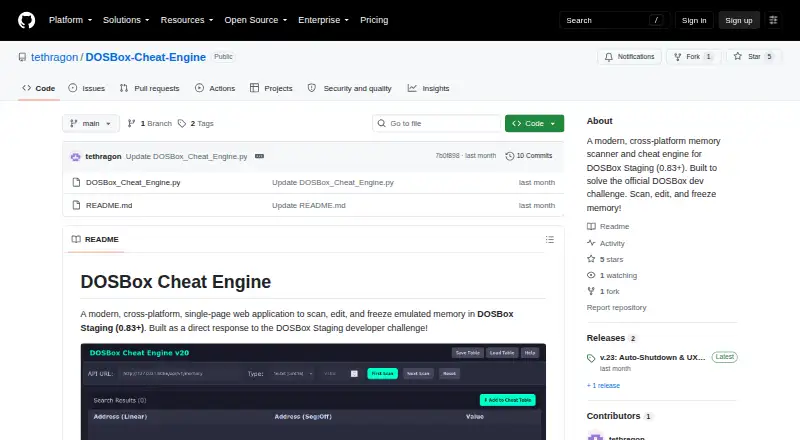
What DOSBox Cheat Engine is
DOSBox Cheat Engine is a free, open-source web application for working with emulated memory in DOSBox Staging. It can scan for values, filter the results, and add addresses to a Cheat Table, where values can be edited or frozen. Freezing can keep values such as health, ammunition, or coins from decreasing. Live memory polling can be paused during CPU-heavy game sections, and address ranges can be selected with Shift-click or Ctrl-click. Cheat tables can be exported and loaded as JSON files for sharing.
The app connects through DOSBox Staging’s Web Server API, which must be enabled in the emulator configuration. DOSBox Staging 0.83 or newer is required; the local API server address is http://127.0.0.1:8086 by default. Windows and Linux executables are offered, and the Python source can be run directly without a pip installation. The project uses Python’s standard library, is MIT licensed, and credits George Petrakis as its creator. Closing the browser tab signals the Python server to shut down gracefully.
Good
- Searches and filters emulated memory values.
- Can freeze health, ammunition, or coins.
- Exports and loads cheat tables as JSON.
- Windows and Linux executables are offered.
Watch out
- Requires DOSBox Staging 0.83 or newer.
- The Web Server API must be enabled.
- Executables are listed for Windows and Linux.
Who it suits
It suits DOSBox Staging users who want to inspect and change emulated game values. It requires DOSBox Staging 0.83 or newer and an enabled Web Server API.
Verdict
DOSBox Cheat Engine provides value scanning, editing, and freezing through a browser-based interface. Check the DOSBox Staging version and API configuration before using it.
Plans and prices
From DOSBox Cheat Engine's own pricing page, checked 4 Oct 2026.
| Plan | Price | What it gives you |
|---|---|---|
| DOSBox Cheat Engine | Free | MIT licensed · requires DOSBox Staging 0.83+ |
The facts
Each one read from DOSBox Cheat Engine's own pages, with the date it was checked.
What it does
- Cheat tables
- Cheat tables can be exported and loaded as JSON files for sharing.checked 4 Oct 2026
- Compatibility requirement
- The maker requires DOSBox Staging version 0.83 or newer.checked 4 Oct 2026
- Dependencies
- The project says it uses only Python's standard library and requires no pip installation to run from source.checked 4 Oct 2026
- Distribution
- Precompiled executables are offered for Windows and Linux, and the README also describes running the Python source directly.checked 4 Oct 2026
- Integration
- The app connects to DOSBox Staging through its Web Server API, which must be enabled in the configuration.checked 4 Oct 2026
- License and creator
- The project is MIT licensed and credits George Petrakis as its creator.checked 4 Oct 2026
- Live updates
- Live memory polling can be paused during CPU-heavy game segments.checked 4 Oct 2026
- Local connection
- The README says the DOSBox API web server runs at http://127.0.0.1:8086 by default.checked 4 Oct 2026
- Memory scanning
- Users can search for values, filter scan results, and add addresses to a Cheat Table.checked 4 Oct 2026
- Purpose
- A single-page web application for scanning, editing, and freezing emulated memory in DOSBox Staging.checked 4 Oct 2026
- Security behavior
- The latest release says closing the browser tab sends a signal for the Python server to shut down gracefully.checked 4 Oct 2026
- Selection
- Range selection supports Shift-click and Ctrl-click.checked 4 Oct 2026
- Value editing
- Cheat Table values can be edited by double-clicking them.checked 4 Oct 2026
Money
- Value freezing
- The app can freeze values such as health, ammunition, or coins so they do not decrease.checked 4 Oct 2026
The full review of DOSBox Cheat Engine
DOSBox Cheat Engine is a free, browser-based memory editor for games running in DOSBox Staging. It is best suited to players who want to find and hold specific in-game values and are comfortable enabling the emulator’s Web Server API. Its focused controls are useful within that setup, but it is not a general-purpose memory editor.
Overview
The single-page app connects to DOSBox Staging through its Web Server API. The API server runs at http://127.0.0.1:8086 by default, and the project requires DOSBox Staging version 0.83 or newer. That makes compatibility a firm boundary: if you use another emulator or cannot enable the API in DOSBox Staging’s configuration, this is not the right choice.
The project is MIT licensed and uses only Python’s standard library. It requires no pip installation to run from source, and precompiled executables are offered for Windows and Linux. The README also describes running the Python source directly. Closing the browser tab signals the Python server to shut down gracefully, a considered detail for a tool that pairs a browser interface with a local server.
Key features
- Memory scanning: Search for values, filter results, and add addresses to a Cheat Table. This gives players a way to narrow down candidate values before changing them, rather than treating memory editing as guesswork.
- Editing and freezing: Double-click a Cheat Table value to edit it, or freeze values such as health, ammunition, or coins so they do not decrease. These are direct controls for adjusting or holding game values, but they remain tied to DOSBox Staging.
- Polling control: Live memory polling can be paused during CPU-heavy game segments. That is useful when continuous updates are undesirable during demanding play.
- Table sharing and selection: Cheat Tables can be exported and loaded as JSON files, and range selection supports Shift-click and Ctrl-click. Together, these features make it easier to manage groups of addresses and share table data.
Pricing
DOSBox Cheat Engine costs nothing, with no paid tier or trial. The free plan includes the MIT-licensed application; there are no paid-plan limits or seat terms to weigh. The practical cost is the required setup: DOSBox Staging 0.83 or newer, with its Web Server API enabled.
Platforms
The project is cross-platform, with precompiled executables offered for Windows and Linux. It also provides a browser-based interface and describes running its Python source directly, which avoids a pip installation. macOS appears among the supported platforms, but precompiled executables are specified only for Windows and Linux.
Who it's for
This is a good fit for DOS game players already using a compatible DOSBox Staging setup who want to scan, edit, freeze, or share memory values without paying. It is a poor fit for users seeking a tool for other emulators, or who cannot enable the Web Server API.
Pros and cons
- Pro: Scanning, editing, and freezing are combined with Cheat Table management, giving DOSBox Staging users a focused workflow for changing game values.
- Pro: JSON export and loading support sharing tables, while Shift-click and Ctrl-click range selection help manage multiple addresses.
- Pro: The MIT license and standard-library-only Python source keep the project open and avoid a pip dependency.
- Con: DOSBox Staging 0.83 or newer and an enabled Web Server API are required, so users outside that configuration cannot use it.
- Con: Precompiled executables are offered for Windows and Linux only; macOS users have the Python source route rather than a stated precompiled build.
Alternatives
Game Memory Editors is the broader category to explore when you want to compare options beyond this DOSBox Staging-specific tool.
- ReClass.NET is a free, open-source option for Linux and Windows; consider it if you want an alternative in that platform range.
- scanmem is free and open source for Linux and Android, making it a platform alternative if you use either of those systems.
- CoSMOS is free on Linux and Windows, with no registration, locked features, or adware stated; consider it if those terms matter.
- MemDBG is a free, open-source option spanning Android, iOS, Linux, macOS, and Windows for users who need wider platform coverage.
- PINCE is a free, open-source Linux reverse engineering tool, a more suitable direction for Linux users seeking that stated focus.
- Bit Slicer is free, open source, and supports macOS 10.8 or later; consider it if you need a macOS option.
- memwatch is free, MIT-licensed macOS software built and installed from source.
- Squalr is free and open source, with Android, API, Linux, macOS, and Windows platform coverage.
Verdict
Choose DOSBox Cheat Engine if you play through DOSBox Staging 0.83 or newer and want a free way to scan, edit, freeze, and share memory values. Its focused workflow and open-source distribution are the main reasons to use it; its dependency on DOSBox Staging’s enabled Web Server API is the main reason to look elsewhere.
Getting started
- Visit https://github.com/tethragon/DOSBox-Cheat-Engine.
- Use DOSBox Staging version 0.83 or newer.
- Enable the Web Server API in the DOSBox Staging configuration; its default local address is http://127.0.0.1:8086.
- Run a precompiled executable on Windows or Linux, or run the Python source directly using the standard library.
- Open the web application and scan memory values.
Limits worth knowing
The free plan requires DOSBox Staging 0.83 or newer. The Web Server API must be enabled for the application to connect.
Questions
How much does DOSBox Cheat Engine cost?
It is free: the listed plan is free.
Is it open source?
Yes. The project is MIT licensed.
Which emulator does it require?
It connects to DOSBox Staging through its Web Server API and requires version 0.83 or newer.
Which platforms have precompiled executables?
Precompiled executables are offered for Windows and Linux. The project also describes running the Python source directly.
Does it require a pip installation?
No, the project says the Python source uses only the standard library and requires no pip installation.
Who created it?
The project credits George Petrakis as its creator.
Alternatives to DOSBox Cheat Engine
- 1
Bit Slicer
Free planOpen sourcemacOS7.0Free plan - 2
chromedp
Free planAPILinuxmacOSSelf-hosted6.7Free plan - 3
ArtMoney
Free planWindows6.5$24.90 one-time - 4
MemDBG
AndroidiOSLinuxmacOS6.4 - 5
ReClass.NET
Free planLinuxWindows6.4Free plan - 6
scanmem
Free planAndroidLinux6.4Free plan