Bit Slicer
Bit Slicer is a free, open-source game trainer for macOS that searches and modifies video-game values such as scores, lives, and ammunition.
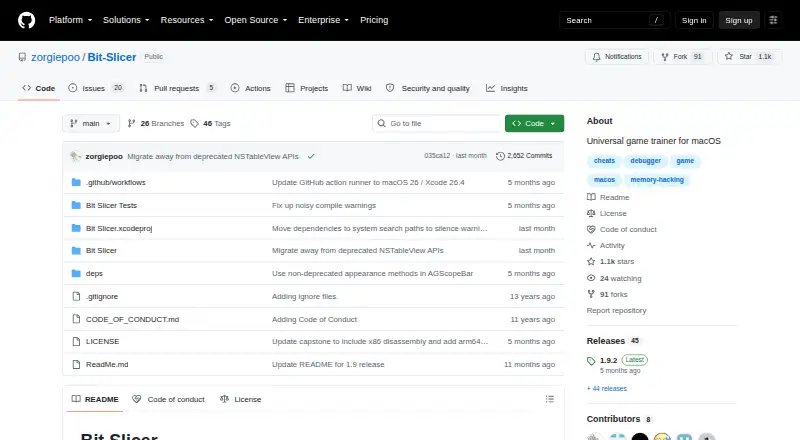
What Bit Slicer is
Bit Slicer is a free, open-source game trainer for macOS that searches and modifies video-game values such as scores, lives, and ammunition. Its scanner searches integers, floating-point numbers, strings, byte arrays, and pointers, then narrows results. Users can inspect and edit live memory in a hex-editor-style window, dump memory to disk, and modify memory-protection attributes. The debugger supports instruction-access watches, live disassembly, breakpoints, backtraces, register manipulation, and stepping; it can also change bytes or assembled instructions. The app can inject assembly code into a running process, and scripts can automate virtual-memory and debugger methods. Slice documents let users save and share cheats. The project says Bit Slicer can run as a normal user rather than root. The current release requires macOS 11.5 or newer, while the listed freeware plan says macOS 10.8 or later. Version 1.9.2 is listed as the latest release, with fixes for narrow-search candidate drops near region boundaries and an arm64 register-writing issue. Support is directed to the wiki and Discord, but is not available 24/7.
Good
- Free and open source.
- Scans pointers, strings, byte arrays, and numeric values.
- Can edit live memory and inject assembly code.
- Scripts can automate virtual-memory and debugger tasks.
- Can run as a normal user instead of root.
Watch out
- Current release requires macOS 11.5 or newer.
- Support is not available 24/7.
- Support is directed to the wiki and Discord.
Who it suits
Bit Slicer is for macOS users who want to inspect or modify game values and use debugger or scripting tools. Its saved Slice documents may suit people who want to share cheats.
Verdict
Bit Slicer offers memory scanning, editing, debugging, and scripting in a macOS game trainer. Check the current macOS requirement, since the listed freeware plan has a different minimum version.
Plans and prices
From Bit Slicer's own pricing page, checked 15 Oct 2026.
| Plan | Price | What it gives you |
|---|---|---|
| Free | Free | macOS 11.5 or later · 25.4 MB · Intel 64 and Apple Silicon |
| Freeware | Free | macOS 10.8 or later |
The facts
Each one read from Bit Slicer's own pages, with the date it was checked.
Where it runs
- Apple Silicon
- Version 1.9.2 adds variable-access watching, instruction overwriting and breakpoints for Apple Silicon Macs.checked 15 Oct 2026
- iOS limitation
- iOS App Store applications running on Apple Silicon Macs cannot be targeted because of their required protections.checked 15 Oct 2026
- OS integration
- The app uses macOS autosave, document versioning, window restoration, Notification Center, App Nap and dark mode.checked 15 Oct 2026
What it does
- Automation
- Python scripts automate memory scanning, value changes and access watching through Bit Slicer's virtual-memory and debugger objects.checked 15 Oct 2026
- Code injection
- Bit Slicer can inject new assembly code while a process is running.checked 1 Oct 2026
- Current requirement
- The current release requires macOS 11.5 or newer.checked 1 Oct 2026
- Debugger
- The debugger provides live disassembly, byte or assembled-instruction edits, breakpoints, backtraces, register manipulation, stepping and code injection.checked 15 Oct 2026
- Documentation
- The project wiki contains 41 pages covering searching, data types, pointers, memory, debugging, scripting, virtual-memory functions and security protections.checked 15 Oct 2026
- Editorial review on Softpedia
- Softpedia's tested review scored Bit Slicer 4.5 out of 5 and characterized it as easy to use while still offering powerful debugging and scripting tools.checked 15 Oct 2026
- Latest release
- Version 1.9.2 is listed as the latest release.checked 1 Oct 2026
- Licence
- The main project code uses a permissive BSD-style three-clause licence, while bundled dependencies carry their own licences and some icon assets have redistribution restrictions.checked 15 Oct 2026
- Limit: access failures
- A documented issue reports searches failing across applications with system-protection errors when task_for_pid access was denied.checked 15 Oct 2026
- Limit: performance
- MacUpdate identifies performance as an area needing improvement in its customer-quality summary.checked 15 Oct 2026
- Limit: user assistance
- MacUpdate comments include users asking how to download, use speed hacks and resolve an archive-expansion error.checked 15 Oct 2026
- Maintainer
- The source repository identifies Mayur Pawashe under the developer identity Zorg (zorgiepoo).checked 15 Oct 2026
- Memory editing
- The app can view and edit live memory in a hex-editor-style window, dump memory to disk and modify memory-protection attributes.checked 1 Oct 2026
- Memory inspection
- A hex-editor-style window displays and edits live memory, supports memory dumps to disk and can change memory-protection attributes.checked 15 Oct 2026
- Memory scanner
- The scanner searches integers, floating-point values, strings, byte arrays and pointers, and can narrow results through repeated searches.checked 15 Oct 2026
- Operating model
- The README says Bit Slicer runs as a normal user instead of requiring root privileges.checked 15 Oct 2026
- Origin
- Mayur Pawashe says he began developing the project in 2008 and released Bit Slicer initially in September 2010.checked 15 Oct 2026
- Pointer handling
- The product can dereference pointer addresses and perform multi-level pointer searches for stable addresses.checked 15 Oct 2026
- Praise: functionality
- Softpedia praised the combination of a virtual-memory scanner, memory viewer, debugger and scripting extensibility.checked 15 Oct 2026
- Praise: usability
- Softpedia described the interface as organized and said automatic application detection simplifies selecting a target process.checked 15 Oct 2026
- Project status
- The maintainer describes Bit Slicer as a side project whose future depends partly on the time available for maintenance.checked 15 Oct 2026
The full review of Bit Slicer
Overview
Bit Slicer is a free, open-source game trainer for Mac users who want to inspect and change a running game’s memory. It is a strong fit for technically minded users who need more than basic score editing, but the current release’s macOS requirement rules out older systems.
Its breadth is the draw: memory searches sit alongside a debugger, code injection, and scripting. That makes it capable well beyond a casual trainer, and less compelling if all you want is a simple way to adjust a game value.
Key features
Find and edit values
The scanner can search and narrow results for integers, floating-point numbers, strings, byte arrays, and pointers; pointer scanning is supported too. That range gives users several ways to locate values that are not straightforward whole numbers. A hex-editor-style window can inspect and edit live memory, dump it to disk, and modify memory-protection attributes. These are useful tools for investigation as well as editing, but changing a running process’s memory calls for care.
Debug, inject, and automate
The debugger includes instruction-access watches, live disassembly, breakpoints, backtraces, register manipulation, and stepping. Users can change bytes or assembled instructions and inject assembly code while a process is running. This depth is valuable for users examining program behavior, but likely excessive for someone who only wants to change a score or ammunition count.
Scripts can automate tasks involving virtual-memory and debugger methods. Slice documents let users save cheats and share them with others, which is useful when preserving or passing along a setup. Bit Slicer can run as a normal user rather than requiring superuser root, according to the project.
Release and support
Version 1.9.2 is the latest release. It fixes narrow-search candidate drops near memory-region boundaries and an arm64 register-writing issue, and updates Sparkle to 2.9.1. The project directs users to its wiki and Discord room for support and development discussion; support is not available 24/7, so users needing around-the-clock help should look elsewhere.
Pricing
Bit Slicer is open source and free. Its sole listed plan, Freeware, costs nothing and includes macOS 10.8 or later as its stated minimum. There are no paid tiers or feature trade-offs to weigh. However, the plan’s older system requirement does not match the current release’s macOS 11.5-or-newer requirement; anyone installing the latest version needs macOS 11.5 or newer.
Platforms
Bit Slicer runs on macOS and supports both architectures. The current release requires macOS 11.5 or newer, which is the practical compatibility floor for users choosing the latest version.
Who it's for
Choose Bit Slicer if you use a compatible Mac and want a free, open-source tool spanning value searches, live memory editing, debugging, and scripting. It is especially suited to users comfortable with technical controls who want to save and share cheat documents. It is not the right pick for users on older macOS releases or anyone seeking a simple trainer without the additional memory and debugging toolkit.
Pros and cons
- Pro: Searches cover several data types, including pointers, giving users more options than integer-only scanning.
- Pro: Memory editing, debugger tools, code injection, and scripting make it useful for deeper inspection and automation.
- Pro: It is free and open source, and saved Slice documents can be shared.
- Con: The latest release requires macOS 11.5 or newer despite the Freeware plan’s macOS 10.8 minimum.
- Con: Its extensive technical capabilities may be unnecessary for users who only need basic value changes.
- Con: Support is not available 24/7.
Alternatives
MemDBG is another free, open-source option, with support across Android, iOS, Linux, macOS, and Windows for users who need broader platform coverage.
PINCE is a free, open-source Linux reverse-engineering tool, making it the more relevant choice for Linux users.
CoSMOS is free on Linux and Windows, with no registration, locked features, adware, or hidden software.
ReClass.NET is a free, open-source option for Linux and Windows, supplied without warranty.
Cheat Engine Linux is a free, open-source alternative for Linux users.
Game Cheetah is a free, open-source alternative available on Linux, macOS, and Windows.
Cheat Engine offers a free plan on Linux, macOS, and Windows, but it is not open source.
Squalr is a free, open-source option spanning Android, API, Linux, macOS, and Windows.
Browse the Game Memory Editors directory for more options.
Verdict
Bit Slicer is an easy recommendation for technically confident Mac users who want a free, open-source trainer that extends into memory inspection, debugging, and automation. Its main advantage is that breadth without a price tag; its main reason to look elsewhere is compatibility, since the current release needs macOS 11.5 or newer.
Alternatives to Bit Slicer
- 1
chromedp
Free planAPILinuxmacOSSelf-hosted6.7Free plan - 2
ArtMoney
Free planWindows6.5$24.90 one-time - 3
DOSBox Cheat Engine
Free planWebLinuxmacOSWindows6.4Free plan - 4
MemDBG
AndroidiOSLinuxmacOS6.4 - 5
ReClass.NET
Free planLinuxWindows6.4Free plan - 6
scanmem
Free planAndroidLinux6.4Free plan