CoSMOS
CoSMOS is a free self-service gamehacking tool for people who want to modify their own games while waiting for trainers.
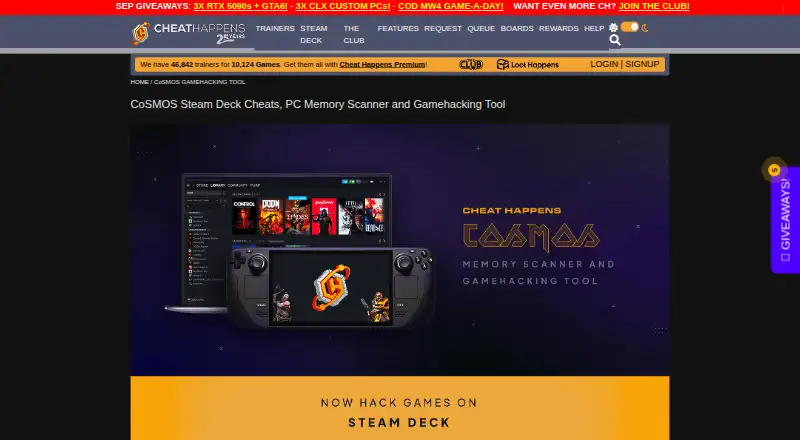
What CoSMOS is
CoSMOS is a free self-service gamehacking tool for people who want to modify their own games while waiting for trainers. It is offered as Steam Deck, PC Beginner, and PC Advanced versions, with options for newcomers and experienced gamehackers. The Steam Deck version is a native application for Linux and Steam Deck, with a simplified memory scanner and built-in disassembler. PC Beginner is integrated with Cheat Happens Aurora. PC Advanced includes a memory scanner, VEH debugger, script engine, disassembler, dump viewer, speedhack, .NET assembly explorer, reference search, process viewers, and script editor; its listed version is 6.1.5. CoSMOS can read and import 99% of CheatEngine tables and uses hardware-accelerated scans. Free technical support is available through the CoSMOS message board. The software checks for updates without sending personal information; feedback and crash-log submissions are optional and may contain personal information. Cheat Happens advises using cheats and trainers offline only and says it does not make them for online or multiplayer games.
Good
- Free plan with no registration required.
- Steam Deck edition is a native application.
- Advanced version includes a debugger and script editor.
- Reads and imports 99% of CheatEngine tables.
- Free technical support through its message board.
Watch out
- Cheats and trainers are advised for offline use only.
- Optional feedback and crash logs may contain personal information.
Who it suits
CoSMOS suits players who want to modify their own games, from beginners to experienced gamehackers creating and sharing cheat scripts. Its Steam Deck version is for users on Linux or Steam Deck.
Verdict
CoSMOS offers distinct versions for Steam Deck and PC, with an advanced toolset for experienced users. Its stated use is offline game modification, not online or multiplayer play.
Plans and prices
From CoSMOS's own pricing page, checked 30 Sep 2026.
| Plan | Price | What it gives you |
|---|---|---|
| CoSMOS | Free | No registration required · no features locked · no adware or hidden software · 100% FREE |
The facts
Each one read from CoSMOS's own pages, with the date it was checked.
What it does
- Advanced tools
- PC CoSMOS Advanced includes a memory scanner, VEH debugger, script engine, disassembler, dump viewer, speedhack, .NET assembly explorer, reference search, process viewers, and a script editor.checked 30 Sep 2026
- Audience
- The product is designed for beginners while also providing advanced features for experienced gamehackers to create and share cheat scripts.checked 30 Sep 2026
- Aurora integration
- PC CoSMOS Beginner is integrated into Cheat Happens Aurora software.checked 30 Sep 2026
- Cheat Engine compatibility
- CoSMOS can read and import 99% of CheatEngine tables.checked 30 Sep 2026
- Privacy
- CoSMOS routinely checks for new versions without sending personal information, while feedback and crash-log submission are optional and may contain personal information.checked 30 Sep 2026
- Purpose
- CoSMOS is a self-service gamehacking tool for users who want to modify their own games while waiting for trainers.checked 30 Sep 2026
- Scan performance
- CoSMOS uses hardware-accelerated scans.checked 30 Sep 2026
- Site security
- Cheat Happens states that all site pages use SSL, data is stored behind two independent firewalls, and Akamai helps protect against DDoS and other attacks.checked 30 Sep 2026
- Support
- Cheat Happens provides free technical support through the CoSMOS message board.checked 30 Sep 2026
- Usage limitation
- Cheat Happens advises using its cheats and trainers offline only and says it does not make cheats for online or multiplayer games.checked 30 Sep 2026
- Version
- The PC CoSMOS Advanced page lists version 6.1.5.checked 30 Sep 2026
- Versions
- CoSMOS is offered in Steam Deck, PC Beginner, and PC Advanced versions.checked 30 Sep 2026
The company
- Founded
- 2001checked 28 Sep 2026
- Maker history
- Dingo WebWorks, LLC/Cheat Happens was formed in 2001.checked 30 Sep 2026
- Steam Deck support
- The Steam Deck version is a native application, includes a built-in disassembler and simplified memory scanner, and works with Linux and Steam Deck.checked 30 Sep 2026
The full review of CoSMOS
CoSMOS is a free game-memory editing tool for players who want to make their own changes rather than wait for a trainer. It suits both newcomers and experienced gamehackers, with separate PC and Steam Deck versions. Its broad toolset and Cheat Engine table support make it a capable choice for offline experimentation, but not for online or multiplayer play.
Overview
CoSMOS is a self-service gamehacking tool from Dingo WebWorks, LLC/Cheat Happens, formed in 2001. It is intended for players who want to modify their own games, with a beginner route alongside tools for creating and sharing scripts. That range is useful, though the distinct versions mean buyers should choose by platform and experience rather than expect one interface everywhere.
CoSMOS can read and import 99% of Cheat Engine tables, a practical advantage for users bringing existing tables with them. Hardware-accelerated scans support memory searches. Cheat Happens advises using cheats and trainers offline only and does not make cheats for online or multiplayer games, so CoSMOS is the wrong tool for networked play.
Key features
Separate routes for beginners and Steam Deck
PC CoSMOS Beginner is integrated into Cheat Happens Aurora software, which gives newcomers a beginner-focused way in. The native Steam Deck version works with Linux and Steam Deck and pairs a simplified memory scanner with a built-in disassembler. That makes it a more focused option for handheld use than the extensive PC Advanced toolkit.
PC Advanced toolset
PC CoSMOS Advanced combines a memory scanner with a VEH debugger, script engine, disassembler, dump viewer and speedhack. It also includes a .NET assembly explorer, reference search, process viewers and a script editor. Experienced users get a substantial set of tools for memory work and script creation; beginners who only need simplified scanning may find this breadth unnecessary. The PC Advanced page lists version 6.1.5.
Debugger and scripting support, along with support for both architectures, broaden its appeal to users who want to move beyond basic scanning. Cheat Happens provides free technical support through the CoSMOS message board. CoSMOS checks for new versions without sending personal information; feedback and crash-log submissions are optional and may contain personal information.
Pricing
CoSMOS costs nothing, billed 100% FREE. The plan requires no registration and has no locked features, adware or hidden software. Beginners can use the free offering to start with PC CoSMOS Beginner, while experienced users can access the deeper PC Advanced toolset without paying for a separate tier. There are no stated seat or quota limits.
Platforms
CoSMOS is available for Linux and Windows. The native Steam Deck version works with Linux and Steam Deck; PC CoSMOS Beginner and PC CoSMOS Advanced serve PC users. The Steam Deck build's simplified scanner and built-in disassembler make it the more specific fit for handheld use, while Advanced is the choice for a broader PC toolset.
Who it's for
CoSMOS fits players who want to modify their own games offline, whether they are new to memory editing or experienced enough to build and share cheat scripts. Existing Cheat Engine table users have a reason to consider it because it imports 99% of those tables. It is not suitable for people seeking cheats for online or multiplayer games.
Pros and cons
- Pros: The free plan has no registration requirement, locked features, adware or hidden software, lowering the barrier to trying the tool.
- Pros: Import support for 99% of Cheat Engine tables helps users carry existing work across.
- Pros: A native Steam Deck version and a separate, extensive PC Advanced toolkit address different use cases.
- Cons: The Steam Deck scanner is simplified, so users seeking the full range of advanced tools should choose PC CoSMOS Advanced instead.
- Cons: Its stated use is offline game modification, ruling it out for online or multiplayer play.
Alternatives
Game Memory Editors is the category to browse when comparing tools for memory editing. For ready-made options rather than modifying a game yourself, see Game Trainers.
- chromedp is a free, open-source Go package for readers who want an API-oriented option across Linux, macOS, Windows and self-hosted environments; it requires Go 1.25 or newer.
- DOSBox Cheat Engine is a free, open-source option for DOSBox Staging users, and requires version 0.83 or newer.
- ReClass.NET is a free, open-source Linux and Windows alternative supplied without warranty.
- scanmem is a free, open-source option for Android or Linux, with GPLv3 licensing and an LGPLv3 license for libscanmem.
- MemDBG is a free option for readers who want a tool spanning Android, iOS, Linux, macOS and Windows.
- PINCE is a free, open-source Linux reverse engineering tool for Linux-only users.
- ProMod offers a free iOS and macOS alternative; its ProMod Mobile plan supports up to 6 mods toggled on at a time.
- ArtMoney is a Windows alternative with a free SE edition that has some features unavailable, while PRO costs $24.90, paid once.
Verdict
Choose CoSMOS if you want a free, capable way to modify games offline, especially if you use Cheat Engine tables or need a native Steam Deck version. Its distinct beginner and advanced PC options also let users choose between a focused entry point and deeper debugging and scripting tools. Look elsewhere if your goal is online or multiplayer cheating, or if you need a tool for an operating system outside Linux and Windows.
Alternatives to CoSMOS
- 1
Bit Slicer
Free planOpen sourcemacOS7.0Free plan - 2
chromedp
Free planAPILinuxmacOSSelf-hosted6.7Free plan - 3
ArtMoney
Free planWindows6.5$24.90 one-time - 4
DOSBox Cheat Engine
Free planWebLinuxmacOSWindows6.4Free plan - 5
MemDBG
AndroidiOSLinuxmacOS6.4 - 6
ReClass.NET
Free planLinuxWindows6.4Free plan