chromedp
chromedp is an open-source Go package for automating browsers that support the Chrome DevTools Protocol, without an external driver.
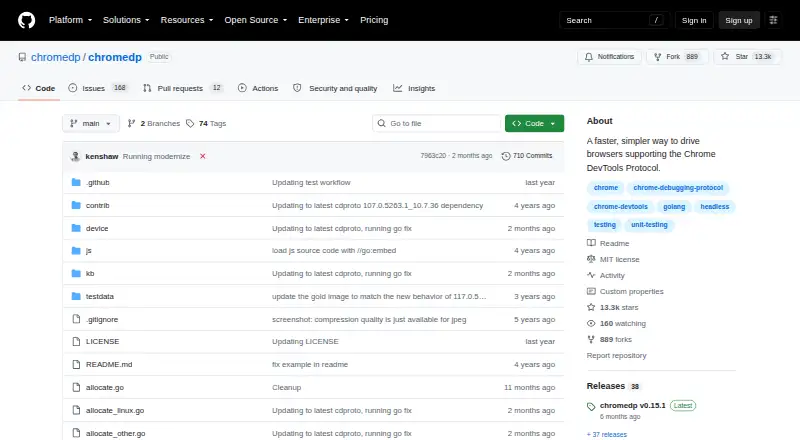
What chromedp is
chromedp is an open-source Go package for automating browsers that support the Chrome DevTools Protocol, without an external driver. Its examples cover navigating pages, clicking controls, reading text, running JavaScript, filling and submitting forms, and waiting for elements. Network-oriented examples include setting cookies and HTTP headers, using a password-protected proxy, intercepting requests, and saving or restoring login sessions. It can capture screenshots, print pages to PDF and save screencast frames as JPEG files. Separate browser contexts can act as tabs for parallel tasks, though sharing one context between goroutines can cause races. A separate remote module connects to an already running browser over WebSocket, including one in a container or hosted service. The project also provides a headless-shell Docker image. By default, Chrome communicates over remote-debugging pipes rather than opening a debugging port; switching to WebSocket uses a debugging port. The repository lists an MIT license. The listed plan is free and requires Go 1.25 or newer; the README also cautions against disabling Chrome site isolation except for trusted pages.
Good
- Automates common browser interactions from Go.
- Can capture screenshots and print PDFs.
- Supports remote browser connections over WebSocket.
- MIT-licensed and open source.
Watch out
- Requires Go 1.25 or newer.
- Sharing one context across goroutines can cause races.
- WebSocket connections use a debugging port.
Who it suits
chromedp suits Go developers building browser automation around Chrome DevTools Protocol-compatible browsers. It may fit projects needing browser actions, page output or remote browser connections.
Verdict
chromedp provides a broad set of browser automation tasks for Go applications, with local pipe and remote WebSocket connection options. Developers should account for its Go requirement and context-sharing caveat.
Plans and prices
From chromedp's own pricing page, checked 9 Oct 2026.
| Plan | Price | What it gives you |
|---|---|---|
| chromedp | Free | MIT-licensed Go package · requires Go 1.25 or newer |
The facts
Each one read from chromedp's own pages, with the date it was checked.
What it does
- Automation
- It supports browser actions such as navigation, reading page content, running JavaScript, clicking elements, filling forms, and uploading files.checked 9 Oct 2026
- Compatibility
- The current module requires Go 1.25 or newer.checked 9 Oct 2026
- Concurrency
- Multiple contexts sharing one browser can run in parallel in separate tabs, but a single context should not be shared between goroutines.checked 9 Oct 2026
- Headless mode
- It runs Chrome headlessly by default, and can use the chromedp/headless-shell container image in headless environments.checked 9 Oct 2026
- Integration
- The project provides a headless-shell Docker image for running chromedp in a headless environment.checked 4 Oct 2026
- License
- The repository identifies its license as MIT.checked 9 Oct 2026
- Network
- Its examples cover setting cookies and HTTP headers, proxy authentication, request interception, session restoration, and HAR recording.checked 9 Oct 2026
- Network features
- Examples show setting cookies and HTTP headers, using a password-protected proxy, intercepting requests, and saving or restoring login sessions.checked 4 Oct 2026
- Output
- It can capture screenshots, print pages to PDF, emulate devices, and save screencast frames.checked 9 Oct 2026
- Purpose
- chromedp is a Go package for driving browsers that support the Chrome DevTools Protocol, without an external driver.checked 9 Oct 2026
- Requirements
- The README says the module requires Go 1.27 or newer.checked 4 Oct 2026
- Security
- By default, chromedp starts Chrome with remote-debugging pipes, so Chrome opens no debugging port.checked 4 Oct 2026
- Security detail
- The default pipe connection does not open a Chrome debugging port; switching to WebSocket uses a debugging port.checked 9 Oct 2026
- Security limitation
- The README says disabling Chrome site isolation can enable access to some cross-site iframe content, and advises doing so only for trusted pages because it turns off a Chrome security feature.checked 9 Oct 2026
- Support
- The project directs questions and feature suggestions to GitHub Discussions and Discord, and reserves the issue tracker for bugs.checked 9 Oct 2026
- What it does
- chromedp is a Go package for driving browsers that support the Chrome DevTools Protocol, without an external driver.checked 4 Oct 2026
Where it runs
- Browser actions
- Its examples cover navigation, clicking, reading page text, running JavaScript, filling and submitting forms, and waiting for elements.checked 4 Oct 2026
- Browser connection
- By default it starts Chrome and communicates over pipes; a separate remote module supports connecting to an already-running browser over WebSocket.checked 9 Oct 2026
- Remote browsers
- The separate remote module can connect to an already running browser, including one in a container or hosted service, over a WebSocket.checked 4 Oct 2026
The full review of chromedp
chromedp is a Go package for automating browsers that support the Chrome DevTools Protocol, without relying on an external driver. It is best suited to developers building browser workflows into Go applications; readers seeking a visual, no-code automation tool should look elsewhere. Its broad range of browser tasks is paired with a free MIT-licensed package, but Go requirements and concurrency caveats make it a focused choice.
Overview
chromedp puts browser control inside Go code rather than offering a standalone automation interface. Its examples cover navigating pages, clicking elements, reading text, running JavaScript, filling and submitting forms, and waiting for elements. That breadth suits application workflows that need to combine browser actions with Go logic, but it leaves people who want to record or configure tasks through a graphical interface out of its target audience.
Chrome runs headlessly by default, and a headless-shell Docker image supports containerized environments. The standard connection uses remote-debugging pipes, so Chrome does not open a debugging port. For a browser already running in a container or hosted service, a separate remote module connects over WebSocket; that option uses a debugging port, so deployment choices affect the security posture.
Key features
The network controls extend chromedp beyond simple page interaction. Examples cover setting cookies and HTTP headers, authenticating to a password-protected proxy, intercepting requests, and saving or restoring login sessions. HAR recording is also supported. These capabilities are useful for workflows that need to reproduce authenticated or network-sensitive browser activity, though they require implementation in Go rather than configuration in a separate interface.
For output, chromedp can capture screenshots, print pages to PDF, and save screencast frames as JPEG files. That makes it relevant to automated capture and document-generation tasks as well as interaction. Parallel work is possible by using separate browser contexts as tabs. Sharing a single context between goroutines can cause races, however, so concurrency requires care in how work is partitioned.
The project cautions that disabling Chrome site isolation can expose a security feature and should be done only for pages you trust. The default pipe connection avoids an open debugging port, but WebSocket connections use one; teams should account for that distinction when choosing a browser connection method.
Pricing
chromedp is free: its plan costs nothing and provides the MIT-licensed Go package. There is no paid tier, seat count, usage quota, or trial to weigh. The trade-off is not a reduced feature set but the need to work within its technical requirements: the package requires Go 1.25 or newer, and browser automation is implemented in code.
Platforms
chromedp is available as an API for Linux, macOS, Windows, and self-hosted environments. It supports one browser engine, not a range of engines. The headless-shell Docker image is a practical fit for headless deployment, while the remote module can connect to an already running browser over WebSocket.
Who it's for
Choose chromedp if you are developing in Go and need browser actions, network controls, or capture output within an application, especially in a headless or self-hosted environment. It is less suitable if your project uses another programming language, needs multiple browser engines, or depends on a graphical workflow builder. Questions and feature ideas go to GitHub Discussions, bugs to the issue tracker, and chat to Discord.
Pros and cons
- Pro: A broad set of browser actions, network controls, session handling, and capture outputs supports varied Go automation workflows.
- Pro: The default pipe connection keeps Chrome’s debugging port closed, and the headless-shell image supports headless environments.
- Con: Go 1.25 or newer is required, limiting its fit for teams working in other languages or on older Go versions.
- Con: Sharing a context between goroutines can cause races, so parallel jobs need separate contexts.
- Con: It supports one browser engine, and WebSocket connections use a debugging port.
Alternatives
For a broader set of browser automation options, browse Browser Automation Tools. The following linked alternatives focus on game memory editing rather than Go-based browser automation, so they are not direct substitutes for chromedp.
- DOSBox Cheat Engine is free and open source for Linux, macOS, Windows, and web, and requires DOSBox Staging 0.83 or newer.
- ReClass.NET is a free, open-source option for Linux and Windows, supplied without warranty.
- scanmem is a free, open-source option for Android and Linux under GPLv3, with libscanmem under LGPLv3.
- CoSMOS is free for Linux and Windows, with no registration, locked features, or adware according to its plan description.
- MemDBG is a free, open-source option for Android, iOS, Linux, macOS, and Windows.
- PINCE is a free, open-source Linux reverse engineering tool under GPLv3+.
- ProMod offers a free iOS and macOS option; its mobile plan supports up to six mods toggled on at a time.
- ArtMoney offers free Windows freeware with some features unavailable in its SE edition, plus a PRO plan priced at $24.90, paid once.
For more options in that category, see Game Memory Editors.
Verdict
For Go developers who need embedded browser automation without adding an external driver, chromedp is a capable free choice, with useful network and capture controls and a secure-by-default pipe connection. Look elsewhere if you need a no-code interface, multiple browser engines, or a workflow that can safely share one context across concurrent goroutines.
Getting started
- Open the chromedp GitHub repository.
- Use the package in a Go project that meets the Go 1.25 requirement.
- Run Chrome headlessly by default, or use the headless-shell Docker image.
- For an existing browser, use the separate remote module to connect over WebSocket.
Questions
How much does chromedp cost?
chromedp is free and open source under the MIT license.
What do I need to use chromedp?
The current module requires Go 1.25 or newer.
Which platforms are listed?
The listed platforms are API, Linux, macOS, self-hosted, and Windows.
Can chromedp connect to a remote browser?
Yes. A separate remote module connects to an already running browser over WebSocket, including a browser in a container or hosted service.
Can browser work run in parallel?
Separate browser contexts can act as tabs for parallel work. Sharing one context between goroutines can cause races.
Who makes chromedp?
chromedp is an open-source Go package hosted in the chromedp GitHub repository.
Alternatives to chromedp
- 1
Bit Slicer
Free planOpen sourcemacOS7.0Free plan - 2
ArtMoney
Free planWindows6.5$24.90 one-time - 3
DOSBox Cheat Engine
Free planWebLinuxmacOSWindows6.4Free plan - 4
MemDBG
AndroidiOSLinuxmacOS6.4 - 5
ReClass.NET
Free planLinuxWindows6.4Free plan - 6
scanmem
Free planAndroidLinux6.4Free plan