
DocPlatform
DocPlatform is a git-native documentation platform offered as self-hosted software or managed cloud service.
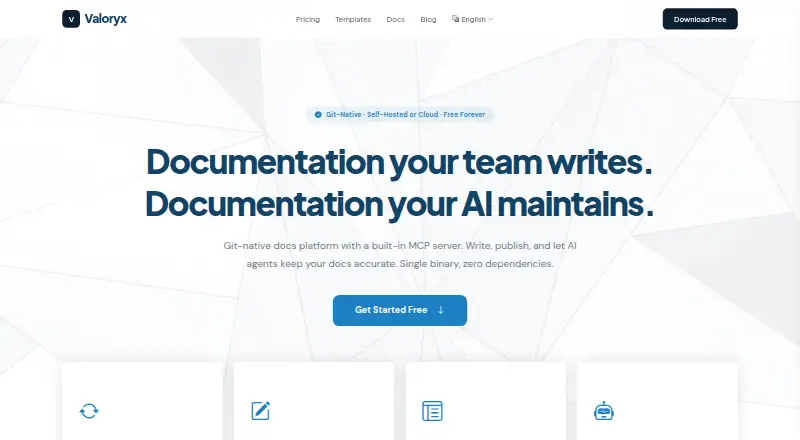
What DocPlatform is
DocPlatform is a git-native documentation platform offered as self-hosted software or managed cloud service. It synchronizes in both directions: editing in the web interface creates git commits, and repository pushes update the interface. Its Tiptap-based WYSIWYG editor writes Markdown and supports tables, code blocks, image embeds, and callouts. Users can publish documentation sites with themes, versioning, and SEO optimization, with full-text search provided by a built-in FTS5 engine rather than an external search service. Git sync works with GitHub, GitLab, Bitbucket, or any git remote. A built-in MCP server connects with clients such as Claude, Cursor, and VS Code through local stdio or cloud HTTPS. The free self-hosted Community Edition includes unlimited editors, workspaces, and pages. The free cloud tier includes one workspace, three editors, and 50 published pages. Cloud Team costs $29 a month and includes three workspaces, 15 editors, and 150 pages per workspace, plus custom domains and priority support. Business is listed at $79 a month as coming soon. The self-hosted app is a single binary for Linux, macOS, Windows, and Docker. Security features include TLS 1.2+, AES-256-GCM for sensitive fields, WebAuthn passkeys, workspace permissions, and logged MCP tool invocations.
Good
- Two-way synchronization links web edits and git pushes.
- Built-in FTS5 search needs no external search service.
- Free self-hosted edition has unlimited editors, workspaces, and pages.
- Supports GitHub, GitLab, Bitbucket, or any git remote.
- Team includes custom domains and priority support.
Watch out
- Cloud Free is limited to one workspace and three editors.
- Team costs $29 a month.
- Business is listed as coming soon.
Who it suits
DocPlatform suits teams that want documentation editing linked to git, with a choice between self-hosting and managed cloud. The free cloud tier may fit a small workspace, while Team adds more editors, workspaces, and pages.
Verdict
DocPlatform connects a visual documentation workflow with git synchronization and built-in search. Choose between its unlimited self-hosted Community Edition and cloud plans with stated workspace and editor limits.
Plans and prices
From DocPlatform's own pricing page, checked 15 Oct 2026.
| Plan | Price | What it gives you |
|---|---|---|
| Community Edition | Free | unlimited editors · unlimited workspaces · unlimited pages · unlimited published docs · self-hosted · free forever |
| Free | Free | 1 workspace · 50 pages/workspace · 3 editors · Git sync · published docs · no custom domain · $0/month |
| Team | $29 a month | 3 workspaces · 150 pages/workspace · 15 editors · Git sync · published docs · custom domain · $29/month |
| Business | $79 a month | 10 workspaces · 500 pages/workspace · 50 editors · Git sync · published docs · custom domain · priority support · $79/month |
The facts
Each one read from DocPlatform's own pages, with the date it was checked.
What it does
- Access control
- The platform defines Viewer, Commenter, Editor, Admin and Super Admin roles with workspace-level permissions.checked 15 Oct 2026
- AI integration
- The built-in MCP server exposes 26 tools for reading, writing, searching, quality checks, versioning, comments and export.checked 15 Oct 2026
- AI integrations
- The built-in MCP server connects with Claude, Cursor, VS Code, and other MCP clients over local stdio or cloud HTTPS.checked 30 Sep 2026
- Audit logging
- The security page says MCP tool invocations are logged with timestamps, user identity, and parameters.checked 30 Sep 2026
- Authentication
- Authentication supports local Argon2id passwords, Google and GitHub OIDC, and WebAuthn passkeys.checked 15 Oct 2026
- CLI
- The command-line interface includes 13 commands covering serving, initialization, diagnostics, export, preview, MCP and version reporting.checked 15 Oct 2026
- Deployment options
- Installation is offered through binaries, an installer script and a multi-architecture Docker image.checked 15 Oct 2026
- Editor
- The Tiptap-based editor supports rich text, Markdown source, frontmatter, tables, code blocks, images, callouts and autosave.checked 15 Oct 2026
- GitHub documentation repository
- The public docplatform-docs repository is described as official DocPlatform Community Edition documentation served through Git synchronization.checked 15 Oct 2026
- GitHub organization
- The Valoryx-org GitHub organization publicly lists documentation, release-binary and community repositories.checked 15 Oct 2026
- GitHub release repository
- The public releases repository describes itself as hosting DocPlatform release binaries and shows zero stars, watchers and forks.checked 15 Oct 2026
- Git sync
- The platform syncs in both directions: web edits create git commits, and pushes to git update the UI.checked 30 Sep 2026
- Git synchronization
- Web edits can create commits and pushes, while repository changes are pulled into the web interface through polling or webhooks.checked 15 Oct 2026
- Installation
- The self-hosted app is a single binary with no external dependencies and is listed for Linux, macOS, Windows, and Docker.checked 30 Sep 2026
- Integrations
- Git remotes can be GitHub, GitLab, Bitbucket or another SSH/HTTPS Git host.checked 15 Oct 2026
- License terms
- The terms grant a revocable, non-transferable license and prohibit sublicensing, distribution, sale or leasing of the software.checked 15 Oct 2026
- Limit: cloud quotas
- Cloud plans cap workspaces, pages and editors, while Community Edition is unlimited and self-hosted.checked 15 Oct 2026
- Limit: enterprise controls
- The documentation says compliance-heavy organizations needing SAML/SCIM are not the current target and that those controls belong to a future Enterprise Edition.checked 15 Oct 2026
- Limit: GitHub UI support
- The guided connection flow currently registers GitHub personal access tokens; other providers require manually configured Git remote URLs.checked 15 Oct 2026
- Notable news
- Valoryx published an open-source-project documentation guide dated April 6, 2026 describing Community Edition as free and self-hosted.checked 15 Oct 2026
The company
- Company business activities
- The registered SIC activities include internet retail, web portals and other information services.checked 15 Oct 2026
- Company founding
- Companies House records incorporation on 22 December 2025.checked 15 Oct 2026
- Company headquarters
- The registered office is 20 Pearce Drive, Faringdon, England, SN7 7ND.checked 15 Oct 2026
- Company legal name
- UK Companies House lists VALORYX LTD as an active private limited company numbered 16925146.checked 15 Oct 2026
The full review of DocPlatform
DocPlatform is a documentation platform that keeps web editing and a Git repository in sync. It suits teams that want collaborative editing without giving up Git-based workflows. Its strongest case is the unlimited self-hosted edition; cloud users should weigh workspace and editor caps against the convenience of managed hosting.
Overview
DocPlatform bridges repository-based documentation and a visual editing workflow: edits in the web interface become Git commits, while repository pushes appear in the platform. That two-way sync gives both developers and non-specialist editors a route to maintain the same content, though teams should choose it for that workflow rather than for a standalone writing environment.
Key features
The Tiptap-based editor writes Markdown and handles tables, code blocks, image embeds, and callouts. Published sites support themes, versioning, and SEO optimization, making the product more than a repository viewer. Full-text search runs on built-in FTS5, avoiding a separate search service.
GitHub, GitLab, Bitbucket, and other Git remotes are supported. An MCP server connects with Claude, Cursor, VS Code, and other MCP clients over local stdio or cloud HTTPS, a useful bridge for teams incorporating those tools into documentation work. The security page describes TLS 1.2+, AES-256-GCM for sensitive fields, and WebAuthn passkeys. It also describes five workspace roles—Viewer, Commenter, Editor, Admin, and Super Admin—and timestamped logging of MCP tool invocations, including user identity and parameters.
Analytics cover page views, search queries, and reader engagement; the home page describes them as GDPR-compliant and free of third-party cookies. This may suit teams monitoring documentation use while avoiding third-party tracking cookies.
Pricing
The free Community Edition is self-hosted and billed forever at no cost. It allows unlimited editors, workspaces, and pages and includes the full editor, Git sync, search, publishing, and MCP server. Its trade-off is that teams run the software themselves; the app is a single binary with no external dependencies and is listed for Linux, macOS, Windows, and Docker.
The cloud Free plan is also billed forever at no cost, but caps teams at 1 workspace, 3 editors, and 50 published pages. It is a sensible way to start a small documentation project, but the editor and publishing limits make it a poor fit for a growing team.
Team costs $29 a month, billed monthly, for 3 workspaces, 15 editors, and 150 pages per workspace, plus custom domains and priority support. It is the practical cloud choice for a team that needs those limits and managed hosting. Business is $79 a month, billed monthly, and marked coming soon; its stated package is 10 workspaces, 50 editors, and 500 pages per workspace, with SSO / SAML, analytics dashboard, and audit logs. It targets larger teams, but is not a current option while marked coming soon. There is no free trial; the pricing FAQ says trial access and annual billing are coming soon and recommends starting with Free.
Platforms
DocPlatform is available through the web and as self-hosted software for Linux, macOS, and Windows; its platform coverage also includes API access. Self-hosted installation is also listed for Docker.
Who it's for
Choose DocPlatform if your team wants Git to remain central while editors can work through a visual interface, or if you want to self-host an unlimited installation. Cloud Free fits a small project with three or fewer editors; Team is better for teams needing up to 15 editors and custom domains. Look elsewhere if you need a cloud plan without these caps, or if you need Business features now.
Pros and cons
- Pro: Two-way Git synchronization lets teams edit in the web interface or push repository changes without splitting documentation across workflows.
- Pro: Community Edition has unlimited editors, workspaces, and pages at no cost, with the core documentation features included.
- Pro: Built-in search and MCP support reduce reliance on an external search service and connect documentation workflows to MCP clients.
- Con: Cloud Free is capped at three editors and 50 published pages, so even modest growth can require a paid plan.
- Con: There is no free trial, and annual billing is not yet offered.
- Con: Business is marked coming soon, leaving larger cloud teams without its stated 50-editor capacity, SSO / SAML, and analytics dashboard as a current option.
Alternatives
Browse the Developer Documentation Software category to compare options. Choose Mintlify if its free Starter plan's five editor seats, custom domain, web editor, authentication, MCP server, and API playground better suit your needs. Sphinx is a free, BSD 2-Clause-licensed option to install locally or self-host. MkDocs is another free option. GitBook may suit an individual: its free plan includes one user, unlimited page views, and 10 GitBook Agent messages per week. DocFX is a free open-source static site generator, but requires .NET SDK 8.0 or higher. Read the Docs offers free hosting for open-source projects with public documentation and ads-supported hosting. Writerside has a free JetBrains IDE plugin with all standalone-version functionality. Consider Redocly if a paid per-seat plan is a better fit: its Pro plan is $10 a month, billed per seat/month and monthly, for one project and 100 pages.
Verdict
DocPlatform is a strong fit for Git-oriented teams that want collaborative visual editing, built-in search, and the choice to self-host or move to cloud. The unlimited Community Edition is its clearest advantage; choose another tool if you need a free trial, more cloud capacity on the free tier, or Business features before that plan is available.
Getting started
- Visit the Valoryx website.
- Choose the self-hosted Community Edition or a cloud plan.
- For self-hosting, use the single binary listed for Linux, macOS, Windows, and Docker.
- Connect a GitHub, GitLab, Bitbucket, or other Git remote.
- Use the web editor or push changes through Git to sync documentation.
Limits worth knowing
The free cloud plan allows one workspace, three editors, and 50 published pages. The self-hosted Community Edition is free forever with unlimited editors, workspaces, and pages. Team costs $29 a month, billed monthly, and includes three workspaces, 15 editors, and 150 pages per workspace.
Questions
Is DocPlatform free?
Yes. The self-hosted Community Edition is free forever with unlimited editors, workspaces, and pages. The cloud Free plan is also free and has one workspace, three editors, and 50 published pages.
What does Cloud Team cost?
Team costs $29 a month, billed monthly. It includes three workspaces, 15 editors, 150 pages per workspace, custom domains, and priority support.
Which platforms are supported?
The listed platforms are API, Linux, macOS, self-hosted, web, and Windows. The self-hosted app is listed for Linux, macOS, Windows, and Docker.
Can I publish a documentation site?
Yes. Publishing supports themes, versioning, and SEO optimization.
Which Git services can it connect to?
Git synchronization supports GitHub, GitLab, Bitbucket, or any Git remote.
Is single sign-on available?
The security information describes WebAuthn passkey authentication. The Business plan lists SSO / SAML and is marked as coming soon.
Alternatives to DocPlatform
- 1

Mintlify
Free planWebAPILinuxmacOS8.0From $450 a month - 2
Fern
Free planOpen sourceWebAPILinuxmacOS7.8Free plan - 3

VitePress
Free planOpen sourceWebAPILinuxmacOS7.7Free plan - 4

GitBook
Free planWebAPI7.6From $65 a month - 5

Documentation.AI
Free planWebAPI7.4From $55 a month - 6

Redocly
WebAPIExtension7.0From $10 a month