
Documentation.AI
Documentation.AI combines an AI documentation agent, team workflows, publishing and AI access for technical documentation.
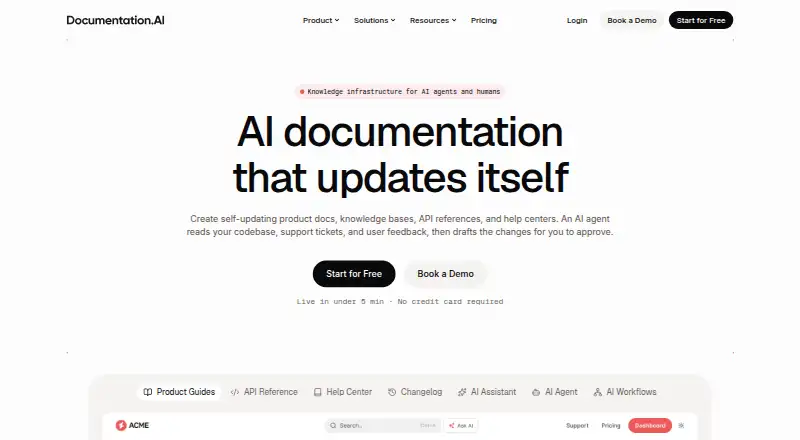
What Documentation.AI is
Documentation.AI combines an AI documentation agent, team workflows, publishing and AI access for technical documentation. Teams can write in a visual web editor or use Markdown and MDX in Git repositories, with pull request previews. OpenAPI files can generate API reference pages with request and response examples and a live playground. Agent and workflow changes arrive as drafts or commits for team review, rather than publishing automatically. The platform also offers an in-document assistant with cited answers, a Reader MCP server and generated llms.txt. GitHub, GitLab, Jira and Confluence can provide context to the agent; built-in integrations include analytics and chat widgets. Documentation can be public, password-protected or private with JWT or OAuth 2.0. SSO with SAML/OIDC and SCIM are Enterprise features. AI features pause when credits run out until the next 30-day cycle or a deliberate top-up; the pricing page says there is no overage billing. Starter is free. Standard costs $55 a month billed yearly, and Pro costs $159 a month billed yearly.
Good
- Supports visual editing and Markdown or MDX.
- OpenAPI files can generate interactive API references.
- Agent changes remain drafts or commits for review.
- Provides private access controls using JWT or OAuth 2.0.
- Starter plan is free.
Watch out
- AI features pause when credits run out.
- Standard costs $55 a month billed yearly.
- SSO and SCIM require Enterprise.
Who it suits
Documentation.AI suits individuals and teams creating technical documentation, from early projects to growing teams. Teams that need SSO or SCIM should note those are Enterprise features.
Verdict
Documentation.AI brings writing, review workflows, publishing and AI access into one documentation platform. Check plan seat and project limits, and consider how its credit pauses affect your team.
Plans and prices
From Documentation.AI's own pricing page, checked 15 Oct 2026.
| Plan | Price | What it gives you |
|---|---|---|
| Starter | Free | 5 editor seats · 1 documentation project · 10,000 one-time AI credits · visual editor · API playground · MCP server · custom domain · forever |
| Standard | $55 a month | 10 editor seats · 2 documentation projects · 10,000 AI credits/month · password-protected docs · external AI sources · Slack support · yearly |
| Pro | $159 a month | Unlimited editor seats · 4 documentation projects · 30,000 AI credits/month · JWT/OAuth private docs · advanced analytics · role permissions · priority support · yearly |
| Enterprise | Priced on request | Custom projects and AI credits · SAML/OIDC SSO · SCIM · custom SLAs · dedicated support · custom integrations · white-glove migration |
The facts
Each one read from Documentation.AI's own pages, with the date it was checked.
What it does
- Access control
- Documentation can be public, password-protected, or private with JWT or OAuth 2.0; SSO with SAML/OIDC and SCIM are Enterprise plan features.checked 29 Sep 2026
- Agent review
- Agent and workflow changes arrive as drafts or commits for team review; they are not published automatically.checked 29 Sep 2026
- AI access
- The platform offers an in-docs assistant with cited answers, a Reader MCP server, and generated llms.txt.checked 29 Sep 2026
- AI assistant
- Ask AI answers reader questions inside documentation with citations and confidence signals.checked 15 Oct 2026
- AI credit limits
- AI Assistant questions cost 10 credits, agent tasks cost roughly 5–320 credits, and unused credits roll over at 50% up to 1.5 times the allowance.checked 15 Oct 2026
- AI data policy
- The security page says model providers receive only content needed for an answer, cannot train on it, and Ask AI conversations are not stored by Documentation.AI.checked 15 Oct 2026
- AI data use
- The privacy policy says workspace content and model inputs and outputs are not used to train AI models, and prompts, context, and outputs may be logged for up to 30 days.checked 29 Sep 2026
- AI writing agent
- The Documentation Agent drafts, rewrites and reformats pages using the site's components and configuration, with human approval before publishing.checked 15 Oct 2026
- API docs
- OpenAPI files can generate API references with request examples, response examples, and a live playground.checked 29 Sep 2026
- API reference generation
- OpenAPI files generate endpoint pages, parameter documentation, cURL/Python/JavaScript/Go/Ruby examples, response examples and a live playground.checked 15 Oct 2026
- Automations
- Automations can run after pull-request merges or on daily, weekly or monthly schedules to propose documentation updates.checked 15 Oct 2026
- Compliance status
- GDPR support with a DPA and standard contractual clauses is available; SOC 2 Type II, ISO 27001 and HIPAA safeguards are described as in progress.checked 15 Oct 2026
- Connectors
- GitHub, GitLab, Jira, and Confluence can provide context to the AI Documentation Agent.checked 29 Sep 2026
- Customization and performance
- Published sites support custom colors, fonts, layouts, CSS and JavaScript, more than 100 reusable blocks, and the maker claims 100/100 Lighthouse scores.checked 15 Oct 2026
- Data location
- The maker says service data is stored in the United States on Render, Vercel, Supabase and Cloudflare.checked 15 Oct 2026
- Docs as code
- Teams can store Markdown and MDX in Git with branches, pull requests, preview builds and bidirectional synchronization.checked 15 Oct 2026
- Funding (independent listing)
- GetLatka describes Documentation AI as bootstrapped and self-funded, with no outside investment reported.checked 15 Oct 2026
- Independent review score
- Dave Swift rated Documentation AI 8.3 out of 10 in a February 25, 2026 review, highlighting AI writing, GitHub integration and its MCP server.checked 15 Oct 2026
- Integrations
- Connectors listed by the product include GitHub, GitLab, Jira, Confluence, Linear, Notion, HubSpot, Plain, Intercom and reader feedback.checked 15 Oct 2026
- Intended users
- The Starter plan is described for individuals and early projects, Standard for startups and small teams, and Pro for growing teams.checked 29 Sep 2026
The company
- Company
- Documentation.AI is a product of Keevs Health Inc., a Delaware corporation headquartered in Alpharetta, Georgia.checked 29 Sep 2026
- Company founded and headquarters (independent listing)
- GetLatka lists Documentation AI as founded in 2025 and headquartered in Hyderabad, Telangana, India.checked 15 Oct 2026
- Headquarters
- Alpharetta, Georgia, USAchecked 23 Sep 2026
- Legal maker
- The privacy policy identifies Keevs Health Inc., a Delaware corporation, as the legal operator of Documentation.AI.checked 15 Oct 2026
The full review of Documentation.AI
Overview
Documentation.AI is a hosted platform for creating and publishing technical documentation, with AI-assisted writing and review workflows. It suits teams that want documentation work connected to their repositories and project tools, as well as individuals starting a project. Its strongest case is the combination of editable drafts, API references and reader-facing AI; credit pauses and project caps deserve attention before a team commits.
Key features
Teams can work in a visual web editor or in Markdown and MDX through Git repositories, with pull-request previews. The agent can draw context from GitHub, GitLab, Jira and Confluence, but its changes arrive as drafts or commits for team review rather than going straight to publication. That review step is a useful safeguard for technical content, though it still leaves teams responsible for approving changes.
OpenAPI files can produce API references with request and response examples and a live playground. Beyond hosted documentation sites, the platform supports PDF, Markdown/MDX and generated llms.txt. An in-docs assistant provides cited answers, and a Reader MCP server adds another route for AI access to documentation.
Built-in integrations include Google Analytics 4 and PostHog, plus Intercom and Crisp chat widgets. Access options range from public pages to password protection and private documentation using JWT or OAuth 2.0. SAML/OIDC single sign-on and SCIM are reserved for Enterprise, an important distinction for organizations with centralized identity requirements.
Documentation.AI describes encryption in transit and at rest, least-privilege controls, audit logging, routine backups and hashed passwords. Its privacy policy says workspace content and model inputs and outputs are not used to train AI models; prompts, context and outputs may be logged for up to 30 days.
Pricing
The free Starter plan costs $0/forever and includes 5 editor seats, 1 documentation project and 10,000 one-time AI credits. It is a meaningful starting point for an individual or early project, but the single project and non-renewing credit allowance make it a limited basis for ongoing AI-heavy work.
Standard costs $55/month, billed yearly, and includes 10 editor seats, 2 documentation projects and 10,000 AI credits/month. It is aimed at startups and small teams that need recurring credits and room for a second project. Pro costs $159/month, billed yearly, and raises those limits to unlimited editor seats, 4 projects and 30,000 AI credits/month; growing teams gain more collaboration and usage headroom, but still face a project cap.
Enterprise has custom pricing, unlimited editor seats, and custom project and AI-credit allowances. It is the tier for organizations needing tailored scale or SAML/OIDC and SCIM. For every plan, AI features pause when credits run out and resume with the next 30-day cycle or a deliberate top-up; the pricing page says there is no overage billing. Teams should account for that interruption rather than assume usage can continue beyond the allowance.
Platforms
Documentation.AI is available on web and through an API. Its hosted output avoids requiring teams to host the documentation site themselves, while Git-based authoring and repository sync suit teams that prefer documentation changes to fit repository workflows.
Who it's for
Choose Documentation.AI if technical writers and developers need shared editing, reviewable AI changes, API reference generation and reader-facing AI in one hosted workflow. Starter fits an individual or early project; Standard is sized for a small team; Pro makes more sense when seat and credit needs grow. Organizations that require SSO or SCIM need Enterprise. It is a weaker fit for teams that cannot tolerate AI pauses or need more than four projects without a custom Enterprise arrangement.
Pros and cons
- Pros: Agent edits remain reviewable drafts or commits, so teams retain a publication checkpoint.
- Pros: OpenAPI references include examples and a live playground, giving API documentation more than static endpoint descriptions.
- Pros: Public, password-protected and JWT/OAuth 2.0 access options cover several common documentation audiences.
- Cons: Starter's 10,000 AI credits are one-time, while paid tiers pause AI features at the credit limit until renewal or top-up.
- Cons: Standard and Pro cap documentation projects at 2 and 4 respectively; teams needing more must consider custom-priced Enterprise.
- Cons: SAML/OIDC SSO and SCIM are Enterprise-only, putting centralized access management beyond the lower plans.
Alternatives
For a broader category comparison, see AI Documentation Generators and Developer Documentation Software.
Docny is worth considering for a free project that needs a custom domain, GitHub sync, analytics and version history on its Hobby plan. AutomaDocs may suit a repository-centered workflow: its free plan covers one repository, 50 AI chat messages a month, core doc generation and auto-sync on push.
InkLoom is another free option, with unlimited pages and one free user per project; its Pro plan is listed at $49 a month. DocuWriter is a paid alternative with a free trial and a Starter plan at $20 a month for 50 credits a month.
ShipDocs is available for Linux and macOS as well as web, and its Advanced plan is listed at $29 a month. Hyperdocs is a web-based freemium alternative. GitBook offers a free plan for individuals with one free user, unlimited page views and 10 Agent messages a week. Komment is a web-based freemium alternative.
Verdict
Documentation.AI is a strong choice for small and growing technical teams that want AI-assisted documentation without surrendering editorial review, especially when API references and multiple publishing formats matter. Choose it for the integrated workflow and useful reader access; look elsewhere if credit interruptions, project limits or Enterprise-only identity controls conflict with how your team operates.
Alternatives to Documentation.AI
- 1

Mintlify
Free planWebAPILinuxmacOS8.0From $450 a month - 2
Fern
Free planOpen sourceWebAPILinuxmacOS7.8Free plan - 3

DocPlatform
Free planWebAPILinuxmacOS7.7From $29 a month - 4

VitePress
Free planOpen sourceWebAPILinuxmacOS7.7Free plan - 5

GitBook
Free planWebAPI7.6From $65 a month - 6

Redocly
WebAPIExtension7.0From $10 a month