Didva
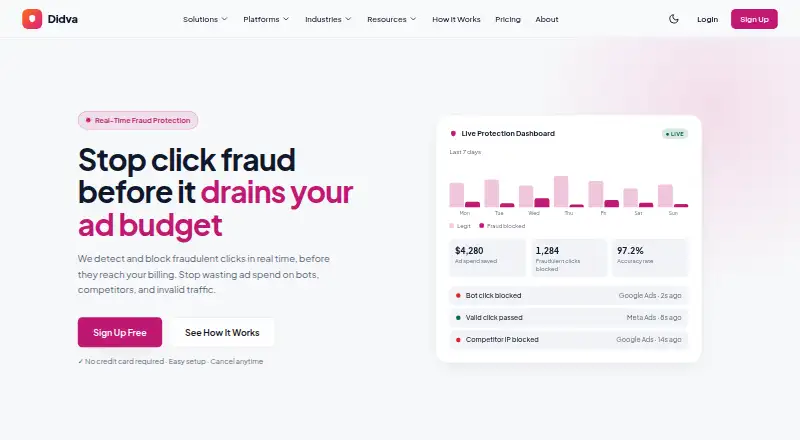
Didva monitors paid advertising clicks to identify and block click fraud in real time.
What Didva is
Didva monitors paid advertising clicks to identify and block click fraud in real time. It says its detection system evaluates more than 50 signals per click, including IP reputation, device fingerprints, click speed, and behavior. High-confidence threats can go to exclusion lists; other traffic can be held for manual review. Reports provide click-level details such as the IP address, device fingerprint, origin, and flag reason, with evidence export for Google refund claims. Didva lists integrations for Google Ads, Meta Ads, Microsoft Advertising, and a REST API for custom connections. Users can connect ad accounts through one-click OAuth, and the service says setup requires neither DNS changes nor a developer. Blocking options include automatic Google Ads IP-exclusion syncing, custom rules, and an allowlist. The free Watchtower plan includes detection across ad channels, manual IP blocking, and a weekly digest, but not automatic enforcement, CSV export, Meta Ads protection, or daily reports.
Good
- Analyzes more than 50 signals per click.
- Click-level reports include flag reasons.
- Evidence export supports Google refund claims.
- One-click OAuth account connection is listed.
- Free Watchtower includes cross-channel detection.
Watch out
- Watchtower excludes automatic enforcement.
- Watchtower excludes Meta Ads protection.
- Starter costs $39/mo.
- No free trial is listed.
Who it suits
Watchtower may suit advertisers seeking free click monitoring with manual IP blocking. Starter is described for small businesses with one or two campaigns, while Growth and Agency are aimed at businesses with multiple campaigns and larger advertisers or agencies.
Verdict
Didva combines paid-click monitoring with review controls, detailed reporting, and several blocking options. Check Watchtower's exclusions and the paid click limits against your campaign needs; Didva does not claim to catch every threat.
Plans and prices
From Didva's own pricing page, checked 15 Oct 2026.
| Plan | Price | What it gives you |
|---|---|---|
| Watchtower | Free | Up to 3,000 clicks/month · all ad-channel detection · manual IP blocking · weekly digest · 1 site · 7-day data retention · Free forever |
| Starter | $39 a month | Up to 20,000 clicks/month · Google and Bing protection · real-time IP blocking · CSV export · daily reports · Meta protection · no API access · $39 /mo |
| Growth | $89 a month | Up to 100,000 clicks/month · Google, Bing and Meta protection · CSV export · daily and weekly reports · appeal packs · priority support · no API access · $89 /mo |
| Agency | $249 a month | 500,000+ clicks/month · Growth features · CSV exports · appeal evidence · REST API access soon · white-label multi-client · dedicated account manager · $249 /mo; custom pricing above |
The facts
Each one read from Didva's own pages, with the date it was checked.
What it does
- Blocking
- Features listed include automatic Google Ads IP-exclusion syncing, custom blocking rules and an allowlist.checked 30 Sep 2026
- Caveat
- Didva says no detection system is perfect and does not claim it will catch everything.checked 30 Sep 2026
- Chrome extension details
- The extension is version 0.6.0, was updated September 1, 2026 and is 32.67 KiB.checked 15 Oct 2026
- Chrome extension scope
- The Chrome panel is read-only, displays Didva account statistics inside Google Ads and cannot change campaigns, budgets or bids.checked 15 Oct 2026
- Click-level monitoring
- Each paid click is tied to campaign, ad group, keyword, landing page, IP, device and conversion context.checked 15 Oct 2026
- Detection
- The site says its system analyzes more than 50 signals per click, including IP reputation, device fingerprint, click velocity and behavior.checked 30 Sep 2026
- Documentation depth
- Public WordPress documentation includes installation steps, FAQs, consent hooks, caching guidance, conversion rules, multisite limits and removal instructions.checked 15 Oct 2026
- Evidence export
- Click logs containing IP addresses, timestamps, user agents and campaign context can be exported for investigations, refunds and client reporting.checked 15 Oct 2026
- Fraud categories
- Didva targets bots, click farms, proxy and datacenter traffic, repeat competitors and low-quality clicks.checked 15 Oct 2026
- Google integration
- Google Ads connects through one-click OAuth and can receive synchronized IP exclusion lists.checked 15 Oct 2026
- Independent review availability
- The WordPress.org listing states that no user reviews have been submitted for the Didva plugin.checked 15 Oct 2026
- Installation
- The hosted product can be installed by placing an asynchronous tracking script on paid landing pages and an optional conversion tag on thank-you pages.checked 15 Oct 2026
- Integrations
- The site lists Google Ads, Meta Ads, Microsoft Advertising (Bing) and a REST API for custom integrations.checked 30 Sep 2026
- Intended users
- The pricing page describes Starter for small businesses with one or two campaigns, Growth for businesses running multiple campaigns, and Agency for agencies and large advertisers.checked 30 Sep 2026
- Licence
- The WordPress connector is explicitly described as open-source software and exposes its code and SVN repository through WordPress.org.checked 15 Oct 2026
- Limit: consent responsibility
- Site owners remain responsible for visitor consent and privacy-law compliance when using behavioral tracking and device click identifiers.checked 15 Oct 2026
- Limit: WordPress multisite
- The current WordPress plugin cannot be activated network-wide and must be enabled separately for each site.checked 15 Oct 2026
The company
- Company founded
- LinkedIn lists Translation Cloud as founded in 2011, headquartered in Jersey City, New Jersey, with 501–1,000 employees.checked 15 Oct 2026
- Company legal address
- Didva's about page identifies Translation Cloud LLC and gives a Morristown, New Jersey, USA address.checked 15 Oct 2026
- Company ownership status
- LinkedIn describes Translation Cloud as a public company.checked 15 Oct 2026
- Headquarters
- Morristown, New Jersey, USAchecked 28 Sep 2026
Money
- Free plan limits
- Watchtower is free forever and includes detection on all ad channels, manual IP blocking and a weekly digest, but excludes auto-block enforcement, CSV export, Meta Ads protection and daily reports.checked 30 Sep 2026
- Limit: free tier enforcement
- Watchtower provides detection and manual blocking but excludes automatic enforcement, CSV export, Meta protection, daily reports and appeal packs.checked 15 Oct 2026
Where it runs
- Limit: platform blocking
- Microsoft Advertising requires users to paste Didva's exclusion list manually, and Meta offers limited direct IP-level blocking.checked 15 Oct 2026
The full review of Didva
Didva is a paid-click monitoring and click-fraud control tool for advertisers running campaigns across Google, Meta and Microsoft. It is best suited to businesses that want both evidence to review suspicious activity and ways to block it. Its free tier supports manual monitoring, while automated enforcement is a paid-plan feature.
Overview
Didva evaluates clicks using more than 50 signals, including IP reputation, device fingerprints, click speed and behavior. High-confidence threats can be routed to exclusion lists, while less certain traffic can be held for manual review. That separation gives advertisers a way to avoid treating every unusual click as confirmed fraud, but it still requires someone to assess the traffic left for review.
Click-level reports include the IP address, device fingerprint, origin and reason a click was flagged. Evidence can be exported for Google refund claims, which makes the reporting useful beyond day-to-day monitoring. Didva cautions that no detection system catches every threat; its alerts should inform decisions, not be treated as a guarantee.
Key features
- Detection and review: Signal-based analysis and a manual-review path suit advertisers who want oversight over uncertain cases. The trade-off is that held traffic requires human attention.
- Blocking: Automatic Google Ads IP-exclusion syncing, custom blocking rules and an allowlist cover automated enforcement as well as exceptions. Automatic enforcement is not part of the free plan, so free users must block IPs manually.
- Reporting: Click-level evidence and export for Google refund claims are valuable when an advertiser needs to explain or investigate suspicious activity, not just count flagged clicks.
- Integrations and setup: Didva lists Google Ads, Meta Ads, Microsoft Advertising and a REST API for custom integrations. It says accounts connect through one-click OAuth and setup needs neither DNS changes nor a developer, reducing setup friction for teams without technical support.
- Limits: Protection continues after a monthly click limit is reached, and Didva asks the user to upgrade rather than silently billing overages. That avoids surprise overage charges, though users should still choose a plan that matches campaign traffic.
Pricing
Watchtower is free forever and covers up to 3,000 clicks per month, one site and seven-day data retention. It includes detection across ad channels, manual IP blocking and a weekly digest. It excludes automatic blocking, CSV export, Meta Ads protection and daily reports, making it a useful entry point for low-volume manual monitoring rather than a complete multi-channel enforcement plan.
Starter costs $39 per month and covers up to 20,000 clicks per month, with Google, Bing and Meta Ads protection. The pricing page positions it for small businesses with one or two campaigns. It excludes API access, so it is less suitable for advertisers who need custom integrations.
Growth costs $89 per month and raises the limit to 100,000 clicks per month, retaining Google, Bing and Meta Ads protection. It is aimed at businesses running multiple campaigns; API access is also excluded, so the higher quota does not add custom API integration.
Agency costs $249 per month and covers 500,000 or more clicks per month, with white-label and multi-client capabilities. It is aimed at agencies and large advertisers. REST API access is marked “soon,” so agencies needing that capability now should not assume it is included. Above the stated Agency level, pricing is custom. Didva offers no free trial.
Platforms
Didva is available on web and through an API. Its supported ad platforms are Google Ads, Microsoft Bing Ads and Meta Ads, including Facebook and Instagram. Watchtower excludes Meta Ads protection, and the paid Starter and Growth plans exclude API access.
Who it's for
Didva is a sensible fit for advertisers who need click-level evidence, review controls and blocking options across multiple ad networks. Watchtower suits those willing to monitor manually within a small monthly quota. Starter is better for a small business with one or two campaigns that needs paid multi-platform protection; Growth fits businesses with several campaigns and higher click volume. Agencies and large advertisers may find Agency’s multi-client and white-label features relevant, provided its click allowance and API timing suit their needs.
It is a weaker fit for teams that require API access on a lower paid tier, automatic enforcement on a free plan, or a guarantee that all fraudulent clicks will be caught.
Pros and cons
- Pros: More than 50 detection signals and a manual-review route give advertisers some control over uncertain flags.
- Pros: Click-level reporting and evidence export for Google refund claims support investigation and follow-up.
- Pros: Protection continues past the plan’s monthly click limit without silent overage billing.
- Cons: The free plan caps usage at 3,000 clicks per month, retains data for seven days and requires manual blocking.
- Cons: Meta Ads protection is excluded from Watchtower, while API access is excluded from Starter and Growth.
- Cons: Detection is not guaranteed to catch every threat, and held traffic still needs review.
Alternatives
Click Fraud Software is the category directory for comparing more tools.
- TrafficGuard is worth comparing if its detection-only free option for ad spend under $2.5K per month or its $49-per-month Shield plan for up to $30K monthly ad spend better matches your budget and needs.
- ClickLens may suit teams focused on session scoring and exploration: its free plan covers 1,000 sessions per month, one site, basic scoring and seven-day retention, while Starter is $49 per month for 10,000 sessions.
- ClickHelm is an option for readers seeking a self-hosted offering; its free edition has no blocking, rules, automatic actions, weekly email report or Google charge reconciliation.
- ClickCease is another web-based, paid option.
- Lunio is another web-based, paid option.
- ProtectPPC may appeal to advertisers comparing spend-based pricing: its Starter plan is $29 per month or 0.6% of ad spend, whichever is higher, for 10,000 clicks per month, one project and Google Ads sync.
- Fraud Blocker is another web-based, paid option.
- ClickGuardian offers a $49-per-month Starter plan for up to $6,000 monthly ad spend, one website, one Google Ads account, unlimited monitored clicks and three months of data retention.
Verdict
Choose Didva if you want paid-click detection paired with review controls, detailed evidence and blocking options across major ad platforms. Its strongest case is the combination of click-level reporting and a path from high-confidence flags to enforcement; its main limitations are the free plan’s manual-only blocking and low-volume cap, and the lack of API access on Starter and Growth. Look elsewhere if those restrictions or the system’s non-guaranteed detection do not fit your needs.
Alternatives to Didva
- 1
ClickPatrol
Free planAndroidiOSWebAPI7.9From €71 a month - 2
ClickHelm
Free planOpen sourceWebSelf-hosted7.7From $29 a month - 3
JuicyTraffic
Free planWeb7.3$15 one-time - 4

ClickCease
AndroidiOSWeb7.0From $69 a month - 5
ClickDefender
AndroidiOSWebAPI6.9From £49 a month - 6
Clixtell
AndroidiOSWeb6.8From $10 a month