dbdocs
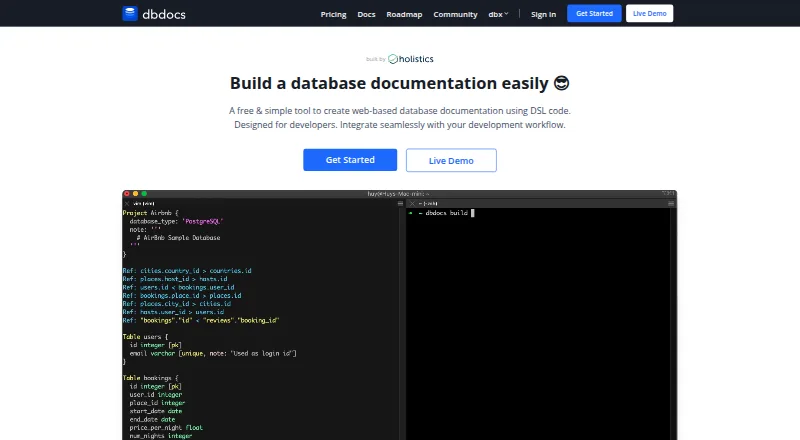
dbdocs turns DBML database definitions into web-based documentation where readers can browse tables and fields and view relationships.
What dbdocs is
dbdocs turns DBML database definitions into web-based documentation where readers can browse tables and fields and view relationships. DBML is an open-source markup language for describing database structures. Teams can keep definitions locally or in Git and publish them to a dbdocs project. The db2dbml command supports imports from PostgreSQL, MySQL, MSSQL, Snowflake, and BigQuery. Documentation views can be embedded in Notion, Confluence, Miro, or a website, and CI publishing can use a token; the instructions include a GitHub Actions example. New projects are public by default. The Free plan offers password-protected sharing, while private mode is listed for paid plans. dbdocs is a cloud service with schema history and a data dictionary, and lists relational database coverage and single sign-on. The Free plan is free. Personal Pro is $20 a month, and Team is $60 a month.
Good
- Imports DBML from five listed database systems.
- Documentation can be embedded in several collaboration tools.
- CI publishing includes a GitHub Actions example.
- Free plan includes password-protected sharing.
Watch out
- New projects are public by default.
- Private mode is listed only for paid plans.
- Self-hosted availability requires contacting the team to discuss requirements.
Who it suits
dbdocs is aimed at internal development teams and software development agencies that want to publish database documentation from DBML. It may suit teams that keep schema definitions in Git or include documentation publishing in CI.
Verdict
dbdocs provides a way to publish browsable database documentation from DBML and connect publishing to team workflows. Consider the default public access and paid-plan privacy options when choosing how to share a project.
Plans and prices
From dbdocs's own pricing page, checked 29 Sep 2026.
| Plan | Price | What it gives you |
|---|---|---|
| Free | Free | 1 user · public sharing · password protection |
| Personal Pro | $20 a month | Single user · 3 paid projects included · up to 5 guest viewers per project · private mode · $20/month; $16/month annually |
| Team | $60 a month | 3 editor seats included · 5 paid projects included · unlimited guest or workspace viewers · up to 6 guest editors · $60/month; $50/month annually |
The facts
Each one read from dbdocs's own pages, with the date it was checked.
What it does
- CI integration
- The CI instructions show publishing with a token and include a GitHub Actions example.checked 29 Sep 2026
- Database import
- The documented db2dbml command supports PostgreSQL, MySQL, MSSQL, Snowflake, and BigQuery.checked 29 Sep 2026
- Default access
- New dbdocs projects are public by default; the access-control documentation lists password-protected sharing on the Free plan and private mode on paid plans.checked 29 Sep 2026
- Integrations
- Embedded views can be added to Notion, Confluence, Miro, or a website.checked 29 Sep 2026
- Intended users
- The site describes dbdocs as built with internal development teams and software development agencies in mind.checked 29 Sep 2026
- Purpose
- dbdocs creates web-based database documentation from DBML code.checked 29 Sep 2026
- Schema language
- It uses DBML, an open-source markup language for defining database structures.checked 29 Sep 2026
- Security
- The maker says Holistics is SOC 2 Type II compliant and dbdocs servers are hosted in Frankfurt, EU.checked 29 Sep 2026
- Self-hosting
- The FAQ says users seeking a self-hosted version can submit a form to discuss their requirements with the team.checked 29 Sep 2026
- Support
- The site links to a contact form and a service status page for support resources.checked 29 Sep 2026
- Visual documentation
- The documentation lets readers browse tables and fields and visualize relationships between tables.checked 29 Sep 2026
- Workflow
- The site describes storing DBML locally or in Git and publishing it to a dbdocs project.checked 29 Sep 2026
The full review of dbdocs
dbdocs turns DBML schema definitions into browsable, web-based references for relational databases. It is best suited to development teams and software agencies that maintain schemas in code and want to share them through team workflows. Its publishing model is a strong match for DBML-based work, but public-by-default projects and paid-only private mode should shape the decision from the start.
Overview
DBML, an open-source markup language for describing database structures, is the foundation: teams can maintain definitions locally or in Git and publish them as dbdocs projects. Readers can browse tables and fields and see relationships between tables, making the output more useful than a static schema listing when colleagues need to understand how a relational database is organized.
For existing databases, the documented db2dbml command supports PostgreSQL, MySQL, MSSQL, Snowflake, and BigQuery. The product also includes a data dictionary and schema history. Its cloud deployment suits teams comfortable publishing documentation online; the FAQ directs teams seeking self-hosting to submit their requirements for discussion.
Key features
- DBML-to-documentation workflow: Keeping schema definitions in local files or Git connects documentation maintenance to a code-oriented process. This is a natural fit for teams already comfortable with DBML, but less compelling for readers who want a workflow that does not depend on that language.
- Browsable schema views: Tables, fields, and visualized relationships help readers navigate a schema rather than infer connections from code alone.
- Database conversion: The db2dbml command covers five named systems, including PostgreSQL, MySQL, MSSQL, Snowflake, and BigQuery, giving teams with those databases a route into the DBML workflow.
- Publishing integrations: Embedded views can be placed in Notion, Confluence, Miro, or a website. CI instructions show token-based publishing and include a GitHub Actions example, which can make updates part of an existing build workflow.
- Sharing controls: New projects are public by default. Free users can password-protect sharing, while private mode is reserved for paid plans; teams documenting sensitive structures should account for that difference before choosing a plan.
Pricing
dbdocs has a free plan and a 7-day trial. The free tier costs nothing and permits one user, public sharing, and password protection. It is a practical starting point for an individual publishing documentation that can be shared publicly or protected with a password, but it does not provide private mode.
Personal Pro costs $20 a month, billed at $20/month or $16/month annually. It is for a solo user who needs private mode: the plan includes three paid projects and up to five guest viewers per project. The trade-off is that it remains a single-user plan, so it is not the choice for a group needing multiple editors.
Team costs $60 a month, billed at $60/month or $50/month annually. It includes three editor seats, five paid projects, unlimited guest or workspace viewers, and up to six guest editors. That makes it the more suitable tier for shared editing and broad internal readership, though the included editor-seat count is limited to three.
The Free plan gives up private mode, while Personal Pro adds privacy without adding a second user. Team is the tier for multiple editors and unlimited viewers. Consider the stated project and seat allowances alongside the monthly or annual billing choice; private mode is the clearest reason to move beyond Free.
Platforms
dbdocs is listed for web, Linux, macOS, and Windows. The deployment model is cloud-based, so desktop platform support should not be read as a self-hosting option.
Who it's for
Development teams and software agencies are the clearest audience, particularly those maintaining relational schemas in DBML or Git and wanting published documentation available to colleagues or embedded in their existing collaboration spaces. Solo developers can start on Free if public or password-protected sharing is sufficient, or choose Personal Pro for private projects. Teams that need several editors and broad viewing access have a stronger case for Team.
Organizations should weigh access controls carefully: projects begin public, and private mode requires a paid plan. The maker says Holistics is SOC 2 Type II compliant and that dbdocs servers are hosted in Frankfurt, EU. Support resources include a contact form and service status page.
Pros and cons
- Pro: DBML can be kept locally or in Git and published, tying documentation to a code-based schema workflow.
- Pro: Table and field browsing, relationship visualization, a data dictionary, and schema history give readers several ways to understand a relational schema.
- Pro: The documented conversion command covers PostgreSQL, MySQL, MSSQL, Snowflake, and BigQuery, while embeds and CI publishing support make sharing and updates fit common team workflows.
- Con: New projects are public by default, and private mode requires a paid plan; that is a meaningful constraint for teams unwilling to publish schema documentation publicly.
- Con: Personal Pro remains single-user, while Team starts with three editor seats, so teams must match their editing needs to the plan allowances.
- Con: The cloud deployment is not a standard self-hosted choice; teams wanting self-hosting need to discuss their requirements with the team.
Alternatives
For a broader set of choices, see Database Documentation Tools.
- MySQL is worth considering when database software itself is the priority: its Community Edition covers SQL and NoSQL applications and includes replication and high-availability components.
- DbSchema is a better direction for readers who want a schema design tool with design-file saving and schema synchronization in its paid tiers.
- DBX is an alternative for readers seeking a free, community-built project maintained in a public repository.
- tbls suits readers looking for free, MIT-licensed schema documentation distributed as a single-binary CLI.
- dbForge Studio for PostgreSQL may fit readers who want a PostgreSQL-focused studio with a free Express tier and a paid Standard tier.
- SchemaCrawler is an option for readers seeking free, open-source software without a free trial.
- Taavik is for readers whose needs center on database querying, saved queries, schedules, and query history rather than DBML-published documentation.
- DataDocs is an alternative for readers seeking web-based data documentation with a free tier that covers one data source and 25 assets.
Verdict
Choose dbdocs if your team maintains relational schemas in DBML and wants browsable, publishable documentation that can connect to Git, CI, and collaboration tools. Its strongest reason to buy is the code-centered path from schema definition to shared reference; its main reason to look elsewhere is the public-by-default model and paid-only private mode, especially if private sharing or self-hosting is a firm requirement.
Getting started
- Open https://dbdocs.io/.
- Use DBML code to define database structures, or use db2dbml for a supported database import.
- Keep DBML locally or in Git.
- Publish the DBML to a dbdocs project.
- For CI publishing, follow the token instructions, which include a GitHub Actions example.
- Choose a plan based on the required users, projects, viewers, and privacy options.
Limits worth knowing
The Free plan costs nothing and includes one user, public sharing, and password protection. Private mode is listed for paid plans; Personal Pro includes one user and three paid projects, while Team includes three editor seats and five paid projects.
Questions
Is dbdocs free?
Yes. The Free plan is free and includes one user, public sharing, and password protection.
What do the paid plans cost?
Personal Pro is $20 a month, billed at $20/month or $16/month annually. Team is $60 a month, billed at $60/month or $50/month annually.
Which platforms does dbdocs support?
It is listed for Linux, macOS, Windows, and the web.
Which databases can db2dbml import?
The command supports PostgreSQL, MySQL, MSSQL, Snowflake, and BigQuery.
Can dbdocs projects be private?
Projects are public by default. Password-protected sharing is available on Free, and private mode is listed for paid plans.
Can dbdocs be self-hosted?
Users seeking a self-hosted version can submit a form to discuss their requirements with the team.
Alternatives to dbdocs
- 1

MySQL
Free planAPILinuxmacOSSelf-hosted7.9Free plan - 2

Azimutt
Free planOpen sourceWebAPIExtensionLinux7.8From €7 a month - 3

DBDock
Free planOpen sourceWebAPILinuxmacOS7.5Free plan - 4

dbt Semantic Layer
Free planWebAPIExtension7.5From $100 a month - 5

DbSchema
Free planLinuxmacOSWindows7.0From $29.40 a month - 6

Taavik
Free planWebAPILinuxSelf-hosted6.9From €39 a month