DBX
DBX is a free, open-source workspace for database and data-infrastructure tasks, including connection management, object browsing, SQL editing, data changes,…
What DBX is
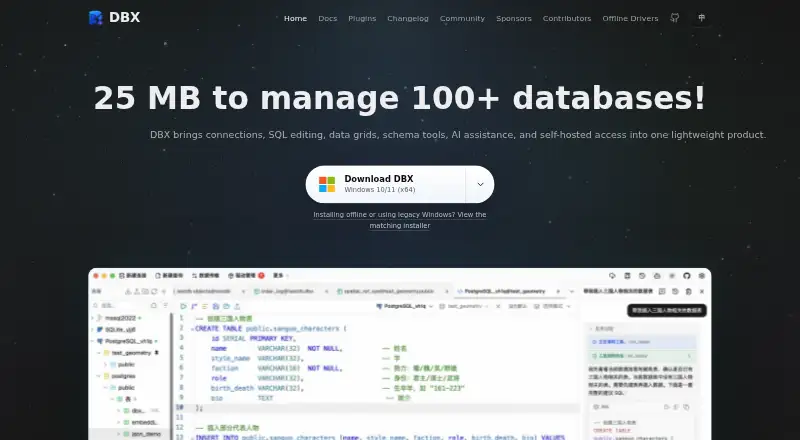
DBX is a free, open-source workspace for database and data-infrastructure tasks, including connection management, object browsing, SQL editing, data changes, schema tools, and automation. It supports more than 100 databases and data systems, spanning relational, NoSQL, vector, time-series, embedded, and messaging systems. The CodeMirror 6 SQL editor includes metadata-aware autocomplete, formatting, selected-query execution, diagnostics, query history, and saved snippets. Other tools cover virtualized data grids, schema browsing and comparison, ER diagrams, field lineage, imports, exports, and cross-connection data transfer. Its AI SQL assistant works with Claude, OpenAI, local models through Ollama, and OpenAI-compatible endpoints. DBX also offers MCP integration for compatible agents and a CLI for terminal and scripting workflows. It runs as a desktop app on macOS, Windows, and Linux, or as a self-hosted Docker web deployment. Safeguards include read-only connections, production write confirmations, reviewable SQL changes, MCP access policies, and encrypted configuration exports. DBX identifies its license as Apache-2.0, with no paid tiers or usage limits stated.
Good
- Supports more than 100 database and data systems.
- Desktop apps for macOS, Windows, and Linux.
- Can be self-hosted as a Docker web deployment.
- AI assistant supports local models via Ollama.
- Free and open source under Apache-2.0.
Watch out
- Advanced capabilities depend on the database and driver.
- Docker/Web local paths refer to the server filesystem.
- Web API is not a stable public contract.
- No schema history is listed.
Who it suits
DBX suits people who work across databases and want connection, SQL, schema, and data-transfer tools in one workspace. It also suits users who want AI assistant, MCP, or CLI integrations.
Verdict
DBX brings database browsing, SQL work, schema tooling, and automation together across desktop and self-hosted deployment options. Confirm that the needed features are supported by your database and driver.
Plans and prices
From DBX's own pricing page, checked 29 Sep 2026.
| Plan | Price | What it gives you |
|---|---|---|
| Free and open source | Free | No paid tiers or usage limits stated |
The facts
Each one read from DBX's own pages, with the date it was checked.
What it does
- Agent integrations
- DBX provides MCP integration for Claude Code, Cursor, Windsurf, and other compatible agents, as well as a CLI for terminal and scripting workflows.checked 29 Sep 2026
- AI integrations
- The AI SQL assistant works with Claude, OpenAI, local models via Ollama, and OpenAI-compatible endpoints.checked 29 Sep 2026
- Credential protection
- DBX says it encrypts connection, plugin, AI, and tunnel credentials before storing them, using the platform credential store on desktop and a managed data-directory key by default for Web/Docker.checked 29 Sep 2026
- Data and schema tools
- DBX provides virtualized data grids, schema browsing and comparison, ER diagrams, field lineage, imports, exports, and cross-connection data transfer.checked 29 Sep 2026
- Database coverage
- DBX supports more than 100 databases and data systems, including relational, NoSQL, vector, time-series, embedded, and messaging systems.checked 29 Sep 2026
- Deployment
- DBX is available as a desktop app for macOS, Windows, and Linux, and can be self-hosted as a Docker web deployment.checked 29 Sep 2026
- License
- The repository identifies DBX as free and open source under the Apache-2.0 license.checked 29 Sep 2026
- Notable limits
- Advanced capabilities depend on the database and driver, Docker/Web local paths refer to the server filesystem, and DBX says its Web API is not a stable public contract.checked 29 Sep 2026
- Plugin ecosystem
- DBX has a plugin store with signed, sandboxed plugins, including S3, Kubernetes, LDAP, Kafka, and file-management tools.checked 29 Sep 2026
- Product
- DBX is an open-source database and data-infrastructure workspace for connection management, object browsing, SQL editing, data changes, schema tools, and automation.checked 29 Sep 2026
- Security controls
- The documented safeguards include read-only connections, production write confirmations, reviewable SQL changes, MCP access policies, and encrypted configuration exports.checked 29 Sep 2026
- SQL editor
- Its CodeMirror 6 editor includes metadata-aware autocomplete, formatting, selected-query execution, diagnostics, query history, and saved snippets.checked 29 Sep 2026
- Support
- The repository directs users to documentation, community discussions, issue reporting, and voluntary donations or sponsorship to support ongoing maintenance.checked 29 Sep 2026
The company
- Maker
- The project is maintained in the public t8y2/dbx repository and describes itself as community-built, with hundreds of contributors.checked 29 Sep 2026
The full review of DBX
DBX is a broad database workspace for developers and data teams working across varied systems. It is especially suitable when desktop flexibility, self-hosting, and automation matter as much as query editing. The main trade-off is that its deepest capabilities vary by database driver, while Web deployments introduce server-side path and API caveats.
Overview
DBX combines connection management, object browsing, SQL editing, data changes, schema work, and automation in one open-source application. Support for more than 100 databases and data systems covers relational, NoSQL, vector, time-series, embedded, and messaging technologies. That breadth is valuable for mixed infrastructure and reduces the need to switch tools, although support is not uniform: advanced operations depend on the connected database and its driver.
The project is community-built in the public t8y2/dbx repository, with hundreds of contributors, and is released under the Apache-2.0 license. It is therefore a credible option for organizations that want inspectable, modifiable software without a subscription commitment.
Key features
The CodeMirror 6 SQL editor is designed for both exploration and repeatable work. Metadata-aware autocomplete uses connection context, while formatting, selected-query execution, diagnostics, query history, and saved snippets shorten the path from an idea to a reusable query. These conveniences help developers handling large schemas, but their usefulness still depends on what the underlying driver exposes.
DBX goes beyond an editor with virtualized data grids, schema browsing and comparison, ER diagrams, field lineage, imports, exports, and transfers between connections. A data dictionary and data lineage are included, making it more useful for understanding systems than a query-only client. Schema history is not included, so teams needing built-in historical schema tracking will need another process or tool.
The AI SQL assistant supports Claude, OpenAI, local models through Ollama, and OpenAI-compatible endpoints. That range lets teams choose hosted or locally run models. MCP integration works with Claude Code, Cursor, Windsurf, and other compatible agents, and the CLI extends database work into terminal and scripting workflows. These integrations are practical for automation, but they increase the importance of carefully managed access policies.
Security controls include read-only connections, confirmations before production writes, reviewable SQL changes, MCP access policies, and encrypted configuration exports. DBX says connection, plugin, AI, and tunnel credentials are encrypted before storage, using the platform credential store on desktop and a managed data-directory key by default for Web and Docker. Its signed, sandboxed plugin store adds integrations such as S3, Kubernetes, LDAP, Kafka, and file management without requiring every capability in the core application.
Pricing
| Plan | Price | Includes |
|---|---|---|
| Free and open source | free | No paid tiers or usage limits stated |
There is no paid upgrade to budget for and no stated seat, usage, or trial restriction. The free Apache-2.0 release fits individual developers, internal teams, and organizations that can operate their own deployment. It also means commercial support is not bundled; the project points users to documentation, community discussions, issue reporting, and voluntary donations or sponsorship.
Platforms
DBX runs as a desktop app on macOS, Windows, and Linux, and it can be deployed as a self-hosted Docker web application. API access and web availability make it adaptable to scripted and browser-based workflows. In Docker and Web deployments, local paths refer to the server filesystem rather than a user's computer, which can complicate imports, exports, and file-oriented plugins. DBX also describes its Web API as not being a stable public contract, so long-term integrations should account for that limitation.
Who it's for
Choose DBX if you routinely move between several database families, need schema and data-transfer tools alongside SQL, or want AI and agent workflows under one roof. It is also a strong fit for teams that prefer a self-hosted Docker service or an open-source desktop client and need controls around production writes and credential storage.
It is less suitable when a single database's most specialized tooling is the priority, when dependable schema history is required, or when Web users need direct access to workstation files. In those cases, a focused database client or documentation tool may be simpler.
Pros and cons
- Pros: supports more than 100 types of databases and data systems, including relational, NoSQL, vector, time-series, embedded, and messaging platforms.
- Pros: combines SQL editing, grids, schema comparison, ER diagrams, lineage, dictionary support, import/export, and cross-connection transfer.
- Pros: offers desktop and self-hosted deployment with AI, MCP, CLI, and a signed plugin ecosystem.
- Pros: free and open source with no stated usage limits or paid tiers.
- Cons: advanced capabilities vary by database and driver, so broad compatibility does not promise identical behavior everywhere.
- Cons: Web and Docker file operations use the server filesystem, and the Web API is not a stable public contract.
- Cons: there is no schema-history feature, and ongoing support is community-oriented rather than a paid service tier.
Alternatives
For database documentation specifically, see Database Documentation Tools.
MySQL is the better choice when you need a focused database platform with a freemium model, a free trial, and Community Edition licensing around SQL and NoSQL applications, replication, high availability, and connectors.
dbdocs fits teams centered on shareable documentation: its free plan supports one user, public sharing, and password protection, while Personal Pro adds paid capacity.
dbForge Studio for PostgreSQL is preferable for PostgreSQL-focused work where context-aware completion, formatting, query history, visual editing, and data transfer are the priority.
DbSchema suits users who want design files and schema synchronization through its Pro and Architect tiers.
tbls is a leaner open-source, MIT-licensed single-binary CLI for documentation workflows.
DBDock is another free, MIT-licensed self-hosted CLI option.
DbSketch is a free MIT-licensed choice for users who only need its database-sketching focus.
LLMSchema is a free, MIT-licensed CLI for teams seeking a more narrowly scoped command-line tool.
Verdict
DBX is a strong recommendation for developers and data teams managing heterogeneous databases who want one free workspace with schema insight, automation, AI and agent integrations, and desktop or self-hosted deployment. Choose it for breadth and control; look elsewhere when database-specific depth, schema history, stable Web API guarantees, or workstation-local Web file handling is more important.
Alternatives to DBX
- 1

MySQL
Free planAPILinuxmacOSSelf-hosted7.9Free plan - 2

Azimutt
Free planOpen sourceWebAPIExtensionLinux7.8From €7 a month - 3

DBDock
Free planOpen sourceWebAPILinuxmacOS7.5Free plan - 4

dbt Semantic Layer
Free planWebAPIExtension7.5From $100 a month - 5

DbSchema
Free planLinuxmacOSWindows7.0From $29.40 a month - 6
dbdocs
Free planWebLinuxmacOSWindows6.9From $20 a month