csvkit
csvkit is a free suite of command-line tools for converting, processing, and analyzing CSV data on Linux, macOS, and Windows.
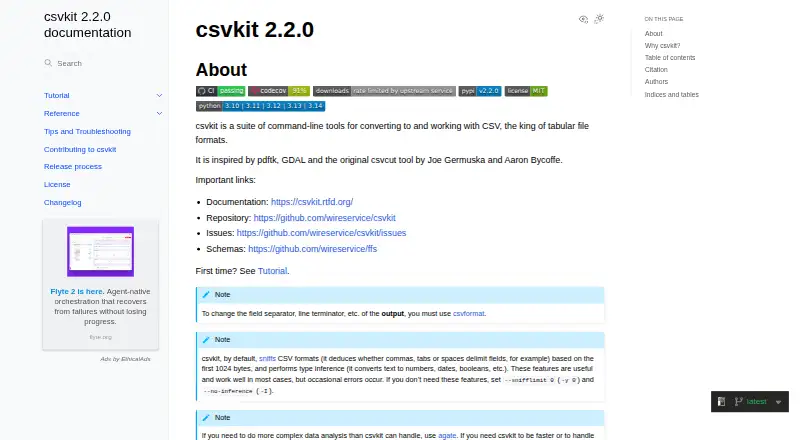
What csvkit is
csvkit is a free suite of command-line tools for converting, processing, and analyzing CSV data on Linux, macOS, and Windows. Its commands cover importing, cleaning, selecting, filtering, joining, sorting, and stacking files, along with formatting and analysis. The in2csv tool converts Excel XLS/XLSX, JSON, and fixed-width files to CSV. For database work, csvsql can query CSV data with SQL and import it into PostgreSQL, while sql2csv pulls query results from PostgreSQL. The toolkit detects delimiters based on the first 1024 bytes of input by default and infers types such as numbers, dates, and booleans, though that inference can be wrong. Installation options include pip and Homebrew; the documentation recommends virtual environments. Current project metadata requires Python 3.10 or newer. Some commands buffer entire files in memory, which can be a concern with large inputs. csvkit is self-hosted, code-driven, and released under the MIT License; its documentation notes that it is provided without warranty.
Good
- Free under the MIT License.
- Converts Excel, JSON, and fixed-width files to CSV.
- Includes tools for cleaning, joining, sorting, and analysis.
- Supports Linux, macOS, and Windows.
- Can query CSV data with SQL.
Watch out
- Requires Python 3.10 or newer.
- Some tools buffer whole files in memory.
- Automatic type inference can be erroneous.
Who it suits
csvkit suits developers, desktop users, and science or research users who work with tabular data from the command line. It is also useful for people combining CSV processing with SQL and PostgreSQL workflows.
Verdict
csvkit brings a broad set of CSV operations into command-line workflows, including conversion and database tasks. Check its Python requirement and memory behavior against the files you need to handle.
Plans and prices
From csvkit's own pricing page, checked 1 Oct 2026.
| Plan | Price | What it gives you |
|---|---|---|
| Open-source csvkit | Free | Command-line toolkit · no paid tiers stated · Free of charge under the MIT License |
The facts
Each one read from csvkit's own pages, with the date it was checked.
What it does
- Database integrations
- Database connections use SQLAlchemy dialects; the troubleshooting guide specifically lists PostgreSQL and MySQL backends.checked 1 Oct 2026
- File conversion
- in2csv converts Excel XLS/XLSX, JSON, and fixed-width files to CSV.checked 1 Oct 2026
- Format detection
- csvkit sniffs delimiters using the first 1024 bytes of input by default.checked 1 Oct 2026
- Input tools
- Its input tools include in2csv and sql2csv.checked 1 Oct 2026
- Installation
- The project documents installation with pip, recommends virtual environments, supports Homebrew installation, and offers an optional Zstandard extra.checked 1 Oct 2026
- Maintenance scope
- The maintainers say csvkit generally no longer adds new tools because of limited maintenance time and a desire to keep the toolkit focused.checked 1 Oct 2026
- Output and analysis
- Its output and analysis tools include csvformat, csvjson, csvlook, csvpy, csvsql, and csvstat.checked 1 Oct 2026
- Performance limits
- Some tools stream rows, while others buffer entire files in memory; the documentation says large files may reach csvkit's limits.checked 1 Oct 2026
- Processing tools
- Its processing tools include csvclean, csvcut, csvgrep, csvjoin, csvsort, and csvstack.checked 1 Oct 2026
- Runtime requirement
- The current project metadata requires Python 3.10 or newer.checked 1 Oct 2026
- Security and licensing
- csvkit is released under the MIT License and the license states the software is provided as-is without warranty.checked 1 Oct 2026
- SQL workflows
- csvsql can query CSV data with SQL and import it into PostgreSQL, while sql2csv extracts query results from PostgreSQL.checked 1 Oct 2026
- Support
- User support is provided through the documentation, GitHub issues, and community contributions.checked 1 Oct 2026
- Supported systems
- The documentation states csvkit is supported on non-end-of-life Python versions on Linux, macOS, and Windows.checked 1 Oct 2026
- Target users
- Project metadata identifies developers, end users/Desktop, and science/research users as intended audiences.checked 1 Oct 2026
- Type inference
- csvkit automatically infers numbers, dates, booleans, and other data types, and the documentation warns that inference can occasionally be erroneous.checked 1 Oct 2026
- What it does
- csvkit is a suite of command-line tools for converting to and working with CSV files.checked 1 Oct 2026
The full review of csvkit
csvkit is a free, open-source command-line toolkit for converting, cleaning, querying, and inspecting tabular data. It best serves developers, desktop users, and research teams who are comfortable turning repeatable data work into shell commands and scripts. Its broad format and database coverage is compelling for code-first workflows, while Python and memory requirements deserve attention before adopting it for very large files.
Overview
csvkit is self-hosted software built around small commands that can be combined into data pipelines. Alongside CSV, it supports DBF, fixed-width text, GeoJSON, JSON, NDJSON, XLS, and XLSX, plus gzip-, bz2-, and xz-compressed CSV input. That makes it useful when incoming files vary by source and format, but the work still needs to end in a predictable, scriptable process rather than a graphical interface.
The toolkit includes workflow orchestration and data quality checks, and its MIT License permits free use. The license also provides the software as-is without warranty. Maintainers generally avoid adding new tools because maintenance time is limited and the project is intentionally focused, so users wanting a fast-growing command catalog should look elsewhere.
Key features
Conversion and transformation
in2csv turns Excel XLS/XLSX, JSON, and fixed-width files into CSV, giving mixed-format intake a consistent starting point. Processing commands include csvclean for cleanup, csvcut for selecting columns, csvgrep for filtering, csvjoin for joins, csvsort for ordering, and csvstack for combining files. These discrete operations are well suited to repeatable pipelines and version-controlled scripts; they are less suitable for someone who expects point-and-click transformation.
Inspection and output
csvformat, csvjson, csvlook, csvpy, csvsql, and csvstat cover reformatting, JSON export, readable terminal inspection, Python-oriented handling, SQL work, and statistical summaries. Delimiter detection samples the first 1,024 bytes by default, which can simplify imports but means unusual files should be checked when their opening bytes do not represent the whole structure.
SQL and databases
csvsql can query CSV data with SQL and import it into PostgreSQL, while sql2csv extracts query results from PostgreSQL. Database connections use SQLAlchemy dialects, with PostgreSQL and MySQL specifically covered in troubleshooting guidance. This is a strong bridge between flat files and relational workflows, provided the user is prepared to configure database connections and work from the command line.
Inference, installation, and limits
csvkit infers numbers, dates, booleans, and other types automatically, reducing manual schema work. The documentation warns that inference can occasionally be wrong, so downstream analysis should validate inferred types. Installation is documented through pip, with virtual environments recommended; Homebrew is also supported, and an optional Zstandard extra is available. Current project metadata requires Python 3.10 or newer and supports non-end-of-life Python versions on Linux, macOS, and Windows.
Some commands stream rows, but others buffer complete files in memory. Large datasets can therefore reach csvkit's limits, making command choice and available RAM important considerations rather than implementation details.
Pricing
Open-source csvkit — free, billed free of charge under the MIT License. It is a command-line toolkit with no paid tiers stated, so there are no seat charges, quotas, renewal terms, or trial-period distinctions. The trade-off is that the package is self-hosted: users provide their own Python environment, machines, storage, and database infrastructure.
Platforms
csvkit supports Linux, macOS, and Windows, with the supported-system policy tied to non-end-of-life Python versions. Its deployment model is self-hosted, and its transformation interface is code-based, so platform support does not remove the need for terminal and Python administration.
Who it's for
Choose csvkit if you need scripted conversion between spreadsheets, JSON, fixed-width text, and CSV; repeatable cleanup and quality checks; or a lightweight path between CSV files and PostgreSQL or MySQL-backed workflows. It is particularly fitting for developers and research users who value composable commands and for desktop users willing to work outside a graphical tool. It is a weaker choice for teams that need visual editing, guaranteed handling of very large files, or a rapidly expanding feature set.
Pros and cons
- Pro: Broad format conversion, including XLS/XLSX, JSON, NDJSON, DBF, GeoJSON, and fixed-width input, reduces manual preparation when sources differ.
- Pro: Separate cleaning, selection, filtering, joining, sorting, stacking, inspection, and statistics commands make recurring pipelines easy to express as code.
- Pro: SQL querying and PostgreSQL import/export connect flat-file work to relational databases without requiring a separate conversion utility.
- Pro: Free MIT-licensed use avoids subscription or seat costs.
- Con: Python 3.10 or newer and a maintained Python installation add setup requirements, especially on managed systems.
- Con: Commands that buffer full files can hit memory limits on large datasets, so it is not a universal solution for high-volume processing.
- Con: Automatic type inference can be erroneous and needs validation before critical analysis.
- Con: Limited maintenance ambition means users should not expect a rapidly growing toolset.
Alternatives
jq is the better pick for focused JSON processing with standalone binaries across Linux, macOS, and Windows. Choose Bonobo when you want an open-source Apache-licensed option for Linux, macOS, Windows, or self-hosted deployment. Polars suits users seeking a free-to-use open-source data manipulation library with API and web availability. Apache Beam is preferable when you need a programming model that can run on different runners, with execution costs determined by infrastructure. Bruin for Customer Success offers a cloud free tier with $100 in credits and 50 AI tasks without a credit card. Choose data.table or dplyr when your workflow is centered on R packages. Ibis is an alternative Python dataframe library when its backend coverage matches your operations.
Verdict
csvkit is a strong choice for developers and researchers who want a free, composable command-line route from mixed tabular files to cleaned data, SQL queries, and database imports. Its main reason to choose it is the breadth of practical CSV-centered operations in one focused toolkit; its main reason to look elsewhere is the combination of Python 3.10-plus setup, occasional type-inference errors, memory-heavy commands, and deliberately limited maintenance.
Alternatives to csvkit
- 1

Bruin for Customer Success
Free planOpen sourceWebAPIExtensionLinux8.2$0.01 usage-based - 2

Cube
Free planOpen sourceWebAPILinuxSelf-hosted7.9From $40 a month - 3

Apache Beam
Free planOpen sourceWebAPILinuxmacOS7.7Free plan - 4

Apache Hop
Free planOpen sourceWebAPILinuxmacOS7.7Free plan - 5

Coalesce Catalog
Free planWebAPIExtension7.5From $150 a month - 6

dbt Semantic Layer
Free planWebAPIExtension7.5From $100 a month