CraftNote
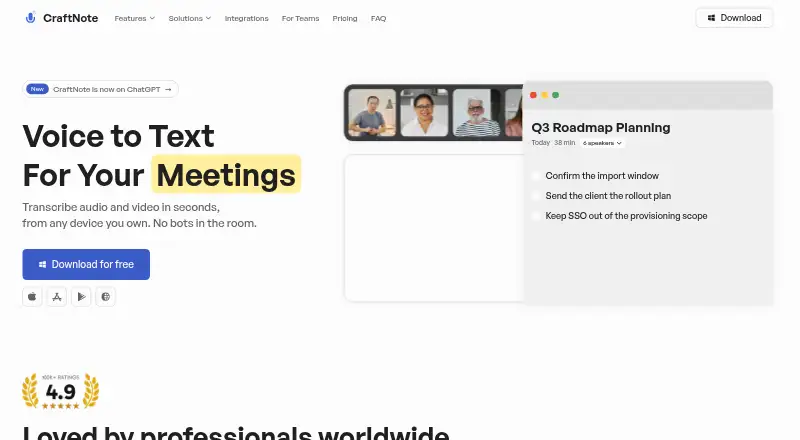
CraftNote records audio and video meetings, then transcribes and summarizes them without bots in the room.
What CraftNote is
CraftNote records audio and video meetings, then transcribes and summarizes them without bots in the room. Its AI tools include meeting notes, transcripts, chat with notes and daily digests. The Free plan lists support for more than 100 languages, two hours of recording per week, and ten uploads and imports per week, alongside Google and Outlook calendar sync. The Individual plan includes more than 30 summary templates, unlimited meeting notes and transcripts, recordings up to four hours, advanced models, chat with notes and bot-free recording. CraftNote lists Microsoft Teams, Zoom, Google Meet and Slack Huddles for recording or note capture, plus connections such as Linear, Notion, Claude, ChatGPT, Codex and MCP clients. Users can share public links and export to PDF and DOCX. Individual is listed at $8.33 a month billed annually, with a separate displayed price of $9.99 per month. CraftNote Teams is listed at $12 a month billed annually per user; its FAQ also states $15 per user per month billed monthly. The privacy policy says recordings, transcripts, summaries and chat are not used to train models. CraftNote is not HIPAA-covered and is not intended for sensitive data.
Good
- Records and summarizes without bots in the room.
- Free supports 100+ languages.
- Integrates with four listed meeting platforms.
- Exports to PDF and DOCX.
- Content is not used to train models.
Watch out
- Free limits recording to two hours weekly.
- Free limits uploads and imports to ten weekly.
- Not intended for sensitive data.
- Teams pricing is listed differently for annual and monthly billing.
Who it suits
CraftNote may suit people who want meeting transcripts and summaries without bots in the room, including users in the listed business, education, recruiting, research and media fields. Its privacy limitation matters for anyone considering it for sensitive data.
Verdict
CraftNote offers bot-free meeting capture with transcription, summaries and integrations, including a free tier with weekly usage limits. Its stated privacy limitation makes it unsuitable for sensitive data.
Plans and prices
From CraftNote's own pricing page, checked 29 Sep 2026.
| Plan | Price | What it gives you |
|---|---|---|
| Free | Free | 10 uploads & imports per week · 2 hours of recording per week · Google & Outlook calendar sync · AI meeting notes & transcripts · 100+ languages · Free forever · no credit card |
| Individual | $8.33 a month | Everything in Free · unlimited meeting notes & transcripts · recordings up to 4 hours · advanced models · chat with notes · bot-free recording · $99.99/year; page also shows $9.99/month |
| CraftNote Teams | $12 a month | Everything in Individual · shared team notes · centralized billing · MCP integrations · admin control & role based access · $144/year per user; page FAQ also states $15/user/month billed monthly |
The facts
Each one read from CraftNote's own pages, with the date it was checked.
What it does
- AI data use
- The privacy policy says recordings, transcripts, summaries, and chat content are not used to train any model, ours or a third party’s.checked 29 Sep 2026
- AI features
- The product offers AI meeting notes and transcripts, chat with notes, and daily digests.checked 29 Sep 2026
- Exports and sharing
- The homepage lists public links and export to PDF and DOCX.checked 29 Sep 2026
- Languages
- The Free plan lists support for 100+ languages.checked 29 Sep 2026
- Other integrations
- The integrations page lists Google Calendar, Outlook Calendar, Linear, Slack, Notion, Claude, ChatGPT, Codex, and MCP clients.checked 29 Sep 2026
- Privacy limitation
- The policy says CraftNote is not a HIPAA-covered service and is not intended for special-category or sensitive data.checked 29 Sep 2026
- Security
- The privacy policy says its listed backends encrypt data at rest with vendor-managed AES-256 and use TLS 1.2 or higher in transit.checked 29 Sep 2026
- Support
- The pricing page directs users to [email protected] for assistance with website subscriptions, billing changes, and refunds.checked 29 Sep 2026
- Templates
- The site lists more than 30 summary templates on the Individual plan.checked 29 Sep 2026
- What it does
- CraftNote records audio and video and transcribes and summarizes meetings without requiring bots in the room.checked 29 Sep 2026
- Who it is for
- The homepage lists solutions for business, recruiting and HR, education, personal use, lawyers, healthcare, researchers, and media and podcasting.checked 29 Sep 2026
The company
- Headquarters
- Istanbul, Türkiyechecked 23 Sep 2026
Where it runs
- Meeting platforms
- The integrations page lists Microsoft Teams, Zoom, Google Meet, and Slack Huddles for recording or note capture.checked 29 Sep 2026
- Platforms
- CraftNote offers Mac, Windows, iOS, Android, and browser versions; the Mac and Windows apps are labeled Beta.checked 29 Sep 2026
The full review of CraftNote
Overview
CraftNote turns recorded meetings into transcripts and summaries without adding a bot to the call. It is best suited to individuals and teams who want meeting capture connected to their calendars and work apps. Its free tier is a practical way to start, but its weekly caps and restriction on sensitive data rule it out for some workloads.
Key features
Bot-free recording is the central appeal: CraftNote can capture audio and video meetings without requiring a meeting bot in the room. It also handles uploads and imports, with automatic transcription, timestamps, and chapter generation alongside AI meeting notes. Chat with notes and daily digests extend the workflow beyond a single recap.
Recording or note-capture integrations cover Microsoft Teams, Zoom, Google Meet, and Slack Huddles. Google and Outlook calendar sync is available on Free; other integrations include Linear, Slack, Notion, Claude, ChatGPT, Codex, and MCP clients. Public links and PDF and DOCX exports support sharing, with markdown also available as an export format.
Free supports more than 100 languages, but its weekly allowance limits how much multilingual material users can process. Individual adds advanced models, chat with notes, recordings up to four hours, and more than 30 summary templates. CraftNote says it does not use recordings, transcripts, summaries, or chat content to train its own or third-party models. Its privacy policy also says listed backends encrypt data at rest with vendor-managed AES-256 and use TLS 1.2 or higher in transit. Those protections do not make it appropriate for every context: CraftNote is not HIPAA-covered and is not intended for special-category or sensitive data.
Pricing
Free costs nothing, forever, with no credit card required. It includes 10 uploads and imports per week, two recording hours per week, Google and Outlook calendar sync, AI meeting notes and transcripts, and support for more than 100 languages. That is a useful ongoing allowance for light personal use, but not a generous fit for frequent meetings or substantial archives.
Individual costs $8.33 a month when billed at $99.99/year; the page also shows $9.99/month. It includes everything in Free, unlimited meeting notes and transcripts, recordings up to four hours, advanced models, chat with notes, and bot-free recording. The annual price suits a regular solo user who can commit for a year; the free plan gives up unlimited notes and longer recordings.
CraftNote Teams costs $12 a month, billed $144/year per user; its FAQ also states $15/user/month billed monthly. It adds shared team notes, centralized billing, MCP integrations, admin control, and role-based access to Individual. Per-user annual billing can suit a team that needs shared administration, while monthly billing costs more per user. A 30-day trial is available. The pricing page directs subscription, billing-change, and refund questions to [email protected].
Platforms
CraftNote is available on Android, iOS, macOS, Windows, web, and as an extension, making it a broad option across desktop and mobile devices.
Who it's for
CraftNote can suit business users, recruiters and HR teams, educators, researchers, lawyers, media and podcasting workflows, and personal use, provided their recordings do not contain sensitive data. Individuals who want recurring meeting notes can start on Free, while teams needing shared notes and access controls have a dedicated plan. It is not the right choice for healthcare work involving protected health information or other sensitive material.
Pros and cons
- Pro: Bot-free audio and video capture avoids adding a visible bot to meetings.
- Pro: Calendar sync is included on Free, and integrations span major meeting platforms and work tools.
- Pro: Free supports 100+ languages and provides weekly recording and import allowances without a credit card.
- Con: Free is capped at 10 uploads and imports and two recording hours per week, limiting heavier use.
- Con: Individual's lower monthly equivalent requires annual billing, while Teams costs more under its stated monthly billing option.
- Con: The service is not intended for sensitive data and is not HIPAA-covered.
Alternatives
For podcast-focused workflows, browse Podcast Show Notes Software. DomeScribe is worth considering for a one-time 30-minute transcription allowance and a free trial; its free plan limits files to 30 minutes or 50 MB and includes five AI credits. Choose EditClips.online instead when browser-based video tools are the priority: its free plan offers 50+ tools without signup, limits, or watermarks.
Deciphr may fit creators seeking a text-only content suite, with a free plan capped at 40 minutes and a pay-as-you-go written-content option at $19, paid once for 120 minutes. audien·to is another web option for short media processing: Free allows 90 minutes per day across three files of up to 30 minutes each, includes all nine output types and shared links, and auto-deletes files after 72 hours. For chapter generation without a subscription, ChapterGen offers two free videos up to 20 minutes each and one-time paid plans.
DriftNote is a more focused podcast workflow, with five monthly summaries, Notion sync, transcript processing, one followed podcast, and public sharing on Free. Show Notes Generator offers a free web upload for a transcript and show notes. Podflow is another web choice, with monthly plans including an eight-upload Creator tier and a ten-upload Build Your Own tier.
Verdict
Choose CraftNote if you want bot-free meeting capture, transcripts, and summaries linked to calendars and work apps, with a free tier for modest weekly use. Its main advantage is a connected meeting-note workflow across devices and platforms; its main reason to look elsewhere is equally clear: it is not suitable for sensitive data, and frequent users will outgrow Free's weekly caps.
Getting started
- Open https://craftnote.com/.
- Choose the Free plan or a paid plan; the Free plan requires no credit card.
- Use CraftNote on Android, iOS, macOS, Windows, web, or through its extension.
- Connect Google or Outlook Calendar, or use a listed meeting platform integration for recording or note capture.
Limits worth knowing
The Free plan allows ten uploads and imports per week and two hours of recording per week. Individual recordings are limited to four hours.
Questions
Is there a free plan?
Yes. Free is available forever without a credit card and includes ten uploads and imports per week, two recording hours per week, calendar sync, AI notes and transcripts, and 100+ languages.
How much do paid plans cost?
Individual is $8.33 per month billed annually at $99.99/year; the page also shows $9.99/month. CraftNote Teams is $12.00 per month billed annually per user at $144/year per user; its FAQ also states $15/user/month billed monthly.
Which platforms does CraftNote support?
It lists Android, iOS, macOS, Windows, web, and an extension.
Which meeting platforms are listed?
Microsoft Teams, Zoom, Google Meet, and Slack Huddles are listed for recording or note capture.
Does CraftNote use meeting content to train models?
Its privacy policy says recordings, transcripts, summaries, and chat content are not used to train any model, its own or a third party's.
Is CraftNote intended for sensitive data?
No. Its privacy policy says CraftNote is not a HIPAA-covered service and is not intended for special-category or sensitive data.
Alternatives to CraftNote
- 1
DomeScribe
Free planAndroidiOSWebLinux8.0From $19 a month - 2

DriftNote
Free planWebAPI7.3From $9.99 a month - 3
EditClips.online
Free planWebAPI7.3From $5.99 a month - 4

Whipscribe
Free planWebAPIExtensionmacOS7.0$8 one-time - 5
PodRescale
Free planWeb6.7From $49 a month - 6

Deciphr
Free planWeb6.6From $288 a year