DomeScribe
DomeScribe transcribes audio and video, then turns recordings into summaries, timestamped chapters, show notes, blog and social drafts, newsletters, clip sel…
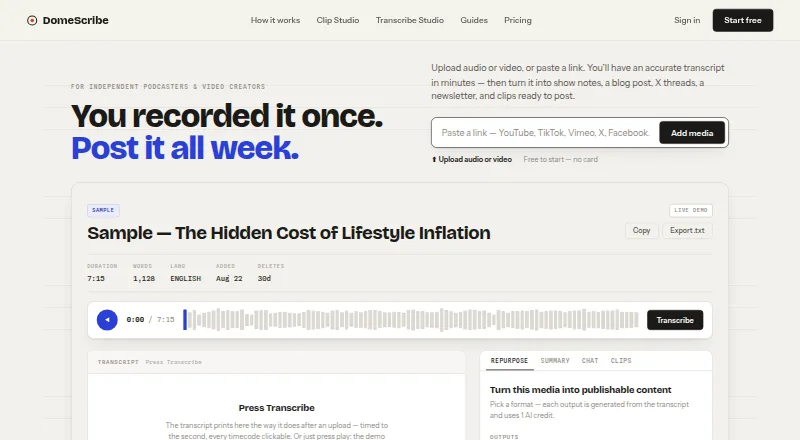
What DomeScribe is
DomeScribe transcribes audio and video, then turns recordings into summaries, timestamped chapters, show notes, blog and social drafts, newsletters, clip selections, and answers based on transcript text. Its maker positions it for independent creators, including podcasters and video creators. Transcription is offered in 99 languages and can use links from YouTube, TikTok, Facebook, X, Vimeo, Twitch, and Dailymotion, as well as media uploads or pasted transcripts. Clip Studio creates manually framed vertical clips with captions and exports 1080×1920 MP4 files for TikTok, Reels, and Shorts. Media conversion, compression, audio extraction, and clip rendering take place in the browser; those files are not uploaded to DomeScribe servers. The product is available on Android, iOS, Linux, macOS, web, and Windows. Its free plan provides a one-time 30-minute transcription allowance, a 30-minute and 50 MB file limit, and five AI credits. The maker says originals are deleted after transcription and transcripts and AI results after 30 days.
Good
- Transcription supports 99 languages.
- Accepts supported media links, uploads, and pasted transcripts.
- Creates captioned vertical clips in the browser.
- Available on six listed platforms.
- Free plan includes five AI credits.
Watch out
- Free transcription allowance is a one-time 30 minutes.
- Free plan limits files to 30 minutes and 50 MB.
- A public API is not yet available.
Who it suits
DomeScribe suits independent creators who want transcripts and related content drafts from audio or video. Podcasters and video creators are specifically named by its maker.
Verdict
DomeScribe combines transcription, content drafting, and short-form clip creation for independent creators. The free tier has a small one-time transcription allowance, and annual billing is required for the listed starting price.
Plans and prices
From DomeScribe's own pricing page, checked 15 Oct 2026.
| Plan | Price | What it gives you |
|---|---|---|
| Free | Free | 30 transcription minutes one-time · 30 min/50 MB per file · 5 AI credits · TXT export · sample Clip Studio · browser tools · forever |
| Pro | $19 a month | 1,000 transcription min/month · 4 h/500 MB per file · 300 AI credits/month · TXT/DOCX/PDF/JSON · 3 concurrent jobs · Clip Studio · monthly; $13 per month billed annually ($156/year) |
| Business | $79 a month | 5,000 transcription min/month · 8 h/2 GB per file · 1,500 AI credits/month · TXT/DOCX/PDF/JSON · 10 concurrent jobs · Clip Studio · monthly; $55 per month billed annually ($660/year) |
| Enterprise | Priced on request | Negotiated minutes and AI credits · 8 h/2 GB per file · DPA · named contact · contractual uptime commitment · invoicing by contract |
The facts
Each one read from DomeScribe's own pages, with the date it was checked.
What it does
- AI summaries
- The service generates a TL;DR, key points, action items, and timestamped chapters from a transcript.checked 15 Oct 2026
- Audience
- The maker describes DomeScribe as a content engine for independent creators, including podcasters and video creators.checked 28 Sep 2026
- Authentication security
- TOTP two-factor authentication is available for every account.checked 15 Oct 2026
- Clip picks
- The AI ranks 15–75 second moments with hook quotes, timecodes, and platform-fit notes.checked 15 Oct 2026
- Clip Studio
- Clip Studio manually reframes videos into six phone layouts and exports captioned 9:16 1080×1920 MP4 files.checked 15 Oct 2026
- Compliance limitation
- DomeScribe states that it does not hold SOC 2, ISO 27001, or HIPAA certifications.checked 15 Oct 2026
- Documentation
- The site provides a FAQ, tool pages, guides, privacy policy, pricing comparison, and dated changelog.checked 15 Oct 2026
- Encryption
- Transcripts and AI results use AES-256-GCM encryption at rest with per-user keys and TLS in transit.checked 15 Oct 2026
- Independent safety assessment
- ScamAdviser described domescribe.ai as likely safe but noted hidden WHOIS ownership, low traffic, and recent registration as cautions.checked 15 Oct 2026
- Independent trust score
- Gridinsoft assigned domescribe.ai a 67/100 trust score in its July 27, 2026 automated assessment.checked 15 Oct 2026
- Installation
- DomeScribe has no desktop app, browser extension, or download; it runs in a browser.checked 15 Oct 2026
- Integrations
- The maker lists supported platform links for transcription and names OpenAI, Stripe, Supabase, Resend, PostHog, and hCaptcha as service providers; it says a public API is not yet available.checked 28 Sep 2026
- Integrations and processors
- The privacy policy names Stripe, Supabase, OpenAI, Resend, PostHog, and hCaptcha as service providers.checked 15 Oct 2026
- Languages
- Transcription is offered in 99 languages.checked 28 Sep 2026
- License
- The reviewed pages do not state an open-source license for DomeScribe.checked 15 Oct 2026
- Limits
- The free plan includes a one-time 30-minute transcription allowance and 5 AI credits, and its file limit is 30 minutes and 50 MB.checked 28 Sep 2026
- Limit: young domain
- Gridinsoft cautioned that domescribe.ai was only about four months old when checked on July 27, 2026.checked 15 Oct 2026
- Link inputs
- Transcribe Studio accepts links from YouTube, TikTok, Facebook, X, Vimeo, Twitch, and Dailymotion.checked 28 Sep 2026
- Link integrations
- Transcribe Studio accepts YouTube, TikTok, Facebook, X/Twitter, Vimeo, Twitch, and Dailymotion links.checked 15 Oct 2026
Where it runs
- Browser processing
- Conversion, compression, audio extraction, and Clip Studio rendering use WebAssembly in the browser without uploading the master file.checked 15 Oct 2026
- Browser tools
- Media conversion, compression, audio extraction, and Clip Studio rendering run in the browser, and those files are not uploaded to DomeScribe servers.checked 28 Sep 2026
The company
- Company
- DomeScribe is built and operated by Domichron Inc. and the maker says the product launched in 2026.checked 28 Sep 2026
- Company launch
- The maker says DomeScribe launched in 2026.checked 15 Oct 2026
- Founded
- 2026checked 28 Sep 2026
The full review of DomeScribe
DomeScribe turns audio and video into transcripts and ready-to-edit content for independent podcasters and video creators. Its appeal is the breadth of the workflow: transcription, publishing drafts, and captioned vertical clips in one service. The free allowance is useful for a small trial, but regular use means weighing monthly quotas against annual billing.
Overview
DomeScribe is a transcription and repurposing service built for creators who want to turn recordings into more than text. It generates summaries, timestamped chapters, show notes, blog and social drafts, newsletters, clip suggestions, and answers based on a transcript. Transcription covers 99 languages, and recordings can come from uploads, pasted text, or supported media links.
It accepts MP3, MP4, M4A, WAV, FLAC, OGG, AVI, and MOV files, and links from YouTube, TikTok, Facebook, X, Vimeo, Twitch, and Dailymotion. DomeScribe is operated by Domichron Inc. and launched in 2026.
Key features
One recording, several content formats
Chapters, summaries, and drafts can shorten the path from a recording to material for publishing. Show notes and social or newsletter copy make DomeScribe particularly relevant to creators who distribute content across formats; transcript-based answers also help surface information without rereading the full transcript. These outputs are drafts, so creators who need a finished editorial voice should expect to review them.
For more options in this category, see our Podcast Show Notes Software list.
Clips and browser-based processing
Clip Studio makes manually framed 9:16 vertical clips, adds transcript captions, and exports 1080×1920 MP4 for TikTok, Reels, and Shorts. That gives creators a way to prepare short-form video alongside written content, though framing is manual rather than automatic. Media conversion, compression, audio extraction, and clip rendering run in the browser; those files are not uploaded to DomeScribe servers.
Data handling and support
DomeScribe says transcripts and AI results are encrypted at rest with AES-256-GCM and per-user keys, and data is encrypted in transit. TOTP two-factor authentication is available. Uploaded originals are deleted after transcription; transcripts and AI results are automatically deleted after 30 days and are not used to train AI models. The maker aims to reply to messages within one business day and provides separate support, enterprise, and privacy email addresses.
Pricing
The Free plan costs nothing, billed forever. It includes a one-time 30-minute transcription allowance, 5 AI credits, a 30-minute and 50 MB per-file limit, TXT export, browser tools, and sample-only access to Clip Studio. That is enough to try a short recording and a few AI outputs, not to support a continuing publishing schedule.
Pro costs $1,913 a month, or $156 a year when billed annually. It includes 1,000 transcription minutes per month, a 4-hour and 500 MB per-file limit, 300 AI credits per month, TXT, DOCX, PDF, and JSON exports, three concurrent jobs, Clip Studio, top-up minutes, and email support. Pro suits an individual creator processing recordings regularly; the annual option is a substantial commitment compared with trying the free allowance first.
Business costs $7,955 a month, or $660 a year when billed annually. It raises the monthly quota to 5,000 minutes and 1,500 AI credits, permits files up to 8 hours and 2 GB, and allows 10 concurrent jobs. It retains the same export formats, Clip Studio, top-up minutes, and email support. The larger quotas and job capacity suit higher-volume workflows, but may be unnecessary for a solo creator with modest output.
Enterprise has custom pricing and is billed by invoice. It offers negotiated transcription minutes and AI credits, the same 8-hour and 2 GB file limit as Business, a contract and DPA, an uptime commitment by contract, and a named contact.
Platforms
DomeScribe is available on Android, iOS, Linux, macOS, web, and Windows. Clip Studio rendering and the other listed browser tools run in the browser.
Who it's for
DomeScribe is a strong fit for independent creators who want transcription, repurposing drafts, and short vertical clips in one workflow, particularly if they work with varied file formats or source links. The 99-language transcription coverage and broad input options add flexibility. It is less compelling for occasional users who need more than the one-time free quota, or for creators seeking automatically framed clips.
Pros and cons
- Pros: Turns recordings into multiple useful formats, including chapters, show notes, newsletters, and transcript-based answers.
- Pros: Supports 99 transcription languages and a wide range of uploads and media links.
- Pros: Browser-based clip rendering and media tools keep those files off DomeScribe servers.
- Cons: Free transcription is capped at 30 minutes once, with just 5 AI credits and sample-only Clip Studio access.
- Cons: Pro and Business list steep monthly prices, while their lower annual totals require annual billing.
- Cons: Clip Studio framing is manual, which limits its appeal to creators expecting automated clip selection and composition.
Alternatives
CraftNote is worth considering if calendar integrations and a weekly allowance of 2 hours of recordings matter more than DomeScribe's stated clip workflow; its free tier allows 10 uploads and imports each week.
EditClips.online is an alternative for people looking for browser-based editing tools, with a free plan described as offering 50+ tools, no limits, no signup, and no watermarks.
Deciphr may suit creators who prefer a text-focused content suite or pay-as-you-go written content, with a free tier for up to 40 minutes and a $19, paid once option for 120 minutes of written content.
Podflow is another web-based freemium option; its Creator plan costs $23 a month for 8 uploads per month.
audien·to offers a free allowance of 90 minutes per day, three files per day up to 30 minutes each, and nine output types, making it an option for readers who prioritize daily free processing.
DriftNote is a web-based alternative for podcast summaries, with a free tier of five summaries per month, Notion sync, and the ability to follow one podcast.
Podlink is another freemium web option.
Show Notes Generator is a free web-based alternative.
Verdict
Choose DomeScribe if you are an independent creator who wants a broad set of transcript-driven outputs and captioned vertical clips alongside transcription. Its main advantage is consolidating those steps across a wide range of inputs and platforms. Look elsewhere if you need only occasional transcription, want generous ongoing free use, or expect clips to be framed automatically.
Getting started
- Visit the DomeScribe website.
- Choose the web service or use an available Android, iOS, Linux, macOS or Windows platform.
- Start with the free plan or select a paid plan; a free trial is available.
- Submit a supported link, upload an audio or video file, or paste transcript text.
- Use transcription and the available tools to create summaries, drafts, answers or clips.
Limits worth knowing
The Free plan provides a one-time 30-minute transcription allowance, a 30-minute and 50 MB per-file limit, five AI credits and TXT export. Clip Studio is available only as a sample on Free.
Questions
Is DomeScribe free?
Yes. Its Free plan is listed as free and includes one-time 30-minute transcription, five AI credits and TXT export.
What platforms can I use it on?
DomeScribe is available on Android, iOS, Linux, macOS, web and Windows.
What can I submit for transcription?
It accepts MP3, MP4, M4A, WAV, FLAC, OGG, AVI and MOV uploads, pasted transcript text, and links from YouTube, TikTok, Facebook, X, Vimeo, Twitch and Dailymotion.
Does DomeScribe have a free trial?
Yes, a free trial is available.
How does DomeScribe handle recordings and transcripts?
The maker says uploaded originals are deleted after transcription, while transcripts and AI results are auto-deleted after 30 days and are not used to train AI models.
Alternatives to DomeScribe
- 1

CraftNote
Free planAndroidiOSWebExtension7.3From $8.33 a month - 2

DriftNote
Free planWebAPI7.3From $9.99 a month - 3

EditClips.online
Free planWebAPI7.3From $5.99 a month - 4

Whipscribe
Free planWebAPIExtensionmacOS7.0$8 one-time - 5
PodRescale
Free planWeb6.7From $49 a month - 6

Deciphr
Free planWeb6.6From $288 a year