
DriftNote
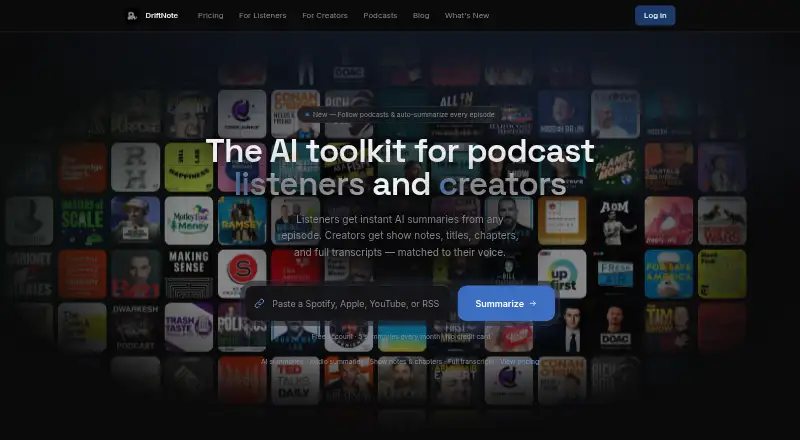
DriftNote creates podcast summaries for listeners and production materials for creators.
What DriftNote is
DriftNote creates podcast summaries for listeners and production materials for creators. Listeners can submit Spotify, Apple Podcasts, YouTube or RSS links to generate summaries containing topics, quotes and timestamps. They can follow podcasts for automatic summaries of new episodes; the free plan allows one followed podcast and five summaries per month. Summaries can sync to Notion, be shared through public links or posted to X and LinkedIn. DriftNote also offers an MCP server connection for assistants that support connectors, while its public developer documentation describes a REST API with keys available in Settings. For creators, Producer Studio accepts MP3, MP4, M4A and WAV uploads. Producer Pro can produce full transcripts, show notes, timestamped chapters, five title options and key quotes, and analyze existing episodes to learn a creator’s style preferences. AI processing on all plans uses Google Gemini. The listener workflow runs through the website without installation or a browser extension. A free plan is available; Pro costs $9.99 per month, and Producer Pro costs $24.00 per month after a 7-day free trial.
Good
- Accepts Spotify, Apple Podcasts, YouTube and RSS links.
- Syncs summaries to Notion.
- Producer Pro creates transcripts, chapters and show notes.
- Can learn style preferences from existing episodes.
- Listener workflow needs no installation or browser extension.
Watch out
- Free plan is limited to five summaries monthly.
- Free plan allows following only one podcast.
- Producer Pro costs $24.00 per month after its trial.
Who it suits
DriftNote suits podcast listeners who want summaries and automatic updates, as well as creators who need transcripts and episode materials. It also fits users who want to sync summaries to Notion or share them through links and social posts.
Verdict
DriftNote serves both listeners seeking podcast summaries and creators preparing episode materials. The free plan is limited, while Pro costs $9.99 per month and Producer Pro costs $24.00 per month after a 7-day free trial.
Plans and prices
From DriftNote's own pricing page, checked 15 Oct 2026.
| Plan | Price | What it gives you |
|---|---|---|
| Free | Free | 5 summaries/month · Notion sync · text transcript processing · follow 1 podcast · public sharing · forever |
| Listener Pro | $9.99 a month | unlimited summaries · unlimited follows · audio summaries · AI follow-ups · priority processing · audio fallback · public sharing · monthly |
| Pro | $9.99 a month | Unlimited summaries · Notion sync · AI follow-up questions · Audio summaries · Unlimited podcast follows · Priority and audio fallback processing · Public sharing · monthly |
| Producer Pro | $24 a month | unlimited episodes · full transcripts · show notes · titles · chapters · key quotes · style profile · listener access · after 7-day free trial |
The facts
Each one read from DriftNote's own pages, with the date it was checked.
What it does
- AI assistant integration
- DriftNote offers an MCP server connection for Claude, ChatGPT, Meta Muse, and other assistants that support connectors.checked 3 Oct 2026
- AI provider
- The pricing page says every plan uses Google Gemini for AI processing.checked 15 Oct 2026
- API authentication
- The service supports bearer API keys and OAuth 2.1 with dynamic client registration, PKCE S256, and a podcasts scope.checked 15 Oct 2026
- API limits
- Free accounts receive five summaries monthly, each account may process three summaries concurrently, and follow-up questions and follows require Pro.checked 15 Oct 2026
- Audio recaps
- Pro users can generate conversational audio versions of episode summaries with eight voices and four delivery styles.checked 15 Oct 2026
- Chrome extension scope
- The Chrome listing is a separate sidebar note-taking extension with local storage, search, tags, offline use, and a declaration that it does not collect data.checked 15 Oct 2026
- Creator outputs
- Producer processing generates show notes, timestamped chapters, five title options, key quotes, and a full transcript.checked 15 Oct 2026
- Creator uploads
- The creator workflow accepts MP3, MP4, M4A, and WAV files and states there is no episode-length limit.checked 15 Oct 2026
- Developer access
- The changelog states that public developer docs include a REST API and that API keys are available in Settings.checked 3 Oct 2026
- Latest release
- Version 2.5.0 dated September 20, 2026 added MCP connectivity, assistant registration, API-key settings, and public developer documentation.checked 15 Oct 2026
- Launch date
- The changelog records the first public release as version 1.0.0 on February 18, 2026.checked 15 Oct 2026
- Licence
- The official pages opened describe a hosted service but do not state an open-source licence or a self-hosting package.checked 15 Oct 2026
- Limit: positioning
- In a Reddit launch post, the maker says the product positioning was still being refined and asks whether it should focus more on listeners or creators.checked 15 Oct 2026
- Limit: review evidence
- Capterra and Software Advice both show no user reviews, so there is little independent evidence about reliability or support quality.checked 15 Oct 2026
- Listener summaries
- Listener results include an overview, key topics, takeaways, notable quotes, and timestamps.checked 15 Oct 2026
- MCP connector
- DriftNote exposes an MCP endpoint that can connect to Claude, ChatGPT, Meta Muse, and other connector-capable assistants.checked 15 Oct 2026
- MCP tools
- Published MCP tools include podcast search, latest-episode and individual-episode summarization, summary polling, summary listing, episode questions, sharing, and following.checked 15 Oct 2026
- Notion integration
- Summaries can be automatically written into a connected Notion workspace or database.checked 15 Oct 2026
- Podcast following
- Users can follow shows and have new episodes summarized automatically; unlimited following is a Pro feature.checked 15 Oct 2026
- Praise: creator workflow
- The maker reports that a producer of a top-100 Spotify show considered the style-profile and timestamped-quote features decisive for production use.checked 15 Oct 2026
Where it runs
- Apple app listing
- An iPad/iPhone app named DriftNote: Drift a Note is a social pen-pal product from Beijing Suanwu Yice Technology Co., Ltd.; Apple says it lacks enough ratings for a review overview.checked 15 Oct 2026
- Platform requirements
- The listener workflow requires no installation or browser extension; it runs through the website.checked 3 Oct 2026
The company
- Company facts
- No headquarters, legal entity name, employee count, founding year, funding, or owner details are stated on the official pages opened.checked 15 Oct 2026
- Maker
- A Microlaunch listing identifies Keval as DriftNote's solo founder.checked 15 Oct 2026
The full review of DriftNote
DriftNote turns podcast links into structured listening notes and uploaded episodes into production materials. It suits listeners who want searchable summaries and creators who need transcripts and show-note assets in one service. Its split listener-and-creator toolkit is compelling, but the free tier is a sampling plan rather than a lasting option for regular use.
Overview
Listeners can submit Spotify, Apple Podcasts, YouTube, or RSS links to get summaries with topics, quotes, and timestamps. Following a podcast triggers automatic summaries for new episodes, while Notion sync and public sharing make the results easier to keep or pass along. The listener workflow runs on the website without an installation or browser extension.
Creators can upload MP3, MP4, M4A, and WAV files in Producer Studio. Producer Pro turns episodes into full transcripts, show notes, timestamped chapters, five title options, and key quotes. Style profiles can learn a creator’s naming patterns, tone, vocabulary, and formatting preferences from existing episodes, a practical way to make generated assets more consistent with an established show.
Key features
- Summaries and following: Topic, quote, and timestamp coverage gives listeners a useful map of an episode without requiring a full listen. Automatic summaries for followed shows are more valuable to regular listeners, though the free plan’s one-show cap limits that use.
- Notion and assistant connections: All plans include Notion sync. An MCP server connection also works with Claude, ChatGPT, Meta Muse, and other assistants that support connectors, extending access beyond DriftNote’s own website workflow.
- Creator production assets: Producer Pro bundles transcripts with the materials creators commonly need to prepare an episode for publication. Style learning is a differentiator for creators seeking a consistent voice, but those outputs are reserved for the most expensive plan.
- Sharing and developer access: Summaries can be shared by public link or one-click posts to X and LinkedIn. Public developer docs describe a REST API, with API keys available in Settings, giving technical users a route to build around DriftNote.
- AI processing: Every plan uses Google Gemini for AI-powered processing. Pro also includes priority and audio fallback processing, while audio summaries and AI follow-up questions are paid-plan features.
Pricing
The free plan costs nothing and includes five summaries per month, text transcript processing, Notion sync, one followed podcast, and public sharing. That is enough to judge the listener workflow, but the five-summary quota and single-follow limit are restrictive for anyone tracking several shows.
Pro costs $9.99 a month, billed monthly. It removes the summary and podcast-follow limits and adds AI follow-up questions, audio summaries, and priority and audio fallback processing. This is the fit for frequent listeners; it does not include the creator asset package reserved for Producer Pro.
Producer Pro costs $24 a month, billed monthly after a 7-day free trial. It includes unlimited episodes, full transcripts, show notes, chapters, titles, key quotes, style profile learning, and full listener access. It makes sense for creators who will use several of those outputs regularly; occasional producers may not need a separate $24 a month plan. Paid plans renew monthly, and the 7-day trial applies to Producer Pro.
All plans share Notion sync and public sharing, so upgrading is mainly about higher listener volume and additional processing or creator tools, not unlocking those two features.
Platforms
DriftNote is available on the web and through an API. The listener workflow needs no local installation or browser extension; creators can upload supported audio and video files through Producer Studio.
Who it's for
DriftNote is strongest for people who both consume and produce podcasts, or for listeners who want summaries automatically organized in Notion. A casual listener can start free, but anyone following multiple podcasts or expecting regular summaries will quickly need Pro. Producers who need transcripts, chapters, titles, and quotes in a single workflow are the clearest audience for Producer Pro.
Pros and cons
- Pro: Listener summaries combine topics, quotes, and timestamps, making them more useful for revisiting specific parts than a bare synopsis.
- Pro: Notion sync is included even on the free plan, and podcast following can automate new-episode summaries.
- Pro: Producer Pro combines transcripts and multiple publication assets, with style learning for creators who want a recognizable format.
- Con: Five monthly summaries and one followed podcast make the free plan a limited trial of regular listening use.
- Con: Creator outputs and style profiles require Producer Pro at $24 a month, a meaningful step up from listener-focused Pro.
- Con: Pro’s unlimited summaries and follows still do not include the full production asset suite.
Alternatives
Podcast Show Notes Software is the category directory for comparing tools in this space.
- CraftNote is a freemium option across Android, iOS, desktop, web, and browser extension platforms; its free plan allows 10 uploads and imports and two recording hours per week.
- audien·to is a web-based freemium option with a free allowance of 90 minutes per day and nine output types; choose it when daily processing allowance and output variety matter more than DriftNote’s podcast-following workflow.
- DomeScribe offers a free plan and trial across web, mobile, desktop, and Linux, with a one-time 30-minute transcription allowance and five AI credits.
- Deciphr is a web-based freemium alternative with a text-only free content suite for up to 40 minutes; its paid written-content option costs $19, paid once for 120 minutes.
- EditClips.online is a freemium web and API option; its free plan offers more than 50 browser tools without limits, signup, or watermarks.
- Podlink is another freemium web option.
- Castmagic is a paid web and iOS alternative with no free plan.
- Show Notes Generator is a free web option for uploading an episode to get a transcript and show notes.
Verdict
Choose DriftNote if you want podcast listening summaries and creator materials under one roof, especially if Notion sync, automatic follows, or style-aware production outputs fit your workflow. The free plan is useful for sampling, and Pro suits active listeners, but creators who need the full asset suite must accept Producer Pro’s $24 a month price. Look elsewhere if you only need occasional show notes or broad device availability matters more than DriftNote’s combined listener and production tools.
Alternatives to DriftNote
- 1
DomeScribe
Free planAndroidiOSWebLinux8.0From $19 a month - 2

CraftNote
Free planAndroidiOSWebExtension7.3From $8.33 a month - 3
EditClips.online
Free planWebAPI7.3From $5.99 a month - 4

Whipscribe
Free planWebAPIExtensionmacOS7.0$8 one-time - 5
PodRescale
Free planWeb6.7From $49 a month - 6

Deciphr
Free planWeb6.6From $288 a year