
EditClips.online
EditClips.online is a browser-based service for converting, resizing, cutting, and enhancing video, audio, and photo files.
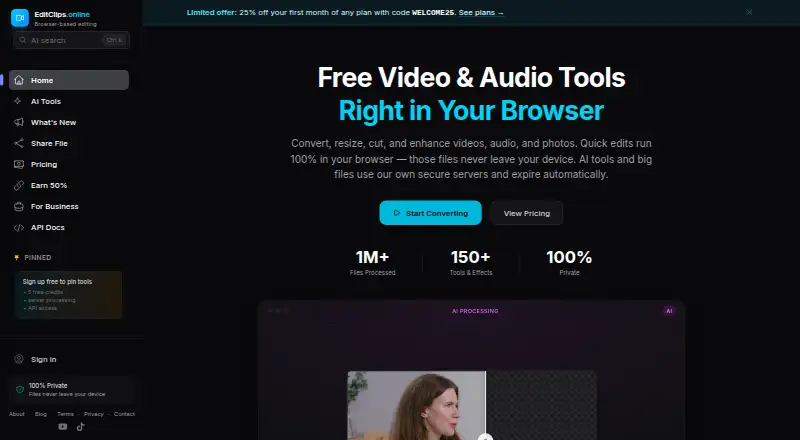
What EditClips.online is
EditClips.online is a browser-based service for converting, resizing, cutting, and enhancing video, audio, and photo files. Its homepage lists more than 150 tools and effects, and more than 40 tools are available through a REST API for programmatic processing. AI features use neural networks on dedicated GPU hardware for frame interpolation, background removal, upscaling, speech-to-text, and audio denoising. The AI Clip Maker reads a video's transcript, picks moments, crops them to a 9:16 frame, and adds animated captions timed to words. Supported formats include MP4, WebM, MKV, MOV, AVI, and GIF for video, and MP3, WAV, AAC, FLAC, and OGG for audio. The service supports Chrome, Firefox, Edge, and Safari on desktop, tablet, and mobile devices. Free browser tools process files locally in the browser using WebAssembly; server-side uploads and results are deleted after seven days.
Good
- More than 150 tools and effects are listed.
- AI Clip Maker creates 9:16 clips with timed captions.
- Free browser tools process files in-browser.
- More than 40 tools are available through a REST API.
Watch out
- Shared videos are publicly accessible by unique link.
- Anonymous share links expire after 24 hours.
- Server-side uploads and outputs are deleted after seven days.
Who it suits
It suits people who want browser-based media tools, including transcript-based short-clip creation or programmatic processing through an API. Free browser tools may suit users who want files processed in-browser rather than uploaded to EditClips servers.
Verdict
EditClips.online combines general media editing tools with AI processing and a transcript-based clip maker. Its free browser tools process files locally, while server processing, share-link terms, and paid plans are worth checking against your needs.
Plans and prices
From EditClips.online's own pricing page, checked 15 Oct 2026.
| Plan | Price | What it gives you |
|---|---|---|
| Free | Free | 100+ browser tools · 2 server downloads/day for clips up to 30 seconds · 5 free AI credits · no signup · no watermark · free forever |
| 20-credit pack | $2.99, paid once | 20 AI credits · credits never expire · one-time purchase |
| Lite | $5.99 a month | 50 AI credits/month · 1080p and 3-minute AI videos · 500 MB uploads · 100 requests/min API · 14-day, 500 MB share links · 5 dynamic QR codes · $5.99/month; $4.17/month when billed yearly ($49.99/year) |
| 100-credit pack | $9, paid once | 100 AI credits · credits never expire · one-time purchase |
| Pro | $14.99 a month | 300 AI credits/month · 8K and 10-minute AI videos · 20 GB uploads · 200 requests/min API · webhooks · 30-day, 20 GB share links · 25 dynamic QR codes · $14.99/month; $10/month when billed yearly ($120/year) |
| 500-credit pack | $29, paid once | 500 AI credits · credits never expire · one-time purchase |
| Business | $39 a month | 1,500 AI credits/month · unlimited server resolution and duration · 50 GB uploads · 600 requests/min API · instant permanent deletion · optional zero-retention mode · 90-day, 50 GB share links · unlimited dynamic QR codes · $39/month; $32.50/month when billed yearly ($390/year) |
| 1500-credit pack | $69, paid once | 1,500 credits · credits never expire |
| 1,500-credit pack | $69, paid once | 1,500 AI credits · credits never expire · one-time purchase |
| Enterprise | Priced on request | custom plans with higher limits · dedicated infrastructure |
The facts
Each one read from EditClips.online's own pages, with the date it was checked.
What it does
- AI capabilities
- The AI catalog includes background removal, face and plate blurring, subtitles, animated captions, video dubbing, slow motion, upscaling, voice tools and image generation.checked 15 Oct 2026
- AI processing
- AI operations such as background removal, frame interpolation, upscaling and transcription run on the maker's GPU server after temporary upload.checked 15 Oct 2026
- API
- The homepage says all 40+ tools are available through a REST API for programmatic processing.checked 30 Sep 2026
- API availability
- EditClips exposes a REST API at https://editclips.online/api/v1 for programmatic media processing.checked 15 Oct 2026
- API inputs
- API jobs accept public URL inputs or direct uploads through presigned URLs.checked 15 Oct 2026
- API outputs
- API results are downloaded through presigned URLs that remain valid for one hour.checked 15 Oct 2026
- API scope
- The API documentation says 27 conversion, editing, effects, extraction and combining tools are available.checked 15 Oct 2026
- Audio formats
- The homepage lists MP3, WAV, AAC, FLAC and OGG support for audio tools.checked 15 Oct 2026
- Availability limitation
- The terms say uninterrupted service is not guaranteed and that features may be modified, suspended or discontinued.checked 15 Oct 2026
- Changelog: August 2026
- The August 2026 release notes add natural-language tool search, LUT workflows, a 26-LUT library, 10-bit output and larger Pro uploads.checked 15 Oct 2026
- Changelog: July 2026
- The July 2026 notes list a royalty-free music library, AI music generation, meme templates, retro effects, music and GIF overlays, affiliate referrals, AI clip making and filler-word removal.checked 15 Oct 2026
- Documentation depth
- Public developer documentation contains an introduction, quick start, endpoint reference, MCP guide, webhook guide and billing guide.checked 15 Oct 2026
- Formats
- The site supports video formats including MP4, WebM, MKV, MOV, AVI and GIF, plus audio formats including MP3, WAV, AAC, FLAC and OGG.checked 30 Sep 2026
- Independent review volume
- Trustpilot lists only two reviews in the last 12 months, so there is limited independent review evidence.checked 15 Oct 2026
- Limit: general timeline editing
- The product pages describe many single-purpose tools but do not document a general multi-track timeline editor.checked 15 Oct 2026
- Local privacy
- Free browser tools process files entirely in-browser with WebAssembly, so files are never uploaded to EditClips servers.checked 30 Sep 2026
- MCP support
- The documentation navigation includes an MCP Server guide, and the Lite plan advertises REST API or MCP access.checked 15 Oct 2026
The company
- AI clip maker
- AI Clip Maker reads a video's transcript, selects engaging moments, crops them to 9:16 and burns in word-timed animated captions.checked 30 Sep 2026
- Maker
- The About page identifies Bernis Nukic as the builder and describes him as a software engineer maintaining the heavier AI hardware.checked 15 Oct 2026
- Maker background
- Bernis Nukic's personal site describes him as a full-stack developer working at Bicom Systems and founder of hosting company FadeHost.checked 15 Oct 2026
- Maker legal operator
- The terms identify BernisDev as the operator of EditClips.online.checked 15 Oct 2026
Money
- API authentication and billing
- The API requires a paid Lite-or-higher plan; AI endpoints consume the same credits used by the web app.checked 15 Oct 2026
Where it runs
- Browser processing
- Most basic operations run locally with FFmpeg compiled to WebAssembly, so the source file is not uploaded.checked 15 Oct 2026
- Browser support
- EditClips says it works on Chrome, Firefox, Edge and Safari across desktop, tablet and mobile devices.checked 30 Sep 2026
The full review of EditClips.online
EditClips.online is a browser-based toolkit for converting, resizing, cutting and enhancing video, audio and photos, with a REST API for automated processing. It is best suited to creators and developers who want a wide range of media utilities in one place. Its local, free browser tools are a strong starting point, while AI credits, server limits and public share links shape the choice for heavier or sensitive work.
Overview
EditClips combines more than 150 tools and effects across video, audio and photo tasks. That breadth is useful for occasional jobs that would otherwise require several single-purpose utilities, and the supported formats span common video files such as MP4, WebM, MKV, MOV, AVI and GIF, alongside MP3, WAV, AAC, FLAC and OGG audio.
Processing location matters. Free browser tools use WebAssembly and keep files on the device; server-side uploads and outputs are automatically deleted after seven days. Shared videos are different: anyone with the unique link can access them, and links expire after 24 hours for anonymous users or seven days for registered users. That is convenient for short-lived sharing, but a poor fit for material that must remain private.
Key features
AI processing and clip creation
AI tools use neural networks on dedicated GPU hardware for frame interpolation, background removal, upscaling, speech-to-text and audio denoising. The AI Clip Maker selects moments from a video's transcript, crops them to 9:16 and adds word-timed animated captions. This makes it relevant to creators turning longer footage into vertical clips; the monthly credit allowance and duration caps determine how much work fits a plan.
Browser tools and API
EditClips says its browser tools work in Chrome, Firefox, Edge and Safari on desktop, tablet and mobile. The homepage also describes 40-plus tools through a REST API, giving developers a route to programmatic processing rather than manual browser sessions. The API rate limits vary by paid tier, so high-volume workflows point toward Pro or Business rather than Lite.
Transcription and support
Auto transcription, chapter generation and timestamp generation are supported, with DOCX among the export formats. Questions, help requests and feedback can be sent through a contact form or to [email protected]. Payments run through Paddle, which acts as merchant of record and handles payment details.
Pricing
The free plan costs nothing, billed forever. It includes 50-plus browser tools with no limits, no signup and no watermarks, plus five AI credits on signup. It is compelling for local, browser-based tasks, but five credits are a small allowance for recurring AI work.
Credit packs are one-time purchases, and credits never expire: the 20-credit pack costs $2.99, paid once, the 100-credit pack $9, paid once, the 500-credit pack $29, paid once, and the 1,500-credit pack $69, paid once. They suit occasional AI use better than a recurring subscription, though they do not add the upload, sharing or API limits bundled into paid plans.
- Lite: $4.99 a month, or billed $49.99/yr — save $10 vs monthly. It includes 50 credits/month, processing up to 1080p and three minutes, 500 MB uploads, 14-day 500 MB share links and five dynamic QR codes. This is the entry paid tier for short, modest-resolution jobs; its file size and duration caps rule it out for longer or larger projects.
- Pro: $12 a month, or billed $120/yr — save $24 vs monthly. It raises the allowance to 300 credits/month, up to 8K and ten minutes, 20 GB uploads, 200 req/min API, 30-day 20 GB share links and 25 dynamic QR codes. It is the more practical tier for creators and developers with regular, larger jobs, though it still caps duration and API throughput.
- Business: $39 a month, or billed $390/yr — save $78 vs monthly. It includes 1,500 credits/month, unlimited resolution and duration, 50 GB uploads, 600 req/min API, 90-day 50 GB share links and unlimited dynamic QR codes. It fits sustained, higher-volume work where the expanded quotas matter.
- Enterprise: custom pricing for custom plans with higher limits and dedicated infrastructure, aimed at needs beyond the Business quotas.
Annual billing is presented with the stated savings against monthly billing. The free plan's no-limit claim applies to its browser tools; AI credits and the paid tiers' explicit upload, duration, resolution and API limits are separate considerations.
Platforms
EditClips is available on the web and through an API. Its browser interface supports Chrome, Firefox, Edge and Safari on desktop, tablet and mobile devices. That coverage avoids a desktop-only workflow, while API access is the relevant option for automated processing.
Who it's for
EditClips is a good fit for creators who handle different media types, need occasional conversions or edits, or want transcript-driven vertical clips with animated captions. Developers can use the REST API, with Pro and Business providing defined request rates. It is less suitable for users who need private-by-default sharing, consistently long AI outputs on the cheapest paid tier, or greater upload and API capacity without moving up to a higher plan.
Pros and cons
- Pros: The free browser toolkit covers more than 50 tools without signup or watermarks, and local WebAssembly processing keeps those files off EditClips servers.
- Pros: The AI Clip Maker combines transcript-based moment selection, vertical cropping and timed captions, a useful set of steps for short-form publishing.
- Pros: Non-expiring credit packs let occasional users pay once rather than subscribe for AI processing.
- Cons: Shared videos are accessible to anyone with the link, which makes link sharing unsuitable for confidential material.
- Cons: Lite limits work to 1080p and three minutes, while its 500 MB upload cap also constrains larger source files.
- Cons: The free plan's five AI credits do not provide a large ongoing allowance for repeated AI jobs.
Alternatives
For a dedicated podcast-show-notes comparison, browse the Podcast Show Notes Software directory.
- DomeScribe is worth considering when cross-platform availability and a free trial matter; its free plan includes a one-time 30 minutes of transcription, 30 minutes or 50 MB per file, five AI credits and TXT export.
- CraftNote is a better direction for users who want recording and imports alongside calendar sync; its free plan allows 10 uploads and imports per week and two hours of recording per week.
- Deciphr suits a text-only content workflow, with a free tier for up to 40 minutes and a one-time 120-minute written-content power-up for $19, paid once.
- Podnotes is an option when a transcription-focused paid plan is preferable: its free trial offers 50 minutes, while Solo Cast is $29 a month for 350 minutes and unlimited summaries.
- PodRescale offers a free episode once, with all content types, one person and unlimited connected accounts, for users who want to try a podcast workflow before a paid Creator plan.
- Whipscribe is an alternative for transcription across web, macOS and browser extension; its free tier covers a first transcript of any length, with the next file unlocking from $2.
- audien·to offers a daily free transcription allowance of 90 minutes across three files, with nine output types and 67 languages, making it an option for regular transcription within a daily quota.
- ChapterGen is a narrower choice for chapter generation, with two free videos up to 20 minutes each and no signup.
Verdict
EditClips.online is best for creators and developers who want varied media tools, local browser processing and optional AI workflows in one service. Its strongest reason to choose is the combination of a broad free toolkit, transcript-based vertical clip creation and API access; its clearest reason to look elsewhere is the need for private sharing or more generous limits on a lower-cost tier. Start free for local edits, use credit packs for occasional AI jobs, and choose a subscription only when its quotas match the workload.
Getting started
- Open https://editclips.online/ in Chrome, Firefox, Edge or Safari.
- Choose a browser tool; the free plan requires no signup.
- Use the browser tools on desktop, tablet or mobile.
- For AI processing, use the five free AI credits provided on signup.
- Choose a paid monthly plan or a one-time credit pack if needed.
- Use the REST API for programmatic processing.
Limits worth knowing
The free plan includes five AI credits on signup. Lite includes 50 credits per month, uploads up to 500 MB, and processing up to 1080p for three minutes.
Questions
Is EditClips.online free?
Yes. Its free plan costs 0.00 USD and includes 50+ browser tools, no signup and no watermarks. It also provides five AI credits on signup.
What does the Lite plan cost?
Lite costs $4.99 a month, or $49.99 per year. It includes 50 credits per month, up to 1080p/3 minutes and 500 MB uploads.
Which platforms and browsers does it support?
The listed platforms are web and API. EditClips says its browser service works in Chrome, Firefox, Edge and Safari on desktop, tablet and mobile devices.
Can I use EditClips through an API?
Yes. The homepage says more than 40 tools are available through a REST API for programmatic processing.
Who built EditClips.online?
The About page identifies Bernis Nukic as the builder.
How long do shared links last?
Shared videos are publicly accessible by unique link. They expire after 24 hours for anonymous users or seven days for registered users; paid plans list longer link durations.
Alternatives to EditClips.online
- 1
DomeScribe
Free planAndroidiOSWebLinux8.0From $19 a month - 2

CraftNote
Free planAndroidiOSWebExtension7.3From $8.33 a month - 3

DriftNote
Free planWebAPI7.3From $9.99 a month - 4

Whipscribe
Free planWebAPIExtensionmacOS7.0$8 one-time - 5
PodRescale
Free planWeb6.7From $49 a month - 6

Deciphr
Free planWeb6.6From $288 a year