Computer Use OOTB
Computer Use OOTB is an open-source framework for automating tasks through a computer's graphical interface.
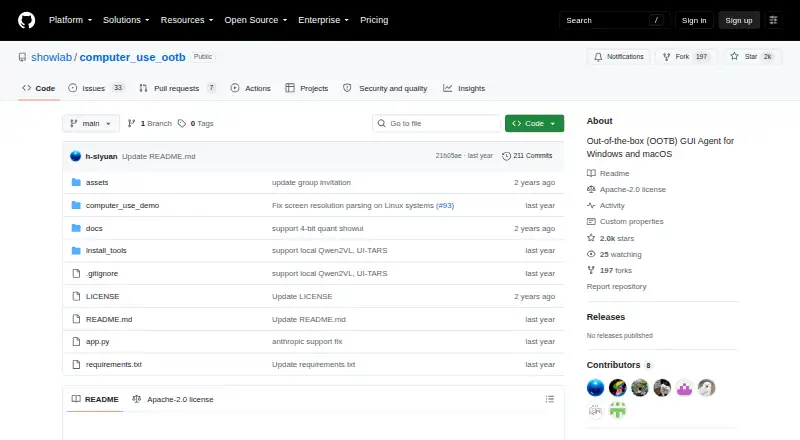
What Computer Use OOTB is
Computer Use OOTB is an open-source framework for automating tasks through a computer's graphical interface. It supports API-based models and models running locally, with a Gradio interface that does not require Docker. Users can configure one model or separate models for planning and computer control. Listed options include Claude 3.5 Sonnet, GPT-4o, Qwen models, ShowUI, and UI-TARS.
The project lists Windows and macOS as supported systems. Setup requires Miniconda, Python 3.12 or newer, and dependency installation. Local inference can avoid API costs, while a task using Claude 3.5 Computer Use may cost a few dollars. A mobile browser can send commands to the computer running the framework, without a mobile app. For local ShowUI runs, the listed hardware requirements are a CUDA-enabled NVIDIA GPU with at least 6 GB of memory on Windows, or an M1-or-newer Apple Silicon Mac with at least 16 GB of unified RAM. The project is licensed under Apache-2.0.
Good
- Supports API-based and locally running models.
- Gradio interface does not require Docker.
- A mobile browser can send commands to the running computer.
- Local inference can avoid API costs.
Watch out
- Setup requires Miniconda and Python 3.12 or newer.
- Local ShowUI runs have specified GPU or Apple Silicon requirements.
- Anyone with a public Gradio link may be able to control the computer.
- Models may take unintended or potentially harmful actions.
Who it suits
Computer Use OOTB may suit users seeking to automate desktop tasks with API-based or local models. Users considering it should be prepared to monitor actions and protect access to any public Gradio link.
Verdict
Computer Use OOTB offers a choice of model setups for graphical-interface automation on Windows and macOS. Its hardware requirements, possible model costs, and warnings about model actions and public links deserve attention before use.
Plans and prices
From Computer Use OOTB's own pricing page, checked 9 Oct 2026.
| Plan | Price | What it gives you |
|---|---|---|
| Open-source software | Free | Apache-2.0 license · API-based or locally running models · Windows and macOS |
The facts
Each one read from Computer Use OOTB's own pages, with the date it was checked.
Money
- Cost limit
- The README says a Claude 3.5 Computer Use task may cost a few dollars; local models can run without API costs.checked 9 Oct 2026
What it does
- Installation
- The README instructs users to install Miniconda, use Python 3.12 or newer, install dependencies and start the interface with python app.py.checked 9 Oct 2026
- Integrations
- The documented API model keys include Anthropic, OpenAI and Qwen; local model setup also references PyTorch and UI-TARS deployment options.checked 9 Oct 2026
- Interface
- It provides a Gradio interface that runs locally and can be accessed through a browser.checked 9 Oct 2026
- License
- The repository identifies its license as Apache-2.0.checked 9 Oct 2026
- Local inference
- The README says local models can run on the user's device with no API costs.checked 8 Oct 2026
- Local model hardware
- For ShowUI local runs, the README lists a CUDA-enabled NVIDIA GPU with at least 6 GB of GPU memory on Windows, or an M1-or-newer Apple Silicon Mac with at least 16 GB unified RAM.checked 8 Oct 2026
- Local model requirements
- For ShowUI local runs, the README specifies a CUDA-capable NVIDIA GPU with at least 6 GB GPU memory on Windows or Apple Silicon M1 or newer with at least 16 GB unified RAM on macOS.checked 9 Oct 2026
- Model options
- The project supports API-based models and locally running models, including Claude 3.5 Sonnet, GPT-4o, Qwen models, ShowUI and UI-TARS.checked 9 Oct 2026
- Model roles
- Users can configure a unified model or separate planner and actor models for high-level planning and low-level control.checked 9 Oct 2026
- Models
- The README lists Claude 3.5 Sonnet, GPT-4o, Qwen models, ShowUI, and UI-TARS among supported GUI agent models.checked 8 Oct 2026
- Operating systems
- The README lists Windows and macOS as supported systems.checked 8 Oct 2026
- Public link risk
- The README warns that anyone with the generated public Gradio link may be able to control the computer and says not to share it.checked 8 Oct 2026
- Purpose
- Computer Use OOTB is an out-of-the-box GUI agent framework for automating desktop tasks with API-based and locally running models.checked 8 Oct 2026
- Remote access
- A user can issue commands from a mobile browser to control the computer running OOTB, without installing a mobile app.checked 8 Oct 2026
- Remote access risk
- The README warns that anyone with a public Gradio link may be able to control the computer and says not to share that link.checked 9 Oct 2026
- Remote control
- A device with internet access, including a mobile browser, can send commands to the computer running the software.checked 9 Oct 2026
- Requirements
- The setup instructions require Miniconda and Python 3.12 or newer.checked 8 Oct 2026
- Security risk
- The project warns that models may perform unintended or potentially harmful operations and recommends continuously monitoring their actions.checked 9 Oct 2026
- Support
- The project invites users to discuss the software through its Discord channel or WeChat.checked 8 Oct 2026
- Supported systems
- The README lists Windows and macOS as supported systems.checked 9 Oct 2026
- What it does
- Computer Use OOTB is an out-of-the-box desktop GUI agent framework for automating computer tasks.checked 9 Oct 2026
The company
- Maker affiliation
- The project page identifies its authors with ShowLab at the National University of Singapore.checked 9 Oct 2026
The full review of Computer Use OOTB
Overview
Computer Use OOTB is a framework for automating desktop tasks through a computer’s graphical interface, using either API-based or local models. It is best suited to users comfortable setting up software and supervising an agent that can act on their computer.
Key features
Model choice and control
The framework supports Claude 3.5 Sonnet, GPT-4o, Qwen models, ShowUI and UI-TARS. Users can configure a single model or divide work between a planner for high-level decisions and an actor for on-screen control. That makes OOTB a flexible option for users who want to shape how a task is handled, but also leaves model selection and configuration to them.
Local inference avoids API charges, though it is not costless in practice: ShowUI’s local setup calls for a CUDA-enabled NVIDIA GPU with at least 6 GB of GPU memory on Windows, or an M1-or-newer Apple Silicon Mac with at least 16 GB of unified memory. Choosing Claude 3.5 Computer Use through an API may cost a few dollars per task, so frequent use can add up.
Interface and remote control
OOTB provides a Gradio interface and does not require Docker. Setup involves installing Miniconda, using Python 3.12 or newer, installing dependencies and starting the app with python app.py. That is a manageable route for technically comfortable users, but not the convenience of a ready-to-run desktop application.
A mobile browser can send commands to the computer running OOTB without a separate mobile app. This is useful for remote access, but the project warns that anyone with the generated public Gradio link may be able to control the computer. The link should not be shared. More broadly, models can take unintended or potentially harmful actions, so users should monitor what the agent does rather than leave it unsupervised.
Pricing
The Open-source software plan costs nothing and is licensed under Apache-2.0. It includes the framework for API-based or locally running models on Windows and macOS. There is no software subscription charge, but API model use can incur separate costs; a Claude 3.5 Computer Use task may cost a few dollars. Local inference avoids those API fees but requires compatible hardware for ShowUI.
This free plan fits users who can install and configure the software and are comfortable choosing between API costs and local hardware requirements. It is less suitable for anyone seeking a packaged service with predictable per-task costs or no setup burden.
Platforms
The README supports Windows and macOS, and the framework offers desktop control and browser control with screen understanding. Deployment is hybrid: users can work with API-based models or run models locally. Remote commands can come from a mobile browser, but that does not make a separate mobile app part of the offering.
Who it's for
Computer Use OOTB is a strong fit for technically capable users who want to automate desktop tasks while choosing the model and separating planning from execution. It can also suit people who want to issue commands remotely from a browser. Users should be prepared to install dependencies, meet local-model hardware requirements when applicable, and supervise actions that can affect their computer.
Look elsewhere if you need a turnkey application, cannot meet the local hardware requirements but also want to avoid API charges, or need an agent that can safely run without monitoring.
Pros and cons
- Pros: API and local model options, with support for several named models, give users flexibility over how automation is powered.
- Pros: Separate planner and actor roles let users divide high-level planning from direct control.
- Pros: The open-source software is free, and local inference avoids API costs.
- Pros: Mobile-browser commands enable remote control without a dedicated mobile app.
- Cons: Installation requires Miniconda, Python 3.12 or newer, and dependency setup, so it is not a plug-and-play choice.
- Cons: Local ShowUI runs require substantial specified hardware, while API-based Claude 3.5 Computer Use may cost a few dollars per task.
- Cons: Model actions may be unintended or harmful, and a public Gradio link may let others control the computer; monitoring and careful link handling matter.
Alternatives
For a different option, AI Computer Use Agents is the category directory to browse.
Claude Code is a paid alternative with a free plan, but its Free plan does not include Claude Code. Consider it only if its broader platform availability is a better fit; it is listed for web, Windows, macOS, Linux, iOS and Android.
Gemini is a freemium alternative with a free plan that includes app access, image generation and editing, Deep Research, Gemini Live, Canvas and Gems. Choose it when those capabilities better match your needs than desktop GUI automation.
QuickDesk is another free, open-source option, with no feature restrictions or connection limits on its MIT-licensed plan. It may suit users who prioritize those terms.
Screenbox is a free, self-hosted alternative under AGPL-3.0. Its developer and maintainer is identified as Dmytro Klymentiev.
Clawd Cursor is a free, MIT-licensed open-source alternative for Linux, macOS, self-hosted and Windows environments.
Lapu AI is a freemium option for macOS and Windows, with a free plan for core agent capabilities and a paid Premium plan. It may be a better fit for users who prefer that platform scope and plan structure.
agent-cu is a free, MIT-licensed alternative that runs locally with zero per-action cost, for Linux, macOS and Windows. It may suit users who want to avoid per-action charges.
open-computer-use is a free, MIT-licensed local option for macOS, Windows and Linux, with API and self-hosted platform listings.
Verdict
Choose Computer Use OOTB if you want a free, open-source desktop automation framework with several model choices, configurable planning and control roles, and remote browser commands. Its strongest reason to choose it is that flexibility; its strongest reasons to look elsewhere are the setup and the need to manage model costs, hardware limits and computer-control risks.
Getting started
- Open the project website on GitHub.
- Install Miniconda and use Python 3.12 or newer.
- Install the dependencies as directed by the project.
- Configure an API-based or locally running model.
- Start the Gradio interface with `python app.py`.
- Use a mobile browser to send commands remotely if needed.
Limits worth knowing
The open-source plan is free, but Claude 3.5 Computer Use tasks may cost a few dollars. Local ShowUI runs require the specified GPU or Apple Silicon hardware, and the project warns that model actions can be unintended or harmful.
Questions
Is Computer Use OOTB free?
The project lists open-source software at no cost. API-based model use may have costs; a task using Claude 3.5 Computer Use may cost a few dollars.
Which operating systems does it support?
The project lists Windows and macOS as supported systems.
Can it use models running locally?
Yes. It supports locally running models, and local inference can run on the user's device without API costs. ShowUI local runs have specified hardware requirements.
Does it support remote control from a phone?
A mobile browser can send commands to the computer running OOTB, without installing a mobile app.
Who makes Computer Use OOTB, and what is its license?
The project identifies its authors with ShowLab at the National University of Singapore. Its repository lists the Apache-2.0 license.
What setup does it require?
The setup instructions require Miniconda, Python 3.12 or newer, dependency installation and starting the interface with `python app.py`. The Gradio interface does not require Docker.