QuickDesk
QuickDesk is a free, open-source remote desktop application with a built-in MCP server for AI agents to view and control remote computers.
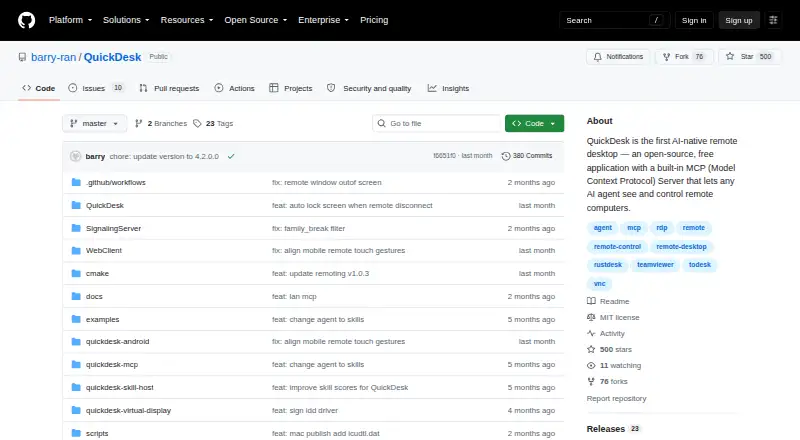
What QuickDesk is
QuickDesk is a free, open-source remote desktop application with a built-in MCP server for AI agents to view and control remote computers. Its MCP tools include screenshots, mouse and keyboard control, clipboard actions, OCR, and UI element detection. The server works with Cursor, Claude Desktop, VS Code, and other MCP clients, using either stdio or HTTP/SSE transport; HTTP/SSE can support multiple AI clients. Remote control features include keyboard and mouse mapping, cursor synchronization, two-way clipboard sync, adaptive frame rate and bitrate, and performance statistics. Devices connect with a 9-digit Device ID and temporary access code, with refresh intervals configurable from every 30 minutes to 24 hours or never. Users can deploy their own signaling and TURN servers. The self-hosted web admin panel lists TOTP two-factor authentication, operation audit logs, and CIDR-based IP whitelisting. QuickDesk's code is MIT-licensed and free for commercial use; its bundled remoting component is BSD 3-Clause licensed. The README lists Windows and macOS downloads, while Linux and mobile clients are roadmap items.
Good
- MCP tools include screenshots, OCR, and UI detection.
- Works with Cursor, Claude Desktop, and VS Code.
- HTTP/SSE transport allows multiple AI clients.
- MIT-licensed code is free for commercial use.
Watch out
- Linux and mobile clients are roadmap items.
- Windows installer requires administrator rights.
- Windows privacy mode requires Windows 10 version 2004 or later.
Who it suits
QuickDesk suits people who want AI clients to view or control remote computers through MCP, and teams that want to host their own signaling and TURN servers. It is also relevant to users seeking an open-source remote desktop application for Windows or macOS.
Verdict
QuickDesk combines remote desktop control with MCP tools for AI clients and allows self-hosting of signaling and TURN servers. The README lists Windows and macOS downloads; Linux and mobile support remain roadmap items.
Plans and prices
From QuickDesk's own pricing page, checked 3 Oct 2026.
| Plan | Price | What it gives you |
|---|---|---|
| Free (open-source) | Free | MIT-licensed · no feature restrictions · no connection limits |
The facts
Each one read from QuickDesk's own pages, with the date it was checked.
What it does
- Admin security
- The self-hosted web admin panel lists TOTP two-factor authentication, operation audit logs, and CIDR-based IP whitelisting.checked 3 Oct 2026
- AI control
- Its MCP tools include screenshots, mouse and keyboard control, clipboard actions, OCR, and UI element detection.checked 3 Oct 2026
- AI integrations
- The README says its MCP server works with Cursor, Claude Desktop, VS Code, and any MCP client.checked 3 Oct 2026
- Available downloads
- The README lists a Windows x64 installer and a macOS ARM64 disk image.checked 3 Oct 2026
- Connection security
- Devices connect using a 9-digit Device ID and temporary access code, which can be configured to refresh from every 30 minutes to 24 hours or never.checked 3 Oct 2026
- License
- QuickDesk's own code is licensed under MIT and is free for commercial use; the bundled quickdesk-remoting component is licensed under BSD 3-Clause.checked 3 Oct 2026
- MCP transports
- The server supports stdio and HTTP/SSE transports, with HTTP/SSE allowing multiple AI clients to connect.checked 3 Oct 2026
- Privacy mode
- On Windows 10 version 2004 or later, privacy screen mode blacks out the host display and blocks local keyboard and mouse input during remote control.checked 3 Oct 2026
- Remote desktop features
- Remote control includes keyboard and mouse mapping, cursor synchronization, bidirectional clipboard sync, adaptive frame rate and bitrate, and performance statistics.checked 3 Oct 2026
- Self-hosting
- Users can deploy their own signaling and TURN servers; the documented signaling server stack uses Go, PostgreSQL, and Redis, with coturn for relay.checked 3 Oct 2026
- What it does
- QuickDesk is an open-source remote desktop application with a built-in MCP server that lets AI agents see and control remote computers.checked 3 Oct 2026
Where it runs
- Linux and mobile
- The README describes Linux support and iOS/Android clients as roadmap items.checked 3 Oct 2026
- Windows installer requirement
- The README says administrator rights are required to install the Windows package.checked 3 Oct 2026
The full review of QuickDesk
QuickDesk suits developers and teams who want AI clients to inspect and operate remote computers alongside conventional remote access. It is a capable, unrestricted free option, but its documented downloads cover Windows and macOS, not Linux or mobile.
Overview
QuickDesk pairs remote desktop control with an MCP server that exposes computer-use tools to AI clients. That combination is useful for building or running workflows against a real desktop rather than asking a general-purpose assistant to work from text alone. Its open-source code is free for commercial use, with the bundled quickdesk-remoting component under a separate BSD 3-Clause license.
Key features
AI computer control
The MCP server provides screenshots, mouse and keyboard control, clipboard actions, OCR, and UI element detection. This gives an agent ways both to understand a screen and to act on it. Cursor, Claude Desktop, VS Code, and any MCP client are supported; stdio suits a local client connection, while HTTP/SSE can serve multiple AI clients.
Remote access and security
For direct control, QuickDesk includes keyboard and mouse mapping, cursor synchronization, two-way clipboard sync, adaptive frame rate and bitrate, and performance statistics. Connections use a 9-digit Device ID and temporary access code. The code can refresh as often as every 30 minutes, as rarely as every 24 hours, or never; that flexibility is useful, but choosing a shorter refresh interval is the more cautious setting.
Self-hosters can deploy signaling and TURN servers. The documented signaling stack uses Go, PostgreSQL, and Redis, with coturn for relay, so operating the infrastructure is a meaningful technical commitment rather than a turnkey setting. The self-hosted web admin panel includes TOTP two-factor authentication, operation audit logs, and CIDR-based IP whitelisting. On Windows 10 version 2004 or later, privacy screen mode blacks out the host display and blocks local keyboard and mouse input during remote control.
Pricing
Free (open-source): free. It is MIT-licensed, has no feature restrictions or connection limits, and is free for commercial use. This is a particularly strong fit for developers and small teams that can supply their own infrastructure; the trade-off is operational work for anyone who wants to self-host signaling and TURN services. The free plan has no stated trial period to wait out or usage cap to budget around.
Platforms
QuickDesk's documented downloads are a Windows x64 installer and a macOS ARM64 disk image. The Windows package requires administrator rights to install. Linux and iOS/Android clients remain roadmap items, so readers who need those clients now should choose another tool. Web and Android appear among the supported platforms, but the README's stated downloads do not establish a currently available client for either.
Who it's for
QuickDesk is best for developers connecting MCP clients to Windows or macOS computers, and for technically capable users who want self-hosted remote-access infrastructure. Its screen understanding and API access suit computer-use workflows. It is less suitable for people who need a documented Linux or mobile client today, or who want remote access without taking responsibility for server deployment.
Pros and cons
- Pro: MCP combines visual understanding and desktop actions, including OCR and UI element detection, rather than stopping at screenshots.
- Pro: The free plan has no feature restrictions or connection limits, and commercial use is allowed under the MIT license for QuickDesk's own code.
- Pro: Self-hosted administration includes TOTP authentication, audit logs, and IP whitelisting.
- Con: Linux and mobile clients are roadmap items, leaving users who need them without a documented download.
- Con: Self-hosting requires deployment and operation of signaling and TURN components, including a Go, PostgreSQL, and Redis stack and coturn.
- Con: Windows installation requires administrator rights, and the privacy screen feature is limited to Windows 10 version 2004 or later.
Alternatives
Explore AI Computer Use Agents for a broader category comparison. Choose Claude Code instead if you want a paid coding product with a free plan rather than QuickDesk's remote desktop and MCP pairing. Gemini is the better fit for readers seeking a general AI app with image generation, Deep Research, Gemini Live, Canvas, and Gems in its free plan. Consider Screenbox as another free, self-hosted option with Linux among its platforms. Clawd Cursor is a free open-source alternative for users whose platform needs include Linux. Lapu AI offers free core agent capabilities and a paid Premium plan for more usage and workflow scheduling. ChatGPT for Excel is aimed at spreadsheet work in a web environment. Contop is another free option with Android and iOS among its platforms. DesktopCtl is a free open-source choice for macOS desktop control that requires no integrations.
Verdict
Choose QuickDesk if you want an unrestricted, commercially usable remote desktop tool that lets MCP clients see and control a machine, and you can work within its documented platform support or run your own infrastructure. Its strongest reason to choose is the unusually broad AI control toolkit at no charge. Look elsewhere if Linux or mobile access is essential now, or if you do not want to manage a self-hosted setup.
Alternatives to QuickDesk
- 1
Gemini
Free planAndroidiOSWebAPI8.4Free plan - 2
Computer Use OOTB
Free planWebmacOSSelf-hostedWindows6.8Free plan - 3
Lapu AI
Free planmacOSWindows6.7From €16 a month - 4
Contop
AndroidiOSLinuxmacOS6.4 - 5
Screenbox
Free planWebAPILinuxmacOS6.4Free plan - 6
Simular Sai
AndroidAPILinuxmacOS6.3From $50 a month