
Claude Code
Claude Code is a coding agent with chat assistance, terminal access and codebase indexing.
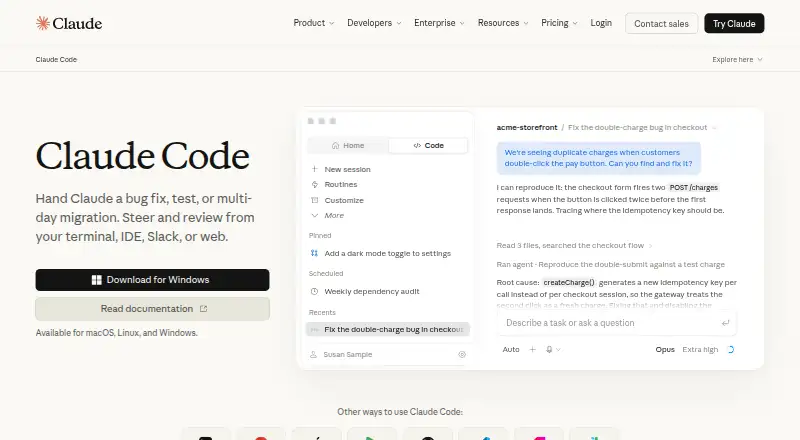
What Claude Code is
Claude Code is a coding agent with chat assistance, terminal access and codebase indexing. It supports VS Code, JetBrains IDEs, Cursor and Devin Desktop, and its listed capabilities include agent mode, desktop app control, browser control, screen understanding and human approval controls. The product is listed for web, Windows, macOS, Linux, iOS and Android, as well as a Chrome extension. Its deployment model is hybrid. Claude Code is not included in the Free plan, although a free Claude plan is available. Pro includes Claude Code for $17.00 per month with an annual subscription discount, billed as $200 up front; the plan also lists more usage, projects and more Claude models. Max 5x costs $100.00 per month and includes five times more usage than Pro with higher output limits. Max 20x costs $200.00 per month and includes 20 times more usage than Pro with higher output limits. The company is listed as founded in 2021 and headquartered in San Francisco, California.
Good
- Terminal access and codebase indexing
- Supports VS Code and JetBrains IDEs
- Human approval controls listed
- Available on macOS, Windows and Linux
Watch out
- Free plan does not include Claude Code
- Pro annual subscription bills $200 up front
- Max 5x costs $100.00 per month
- Max 20x costs $200.00 per month
Who it suits
Claude Code may suit developers who want a coding agent with terminal and codebase access, and who use one of its listed IDEs. It is available through Pro and Max plans, not the Free plan.
Verdict
Claude Code offers coding-agent functions across a broad list of platforms and IDEs. The key plan detail is that access starts with Pro, while Free does not include it.
Plans and prices
From Claude Code's own pricing page, checked 21 Oct 2026.
| Plan | Price | What it gives you |
|---|---|---|
| Free | Free | Claude Code not included · web, desktop and mobile chat · free for everyone |
| Pro | $17 a month | Claude Code included · more usage · projects · more models · $200 billed up front annually; $20 if billed monthly |
| Max 5x | $100 a month | 5x Pro usage · higher output limits · $100/month API credits · monthly |
| Max 20x | $200 a month | 20x Pro usage · higher output limits · $200/month API credits · monthly |
The facts
Each one read from Claude Code's own pages, with the date it was checked.
What it does
- API access
- Console users pay standard Anthropic API token rates, and the Agent SDK exposes orchestration, tool and permission controls.checked 21 Oct 2026
- Chat assistance
- Yeschecked 22 Sep 2026
- Codebase indexing
- Yeschecked 22 Sep 2026
- Coding agent
- Yeschecked 22 Sep 2026
- Compliance
- Anthropic's Trust Center lists SOC 2 Type 2, ISO 27001, ISO 42001, CSA STAR, HIPAA, FedRAMP High and NIST 800-171 scopes for applicable services.checked 21 Oct 2026
- Customization
- CLAUDE.md files, skills, hooks, auto memory and plugins provide project instructions and repeatable workflows.checked 21 Oct 2026
- Documentation
- The documentation covers getting started, integrations, administration, configuration, reference material and an Agent SDK.checked 21 Oct 2026
- Feature: bug fixing
- Users can describe an error and Claude Code traces the codebase, identifies a likely cause and implements a fix.checked 21 Oct 2026
- Feature: codebase understanding
- It analyzes project structure and dependencies to explain unfamiliar codebases and preserve context across files.checked 21 Oct 2026
- Feature: Git workflows
- Claude Code can stage changes, create branches and commits, and open pull requests.checked 21 Oct 2026
- Feature: parallel agents
- The Agent SDK and built-in subagents support parallel work with a coordinating lead agent.checked 21 Oct 2026
- Feature: scheduled tasks
- Cloud scheduled tasks can run recurring reviews, dependency audits and other jobs even when a computer is off.checked 21 Oct 2026
- Feature: testing and automation
- It can write tests, run them, fix failures, resolve lint errors, update dependencies and generate release notes.checked 21 Oct 2026
- Installation
- Native installers are provided for macOS, Linux, WSL and Windows, with Homebrew and WinGet options; native installs auto-update.checked 21 Oct 2026
- Integrations
- Official integrations include GitHub, GitLab, Slack, VS Code, Cursor, JetBrains IDEs, desktop, web, iOS and Android.checked 21 Oct 2026
- Licence
- The public repository's LICENSE.md says use is subject to Anthropic's Commercial Terms of Service and does not grant an open-source licence.checked 21 Oct 2026
- Limit: integration friction
- A TrustRadius review identifies difficulty integrating Claude Code with an IDE terminal.checked 21 Oct 2026
- Limit: reliability and support
- Trustpilot reviewers report incorrect outputs, repeated errors, unfinished work, billing problems and difficulty obtaining human support.checked 21 Oct 2026
The company
- Company founded
- Axios reports Anthropic was founded in 2021 by former OpenAI employees.checked 21 Oct 2026
- Company legal name
- Crunchbase lists the legal name as Anthropic PBC, a private for-profit company headquartered in San Francisco.checked 21 Oct 2026
- Company size
- Gartner lists Anthropic's company size as 51–200 employees.checked 21 Oct 2026
- Founded
- 2021checked 23 Sep 2026
- Headquarters
- San Francisco, Californiachecked 23 Sep 2026
Money
- Free plan
- Nochecked 22 Sep 2026
The full review of Claude Code
Overview
Claude Code is a coding agent from Anthropic that pairs chat assistance with tools for working in software projects. It is best suited to developers who want an agent alongside their existing IDE and terminal workflow, with controls for approving actions. Its broad device support is a plus, but access requires a paid plan.
Key features
Working with code
Claude Code combines coding-agent and chat-assistance functions with codebase indexing and terminal access. That mix is relevant to developers who want help grounded in a project and able to work with development tools, rather than a chat assistant alone. It supports VS Code, JetBrains IDEs, Cursor and Devin Desktop, giving users several established environments to work from.
Agent controls and context
Agent mode extends the coding workflow, while desktop app control, browser control and screen understanding give the agent capabilities beyond editing code. Human approval controls are a practical safeguard for users who want to review actions instead of granting fully automatic control. Hybrid deployment is another option for teams considering how to incorporate the product into their setup.
Pricing
The Free plan costs nothing and is free for everyone, but does not include Claude Code. It is therefore not a way to try the coding agent without paying.
Pro costs $17 a month with an annual subscription discount, with $200 billed up front. It includes Claude Code, more usage, Projects and more Claude models. This is the entry point for an individual who wants Claude Code and can commit to annual billing; the upfront charge is worth weighing against a monthly subscription.
Max 5x costs $100 a month on a monthly subscription. It includes Claude Code, five times more usage than Pro and higher output limits. Max 20x costs $200 a month monthly, with twenty times more usage than Pro and higher output limits. These plans suit users whose usage needs exceed Pro’s; the higher limits come at a substantial price premium.
Platforms
Claude Code supports web, Windows, macOS, Linux, iOS and Android, with Chrome extension also included in its supported-platform list. This range makes it a plausible choice for developers who move between desktop and mobile devices, though platform breadth alone does not make the paid access requirement disappear.
Who it's for
Claude Code fits developers who want coding-agent functions, terminal access and codebase indexing, particularly those already working in one of its supported IDEs. Its browser and desktop controls may also appeal to users seeking agent capabilities beyond code. It is a poorer fit for anyone who needs a free coding agent or wants to avoid Pro’s annual upfront payment and the higher monthly costs of Max.
Pros and cons
- Pros: Codebase indexing, terminal access and support for four named IDEs make it relevant to real development workflows.
- Pros: Human approval controls offer a way to retain oversight of agent actions.
- Pros: Web, desktop, mobile and Chrome extension support gives it a broad platform footprint.
- Cons: The free plan excludes Claude Code, so access begins with a paid subscription.
- Cons: Pro’s $200 upfront annual billing is a commitment, while Max starts at $100 a month.
Alternatives
For a free option with Windows, macOS and Linux support, Pan-Agent is worth considering; it also supports API use and self-hosting.
Gemini is a freemium alternative for users who want a broader assistant app across web and mobile, with its free plan including image generation and editing, Deep Research, Gemini Live, Canvas and Gems.
QuickDesk may suit users looking for a free, open-source option with no feature restrictions or connection limits, including self-hosted use.
Clawd Cursor is another free, open-source alternative for users who prefer a self-hosted option on Windows, macOS or Linux.
Lapu AI offers core agent capabilities on a free plan for Windows and macOS users; its Premium plan adds more usage and workflow scheduling.
ChatGPT for Excel is a freemium web alternative for users focused on spreadsheet work, with limited access on its Free plan.
Coasty offers a pay-as-you-go plan with no monthly minimum, making it an alternative for users who prefer usage-based pricing.
Contop is a free alternative available on Android, iOS, Linux, macOS and Windows.
For category browsing, see AI Coding Assistants, AI Code Generators and AI Computer Use Agents.
Verdict
Claude Code is a strong candidate for developers who want codebase-aware agent capabilities integrated into an IDE and terminal workflow, with human approval controls and broad platform support. Choose it if those tools justify Pro’s annual commitment or Max’s higher monthly prices; look elsewhere if free access or a lower-cost starting point is essential.
Getting started
- Visit the Claude Code website.
- Choose Pro, Max 5x or Max 20x to get Claude Code.
- Use it on a supported platform: web, Windows, macOS, Linux, iOS or Android.
- Connect through a supported IDE such as VS Code, JetBrains IDEs, Cursor or Devin Desktop.
Limits worth knowing
The Free plan does not include Claude Code. Pro is billed annually with $200 billed up front; Max 5x and Max 20x have higher output limits and usage multiples as described for each plan.
Questions
Does Claude Code have a free plan?
A Free plan is available at no cost, but Claude Code is not included.
Which plans include Claude Code?
Claude Code is included with Pro, Max 5x and Max 20x.
How much does Pro cost?
Pro is $17.00 per month with an annual subscription discount, billed as $200 up front.
Which IDEs does Claude Code support?
Supported IDEs include VS Code, JetBrains IDEs, Cursor and Devin Desktop.
What platforms are supported?
The listed platforms are web, Windows, macOS, Linux, iOS and Android, plus a Chrome extension.
Who makes Claude Code?
The associated company was founded in 2021 and is headquartered in San Francisco, California.
Alternatives to Claude Code
- 1

OpenCode
Free planOpen sourceiOSWebAPIExtension9.2From $10 a month - 2
GitHub Copilot
Free planAndroidiOSWebExtension9.1From $10 a month - 3

Amazon Q
Free planAndroidiOSWebAPI9.1Free plan - 4

Kilo Code
Free planAndroidiOSWebAPI8.8From $15 a month - 5

Devin
Free planWebAPILinuxmacOS8.5From $20 a month - 6
Agentforce Vibes
Free planAndroidiOSWebAPI8.5Free plan