
Devin
Devin is an AI coding tool that Cognition describes as an autonomous software engineer.
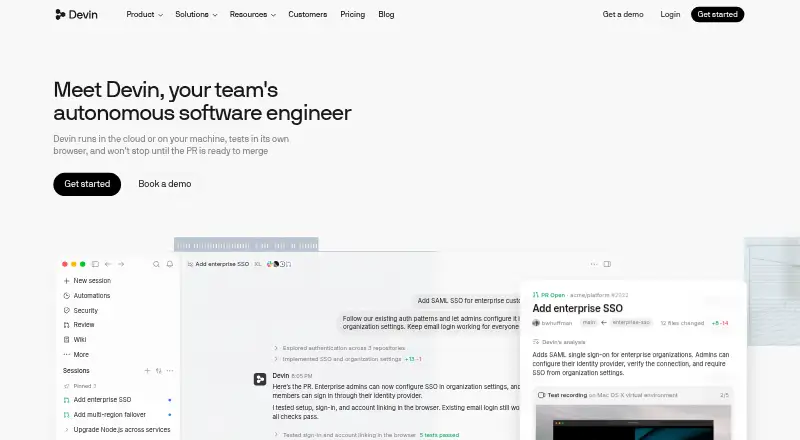
What Devin is
Devin is an AI coding tool that Cognition describes as an autonomous software engineer. It can plan, write, and test code, with workflows covering migrations, refactors, documentation, issue triage, bug fixes, and performance optimization. Devin can run in the cloud or on a user’s machine, test in its own browser, and work toward a pull request ready to merge. Larger jobs can be split across parallel cloud agents. Devin CLI runs in the terminal on macOS, Linux, and Windows, with model switching and handoff to Devin Cloud. Devin Desktop includes an IDE with syntax highlighting, autocomplete, debugging tools, agent fleet management, and shared context. Other listed capabilities include code completion, chat assistance, codebase indexing, and terminal access. Integrations and workflows involve tools such as GitHub, Linear, Slack, Teams, Datadog, Sentry, Jira, Confluence, AWS, Google Drive, and PostgreSQL. A free plan has limited usage; Pro costs $20 a month and Max costs $200 a month. Teams is $80 a month minimum, with $40 a month per full seat.
Good
- Can split larger work across parallel cloud agents.
- Desktop IDE includes debugging tools and autocomplete.
- CLI supports macOS, Linux, and Windows.
- Free plan is available.
- Listed integrations include GitHub, Linear, Slack, and Jira.
Watch out
- Free plan has limited usage.
- Included usage allowances refresh daily and weekly.
- Extra usage may be purchased at API pricing.
- Enterprise pricing is set in the order form.
Who it suits
Devin suits developers or teams seeking an AI coding agent for tasks such as bug fixing, migrations, testing, and documentation. Its desktop IDE, CLI, cloud agents, and listed integrations offer different ways to incorporate it into engineering workflows.
Verdict
Devin combines coding assistance with agent workflows that can work toward a merge-ready pull request. Review the plan allowances and extra-usage terms when choosing between its free and paid options.
Plans and prices
From Devin's own pricing page, checked 28 Sep 2026.
| Plan | Price | What it gives you |
|---|---|---|
| Free | Free | Light quota to code with agents · Limited model availability · Unlimited inline edits · Unlimited Tab completions |
| Pro | $20 a month | Increased quotas · Full model availability · Devin Cloud access · Extra usage at API pricing · per month |
| Max | $200 a month | Everything in Pro · Significantly higher quotas · per month |
| Teams | $8,040 a month | Up to 200 users · Sharing and collaboration · Centralized billing · Admin analytics · Priority support · team plan + per full dev seat |
| Enterprise | Priced on request | Highest priority support · Dedicated account management · SAML/OIDC SSO · Centralized admin controls · Dedicated deployment option |
The facts
Each one read from Devin's own pages, with the date it was checked.
What it does
- Chat assistance
- Yeschecked 22 Sep 2026
- CLI
- Devin CLI runs locally in the terminal, supports model switching and handoff to Devin Cloud, and supports macOS, Linux, and Windows.checked 28 Sep 2026
- Codebase indexing
- Yeschecked 22 Sep 2026
- Code completion
- Yeschecked 22 Sep 2026
- Coding agent
- Yeschecked 22 Sep 2026
- Core function
- Cognition describes Devin as an autonomous software engineer that plans, writes, tests, and ships production code.checked 28 Sep 2026
- Desktop IDE
- Devin Desktop includes a full IDE with syntax highlighting, autocomplete, debugging tools, agent fleet management, and shared context.checked 28 Sep 2026
- Engineering workflows
- Devin supports code migrations, refactors, documentation, scheduled chores, issue triage, bug fixing, testing, and performance optimization.checked 28 Sep 2026
- Enterprise privacy
- Devin Enterprise states that customer data is saved within the customer's controlled environment and never used for training.checked 28 Sep 2026
- Enterprise security
- Devin Enterprise offers virtual private cloud deployment, intellectual-property ownership of inputs and outputs, SOC 2 Type 2 compliance, audit logs, fine-grained access controls, and custom identity-provider integration.checked 28 Sep 2026
- Execution environments
- Devin runs in the cloud or on the user's machine, tests in its own browser, and works until a pull request is ready to merge.checked 28 Sep 2026
- Integrations
- The official site lists integrations and workflows involving GitHub, Linear, Slack, Teams, Datadog, Sentry, Jira, Confluence, AWS, Google Drive, PostgreSQL, and other tools.checked 28 Sep 2026
- Paid from
- 20checked 22 Sep 2026
- Parallel agents
- Devin can split large work across parallel cloud agents and report back when the laptop is closed.checked 28 Sep 2026
- Security Swarm
- Devin Security Swarm says it found 36 of 50 real-world GHSA vulnerabilities, with 72% recall and 30% lower cost per finding than the next most accurate alternative.checked 28 Sep 2026
- Support
- Devin support chat requires the user to be logged in, while other users are directed to the official documentation or sales team.checked 28 Sep 2026
- Supported IDEs
- Devin Desktop IDE; Zed; JetBrains; Xcodechecked 22 Sep 2026
- Terminal access
- Yeschecked 22 Sep 2026
- Trust Center
- Cognition's Trust Center lists CCPA, SOC 2 Type 2, and ISO/IEC 27001:2022 compliance resources.checked 28 Sep 2026
- Usage limits
- Paid-plan usage allowances refresh automatically on a daily and weekly basis, and extra usage can be purchased at API pricing after included usage is exceeded.checked 28 Sep 2026
The company
- Company scale
- Cognition says it has raised over $400M and that its headquarters are in San Francisco.checked 28 Sep 2026
Money
- Free plan
- Yeschecked 22 Sep 2026
The full review of Devin
Devin is an AI coding agent that combines code completion and chat with multi-step software work, from planning and testing toward a pull request. It best suits developers and teams that want to delegate broader engineering tasks across local and cloud environments. Its range is a strength, but usage allowances and paid overages make plan choice important.
Overview
Rather than stopping at suggestions or answers, Devin can plan, write and test code, using its own browser and working toward a pull request ready to merge. It can run in the cloud or on your machine, and larger jobs can be split among cloud agents that continue while your laptop is closed. That is useful for work that can be divided and reviewed asynchronously; for occasional inline help, a narrower coding assistant may be a better fit.
Key features
Devin supports migrations, refactors, documentation, scheduled chores, issue triage, bug fixes, testing and performance optimization. Its integrations and workflows involve GitHub, Linear, Slack, Teams, Datadog, Sentry, Jira, Confluence, AWS, Google Drive and PostgreSQL, connecting agent work to a broad set of engineering tools.
The desktop IDE brings syntax highlighting, autocomplete, debugging tools, agent fleet management and shared context into one environment. Devin CLI runs locally on macOS, Linux and Windows, with model switching and handoff to Devin Cloud. Codebase indexing, terminal access, completion and chat round out the agent workflow. Supported IDEs include Devin Desktop IDE, Zed, JetBrains and Xcode.
For enterprise buyers, Devin Enterprise offers deployment in a virtual private cloud, audit logs, fine-grained access controls and custom identity-provider integration. It states that customer data remains in the customer's controlled environment and is not used for training; it also offers intellectual-property ownership of inputs and outputs and SOC 2 Type 2 compliance. Cognition's Trust Center provides compliance resources for CCPA, SOC 2 Type 2 and ISO/IEC 27001:2022.
Security Swarm reports finding 36 of 50 real-world GHSA vulnerabilities, with 72% recall and 30% lower cost per finding than the next most accurate alternative. Those figures give security teams a specific reason to consider it, though they do not replace evaluating the fit for a particular workflow.
Pricing
Devin uses a freemium model. Free costs nothing, billed monthly, and allows one member with limited usage. It is a sensible starting point, but the capped allowance makes it difficult to treat as an unrestricted work plan.
Pro costs $20 a month, billed monthly, for one member. Max costs $200 a month, billed monthly, also for one member. Both paid plans' included usage refreshes automatically on a daily and weekly basis; after it is exceeded, extra usage can be purchased at API pricing. That means the monthly price is not the only cost to consider if workloads are heavy or unpredictable.
Teams costs $80/month minimum, with full seats at $40/month each; flex seats are free, and the plan supports up to 200 members. The minimum and per-seat rate matter when budgeting across a team, while free flex seats provide room for participation without another full-seat charge. Enterprise has custom pricing, billed in Agent Compute Units at a rate set in the order form.
Platforms
Devin supports API, Linux, macOS, web and Windows. Its CLI runs on macOS, Linux and Windows, while the Desktop IDE provides a dedicated development environment.
Who it's for
Devin is a strong fit for developers and teams with multi-step work to delegate, especially migrations, issue triage, testing and other tasks that can proceed in parallel. Teams already working across the listed engineering integrations may benefit from connecting agent workflows to their existing tools. Individual developers focused mainly on code suggestions or chat may find Devin's broader workflow and usage costs unnecessary.
Pros and cons
- Pro: It spans planning, implementation and testing, with cloud and local execution options, rather than limiting assistance to completion or chat.
- Pro: Parallel cloud agents can keep divided work moving while the laptop is closed, a practical advantage for asynchronous tasks.
- Pro: Teams supports up to 200 members, with free flex seats alongside paid full seats.
- Con: Free is limited to one member and limited usage, so it is best treated as an entry point rather than a team plan.
- Con: Paid allowances refresh daily and weekly, and usage beyond them costs extra at API pricing; teams with variable workloads should account for that uncertainty.
- Con: Pro and Max each cover one member, so their listed monthly prices do not represent multi-seat team costs.
Alternatives
Choose GitHub Copilot if you want a freemium coding assistant with a free plan, a free trial and broad platform support including mobile, rather than centering work on Devin's agent workflows.
Claude Code is another option for readers considering a paid coding tool; its plan information includes a $17 a month Pro tier, billed annually, while its free plan does not include Claude Code.
Kilo Code may suit developers who prefer open-source VS Code, JetBrains and CLI extensions, with usage billed separately.
Consider JetBrains Junie for a JetBrains-focused freemium option with five AI credits on its free-to-start plan and AI usage billed separately.
Gemini CLI is an alternative for command-line use on Windows, macOS and Linux, with free access through Google Account authentication.
Amp offers a freemium alternative with a $20 a month Megawatt plan that includes 45,000 minutes of orb time and unlimited public and private repositories.
Atlassian Rovo Dev is worth considering for a Jira-site-based option, with 350 free credits per user per month on its free plan.
Tabby may appeal to teams seeking local deployment: its free Community plan supports up to five users and includes code completion, an answer engine, in-line chat and a context provider.
Browse the AI Coding Assistants and AI Code Generators lists to compare more options.
Verdict
Choose Devin if you want an agent to take on multi-step engineering work across local and cloud environments, with parallel agents and a workflow that can continue toward a merge-ready pull request. Look elsewhere if you mainly need inline help or if variable usage and API-priced overages make predictable costs a priority.
Getting started
- Visit https://devin.ai/.
- Choose the free plan or a paid plan: Pro, Max, Teams, or Enterprise.
- Use Devin through web, API, Linux, macOS, or Windows.
- For local terminal work, use Devin CLI on macOS, Linux, or Windows.
- Connect a supported IDE such as Devin Desktop IDE, Zed, JetBrains, or Xcode.
Limits worth knowing
The Free plan includes limited usage. Paid-plan usage allowances refresh daily and weekly; additional usage can be purchased at API pricing after included usage is exceeded.
Questions
Is Devin free?
Yes. The Free plan costs nothing and includes limited usage.
What do the paid plans cost?
Pro is $20 a month and Max is $200 a month, each for one member. Teams has an $80 a month minimum and costs $40 a month per full seat; Enterprise pricing is set in the order form.
Which platforms does Devin support?
The listed platforms are API, Linux, macOS, web, and Windows. Devin CLI supports macOS, Linux, and Windows.
Which IDEs are supported?
Supported IDEs are Devin Desktop IDE, Zed, JetBrains, and Xcode.
What tools does Devin integrate with?
Listed integrations and workflows involve GitHub, Linear, Slack, Teams, Datadog, Sentry, Jira, Confluence, AWS, Google Drive, PostgreSQL, and other tools.
What privacy and security options does Enterprise provide?
Devin Enterprise states customer data stays within the customer's controlled environment and is not used for training. It offers virtual private cloud deployment, intellectual-property ownership of inputs and outputs, SOC 2 Type 2 compliance, audit logs, fine-grained access controls, and custom identity-provider integration.
Alternatives to Devin
- 1

OpenCode
Free planOpen sourceiOSWebAPIExtension9.2From $10 a month - 2
GitHub Copilot
Free planAndroidiOSWebExtension9.1From $10 a month - 3

Amazon Q
Free planAndroidiOSWebAPI9.1Free plan - 4

Claude Code
Free planAndroidiOSWebAPI9.0From $17 a month - 5

Kilo Code
Free planAndroidiOSWebAPI8.8From $15 a month - 6
Agentforce Vibes
Free planAndroidiOSWebAPI8.5Free plan