
Common Planner
Common Planner is a web-based lesson planning service for individual teachers and school teams.
What Common Planner is
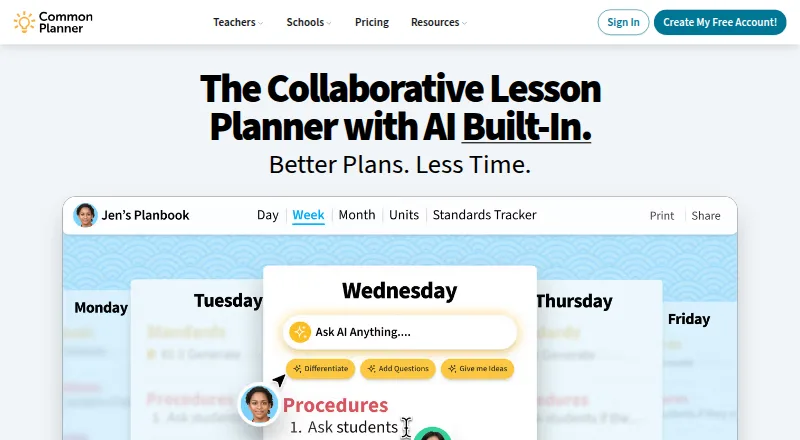
Common Planner is a web-based lesson planning service for individual teachers and school teams. Teachers can build lesson and unit plans, organize classes, and reuse planbooks and lessons in later school years. They can search for standards, add them to units, and track what has been taught. Shared planbooks support co-planning, sharing plans with administrators, and borrowing plans from other teachers. For school leaders, planning status, standards coverage, and pacing are visible, with options to comment on lesson plans. The school product page describes AI-assisted insights for identifying standards gaps, pacing issues, and instructional gaps. Basic for Teachers is free forever and includes up to 50 Google Classroom posts and file uploads from a computer or supported storage services. Pro for Teachers is listed at $5.59/user/mo, with unlimited Google Classroom posts, unit planning, automatic standards tracking, and up to five collaborators. Schools can request a demo for a plan that includes staff training and ongoing support. There is no app, but the service works in a browser on tablets and smartphones.
Good
- Free Basic plan for teachers.
- Reuse plans across school years.
- Track standards attached to units.
- School leaders can comment on plans.
- Browser access on phones and tablets.
Watch out
- No dedicated Common Planner app.
- Basic limits Google Classroom posts to 50.
- Pro is listed at $5.59/user/mo.
Who it suits
Common Planner suits teachers who want to organize lessons, units, and standards in one shared planbook. It also fits school and district teams that need planning oversight and collaboration.
Verdict
Common Planner combines lesson planning, standards tracking, and collaboration for teachers and school teams. Check the plan limits and browser-only mobile access against your workflow.
Plans and prices
From Common Planner's own pricing page, checked 15 Oct 2026.
| Plan | Price | What it gives you |
|---|---|---|
| Basic for Teachers | Free | AI lesson assistant · daily/weekly/monthly planning · standards search · 50 Google Classroom posts · individual lesson print/download · file uploads · lesson reuse · Free Forever |
| Pro for Teachers | $5.59 a month | 2x the AI usage of Basic · unlimited Google Classroom posts · unit planning · automatic standards tracking · up to 5 collaborators · credit card only; for individual teachers · $5.59/month; One payment of $71.88. |
| Pro for Teachers (monthly) | $5.59 a month | 2x Basic AI usage · unlimited Google Classroom posts · unit planning · automatic standards tracking · day/week/month/unit export · class website · up to 5 collaborators · $5.59/month |
| Pro for Teachers (annual) | $71.88 a year | 2x Basic AI usage · unlimited Google Classroom posts · unit planning · automatic standards tracking · day/week/month/unit export · class website · up to 5 collaborators · One payment of $71.88 |
| Cc for Schools | Priced on request | Everything in Pro · school planbooks · teams · school-wide templates · membership management · unlimited school collaborators · staff training/support · Schedule a Demo |
The facts
Each one read from Common Planner's own pages, with the date it was checked.
What it does
- Account age restriction
- Account registration is not authorized for people under 13, while teacher-shared pages may be viewed by students of any age as directed by a school.checked 15 Oct 2026
- AI features
- The school product page describes AI-assisted insights for identifying missing standards, pacing issues, or instructional gaps.checked 29 Sep 2026
- AI lesson assistant
- The product includes an AI-powered lesson planning assistant.checked 15 Oct 2026
- API development
- The repository documents Ruby, MongoDB, Foreman/Forego and Docker-based local setup and deployment.checked 15 Oct 2026
- API license
- The public Common Standards Project API repository is marked Apache-2.0 licensed.checked 15 Oct 2026
- API terms
- The Terms of Service state that developers using the Common Curriculum API are subject to separate API Terms.checked 15 Oct 2026
- Bump lessons
- A bump function shifts plans forward while preserving pacing.checked 15 Oct 2026
- Class websites
- Pro users can publish lessons to an auto-updating class website for students and parents.checked 15 Oct 2026
- Collaboration
- Teachers can co-plan in a shared planbook, share plans with administrators, and borrow plans from other teachers.checked 29 Sep 2026
- Compliance
- The company provides a Student Data Privacy Notice covering COPPA, FERPA and state student-privacy-law compliance for schools and districts.checked 15 Oct 2026
- Contract terms
- Paid subscriptions auto-renew by default, fees are generally non-refundable, and premium features stop when the subscription ends.checked 15 Oct 2026
- Documentation
- The help center has collections for setup videos, planbooks/calendars, lesson-planning tools, sharing/collaboration and subscriptions/policies.checked 15 Oct 2026
- Drag and drop
- Lessons can be rearranged across days, weeks and classes by drag and drop.checked 15 Oct 2026
- File integrations
- The Basic plan accepts uploads from a computer, Google Drive, Dropbox and Office 365.checked 15 Oct 2026
- Google Classroom
- The Basic plan includes posting up to 50 lessons to Google Classroom, while Pro includes unlimited posts.checked 29 Sep 2026
- Google Classroom integration
- Basic includes 50 Google Classroom lesson posts and Pro removes that posting limit.checked 15 Oct 2026
- Intended users
- The maker presents the product for individual teachers as well as school and district teams seeking shared planning and instructional oversight.checked 29 Sep 2026
Money
- Backward planning
- The planner supports starting from goals and assessments to align class periods.checked 15 Oct 2026
- Billing limit
- The Pro individual plan requires a credit card and is unavailable for school-wide multi-staff purchasing.checked 15 Oct 2026
- Lesson planning
- Teachers can create lesson and unit plans, organize classes, and reuse planbooks and lessons across school years.checked 29 Sep 2026
The company
- Company legal name
- The subscriber agreement identifies the maker as Common Curriculum, Inc., a Delaware corporation.checked 15 Oct 2026
- Company rename
- LinkedIn says Common Curriculum changed its product name to Common Planner because the old name was confusing and did not describe a curriculum provider.checked 15 Oct 2026
- Company size and founding
- LinkedIn lists Common Planner as a 2–10 employee educational company headquartered in Baltimore and founded in 2011.checked 15 Oct 2026
- Headquarters
- Baltimore, Maryland, United Stateschecked 23 Sep 2026
The full review of Common Planner
Overview
Common Planner is a collaborative lesson-planning service for teachers, schools, and districts. It is best suited to educators who want lesson plans, standards tracking, and shared planning in one workspace.
Its strongest case is the connection between classroom planning and school-wide oversight: teachers can build and share plans while leaders review coverage and pacing.
Key features
Teachers can create lesson and unit plans, organize classes, and reuse plans and lessons across school years. That reuse can reduce repeated setup for educators who teach recurring courses, while unit planning is reserved for the paid Pro plan.
Standards search, unit alignment, and tracking of taught standards make Common Planner more than a planbook: teachers can monitor coverage, and school leaders can review planning status, standards coverage, and pacing. Leaders can also comment on lesson plans. AI-assisted insights on the school product page aim to identify missing standards, pacing issues, and instructional gaps.
Co-planning in a shared planbook, sharing with administrators, and borrowing colleagues’ plans support team workflows. Pro allows up to five collaborators; the Schools plan supports collaboration with anyone in the school. Schools also get school-wide templates, membership management, staff training, and ongoing support.
Basic supports file uploads from a computer, Google Drive, Dropbox, or Office 365. It can post up to 50 lessons to Google Classroom; Pro removes that posting cap. The service also offers calendar view and AI-assisted lesson planning, though the Basic plan has less AI usage than Pro.
Pricing
Basic for Teachers: Free forever. It includes AI Powered Lesson Assistant, daily, weekly, and monthly planning, up to 50 Google Classroom posts, and file uploads from a computer, Google Drive, Dropbox, or Office 365. It suits teachers who want core planning without a subscription, but omits unit planning, automatic standards tracking, unlimited Classroom posts, and Pro’s higher AI allowance.
Pro for Teachers: $5.59/month, billed as one payment of $71.88. It adds unit planning, automatic standards tracking, unlimited Google Classroom posts, twice Basic’s AI usage, and up to five collaborators. It fits individual teachers who need those capabilities; credit card only is the stated payment condition.
Cc for Schools: custom pricing, with a demo scheduled. It adds school planbooks and teams, school-wide templates, school membership management, collaboration with anyone in school, free staff training, and ongoing support throughout the year. This is the relevant tier for school-wide planning and leadership oversight rather than an individual teacher’s plan.
A 30-day trial is offered. Check the $71.88 one-payment term against the $5.59/month price when budgeting.
Platforms
Common Planner runs on the web, including in a smartphone or tablet browser; there is no dedicated app. That works for browser-based planning, but is a drawback for teachers who want a native mobile app.
The privacy policy says sensitive information is transmitted using industry-standard encryption and data is regularly backed up. The maker says its Student Data Privacy Notice addresses COPPA, FERPA, and state student privacy law compliance for schools and districts.
Who it's for
Common Planner makes the most sense for teachers who want standards-aware planning and collaboration, and for schools or districts that need shared planbooks and instructional oversight. A solo teacher needing only a basic planbook may not benefit from the school-facing tools, while educators who rely on a native mobile app should look elsewhere.
Pros and cons
- Pro: Standards tracking and school-leader review connect classroom plans with coverage and pacing oversight.
- Pro: Shared planbooks, plan borrowing, and school-wide collaboration support planning across a team.
- Pro: Basic includes file uploads from four common sources and up to 50 Google Classroom posts at no charge.
- Con: Basic lacks unit planning and automatic standards tracking, so teachers who need those tools must move to Pro.
- Con: Pro is priced monthly but billed as one $71.88 payment, and accepts credit cards only.
- Con: Mobile access is browser-only, with no dedicated app.
Alternatives
For a wider view of the category, browse Lesson Planning Software or AI Lesson Plan Generators.
- PlanbookEdu is a free-forever option with unlimited weekly plans, A/B day and rotation schedules, word-processor editing, and iPad and phone support; choose it if those scheduling and mobile features matter more than Common Planner’s standards tracking.
- Planbook is another freemium lesson-planning alternative.
- Lesson Maker Pro offers a free monthly allowance of five generated lessons, one unit plan, ten standalone materials, and 25 Teaching Assistant messages; consider it if those generation and materials quotas match your needs.
- Planboard offers free digital lesson planning for teachers and has Android, iOS, and web platforms; choose it if native mobile access is important.
- TeacherHero is a freemium web alternative.
- SchEDU has an Android and web free plan capped at two lifetime lesson plans, two subjects, and one automated activity or exam per day; its Pro plan is $4.99 per month. It may suit a budget-focused user comfortable with those free-plan limits.
- Lessonly offers a free-forever web plan with no credit card required.
- LessonApp is a freemium alternative for web, iOS, and Android.
Verdict
Choose Common Planner if you want lesson planning tied to standards tracking and collaboration, especially as part of a school or district workflow. Its main advantage is that teachers and leaders can work from shared plans and coverage data; look elsewhere if you need a dedicated mobile app or a simpler planbook without school-wide oversight.
Alternatives to Common Planner
- 1

Make My Lesson
Free planAndroidiOSWebmacOS8.0From $90 a year - 2

GradeAid
Free planWeb7.3From $8.99 a month - 3

RockettAI
Free planWeb7.3From £49.99 a year - 4
SparkSchool AI
Free planWebExtension6.7From $5 a month - 5
TeacherMatic
Free planWeb6.7From £69 a year - 6

TeachTools
Free planWeb6.7From $2 a month