
TeachTools
TeachTools is a web service that helps K–12 teachers generate classroom materials with AI.
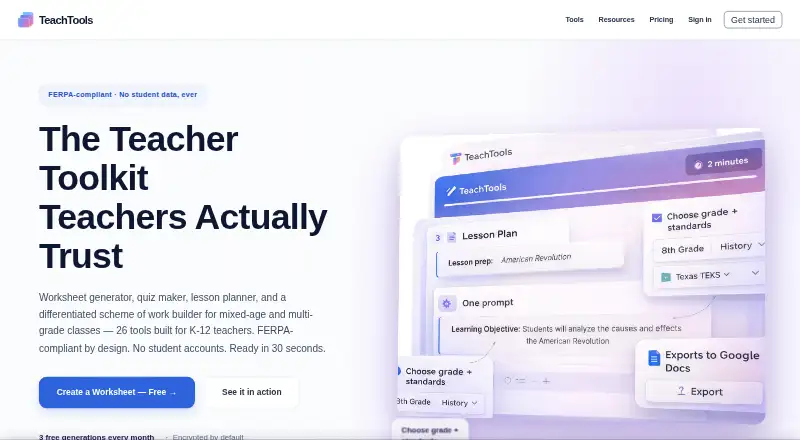
What TeachTools is
TeachTools is a web service that helps K–12 teachers generate classroom materials with AI. Its 26 tools cover worksheets, quizzes, lesson plans, schemes of work, rubrics, report-card comments, puzzles, bingo cards, parent emails and newsletters. Teachers can use it across Kindergarten through grade 12 and subjects including Math, Science, ELA, Social Studies, World Languages, Art, Music, PE and Special Education. Generated materials can be downloaded as PDFs, sent to Google Docs or printed. Students do not create accounts or use the AI; TeachTools says it collects no student personally identifiable information and is FERPA compliant. It offers a Data Processing Addendum to school districts on request. TeachTools says data is encrypted in transit and at rest, and that content sent to its AI provider is not used to train models. The Free plan includes 3 generations a month and 5 core tools. The maker describes the service as intended for individual teachers, not administrators or school boards.
Good
- 26 specialized AI tools for classroom materials
- Covers Kindergarten through grade 12
- Export as PDF, Google Docs, or print
- Free plan includes 3 generations monthly
- Students do not need accounts
Watch out
- Free plan limited to 3 generations a month
- No integration with school systems
- Designed for individual teachers, not administrators
Who it suits
TeachTools suits K–12 teachers who want to generate and export classroom materials across multiple subjects. Its stated audience is individual teachers rather than administrators or school boards.
Verdict
TeachTools brings a broad set of classroom-generation tools together with PDF, Google Docs and print output. Its free plan is limited, and it does not integrate with school systems.
Plans and prices
From TeachTools's own pricing page, checked 30 Sep 2026.
| Plan | Price | What it gives you |
|---|---|---|
| Free | Free | 3 generations a month · 5 core tools · print-ready PDFs · one-click Google Docs export · forever |
| Starter | $2 a month | 15 generations a month · 10 essential tools · cancel anytime · or $18/year — save 25% |
| Plus | $5 a month | 60 generations a month · all 26 AI generators · early access to new tools · cancel anytime · or $45/year — save 25% |
| Pro | $10 a month | Unlimited generations · Easy Grader · reusable header and footer templates · priority email support · or $89/year — save 26% |
| School | — | Unlimited for your school · team management · advanced analytics · dedicated support · per school year |
The facts
Each one read from TeachTools's own pages, with the date it was checked.
What it does
- AI provider
- TeachTools uses Anthropic's Claude API and says content sent through the API is not used to train models.checked 30 Sep 2026
- Audience
- The maker describes TeachTools as built for individual teachers rather than administrators or school boards.checked 30 Sep 2026
- Encryption
- Data is encrypted in transit with TLS/HTTPS and at rest with AES-256.checked 30 Sep 2026
- FERPA
- TeachTools says it is FERPA compliant and offers a Data Processing Addendum to school districts on request.checked 30 Sep 2026
- Grade coverage
- TeachTools supports grade levels from Kindergarten through 12th grade.checked 30 Sep 2026
- Infrastructure
- TeachTools says it is hosted on SOC 2 Type II compliant servers and uses Neon PostgreSQL with automatic backups and disaster recovery.checked 30 Sep 2026
- Integrations limit
- TeachTools says it does not integrate with school systems, while providing Google Docs export.checked 30 Sep 2026
- Output formats
- Generated materials can be downloaded as PDF, sent to Google Docs, or printed directly.checked 30 Sep 2026
- Purpose
- TeachTools provides AI worksheet, quiz, lesson-plan, scheme-of-work and other generators for K-12 teachers.checked 30 Sep 2026
- Subjects
- The tools support Math, Science, ELA, Social Studies, World Languages, Art, Music, PE, Special Education and more.checked 30 Sep 2026
- Support
- The Pro plan includes priority email support with a real reply within 24 hours.checked 30 Sep 2026
- Teacher-only design
- Students do not create accounts or interact with the AI, and TeachTools says it collects no student personally identifiable information.checked 30 Sep 2026
- Third-party services
- The security page identifies Anthropic for content generation and Stripe for PCI DSS Level 1 payment processing.checked 30 Sep 2026
- Tool catalog
- The service offers 26 specialized AI tools, including worksheets, quizzes, lesson plans, rubrics, report-card comments, crosswords, word searches, bingo cards, parent emails and newsletters.checked 30 Sep 2026
The company
- Headquarters
- Austin, Texas, United Stateschecked 28 Sep 2026
The full review of TeachTools
TeachTools is a browser-based AI toolkit for preparing K–12 classroom materials. It is best suited to individual teachers who need more than a lesson planner; its breadth is useful, but capped generation and no school-system integrations limit its reach.
Overview
With 26 specialized generators, TeachTools spans classroom preparation, assessment and communication: alongside worksheets, quizzes and lesson plans, it can create rubrics, report-card comments, crosswords, word searches, bingo cards, parent emails and newsletters. Materials cover Kindergarten through Grade 12 and subjects including Math, Science, ELA, Social Studies, World Languages, Art, Music and PE, as well as Special Education. That range is a real advantage for teachers who want one service for different classroom tasks, rather than a tool focused on lesson plans alone.
Generated materials can be downloaded as PDFs, sent to Google Docs or printed directly. That gives teachers practical ways to edit, share or use a resource without requiring students to use the service. TeachTools says students do not create accounts or interact with its AI, and that it collects no student personally identifiable information. It also says it is FERPA compliant and offers school districts a Data Processing Addendum on request. Data is encrypted in transit with TLS/HTTPS and at rest with AES-256; content generation uses Anthropic’s Claude API, and TeachTools says API submissions are not used to train models. Its security page identifies Stripe for payment processing and says its servers are SOC 2 Type II compliant, with Neon PostgreSQL, automatic backups and disaster recovery. These safeguards matter to teachers handling classroom materials, but they do not change the lack of school-system integrations.
Key features
The strongest feature is the breadth of ready-to-generate formats. Lesson plans and schemes of work support planning, quizzes and worksheets support assessment and practice, while rubrics and report-card comments help with evaluation and reporting. Less common generators such as crosswords, bingo cards and parent newsletters extend the service into classroom activities and communication. Standards alignment is supported, though TeachTools’ audience remains individual teachers rather than administrators or school boards.
PDF download, direct printing and Google Docs export make outputs usable in familiar workflows. Google Docs is an export route, not a broader school-system integration: teachers whose work depends on connected administrative or learning systems should look elsewhere.
Pricing
The Free plan costs nothing, billed forever. It allows 3 generations a month across 5 core tools, with print-ready PDFs and one-click Google Docs export. That is enough for occasional use, but the low monthly quota and limited selection make it a trial-sized option for teachers who generate materials regularly.
Starter costs $2 a month, or $18/year — save 25%. It raises the allowance to 15 generations a month and includes 10 essential tools; cancel anytime. This is the lowest-cost paid step, but the quota and tool selection still rule it out for heavier use.
Plus costs $5 a month, or $45/year — save 25%. It provides 60 generations a month, all 26 AI generators and early access to new tools, with the option to cancel anytime. This is the most balanced plan for a teacher who wants the full catalog but does not need unlimited volume.
Pro costs $10 a month, or $89/year — save 26%. It includes unlimited generations, Easy Grader, reusable header and footer templates, and priority email support with a real reply within 24 hours. It makes sense for frequent generation and reusable materials; occasional users are better served by a capped tier.
School is billed per school year, with custom pricing. It provides unlimited use for the school, team management, advanced analytics and dedicated support. Those shared and administrative features distinguish it from the individual-teacher plans, though TeachTools still does not integrate with school systems.
Platforms
TeachTools is available on the web. Its Google Docs export can move generated material into that service, but it does not amount to integration with school systems.
Who it's for
TeachTools suits individual K–12 teachers who want a broad set of generators for planning, assessment, classroom activities and parent communication, and who can work with PDF, print or Google Docs outputs. Teachers generating only a few items each month can start free; those needing all tools and regular capacity will find Plus the clearest fit, while Pro is for unlimited generation and its additional grading, template and support features.
It is a weaker fit for administrators or school boards seeking system integrations, and for schools that need connected workflows. The School plan adds team management and analytics, but not school-system integration.
Pros and cons
- Pro: 26 tools cover far more than lesson planning, including assessment, classroom activities and parent communications.
- Pro: PDF, Google Docs and print output give teachers several straightforward ways to use generated materials.
- Pro: Students do not need accounts or AI access, and TeachTools says it collects no student personally identifiable information.
- Con: The Free plan’s 3 monthly generations and 5 core tools are restrictive for regular classroom preparation.
- Con: Starter remains capped at 15 generations and 10 tools, so frequent users need to move up a tier.
- Con: No school-system integrations make TeachTools less suitable for administrator-led or connected school workflows.
Alternatives
For a wider comparison of lesson-planning options, see AI Lesson Plan Generators.
- Make My Lesson is worth considering if Android or iOS access matters alongside web use; its free plan provides 5 generations.
- Eduaide offers a free plan with generation limits and limited input context, covering lesson plans, worksheets, organizers, games and assessments; its Pro plan is $49.99 a year, billed $4.17/mo.
- Education Copilot offers a free plan with 3 core AI templates, lesson plans and handouts, plus document editing and export, training videos and community support.
- GradeAid may suit teachers prioritizing resource creation with PDF and Word export: its free plan allows 5 resources a week, with no card details required.
- GradeWithAI is the alternative to consider when automated submission grading and AI detection are the priority; its Pro plan costs $20 a month.
- MyLesson.AI provides a free plan with one lesson draft and a few AI grading trials, while Pro includes unlimited lesson plans and AI grading.
- TeacherMatic offers a free plan with 15 generations a day for the first week, then 5 a day, and exports including PDF, DOCX and Google Docs.
- Aila is a free alternative, with fair-use limits potentially applying to excessive use.
Verdict
TeachTools is a strong choice for individual K–12 teachers who want one service for varied classroom materials and straightforward document output. Its broad generator catalog is the main reason to choose it; limited free and lower-tier quotas and the absence of school-system integrations are the reasons to look elsewhere if your workload is heavy or your school needs connected administration.
Alternatives to TeachTools
- 1

Common Planner
Free planAndroidiOSWebAPI8.0From $5.59 a month - 2

Make My Lesson
Free planAndroidiOSWebmacOS8.0From $90 a year - 3

GradeAid
Free planWeb7.3From $8.99 a month - 4

RockettAI
Free planWeb7.3From £49.99 a year - 5
SparkSchool AI
Free planWebExtension6.7From $5 a month - 6
TeacherMatic
Free planWeb6.7From £69 a year