GradeWithAI
GradeWithAI is a web tool for grading student assignments against rubrics and drafting personalized feedback for teachers to review.
What GradeWithAI is
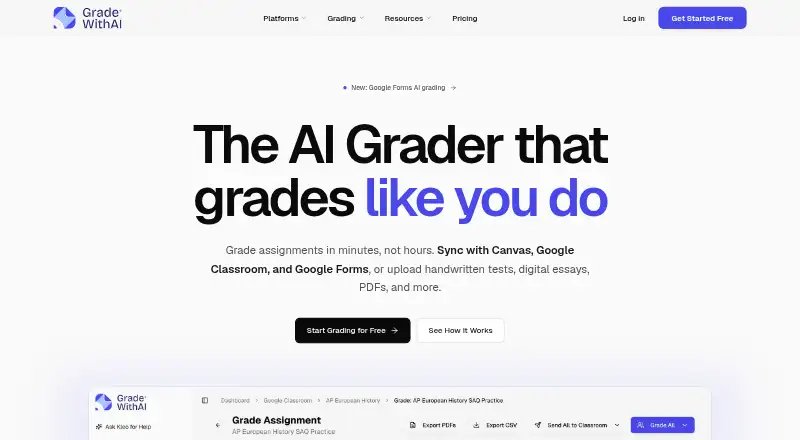
GradeWithAI is a web tool for grading student assignments against rubrics and drafting personalized feedback for teachers to review. Teachers can submit PDFs, Word documents, PowerPoints, images, and handwritten work. Rubrics can be created from assignment instructions and attachments or from a short description. Teachers can edit or regrade suggested feedback and override scores or comments before returning work. Results can be exported as PDFs or CSV files. GradeWithAI syncs with Canvas and Google Classroom and can grade Google Forms responses. Microsoft Teams users have to download files and upload them manually because native sync and grade return are unavailable. Its Kleo assistant can use student, assignment, and rubric context to surface learning gaps, draft parent emails, and suggest next steps. The maker describes the service as built for K-12 and presents its tools for teachers, schools, and districts. The Free plan lists 25 AI grading requests per month. Pro costs $20/mo and includes unlimited AI grading requests, automated grading, AI detection on every submission, and priority support.
Good
- Accepts handwritten work, images, and common document formats
- Syncs with Canvas and Google Classroom
- Teachers can override scores and comments
- Exports results as PDFs or CSV files
- Free plan includes 25 grading requests per month
Watch out
- Microsoft Teams file handling is manual
- Native Teams sync and grade return are unavailable
- Pro costs $20/mo
Who it suits
GradeWithAI suits K-12 teachers who want to grade varied assignment formats and review AI-drafted feedback. Its school and district features may also suit organizations managing grading across teams.
Verdict
GradeWithAI combines rubric-based grading, teacher-editable feedback, and integrations with Canvas and Google Classroom. Teams using Microsoft Teams should account for manual file handling, while Pro adds unlimited grading requests and AI detection for $20/mo.
Plans and prices
From GradeWithAI's own pricing page, checked 2 Oct 2026.
| Plan | Price | What it gives you |
|---|---|---|
| Pro | $20 a month | Unlimited AI grading requests · Automated submission grading · AI detection on every submission · Priority support · Everything in Free |
| Free | — | 25 AI grading requests per month · Google Classroom & Canvas sync · Google Forms grading · Handwritten assignment support · AI rubric generation · Unlimited Kleo AI assistant |
| Schools & Districts | Priced on request | Schoology · Admin dashboard & analytics · SSO / SAML authentication · Bulk user management · Dedicated onboarding · Everything in Pro |
The facts
Each one read from GradeWithAI's own pages, with the date it was checked.
What it does
- AI detection
- The site says Pro includes AI detection on every submission and describes a 0–100% AI score with a matching label.checked 2 Oct 2026
- Compliance
- The security page lists SOC 2 Type II aligned security controls and says the service is FERPA, COPPA, and SOPIPA compliant.checked 2 Oct 2026
- Encryption
- The security page says data is encrypted in transit using TLS 1.2 or higher and at rest using AES-256.checked 2 Oct 2026
- Exports
- Grading results can be exported as PDFs or CSV files.checked 2 Oct 2026
- Intended users
- The maker describes GradeWithAI as built for K-12 and presents its features and plans for teachers, schools, and districts.checked 2 Oct 2026
- Kleo assistant
- Kleo can surface learning gaps, draft parent emails, and suggest next steps using context about students, assignments, and rubrics.checked 2 Oct 2026
- LMS integrations
- The product syncs with Canvas and Google Classroom and supports grading Google Forms responses.checked 2 Oct 2026
- Rubrics
- AI can build a rubric from assignment instructions and attachments or generate one from a short description.checked 2 Oct 2026
- Student data and AI training
- The security page says its AI providers have data processing terms that prohibit training on customer data.checked 2 Oct 2026
- Support
- The pricing page lists priority support for Pro and provides [email protected] for questions.checked 2 Oct 2026
- Supported work
- Teachers can upload PDFs, Word documents, PowerPoints, images, and handwritten work for grading.checked 2 Oct 2026
- Teacher review
- Teachers can edit or regrade AI feedback before returning it and can manually override scores or comments.checked 2 Oct 2026
- What it does
- GradeWithAI grades student assignments against rubrics and drafts personalized feedback for teachers to review.checked 2 Oct 2026
The company
- Microsoft Teams limit
- Microsoft Teams users must manually download files, upload them to GradeWithAI, and return reviewed results because native sync and grade return are unavailable.checked 2 Oct 2026
The full review of GradeWithAI
GradeWithAI is a web-based assistant for rubric-driven assignment marking and teacher feedback. It suits K–12 educators and teams working in Canvas or Google Classroom who want to accelerate routine grading while retaining final control. The main trade-off is its 25-request Free allowance and the manual workflow required for Microsoft Teams.
Overview
GradeWithAI accepts PDFs, Word files, PowerPoints, images, and handwritten work, then grades submissions against a rubric and drafts individualized comments. Teachers can edit or regrade the output and override scores or comments before students receive it. That review gate makes the service a better fit for assisted assessment than unattended automated marking.
Results can be exported as PDF or CSV, which helps when records must move outside the classroom platform. Rubrics can be built from assignment instructions and attachments or generated from a short description, reducing setup for teachers who do not already have a formal rubric.
Key features
Rubrics and feedback
The core workflow is practical for varied classroom submissions, including handwritten pages that would otherwise require separate handling. AI-generated feedback is a draft, not a final judgment: teacher editing and manual score overrides are central safeguards for accuracy and context.
Kleo assistant
Kleo uses student, assignment, and rubric context to surface learning gaps, draft parent emails, and suggest next steps. It broadens GradeWithAI from marking into follow-up support, but its suggestions still need an educator’s review before they shape communication or intervention.
Classroom connections and detection
Canvas and Google Classroom sync, plus Google Forms grading, can reduce file movement for schools on those systems. Microsoft Teams has no native sync or grade return; teachers must download files, upload them to GradeWithAI, and return reviewed work themselves. Pro adds AI detection on every submission, reporting a 0–100% AI score with a corresponding label.
Security and control
Data is encrypted in transit with TLS 1.2 or higher and at rest with AES-256. GradeWithAI says its AI providers’ data-processing terms prohibit training on customer data, and it lists SOC 2 Type II-aligned controls alongside FERPA, COPPA, and SOPIPA compliance.
Pricing
GradeWithAI uses a freemium model. The Free plan has no published price and includes 25 AI grading requests per month, Google Classroom and Canvas sync, Google Forms grading, handwritten-assignment support, AI rubric generation, and unlimited Kleo use. It is suitable for an individual teacher evaluating the workflow or handling a modest submission volume; the monthly request cap will constrain heavier classes.
Pro costs $20 a month. It includes everything in Free, plus unlimited AI grading requests, automated submission grading, AI detection on every submission, and priority support. This is the clearest choice for teachers or departments grading frequently, provided the recurring fee is justified by eliminating the Free quota. Questions can be directed to [email protected].
Schools & Districts has custom pricing and includes everything in Pro, plus Schoology, an admin dashboard with analytics, SSO/SAML authentication, bulk user management, and dedicated onboarding. Those administrative features make it the appropriate tier for managed deployments rather than a single classroom.
Platforms
GradeWithAI runs on the web. Canvas and Google Classroom integration is built into the service, while Microsoft Teams users should plan for manual download, upload, and return steps.
Who it's for
It is aimed at K–12 teachers, schools, and districts that need rubric-based grading across mixed file types and want educators to approve every result. Canvas and Google Classroom users gain the smoothest workflow. Teams centered on Microsoft Teams, or classes that regularly exceed 25 monthly requests without a Pro budget, should look carefully at the extra handling or cost.
Pros and cons
Pros
- Supports documents, presentations, images, PDFs, and handwritten work, covering common K–12 submissions.
- Teacher editing, regrading, and score overrides keep professional judgment in the final result.
- Canvas, Google Classroom, and Google Forms support can reduce repetitive transfer work.
- Kleo adds learning-gap, parent-email, and next-step assistance beyond basic marking.
- Pro combines unlimited grading requests with per-submission AI detection.
Cons
- Free is limited to 25 AI grading requests per month, so frequent graders need Pro.
- Microsoft Teams has no native sync or grade return, creating a manual file loop.
- AI feedback and detection scores require educator interpretation rather than automatic acceptance.
- School and district administration features are reserved for custom-priced deployment.
Alternatives
For broader lesson-planning software, browse the AI Lesson Plan Generators list. Make My Lesson is a freemium Android, iOS, and web option with a Free tier and a 9.99 USD monthly plan, making it more relevant when lesson generation across mobile and web matters more than rubric grading.
RockettAI is a web freemium planner with a free allowance of 10 successful generations each day and a 5.99 GBP monthly Pro plan; choose it for daily planning tools instead of assignment assessment. Almanack is a freemium web/API service focused on standards-aligned curriculum and lesson planning, a better direction when planning is the priority.
GradeAid offers a free five-resources-per-week tier and an 8.99 USD monthly Pro plan, suiting resource creation rather than GradeWithAI’s rubric workflow. SparkSchool AI is a web and extension tool with 90-plus content tools and curriculum frameworks, useful for broad material generation.
TeacherMatic provides web-based AI generators with a free daily allowance and a 6.99 GBP monthly Professional plan. TeachTools is a low-cost web option with three free generations per month and a 2.00 USD monthly Starter tier. Aila is a free web service for lesson and resource creation with fair-use limits.
Verdict
Choose GradeWithAI if you are a K–12 teacher or school using Canvas or Google Classroom and want faster rubric grading without surrendering control over scores and comments. Its strongest reason to buy is the combination of broad file support, teacher overrides, and unlimited Pro requests; look elsewhere if your workflow depends on native Microsoft Teams exchange or if you primarily need lesson and resource generation.
Alternatives to GradeWithAI
- 1

Common Planner
Free planAndroidiOSWebAPI8.0From $5.59 a month - 2

Make My Lesson
Free planAndroidiOSWebmacOS8.0From $90 a year - 3

GradeAid
Free planWeb7.3From $8.99 a month - 4
RockettAI
Free planWeb7.3From £49.99 a year - 5
SparkSchool AI
Free planWebExtension6.7From $5 a month - 6
TeacherMatic
Free planWeb6.7From £69 a year