SchEDU
SchEDU turns subjects and class times into term schedules and classroom activities for teachers and schools.
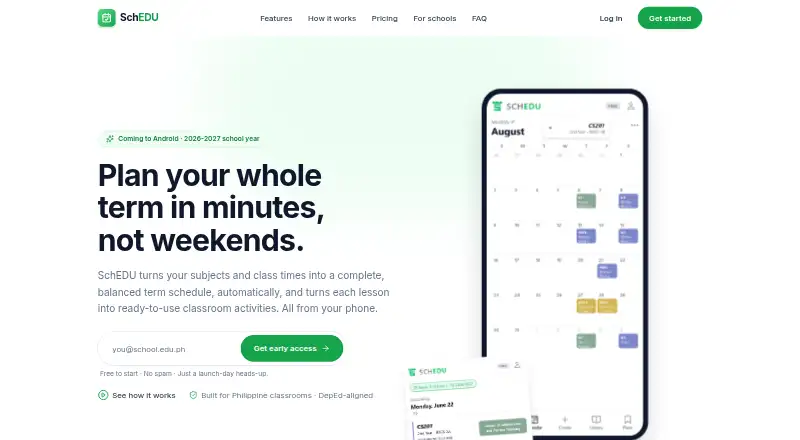
What SchEDU is
SchEDU turns subjects and class times into term schedules and classroom activities for teachers and schools. Its automatic planning spaces quizzes, sequences performance tasks and exams, and accounts for review buffers and holidays. It can draft quizzes, written work, performance tasks, and exams from lessons, while tracking sections separately with plan status and completion visibility. Activities and exams can be exported as Word or PDF documents. Users can import text from existing PDFs and photos, and upload a template so generated documents follow a school format. SchEDU supports DepEd school-year calendars and college prelim-midterm-final terms. Department heads can view teachers’ plans and progress in a dashboard. It is designed for subject teachers, class advisers, new and busy teachers, departments, and schools. SchEDU says it will soft-launch on Android for the 2026–2027 school year, while plan upgrades can be made from the web. Automated generation may send selected lesson content to trusted AI service providers. A free plan is available; Pro costs $4.99 a month and Max costs $9.99 a month.
Good
- Plans quizzes, performance tasks, and exams across a term.
- Tracks each section’s plan status and completion.
- Exports activities and exams as Word or PDF.
- Supports DepEd and college term calendars.
- Includes a free plan.
Watch out
- Android soft launch is planned for the 2026–2027 school year.
- Free plan allows two lesson plans for life.
- Automated generation may send selected lesson content to AI providers.
Who it suits
SchEDU suits teachers who want help scheduling term activities and preparing lesson-based assessments. Department heads can use its dashboard to view teachers’ plans and progress.
Verdict
SchEDU combines term planning, activity drafting, and section tracking for teachers and departments. Note the stated Android launch timing and the free plan’s lifetime lesson-plan limit.
Plans and prices
From SchEDU's own pricing page, checked 15 Oct 2026.
| Plan | Price | What it gives you |
|---|---|---|
| Free | Free | 2 lesson plans lifetime · 2 subjects · 1 automated activity/exam per day · full-term auto-planning · $0 forever |
| Pro | $4.99 a month | 10 lesson plans · 5 subjects · 10 automated activities/exams per day · everything in Free · $4.99/month; billed monthly |
| Max | $9.99 a month | 20 lesson plans · 20 subjects · 20 automated activities/exams per day · everything in Pro · $9.99/month; billed monthly |
The facts
Each one read from SchEDU's own pages, with the date it was checked.
What it does
- Academic calendars
- Planning supports DepEd school-year calendars and college prelim-midterm-final terms.checked 15 Oct 2026
- Activity generation
- Lessons can be turned into draft quizzes, written work, performance tasks and exams with included items and instructions.checked 15 Oct 2026
- Age requirement
- Users must be at least 18 or the local age of majority to use the service.checked 15 Oct 2026
- AI data handling
- Selected lesson content may be sent to trusted AI providers to generate requested activities or exams.checked 15 Oct 2026
- AI limitation
- Generated schedules, activities and exams are drafts that may contain mistakes and are not guaranteed to meet school or DepEd requirements.checked 15 Oct 2026
- AI processing
- Automated activity and exam generation may send selected lesson content to trusted AI service providers to produce requested materials.checked 1 Oct 2026
- API and SDKs
- The official site navigation links product, pricing, how-it-works, schools, privacy and terms pages but does not link public API or SDK documentation.checked 15 Oct 2026
- Audience
- The product is designed for subject teachers, class advisers, new teachers, busy teachers, departments, and schools.checked 1 Oct 2026
- Calendar views
- The product provides monthly overviews and daily class timelines.checked 15 Oct 2026
- Cancellation
- Cancellation keeps paid features active through the current billing period, with no refund for a started period except where law requires.checked 15 Oct 2026
- Content import
- Text can be imported from PDFs and photos to help create lessons and activities.checked 15 Oct 2026
- Core function
- SchEDU turns subjects and class times into a complete, balanced term schedule and classroom activities.checked 1 Oct 2026
- Deletion
- Users can delete their account and associated content from app settings or request deletion by email.checked 15 Oct 2026
- Department dashboard
- Department heads can view teachers’ plans and progress in one dashboard.checked 15 Oct 2026
- Document export
- Generated activities and exams can be exported as Word or PDF documents.checked 15 Oct 2026
- Integrations
- The official feature and legal pages do not describe third-party calendar, LMS or developer integrations.checked 15 Oct 2026
- Launch status
- SchEDU says it is coming to Android for the 2026–2027 school year and invites users to join early access.checked 15 Oct 2026
- Lesson library
- Subjects, units, chapters and lessons are stored in an organized reusable library.checked 15 Oct 2026
- Lesson materials
- It automatically drafts quizzes, written work, performance tasks, and exams from lessons.checked 1 Oct 2026
- Mid-term start
- Users can enter their current point in a term so SchEDU plans only the remaining work.checked 15 Oct 2026
Money
- Automatic planning
- It spaces quizzes, orders performance tasks and exams, and respects review buffers and holidays.checked 1 Oct 2026
- Automatic term planning
- The service spaces lessons and assessments, orders performance tasks and exams, and accounts for review buffers and holidays.checked 15 Oct 2026
- Billing
- Paid subscriptions are charged monthly in advance through PayMongo in the Philippines or cards internationally and renew until cancelled.checked 15 Oct 2026
The company
- Maker identity
- The service identifies its operator simply as SchEDU and provides [email protected] as its contact address.checked 15 Oct 2026
The full review of SchEDU
SchEDU is a term-planning and classroom-materials app for teachers whose work follows DepEd or college term calendars. It is especially well suited to busy teachers and departments coordinating several sections. Its value lies in pairing balanced schedules with assessment drafting and progress tracking, though its free plan’s two-plan lifetime cap is restrictive.
Overview
SchEDU takes subjects and class times and builds a term schedule, then helps turn lessons into classroom activities. Separate section tracking and a department-wide view make it more useful for coordinating classes than a planner focused only on an individual teacher’s calendar. Teachers who simply need a place to record lessons may find that broader workflow unnecessary.
Key features
Term planning and activity drafting
Automatic planning spaces quizzes, sequences performance tasks and exams, and accounts for review buffers and holidays. That can help teachers distribute assessment work across a term; the plan still needs to fit the needs of each class. SchEDU drafts quizzes, written work, performance tasks and exams from lessons, with daily generation quotas that make the paid tiers more suitable for frequent use.
Materials and oversight
Text can be imported from PDFs and photos, and teachers can upload a school template for generated documents. Export to Word or PDF makes activities and exams easier to carry into existing document workflows. Each section has its own pace and completion status, while department heads can see teachers’ plans and progress in one dashboard—a meaningful advantage for school oversight, but less relevant to a solo teacher.
Calendar support covers DepEd school years and college prelim-midterm-final terms. SchEDU says it handles personal information under the Philippine Data Privacy Act of 2012 and its implementing rules; data is encrypted in transit, database access is controlled per user, and payment credentials are handled by payment providers. Requested activity and exam generation may send selected lesson content to trusted AI providers.
Pricing
The Free plan costs free, billed forever. It includes full-term auto-planning, two subjects, one automated activity or exam per day, and only two lesson plans for the lifetime of the account. That lifetime cap makes it a way to try the workflow or manage a very small planning load, not a roomy ongoing option.
Pro costs $4.99 a month, billed monthly, and raises the allowance to 10 lesson plans, five subjects and 10 automated activities or exams per day. It suits an individual teacher who needs more room than Free without Max’s larger quotas. Max costs $9.99 a month, billed monthly, and includes 20 lesson plans, 20 subjects and 20 generated activities or exams per day. It is the stronger fit for heavier workloads across more subjects. Both paid plans include everything in Free; even Max remains capped at 20 lesson plans.
Platforms
SchEDU is web-based, with an Android soft launch planned for the 2026-2027 school year. Plan upgrades can be made from the web. Readers needing iOS access should consider another option.
Who it's for
Subject teachers, class advisers, new and busy teachers can use SchEDU to organize term assessments and prepare classroom materials. Its section tracking and department dashboard make it particularly relevant to departments and schools that need visibility across teachers’ plans. It is a weaker fit for educators who need iOS support or more than 20 lesson plans under a single plan.
Pros and cons
Pros
- Automatic term planning accounts for assessment order, review buffers and holidays, reducing the work of balancing a schedule.
- PDF/photo text import, school templates and Word/PDF export connect lesson content to document preparation.
- Per-section tracking and a department dashboard support oversight beyond one teacher’s own plan.
Cons
- The Free plan allows just two lesson plans over the account’s lifetime, sharply limiting continued use.
- Paid tiers still cap lesson plans at 10 or 20, so larger workloads may outgrow them.
- Android launch timing is stated for the 2026-2027 school year; iOS is not a supported platform.
- Generation may send selected lesson content to AI service providers, a consideration for schools handling sensitive material.
Alternatives
Browse lesson planning software to compare options across the category. Choose LessonApp if you want a free tier with 50+ teaching methods, up to 10 draft lessons, printable plans and the ability to browse and apply other users’ plans. Planboard is another free digital lesson-planning option for teachers. PlanbookEdu may suit teachers who prioritize unlimited weekly plans and A/B-day or rotation schedules on its free tier. Common Planner is worth considering for web-based planning with a free AI lesson assistant and Google Classroom posting. For a web tool with a free monthly allowance of generated lessons, unit plans, standalone materials and assistant messages, consider Lesson Maker Pro. Lessonly, TeacherHero and Ignite are also alternatives.
Verdict
SchEDU is a good match for teachers and departments that need term schedules, drafted assessments and visibility across sections in one workflow. Its department dashboard and school-oriented document support are compelling reasons to choose it; the free plan’s lifetime limit and paid plan caps are strong reasons to look elsewhere if your teaching load is large or growing.
Alternatives to SchEDU
- 1

Common Planner
Free planAndroidiOSWebAPI8.0From $5.59 a month - 2

LessonApp
Free planAndroidiOSWeb7.9From $99 a year - 3

PlanbookEdu
Free planAndroidiOSWeb7.8From $30 a year - 4

Lesson Maker Pro
Free planWeb7.3From $72.50 a year - 5

Planbook
AndroidiOSWeb6.9From $14 a year - 6

Daytical
AndroidiOSWeb6.8From $144 a year