
Lesson Maker Pro
Lesson Maker Pro is a web app that helps teachers plan lessons, organize a teaching week, and create classroom materials.
What Lesson Maker Pro is
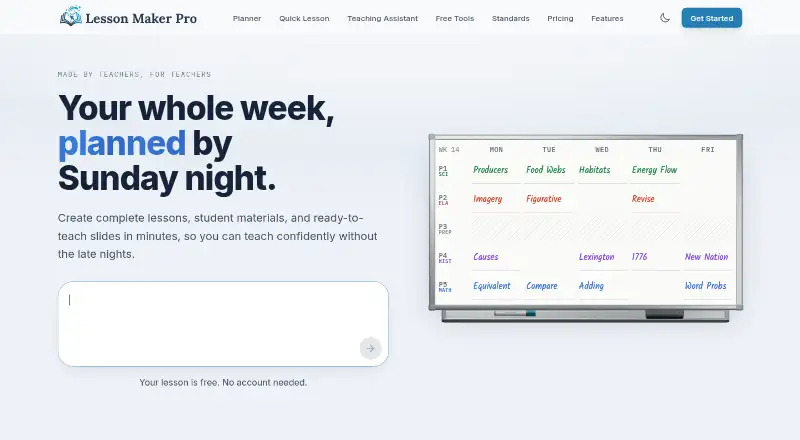
Lesson Maker Pro is a web app that helps teachers plan lessons, organize a teaching week, and create classroom materials. Its weekly planner is a drag-and-drop board for placing lessons into a bell schedule and switching days. The Teaching Assistant can brainstorm, draft lesson plans, suggest activities, and discuss teaching questions. Lesson plans can align with Common Core, NGSS, and state standards from a catalog of more than 455,000 standards. The app generates worksheets, handouts, assessments, student notes, teacher guides, graphic organizers, infographics, card sheets, and presentations. Materials can be downloaded as PDF, DOCX, or PPTX, or sent to Google Docs, Slides, Forms, and Classroom. Free accounts include sub plans that can be printed or shared using a private link. Student accounts, rosters, and student data are not needed; Digital Experiences also require no student accounts, installs, or app, and their links work for two weeks. The free plan allows five generated lessons and one unit plan monthly, ten standalone materials monthly, and 25 Teaching Assistant messages monthly. Pro is $7.99 a month, billed annually.
Good
- Drag-and-drop weekly planner for bell schedules.
- Aligns plans to a catalog of 455,000+ standards.
- Generates a broad range of classroom materials.
- Exports to PDF, DOCX, PPTX, and Google tools.
- Free accounts include printable or shareable sub plans.
Watch out
- Free plan caps lessons, materials, and assistant messages monthly.
- Pro is $7.99 a month, billed annually.
- Web-only access; mobile access is through the web.
- Digital Experience links work for two weeks.
Who it suits
It suits teachers who want to plan around a weekly bell schedule and prepare lesson materials. It may also fit teachers who need standards alignment and exports to common Google classroom tools.
Verdict
Lesson Maker Pro combines weekly planning with lesson drafting, standards alignment, and classroom-material creation. Compare the free monthly allowances with the annually billed Pro plan if you expect heavier use.
Plans and prices
From Lesson Maker Pro's own pricing page, checked 15 Oct 2026.
| Plan | Price | What it gives you |
|---|---|---|
| Free | Free | 5 generated lessons + 1 unit plan/month · 10 standalone materials/month · 25 Teaching Assistant messages/month · Free forever |
| Pro | $7.99 a month | Unlimited generated lessons · 5 unit plans/month · unlimited standalone materials · unlimited Teaching Assistant messages · Billed annually at $95.88 |
| Schools | $72.50 a year | Pro for every teacher · centralized seat management · invoice or purchase-order billing · onboarding support · Per seat annually; minimum 10 seats |
The facts
Each one read from Lesson Maker Pro's own pages, with the date it was checked.
What it does
- Activity library
- The Activity Library contains 100 customizable classroom activities.checked 15 Oct 2026
- Adaptations
- Saved or uploaded resources can be adapted for learner support, reading level, multilingual use or extension work.checked 15 Oct 2026
- AI providers
- Generation uses OpenAI with Anthropic as fallback; the company says provider training on Lesson Maker Pro content is disabled or excluded by default.checked 15 Oct 2026
- API and SDK
- The security page mentions centrally authenticated protected API routes but gives no public API, SDK or developer documentation.checked 15 Oct 2026
- Data retention
- Student session records are deleted after 14 days, anonymous completion records after 12 months, and account deletion is handled by request.checked 30 Sep 2026
- Digital experiences
- Lessons can become self-paced student activities with maps, levels, interactive checks, XP, streaks and a final boss battle.checked 15 Oct 2026
- Export integrations
- Materials can be downloaded as PDF, DOCX, or PPTX, or exported to Google Docs, Slides, Forms, and Classroom.checked 30 Sep 2026
- Founder background
- High Tech High Graduate School of Education credits Matt Gottilla on a 2021 sixth-grade adaptive-gaming project.checked 15 Oct 2026
- Independent coverage
- USA News reported on November 27, 2025 that Matt Gottilla founded the AI lesson-planning platform after seeing teachers struggle with detailed planning and materials.checked 15 Oct 2026
- Independent time claim
- USA News reported the founder's claim that Lesson Maker Pro can reduce lesson-planning time by more than 95 percent.checked 15 Oct 2026
- Integrations
- Official subprocessors and export descriptions list Google Drive, Docs, Slides, Forms and Classroom integrations.checked 15 Oct 2026
- Lesson chat
- Each lesson includes chat-based editing whose changes appear directly in the plan.checked 15 Oct 2026
- Limit: AI accuracy
- AIToolsCapital warns that generated content still needs teacher review for accuracy and standards alignment.checked 15 Oct 2026
- Limit: differentiation
- AIToolsCapital says deep differentiation and IEP-specific work generally require manual effort.checked 15 Oct 2026
- Materials
- It generates worksheets, handouts, assessments, student notes, teacher guides, graphic organizers, infographics, card sheets, and presentations.checked 30 Sep 2026
- Materials generator
- The product generates worksheets, handouts, assessments, student notes, teacher guides, graphic organizers, infographics, card sheets and presentations.checked 15 Oct 2026
- Pilot offer
- The founding-district pilot provides Pro free through June 2027 with no contract or automatic conversion to paid service.checked 15 Oct 2026
- Praise: workflow breadth
- AIToolsCapital praises producing a plan, worksheets, assessment and slides together, conversational refinement, weekly pacing and manual editing.checked 15 Oct 2026
- Presentation generator
- Generated decks contain 13 or more slide types, speaker notes, slide-level editing and export to PowerPoint, Google Slides or PDF.checked 15 Oct 2026
- Privacy
- The company says it has no student accounts or rosters, does not sell personal information, and offers a data-processing agreement on request.checked 15 Oct 2026
- Purpose
- Lesson Maker Pro helps teachers plan lessons, organize their week, and build accompanying materials.checked 30 Sep 2026
- Rating on AI Tools Capital
- No rating from 0 reviews; the page says users should be the first reviewer.checked 15 Oct 2026
Money
- AI lesson planner
- The Quick Lesson form turns a topic, grade and class period into a standards-aligned lesson plan.checked 15 Oct 2026
The company
- Maker scale
- The contact page describes Lesson Maker Pro as a small operation whose support messages go directly to the founder.checked 15 Oct 2026
The full review of Lesson Maker Pro
Lesson Maker Pro is a web-based planning and material-generation workspace for teachers who want scheduling, standards alignment, and classroom resources together. It is strongest for educators working without student logins, while the principal drawback is limited monthly usage on Free and annual billing for Pro.
Overview
The weekly planner uses a drag-and-drop board for placing lessons into a bell schedule and moving them between days. A calendar view adds a broader planning perspective, so teachers managing frequent timetable changes can keep scheduling and preparation in one workspace rather than maintaining separate systems.
Lesson Maker Pro does not provide student accounts, rosters, or student logins, and it does not need student data to operate. Traffic is encrypted with TLS, the database provider encrypts stored data, and row-level security restricts each account to its own records. Lesson generation uses OpenAI models with Anthropic as a fallback; neither provider may use Lesson Maker Pro content to train its models. Student session records are deleted after 14 days, anonymous completion records after 12 months, and account deletion requires a request, which schools should account for during offboarding.
Key features
The Teaching Assistant can brainstorm ideas, draft lesson plans, suggest activities, and answer teaching questions. It is a practical first pass for preparation, but teachers remain responsible for checking accuracy, suitability, and classroom context. Free users receive 25 Teaching Assistant messages per month, making sustained experimentation difficult without upgrading.
Plans can align with Common Core, NGSS, and state standards from a catalog of more than 455,000 entries. That breadth benefits standards-conscious planning across different jurisdictions. The service also creates worksheets, handouts, assessments, student notes, teacher guides, graphic organizers, infographics, card sheets, and presentations, giving teachers a wide range of starting points for print and digital work.
Downloads support PDF, DOCX, and PPTX. Exports to Google Docs, Slides, Forms, and Classroom fit schools already using Google Workspace and reduce conversion work. Sub plans are included with every free account and can be printed or shared through a private link. Digital Experiences require no student account, installation, or app; their shared links work for two weeks, which suits short-lived activities but not permanent course access.
Pricing
Free costs nothing account. It includes five generated lessons and one unit plan per month, 10 standalone materials per month, and 25 Teaching Assistant messages per month. Sub plans are included, so occasional users can cover basic planning and resource creation without payment, but the quotas can restrict a teacher preparing several classes each week.
Pro costs $7.99 a month, billed annually at $95.88. It provides unlimited generated lessons, five unit plans, unlimited standalone materials, and unlimited Teaching Assistant messages. This is the sensible tier for individual teachers who will use AI drafting and material generation regularly; annual prepayment is the commitment to weigh against that higher allowance.
Schools uses custom pricing at $72.50 per seat per year, billed annually, with a minimum of 10 seats. Each seat grants one teacher Pro, and the plan offers discounted per-seat pricing. It fits schools buying for a group rather than a single educator, but the minimum 10-seat purchase rules out small or trial deployments.
Platforms
Lesson Maker Pro runs on the web. Mobile access is therefore through a browser rather than a dedicated mobile application, while exports cover PDF, Word, PowerPoint, Google Docs, Google Slides, Google Forms, and Google Classroom.
Who it's for
Choose it if you want a weekly schedule, AI-assisted drafting, standards-aware planning, and varied classroom materials in one browser workspace, especially when student data and logins are undesirable. It is less suitable for teachers needing generous free usage, native mobile apps, or a low-commitment paid plan, since Pro is billed annually.
Pros and cons
- Pro: The planner combines bell-schedule organization with a calendar view and day swapping.
- Pro: More than 455,000 Common Core, NGSS, and state standards support detailed alignment.
- Pro: Broad material generation and direct Google exports support both printed and digital lessons.
- Pro: No student accounts or student data requirement simplifies classroom access and privacy management.
- Con: Free quotas cap lessons, unit plans, materials, and assistant messages each month.
- Con: Pro requires annual billing, while Schools requires at least 10 seats.
- Con: Web-only access may disappoint teachers seeking native Android or iOS apps.
Alternatives
LessonApp is the better choice if you need Android, iOS, and web access, 50-plus teaching methods, or the ability to browse and apply other users’ plans; its free Basic Licence allows up to 10 draft lessons.
Planboard suits teachers who want free digital lesson planning across Android, iOS, and web.
PlanbookEdu is preferable for unlimited weekly plans, A/B and rotation schedules, and word-processor editing on iPad and phone through its free tier.
SchEDU fits Android and web users seeking automated term planning, though its free plan allows only two lifetime lesson plans and two subjects.
Common Planner is an alternative for web users wanting an AI lesson assistant, multi-period planning, and up to 50 lessons posted to Google Classroom on its free teacher plan.
Lessonly is a free web-based alternative.
TeacherHero is another freemium web option with a free account.
Ignite is a free web alternative.
For a wider comparison, see Lesson Planning Software.
Verdict
Lesson Maker Pro is a strong match for teachers who want one web workspace for shifting weekly schedules, standards-aligned AI drafting, and export-ready materials without student accounts. Choose Pro when the free quotas would interrupt regular preparation; look elsewhere if native mobile apps, unlimited free planning, or month-to-month payment matters more than an integrated workflow.
Alternatives to Lesson Maker Pro
- 1

Common Planner
Free planAndroidiOSWebAPI8.0From $5.59 a month - 2

LessonApp
Free planAndroidiOSWeb7.9From $99 a year - 3

PlanbookEdu
Free planAndroidiOSWeb7.8From $30 a year - 4
SchEDU
Free planAndroidWeb7.5From $4.99 a month - 5

Planbook
AndroidiOSWeb6.9From $14 a year - 6

Daytical
AndroidiOSWeb6.8From $144 a year