
Cloudsfer
Cloudsfer provides migration, backup and synchronization for data across cloud and on-premise systems.
What Cloudsfer is
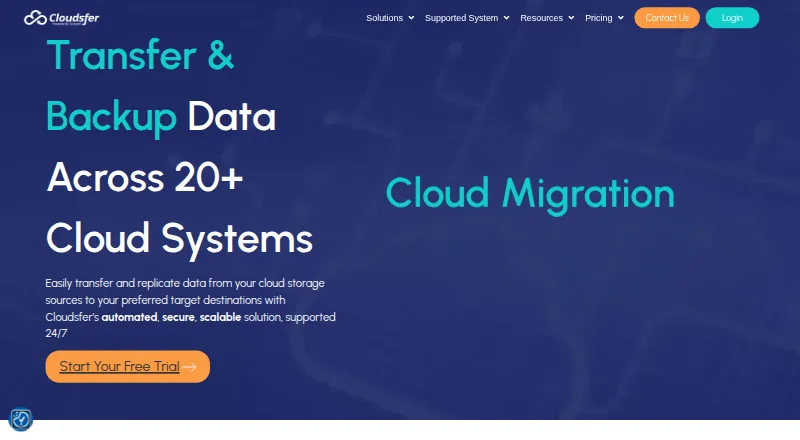
Cloudsfer provides migration, backup and synchronization for data across cloud and on-premise systems. Its migration service supports more than 20 cloud storage providers, with listed connections including Dropbox, Box, OneDrive, SharePoint Online, Egnyte, Amazon S3 and Azure Blob. Transfer tools include delta migration, filters, detailed reports and an on-premise agent. Backup can run automatically on daily, weekly or monthly schedules, including to a local environment. Synchronization transfers cloud and on-premise data on a configured schedule and moves only changes. Cloudsfer says communications between systems are encrypted and that it does not store user data or passwords; its migration page says transfers use TLS and data is not stored on its servers. The Free Tier is $0 / Month for 1GB. Essential costs $100.00 per month for 100GB, with $1.20 per GB overage and one parallel job. Higher listed plans provide more capacity and parallel jobs, with separate overage rates. The company describes its migration solution as serving IT administrators and entire organizations.
Good
- Migration supports more than 20 cloud storage providers
- Backup schedules can be daily, weekly or monthly
- Sync transfers only data changes
- Transfer tiers include reports, filters and delta migration
- Free Tier includes 1GB
Watch out
- Free Tier is limited to 1GB
- Essential includes 100GB and one parallel job
- Essential overage is $1.20 per GB
Who it suits
Cloudsfer suits IT administrators and organizations moving or synchronizing data between cloud and on-premise systems. Its scheduled backup options may also suit teams that need recurring copies, including to a local environment.
Verdict
Cloudsfer combines migration, scheduled backup and delta-based synchronization for cloud and on-premise data. Compare transfer quotas, parallel-job counts and overage rates when selecting a paid tier.
Plans and prices
From Cloudsfer's own pricing page, checked 15 Oct 2026.
| Plan | Price | What it gives you |
|---|---|---|
| Free | Free | 250 MB · 1 parallel job · free support · Always $0 |
| Free Tier | Free | 1GB · $0 / Month |
| Basic | $25 a month | 25 GB/month · $0.75 per additional GB · one-time migration · 1 parallel job · Billed monthly + Pay as you go |
| Essential | $100 a month | 100GB · Overage: $1.20 per GB · 1 parallel job · Fixed: $100 / month |
| Standard | $100 a month | 100 GB/month · $0.75 per additional GB · backup · weekly scheduling · 2 parallel jobs · Billed monthly + Pay as you go |
| Pro | $250 a month | 250 GB/month · $0.75 per additional GB · backup and automatic sync · daily scheduling · 4 parallel jobs · Billed monthly + Pay as you go |
| Professional | $320 a month | 400GB · Overage: $0.90 per GB · 2 parallel jobs · Fixed: $320 / month |
| Enterprise | $780 a month | 1TB · Overage: $0.80 per GB · 4 parallel jobs · Fixed: $780 / month |
| Custom plan | Priced on request | Dedicated migration servers · professional consultancy · multi-user migration · tailored quotas · Contact sales for tailored pricing |
The facts
Each one read from Cloudsfer's own pages, with the date it was checked.
What it does
- Backup
- Cloudsfer describes automated backups on daily, weekly, or monthly schedules, including backup to a local environment.checked 28 Sep 2026
- CASA compliance
- Cloudsfer announced Google App Defense Alliance CASA Tier 2 compliance and alignment with NIST, OWASP and ISO/IEC 27001 practices.checked 15 Oct 2026
- Cloud integrations
- Supported connectors include Google Drive, Dropbox, Box, OneDrive, SharePoint Online, Amazon S3, Azure Blob, Egnyte, Backblaze B2, Procore, BIM 360, Autodesk Construction Cloud, WebDAV, FTP, OpenText, Yandex Disk and NAS file systems.checked 15 Oct 2026
- Cloudsfer Sync
- The Sync feature listens for Autodesk Construction Cloud file and folder events and replicates them to destinations including Box, Google Drive, SharePoint, OneDrive, Egnyte and Windows file servers.checked 15 Oct 2026
- Crunchbase profile
- Crunchbase describes Cloudsfer as an active private Tzunami sub-organization in New York with a 1–10 employee estimate and no publicly displayed founded year.checked 15 Oct 2026
- Delta migration
- Delta mode transfers only newly changed data instead of repeating a complete migration.checked 15 Oct 2026
- Documentation depth
- The help center lists 24 integration guides, 10 on-premises articles, 9 bulk-migration articles, 10 backup articles, 2 restore articles and 40 FAQ entries.checked 15 Oct 2026
- Integrations
- Listed systems include Dropbox, Box, OneDrive, SharePoint Online, Egnyte, Amazon S3, Google Drive, Azure Blob, BIM 360, Procore, FTP, and WebDAV.checked 28 Sep 2026
- Intended users
- Cloudsfer describes its migration solution as serving IT administrators and entire organizations.checked 28 Sep 2026
- Launch
- Cloudsfer says it launched in 2015.checked 28 Sep 2026
- Limit: pricing
- A G2 reviewer stopped using Cloudsfer because of price and another requested more plans or bulk-transfer discounts.checked 15 Oct 2026
- Limit: reliability and visibility
- A recent G2 reviewer reported very slow transfers, recurring disconnections, failed file moves and weak failure-status guidance.checked 15 Oct 2026
- Limit: security expectations
- One G2 reviewer considered Cloudsfer less privacy-focused than competitors and said it lacked more advanced protections such as zero-knowledge encryption.checked 15 Oct 2026
- Limit: SFTP and usability
- A Software Advice review reported that SFTP was unsupported, the interface was less easy than newer alternatives and chat support sometimes ended before issues were solved.checked 15 Oct 2026
- Limit: support responsiveness
- Reviews mention slow responses from support, especially outside business hours.checked 15 Oct 2026
- Metadata and versions
- The feature set preserves file dates, authors and version history during migration.checked 15 Oct 2026
- Migration
- The service supports migration to more than 20 cloud storage providers.checked 28 Sep 2026
- Migration scale
- The maker says the service supports more than 20 cloud systems and has migrated over 20 million users and thousands of terabytes.checked 15 Oct 2026
- Migration security
- The migration pricing page says transfers use secure TLS protocols and data is not stored on Cloudsfer servers.checked 28 Sep 2026
- Multi-user migration
- Administrators can migrate multiple users while retaining permissions, shared folders and security settings.checked 15 Oct 2026
The company
- Company facts
- LinkedIn lists Cloudsfer as privately held software-development company founded in 2014, headquartered in New York and employing 11–50 people.checked 15 Oct 2026
- Company ownership
- Cloudsfer is presented as a product created and powered by Tzunami Inc.checked 15 Oct 2026
- Headquarters
- New York, United Stateschecked 28 Sep 2026
- Maker history
- LinkedIn lists Tzunami as founded in 1999, privately held, headquartered in New York and sized at 51–200 employees.checked 15 Oct 2026
The full review of Cloudsfer
Overview
Cloudsfer brings file migration, scheduled backup and synchronization together for IT administrators and organizations moving data among cloud and on-premise systems. It is strongest when a team needs migration controls across many storage services; the key trade-off is that its $100 a month entry plan allows just one parallel job and 100GB of transfers.
Key features
Cloudsfer connects to more than 20 cloud storage providers, with supported systems spanning Google Drive, Dropbox, Box, OneDrive, SharePoint Online, Egnyte, Amazon S3, Azure Blob, NAS file systems, OpenText, FTP, WebDAV, BIM 360, Autodesk Construction Cloud, Procore, Backblaze B2, CyberFortress, Yandex Disk and Amazon S3-compatible storage. That breadth is useful for organizations consolidating or moving files across a mixed environment, rather than users working within one service.
Migration includes delta transfers, filters, detailed reports, an on-premise agent and cutover orchestration. Metadata and access preservation are supported, and these tools appear across all four listed migration tiers. Delta migration reduces repeated work when files have not changed, while report and cutover controls help administrators manage a planned move. The practical ceiling is concurrency: Essential permits one parallel job, compared with two on Professional and four on Enterprise.
Scheduled synchronization transfers cloud and on-premise data and moves only deltas. Automated backups can run daily, weekly or monthly, including to a local environment. These scheduled options suit teams maintaining recurring copies; Cloudsfer is less compelling for someone who only needs a simple personal backup destination.
Cloudsfer says system communications are encrypted and that it does not retain user data or passwords. Its migration pricing page also describes TLS-protected transfers without data storage on Cloudsfer servers. These are relevant assurances for organizational migrations, though they do not replace a team's own security review.
Pricing
The Free Tier costs nothing and includes 1GB, with email ticketing support. It is a small test or limited transfer allowance, not a practical migration tier for substantial file sets. Cloudsfer also advertises 5 GB free and transfer pricing from $0.25 per GB transferred; that usage option is distinct from the tiered monthly quotas.
Essential costs $100 a month for 100GB, one parallel job and overage at $1.20 per GB. It is the lowest paid option, but the single-job cap and relatively high overage rate favor smaller, sequential migrations.
Professional costs $320 a month for 400GB, two parallel jobs and $0.90 per GB of overage. It suits teams needing more capacity and concurrency without moving to the top tier. Enterprise costs $780 a month for 1TB, four parallel jobs and $0.80 per GB over quota; it is the more suitable listed tier for larger workloads running multiple transfers, although the monthly commitment is substantially higher.
Paid plans include 24/7 technical support by email, phone and live chat. The Custom Plan uses custom pricing for large quotas or multi-user solutions. A free trial supplies the data volume needed for a test migration and requires no credit card, making it a sensible way to assess a transfer before choosing a quota.
Platforms
Cloudsfer is a web service. Its supported migration systems include cloud services and on-premise file systems, so it can bridge those environments without requiring a separate desktop platform.
Who it's for
Cloudsfer is best suited to IT administrators and organizations planning file migrations, scheduled backups or recurring synchronization across several storage systems. Its reporting, cutover orchestration and preservation options are particularly relevant to managed business moves. Individual users with modest backup needs are unlikely to benefit enough from these controls to justify the paid quotas.
Pros and cons
- Broad system coverage: More than 20 cloud providers and support for NAS, FTP and WebDAV make it useful in mixed environments.
- Migration controls: Delta migration, filtering, reports, cutover orchestration, and metadata and access preservation help administrators manage planned moves.
- Recurring data protection: Daily, weekly or monthly backup schedules and delta-based sync cover ongoing workflows as well as one-time transfers.
- Constrained entry tier: Essential's 100GB quota and one parallel job can bottleneck larger migrations, while over-quota use costs $1.20 per GB.
- Higher tiers require a meaningful step up: Professional is $320 a month and Enterprise is $780 a month, so additional capacity and concurrency come at a considerable increase over Essential.
Alternatives
For a broader comparison of migration-focused products, start with Storage Migration Software.
Synology Photos is a free photo option across web, desktop and mobile platforms, but its free plan requires a Synology NAS. Choose it for NAS-based photo management rather than multi-provider migration.
Google Cloud Storage is a freemium cloud storage service with usage-based Coldline pricing that varies by storage class and bucket location. It is a better fit when the goal is cloud storage rather than orchestrating a migration across providers.
NetApp XCP offers a free license described as renewable for another year and supports Linux, Windows and self-hosted use. Consider it for a license-based migration tool instead of a monthly transfer-quota plan.
Azure Storage Mover charges no fee for its capabilities, though standard storage, transaction and networking charges apply; it covers on-premises-to-Azure and AWS-to-Azure moves. Choose it when those routes and Azure are the focus.
Atempo Lina is a paid alternative with pricing available by request.
Synology Active Backup for SaaS is a free Synology NAS add-on for Microsoft 365 and Google Workspace. It is the more focused choice for those services and that hardware environment.
Data Dynamics StorageX uses a terabyte-consumption pricing model, a different option for teams whose needs are better matched to consumption-based capacity.
Komprise Intelligent Data Management offers a free trial and subscription capacity documented in a customer quote, making it another trial-first option with quote-based capacity.
Verdict
Choose Cloudsfer if your organization needs one service for planned migrations and recurring backup or synchronization across cloud and on-premise storage, especially when reporting, cutover controls and data-preservation support matter. Look elsewhere if your transfer is large but budget or concurrency is tight: even the entry paid tier is limited to 100GB and one job, and scaling capacity means a steep monthly increase.
Getting started
- Open the Cloudsfer website.
- Use the free trial for a test migration; it requires no credit card.
- Choose the Free Tier or a paid plan based on the listed transfer volume and parallel jobs.
- Connect the cloud or on-premise systems involved in the transfer.
- Set up a migration, backup schedule, or synchronization schedule.
Limits worth knowing
The Free Tier costs $0.00 per month and includes 1GB. Essential costs $100.00 per month for 100GB, with $1.20 per GB overage and one parallel job.
Questions
Is Cloudsfer free?
A Free Tier is listed at $0.00 per month for 1GB. The pricing page also advertises 5 GB free.
Is there a free trial?
Yes. The free trial provides the data volume needed for a test migration and requires no credit card.
Which platforms does Cloudsfer support?
Cloudsfer is listed as a web platform. Supported systems include Google Drive, Dropbox, Box, OneDrive, SharePoint Online, Egnyte, Amazon S3, Azure Blob, File System (NAS), OpenText, FTP, WebDAV, BIM 360, Autodesk Construction Cloud, and Procore.
Does Cloudsfer store transferred data?
Cloudsfer says it does not store user data or passwords. Its migration pricing page says transfers use TLS and data is not stored on Cloudsfer servers.
Who is Cloudsfer for?
Cloudsfer describes its migration solution as serving IT administrators and entire organizations.
Alternatives to Cloudsfer
- 1

Google Cloud Storage
Free planAndroidiOSWebAPI8.2From $0.01 a month - 2

Synology Photos
Free planAndroidiOSWebExtension7.7Free plan - 3
Datadobi DobiMigrate
Free planWebAPILinuxSelf-hosted6.8Free plan - 4

Synology Active Backup for SaaS
Free planSelf-hosted6.7Free plan - 5
Peer Global File Service
LinuxSelf-hostedWindows6.3 - 6
PoINT Storage Manager
WebSelf-hostedWindows6.3