Google Cloud Storage
Google Cloud Storage is a managed service for keeping unstructured data in buckets.
What Google Cloud Storage is
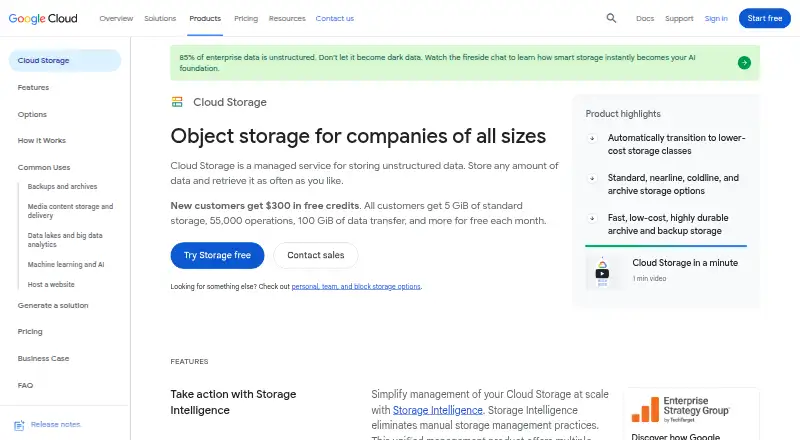
Google Cloud Storage is a managed service for keeping unstructured data in buckets. It offers Standard, Nearline, Coldline, Archive, and Rapid storage classes for different access patterns, with Autoclass and Object Lifecycle Management able to change or delete objects under access-based or custom rules. Data can be used with BigQuery, Managed Service for Apache Spark, and Gemini Enterprise Agent Platform. Transfer options include online, offline, and SFTP methods. Security controls include IAM access controls, encryption at rest and in transit, retention policies, and signed URLs. Soft delete is enabled by default with seven days of retention, and Object Versioning can preserve overwritten or deleted objects. Dual-region and multi-region buckets replicate data across separated regions for 99.99% availability. Users can access the service through the browser-based console, client libraries, command-line tools, or JSON and XML APIs. Always Free usage has monthly limits for storage, operations, and qualifying transfer in three US regions. Other charges may apply for operations, retrieval, replication, and network use, with rates varying by location and storage class.
Good
- Five storage classes cover different access patterns.
- Lifecycle tools can transition or delete objects.
- Soft delete retains deleted objects for seven days by default.
- Dual-region and multi-region buckets offer 99.99% availability.
Watch out
- Storage, retrieval, operations, replication, and network charges can apply.
- Rates vary by location and storage class.
- Retrieval fees may apply to Coldline and Archive storage.
Who it suits
Google Cloud Storage suits organizations and developers that need bucket-based storage for unstructured data, with choices of storage class, lifecycle automation, and transfer tools. Its integrations and APIs may also suit teams using the listed analytics services or programmatic access.
Verdict
Google Cloud Storage offers multiple storage classes, lifecycle controls, and several access and transfer methods. Consider storage class, location, and usage-related charges when estimating what a bucket will cost.
Plans and prices
From Google Cloud Storage's own pricing page, checked 15 Oct 2026.
| Plan | Price | What it gives you |
|---|---|---|
| Coldline storage | Free | Data retained at least 90 days · retrieval fees apply · per GiB per month |
| Free tier | Free | 5 GiB standard storage · 5,000 Class A operations · 50,000 Class B operations · unlimited free operations · no Standard retrieval fee · 100 GiB North America transfer |
| Cloud Storage Coldline storage | Free | Best for data that can be stored for 90 days; retrieval fees may apply · Usage-based; rates vary by storage class and bucket location. |
| Archive storage | Free | Data retained at least 365 days · retrieval fees apply · per GiB per month |
| Cloud Storage Archive storage | Free | Best for data that can be stored for 365 days; retrieval fees may apply · Usage-based; rates vary by storage class and bucket location. |
| Cloud Storage Nearline storage | $0.01 a month | Best for data that can be stored for 30 days; retrieval fees may apply · Usage-based; rates vary by storage class and bucket location. |
| Nearline storage | $0.01 a month | Data retained at least 30 days · retrieval fees apply · per GiB per month |
| Standard storage | $0.02 a month | Frequently accessed data · per GiB per month |
| Cloud Storage Standard storage | $0.02 a month | Starting price shown; data processing and network usage can incur additional charges · Usage-based; rates vary by storage class and bucket location. |
The facts
Each one read from Google Cloud Storage's own pages, with the date it was checked.
What it does
- Analytics integrations
- Cloud Storage data can be used with BigQuery, Managed Service for Apache Spark, and Gemini Enterprise Agent Platform.checked 29 Sep 2026
- API protocols
- Cloud Storage supports HTTP/1.1, HTTP/2 and HTTP/3, plus JSON API, XML API and gRPC access.checked 15 Oct 2026
- APIs and tools
- Cloud Storage can be accessed through the browser-based Google Cloud console, client libraries, command-line tools, and JSON or XML APIs.checked 29 Sep 2026
- Authentication
- Client libraries support Application Default Credentials for local development and production authentication.checked 15 Oct 2026
- CLI
- The Google Cloud CLI is provided at no charge and includes commands for managing cloud resources at scale.checked 15 Oct 2026
- Client libraries
- Official client libraries are documented for C++, C#, Go, Java, Node.js, PHP, Python and Ruby.checked 15 Oct 2026
- Compliance
- Google Cloud publishes certifications, attestations, and audit reports for compliance controls, while noting providers cannot certify customers' own compliance with laws.checked 29 Sep 2026
- Crunchbase headcount
- Crunchbase lists Google with a 10,001-plus employee headcount and Mountain View, California headquarters.checked 15 Oct 2026
- Data organization
- Buckets belong to Google Cloud projects and can contain objects, folders and managed folders.checked 15 Oct 2026
- Deletion recovery
- Soft delete is enabled by default with a seven day retention period, and Object Versioning can preserve overwritten or deleted objects.checked 29 Sep 2026
- Documentation depth
- Documentation includes quickstarts, API references, code samples, best practices, issue trackers and source-code links for client libraries.checked 15 Oct 2026
- Encryption
- Server-side encryption is enabled by default, with optional customer-managed, customer-supplied and client-side encryption.checked 15 Oct 2026
- Integrations
- Buckets can back services including BigQuery, Vertex AI, Google Kubernetes Engine and Managed Service for Apache Spark.checked 15 Oct 2026
- Lifecycle automation
- Autoclass and Object Lifecycle Management can transition or delete objects according to access patterns or custom rules.checked 29 Sep 2026
- Lifecycle management
- Lifecycle rules can delete objects or move them to cheaper storage classes when configured conditions are met.checked 15 Oct 2026
- Limit: G2 pricing
- Reviewers repeatedly report complex pricing, expensive egress or retrieval fees and difficult cost forecasting.checked 15 Oct 2026
The company
- Company facts
- Gartner lists Google as founded in 1998 with headquarters in Mountain View, California.checked 15 Oct 2026
- Company size
- LinkedIn lists Google as a public company headquartered in Mountain View, California, with more than 10,001 employees.checked 15 Oct 2026
- Founded
- 1998checked 23 Sep 2026
- Headquarters
- Mountain View, California, United Stateschecked 23 Sep 2026
Money
- Free plan
- Yeschecked 20 Sep 2026
- Free usage
- The Always Free limits include 5 GB-months of Standard storage, 5,000 Class A operations, 50,000 Class B operations, and 100 GB of qualifying transfer monthly in three US regions.checked 29 Sep 2026
- Limit: Capterra interface and cost
- Capterra reviewers report that costs rise with larger data volumes and that the interface can be difficult for beginners.checked 15 Oct 2026
Where it runs
- Google Play app scope
- The Google One Android app backs up phone data and manages storage shared by Google Drive, Gmail and Google Photos.checked 15 Oct 2026
The full review of Google Cloud Storage
Overview
Google Cloud Storage is a managed service for storing unstructured data in buckets, aimed at teams and developers who need durable object storage with flexible access and transfer options. Its range of storage classes and lifecycle controls can help match costs to usage, but charges beyond storage make the right class, location, and access pattern important choices.
Key features
Standard, Nearline, Coldline, Archive, and Rapid storage classes cover different access patterns. Autoclass can adjust storage class based on access, while Object Lifecycle Management applies custom transition or deletion rules. That flexibility suits data with changing or predictable retention needs; it also means storage class selection and retrieval fees belong in the cost calculation.
Security controls include IAM access, encryption at rest and in transit, retention policies, and signed URLs. Soft delete is enabled by default for seven days, and Object Versioning can preserve overwritten or deleted objects. These safeguards help with access control and recovery, though retention and versioning choices need to reflect how long data should remain recoverable.
Dual-region and multi-region buckets replicate across geographically separated regions for 99.99% availability. For analysis, stored data can be used with BigQuery, Managed Service for Apache Spark, and Gemini Enterprise Agent Platform. Transfers are supported through Storage Transfer Service, Transfer Appliance, and Cloud FTP, with online, offline, and SFTP options.
Access is through the Google Cloud console, client libraries, command-line tools, and JSON or XML APIs. S3 compatibility, lifecycle rules, object versioning, object immutability, cross-region replication, and a maximum object size of 5120 GB make it adaptable to varied storage workflows. Google Cloud publishes compliance certifications, attestations, and audit reports; customers remain responsible for their own legal compliance.
Pricing
Pricing is usage-based, with charges potentially covering storage, operations, retrieval, replication, and network usage. Rates vary by storage class and bucket location, so the displayed monthly starting prices are not a complete estimate of a workload's bill.
- Standard storage: $0.02 a month starting price. It suits data accessed regularly; data processing and network usage can add charges.
- Nearline storage: $0.01 a month, billed usage-based, with rates varying by class and location. It is best for data stored for 30 days; retrieval fees may apply.
- Coldline storage: free, billed usage-based, with variable rates by class and location. It is best for data stored for 90 days; retrieval fees may apply.
- Archive storage: free, billed usage-based, with variable rates by class and location. It is best for data stored for 365 days; retrieval fees may apply.
The Always Free limits include 5 GB-months of Standard storage, 5,000 Class A operations, 50,000 Class B operations, and 100 GB of qualifying monthly transfer in three US regions. These caps make a small workload a possible fit, but they do not remove the need to account for usage beyond the limits or other charge categories. A free trial is available.
Platforms
Cloud Storage supports API, Linux, macOS, web, and Windows access. The browser console, command-line tools, libraries, and APIs give technical users several ways to manage buckets and integrate storage into applications.
Who it's for
Choose Google Cloud Storage for unstructured data that needs multiple access tiers, automated lifecycle handling, or integration with Google Cloud analytics and transfer services. It is less suitable when a predictable all-in price matters more than usage-based flexibility, or when retrieval and network costs would be difficult to forecast.
Pros and cons
- Pro: Multiple storage classes and lifecycle automation can align storage choices with access and retention patterns.
- Pro: Seven-day soft delete, versioning, security controls, and cross-region replication provide recovery and availability options.
- Pro: S3 compatibility and several APIs and tools support varied access workflows.
- Con: Storage is only one possible charge; operations, retrieval, replication, and network use can also affect cost.
- Con: Free Standard storage and operation quotas are capped, and qualifying transfer is limited to specified US regions.
Alternatives
Synology Photos is a free option for photo storage across Android, iOS, macOS, web, and Windows, but it requires a Synology NAS. Choose Cloudsfer when a web-based migration service with a 1 GB free tier and fixed monthly plans better fits the task.
Azure Storage Mover is a free alternative for moving data from on-premises systems to Azure or from AWS to Azure; standard storage, transaction, and networking charges still apply. NetApp Data Migrator is another free option.
Atempo Lina is a paid alternative with custom pricing. Synology Active Backup for SaaS is a free add-on for Synology NAS. Komprise Intelligent Data Management is a paid option with a free trial and subscription capacity documented in the customer quote. Data Dynamics StorageX is a paid option priced on a terabyte-consumption model.
For more options, see Storage Migration Software and Cloud Storage Services.
Verdict
Google Cloud Storage is a strong choice for technical teams that need bucket-based storage with tiering, lifecycle automation, broad tooling, and cross-region replication. Its main advantage is the range of ways to control and use stored data; look elsewhere if usage-based charges and retrieval costs make budgeting too uncertain.
Getting started
- Visit https://cloud.google.com/storage.
- Use the Google Cloud console, client libraries, command-line tools, or JSON or XML APIs.
- Choose a storage class based on the access pattern.
- Use a free trial or Always Free usage where applicable.
- Set lifecycle rules or versioning if they fit your storage needs.
Limits worth knowing
Always Free usage includes 5 GB-months of Standard storage, 5,000 Class A operations, 50,000 Class B operations, and 100 GB of qualifying monthly transfer in three US regions. Retrieval fees may apply for Coldline and Archive storage; usage charges can also include storage, operations, replication, and network use.
Questions
Is there free usage?
Yes. The Always Free limits include monthly Standard storage, operations, and qualifying transfer in three US regions. A free trial is also listed.
What are the listed storage prices?
Coldline and Archive are each free, usage-based, with rates varying by storage class and bucket location.
Does Google Cloud Storage support S3 compatibility?
Yes, S3 compatibility is listed.
Can it preserve overwritten or deleted objects?
Yes. Object Versioning can preserve overwritten or deleted objects, and soft delete is enabled by default with a seven day retention period.
Which platforms are listed?
API, Linux, macOS, web, and Windows are listed.
What integrations and transfer options are available?
Storage data can be used with BigQuery, Managed Service for Apache Spark, and Gemini Enterprise Agent Platform. Transfer options include Storage Transfer Service, Transfer Appliance, and Cloud FTP.
Alternatives to Google Cloud Storage
- 1

Synology Photos
Free planAndroidiOSWebExtension7.7Free plan - 2

Cloudsfer
Free planWebSelf-hostedWindows7.4Free plan - 3
Datadobi DobiMigrate
Free planWebAPILinuxSelf-hosted6.8Free plan - 4

Synology Active Backup for SaaS
Free planSelf-hosted6.7Free plan - 5
Peer Global File Service
LinuxSelf-hostedWindows6.3 - 6
PoINT Storage Manager
WebSelf-hostedWindows6.3