Clip Studio Paint
Clip Studio Paint is a digital art app for creating illustrations, comics, webtoons, and animation.
What Clip Studio Paint is
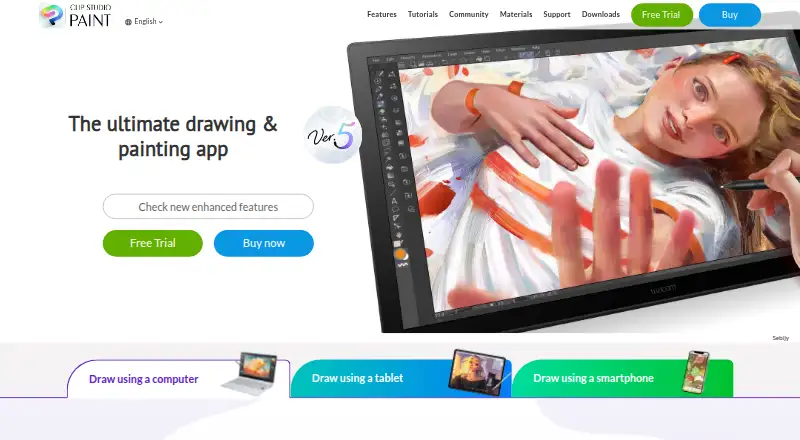
Clip Studio Paint is a digital art app for creating illustrations, comics, webtoons, and animation. Its customizable brushes are designed to evoke traditional materials, and adjustable 3D models can serve as drawing references for characters and backgrounds. Comic tools include panel frames, speech balloons, text, effect lines, screentones, and multi-page project management. Animation features include a light table and onion-skin tools; PRO handles simple animation up to 24 frames, while EX includes full-length animation tools. Monthly and annual plans include 10GB of cloud data, with options to expand storage. Clip Studio Assets offers downloadable brushes and materials, and projects can be saved in compatible and industry-standard formats. Versions are listed for Windows, macOS, iPad, iPhone, Android, Chromebook, and web. PRO is positioned for concept artists, illustrators, and designers, while EX is intended for comic and manga artists and animators. Pricing listed includes PRO at $0.99 per month and EX at $2.49 per month; trials can last up to six months depending on platform.
Good
- Customizable brushes and 3D drawing references
- Comic tools include multi-page project management
- PRO supports animation up to 24 frames
- Monthly and annual plans include 10GB cloud data
- Tutorials, Q&A community, and support are available
Watch out
- No free plan
- Perpetual licenses are limited to Windows and macOS
- Update Pass is separate for feature updates
Who it suits
PRO is suited to concept artists, illustrators, and designers. EX is aimed at comic and manga artists and animators who need multi-page management or full-length animation tools.
Verdict
Clip Studio Paint brings drawing, comic creation, and animation tools together, with PRO and EX aimed at different creative workflows. Compare the plan and platform details, especially if you want a perpetual license or ongoing feature updates.
Plans and prices
From Clip Studio Paint's own pricing page, checked 23 Sep 2026.
| Plan | Price | What it gives you |
|---|---|---|
| Clip Studio Paint PRO annual/monthly plan | $0.99 a month | For concept artists, illustrators, and designers · Available on iPad, Android, Windows, macOS, and iPhone · Includes new features, bonus materials, and 10GB of cloud storage · billed monthly |
| Clip Studio Paint EX annual/monthly plan | — | For comic artists, manga artists, and animators · Includes multi-page management and full-length 2D animation features · Available on iPad, Android, Windows, macOS, and iPhone |
| Clip Studio Paint PRO Ver. 5.0 perpetual license | $63 a month | Windows and macOS only · Pay once and use Version 5.0 indefinitely · Update Pass available separately |
| Clip Studio Paint EX Ver. 5.0 perpetual license | $277 a month | Windows and macOS only · Includes PRO features plus comic and animation features · Update Pass available separately |
| Clip Studio Paint PRO Annual / Monthly Plan | $0.99 a month | iPad · Android · Windows · macOS · iPhone · up to 3 months free for first-time subscribers · 10GB cloud data · US$0.99~/month |
| Clip Studio Paint EX Annual / Monthly Plan | $2.49 a month | iPad · Android · Windows · macOS · iPhone · up to 3 months free for first-time subscribers · 10GB cloud data · US$2.49~/month |
| Clip Studio Paint PRO Update Pass | $10.99 a year | Windows / macOS · one year of updates · first month free for first-time users · US$10.99 annually |
| Clip Studio Paint EX Update Pass | $31.99 a year | Windows / macOS · one year of updates · first month free for first-time users · US$31.99 annually |
| Clip Studio Paint PRO Ver. 5.0 Edition | $63, paid once | Windows / macOS · perpetual license · US$63.00 |
| Clip Studio Paint EX Ver. 5.0 Edition | $277, paid once | Windows / macOS · perpetual license · US$277.00 |
The facts
Each one read from Clip Studio Paint's own pages, with the date it was checked.
What it does
- 3D references
- Users can pose and adjust 3D reference models and use them to help draw characters and backgrounds.checked 30 Sep 2026
- Animation
- Animation tools include a light table and onion-skin features, and PRO supports simple animation up to 24 frames while EX includes full-length animation tools.checked 30 Sep 2026
- Asset materials
- Clip Studio Assets offers downloadable brushes and materials, and GOLD can be used to purchase materials there.checked 30 Sep 2026
- Brushes and drawing
- The app includes customizable brushes designed to provide the feel of traditional materials.checked 30 Sep 2026
- Cloud storage
- Annual and monthly plans include 10GB of cloud data, with the option to increase storage capacity.checked 30 Sep 2026
- Comic tools
- Comic tools include panel frames, speech balloons, text, effect lines, screentones, and multi-page project management.checked 30 Sep 2026
- File compatibility
- The product supports saving projects in compatible and industry-standard file formats for work across creative software.checked 30 Sep 2026
- Illustration tools
- Yeschecked 23 Sep 2026
- Intended users
- The maker describes PRO as suited to concept artists, illustrators, and designers, and EX as suited to comic artists, manga artists, and animators.checked 30 Sep 2026
- Paid from
- 0.99checked 23 Sep 2026
- Perpetual license limits
- The perpetual Ver. 5.0 license is available only for Windows and macOS, and a separately purchased Update Pass provides feature updates.checked 30 Sep 2026
- Purpose
- Clip Studio Paint is a digital art app for creating illustrations, comics, webtoons, and animations.checked 30 Sep 2026
- Security and compliance
- The official pages opened for this research did not state a security certification or compliance standard.checked 30 Sep 2026
- Support and learning
- The maker provides official tutorials and instructional videos, a Q&A community, and a support team.checked 30 Sep 2026
Where it runs
- Desktop app
- Yeschecked 23 Sep 2026
- Mobile app
- Yeschecked 23 Sep 2026
- Platform availability
- The download page lists Windows, macOS, iPad, iPhone, Galaxy, Android, and Chromebook versions.checked 30 Sep 2026
The company
- Founded
- 1991checked 23 Sep 2026
- Headquarters
- Tokyo, Japanchecked 23 Sep 2026
Money
- Free plan
- Nochecked 23 Sep 2026
- Trial availability
- The maker offers free trials of up to six months, with trial duration varying by platform.checked 30 Sep 2026
The full review of Clip Studio Paint
Clip Studio Paint is a digital art app for illustrations, comics, webtoons, and animation. It best suits artists who want drawing and comic-making tools in one workspace, with PRO for illustration and EX for fuller comic and animation workflows. The trade-off is that the strongest feature set depends on the plan, while perpetual licenses are limited to desktop.
Overview
Customizable brushes aim to reproduce the feel of traditional materials, while adjustable 3D reference models can help with character poses and backgrounds. The combination is useful for artists who want reference and drawing tools together, though Clip Studio Paint is a paid product with no free plan. Free trials run for up to six months, depending on platform.
Projects can be saved in compatible and industry-standard file formats for work across creative software. Clip Studio Assets adds downloadable brushes and materials, with GOLD available for purchasing materials. Monthly and annual plans include 10GB of cloud data, with the option to increase storage.
Key features
Drawing and comic creation
Comic tools cover panel frames, speech balloons, text, effect lines, screentones, and multi-page project management. That breadth makes the app a strong fit for people producing comics or manga, rather than someone seeking only a basic drawing canvas. EX is the plan aimed at comic artists and manga artists; PRO is positioned for concept artists, illustrators, and designers.
Animation
Both tiers approach animation differently: PRO supports simple animation up to 24 frames, while EX includes full-length animation tools, a light table, and onion-skin features. PRO is adequate for short animation work; animators who need full-length production tools should consider EX.
Learning and support
Official tutorials and instructional videos, a Q&A community, and a support team give new users several ways to learn the app and get help.
Pricing
Clip Studio Paint has monthly or annual subscriptions and one-time desktop licenses. The subscriptions include 10GB of cloud data and new features; the one-time licenses let users keep Version 5.0 indefinitely, but feature updates require a separately purchased Update Pass.
| Plan | Price | Best fit and trade-offs |
|---|---|---|
| PRO Annual / Monthly Plan | $0.99 a month (billed US$0.99~/month) | Illustrators, concept artists, and designers; includes new features, bonus materials, and 10GB of cloud data. First-time subscribers get up to three months free. |
| EX Annual / Monthly Plan | $2.49 a month (billed US$2.49~/month) | Comic artists, manga artists, and animators who need multi-page management and full-length 2D animation features. Includes 10GB of cloud data; first-time subscribers get up to three months free. |
| PRO Ver. 5.0 Edition | $63, paid once (billed US$63.00) | Windows and macOS users who prefer a perpetual license; feature updates require the separately available Update Pass. |
| EX Ver. 5.0 Edition | $277, paid once (billed US$277.00) | Windows and macOS users who want a perpetual license plus PRO features and comic and animation tools; feature updates require the separately available Update Pass. |
| PRO Update Pass | $10.99 a year (billed US$10.99 annually) | Windows and macOS license holders who want one year of updates; first-time users get the first month free. |
| EX Update Pass | $31.99 a year (billed US$31.99 annually) | Windows and macOS license holders who want one year of updates; first-time users get the first month free. |
EX costs more than PRO because it adds multi-page management and full-length animation tools. Choose PRO if its 24-frame animation limit is enough; choose EX when those expanded workflows matter. Subscription plans include new features, while perpetual licenses separate ongoing updates from the initial purchase.
Platforms
Clip Studio Paint is available for Windows, macOS, iPad, iPhone, Android, Galaxy, and Chromebook; the platform information also includes web. The listed subscription plans cover iPad, Android, Windows, macOS, and iPhone. Perpetual Version 5.0 licenses and Update Passes are limited to Windows and macOS, so mobile-first users need a subscription rather than a perpetual license.
Who it's for
PRO is the practical starting point for illustrators, concept artists, and designers who want customizable brushes, 3D references, and short-form animation. EX is the better match for comic and manga artists who need multi-page management, or animators who need full-length tools. Anyone who needs a free ongoing plan should look elsewhere; the trial is temporary and its length varies by platform.
Pros and cons
- Pro: Drawing, 3D references, comic production, and animation tools serve several creative workflows in one app.
- Pro: The two tiers let illustrators avoid paying for EX's expanded comic and animation capabilities when PRO is enough.
- Pro: Subscription plans include 10GB of cloud data and new features.
- Con: PRO animation is limited to simple work of up to 24 frames; full-length animation tools require EX.
- Con: Perpetual licenses are desktop-only, and feature updates require a separate Update Pass.
- Con: There is no free plan, so continuing to use the app requires a paid plan or license after the trial.
Alternatives
- MediBang Paint is a freemium option for users who want a free plan across Windows, macOS, iOS, and Android; its listed Premium plans offer 20GB storage for ¥300 a month or Premium100 for ¥500 a month.
- BlankComic is worth considering for a free comic-making option on Android, iOS, or web, with no subscription, account requirement, watermark, or hidden paid tiers.
- Anifusion is a web-based freemium alternative.
- GenToon is a freemium option on Android, iOS, and web, with a free tier of 150 credits per month and 20 characters.
- Comic Life is a paid alternative for Android, iOS, macOS, and Windows; its Mac version is listed at $29.99, paid once.
- ComicsAI is a web-based freemium alternative with a free tier.
- Dashtoon Studio is a web-based freemium alternative.
- StoryComic AI is a web-based freemium alternative with a free tier that includes scripts, previews, character sheets, and starting credits.
For broader comparisons, see Comic Creation Software, Digital Painting Software, and Graphic Design Software.
Verdict
Clip Studio Paint is a strong choice for artists who want illustration and comic tools together, with PRO for drawing and short animation and EX for multi-page comics or full-length animation. Its main advantage is that range of creative tools; its main reason to look elsewhere is the cost and platform constraint of ongoing use, especially for those who want a free plan or a perpetual mobile license.
Alternatives to Clip Studio Paint
- 1

ibisPaint
Free planAndroidiOSmacOSWindows8.1From $27.99 a year - 2

Concepts
Free planAndroidiOSWindows8.0Free plan - 3

Drawpile
Free planOpen sourceAndroidiOSWebAPI7.9Free plan - 4
FireAlpaca
Free planLinuxmacOSWindows7.6$39.99 one-time - 5
Sketchbook
Free planAndroidiOSmacOSWindows7.5Free plan - 6
Sumo Paint
Free planWebExtension7.3From $4 a month