BlankComic
BlankComic is a free browser-based tool for creating comic panels and multi-page projects.
What BlankComic is
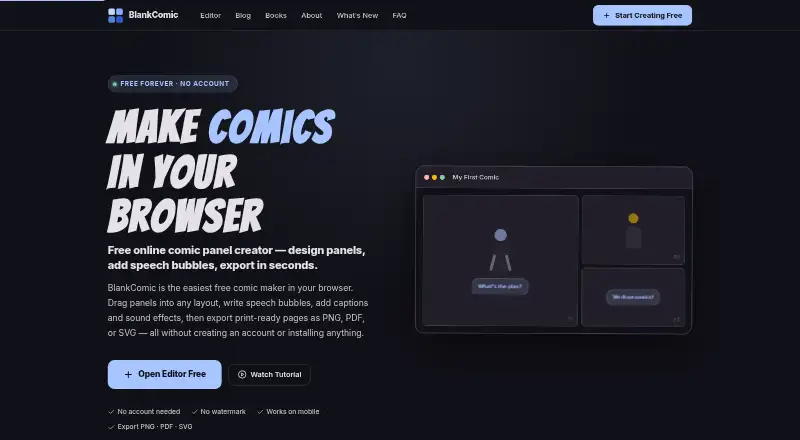
BlankComic is a free browser-based tool for creating comic panels and multi-page projects. Users can arrange panels by dragging, resizing, or splitting them, or start from more than 30 templates. The editor includes speech, thought, shout, and whisper bubbles, plus narration, captions, sound effects, and comic-style fonts. Reusable character color schemes can be saved and applied across panels. Projects can include pages that users add, reorder, or duplicate, then export together as a PDF. Other export choices are PNG, SVG, and editable .blank files; PNG output supports up to 300 DPI. Page formats include US Comic, A4, Manga, Square, Webtoon, and custom dimensions. Projects autosave to browser IndexedDB and can be moved between devices as .blank files. The maker says projects remain in the browser and are never uploaded. After initial loading, the app works offline, though internet access is needed to load it and access Google Fonts. Exports use sRGB; CMYK is not supported.
Good
- More than 30 built-in panel templates
- Exports PNG, PDF, SVG, and editable projects
- Multi-page projects export together as PDF
- Projects autosave in browser storage
Watch out
- CMYK export is not supported
- Internet is needed for initial loading and Google Fonts
- Font requests are governed by Google's Privacy Policy
Who it suits
BlankComic suits storytellers and artists who want to compose comics in a browser using panel layouts, lettering, and multiple pages. It may also fit people who want projects kept locally in browser storage and exportable as editable files.
Verdict
BlankComic offers panel, lettering, and page tools alongside several export formats. Its local-storage approach and offline use after loading may suit browser-based work, but CMYK output is unavailable.
Plans and prices
From BlankComic's own pricing page, checked 15 Oct 2026.
| Plan | Price | What it gives you |
|---|---|---|
| Free | Free | no account · no subscription · no watermark · browser-based · Free forever |
The facts
Each one read from BlankComic's own pages, with the date it was checked.
What it does
- Bubbles and text
- It supports speech, thought, shout, and whisper bubbles, plus narration, captions, sound effects, and comic-style fonts.checked 4 Oct 2026
- Changelog
- The published changelog identifies v1.0, released in May 2025, as the initial public release.checked 15 Oct 2026
- Character colors
- Users can save reusable character color schemes and apply them to panels.checked 4 Oct 2026
- Documentation
- The site provides a FAQ, getting-started guide, keyboard-shortcut guide, panel-composition guide, bubble-style guide and export guide.checked 15 Oct 2026
- Drawing tools
- Users can draw with pen, marker or brush, erase, set opacity and undo strokes.checked 15 Oct 2026
- Export formats
- Exports are available as PNG, JPG, multi-page PDF, SVG and editable .blank project files.checked 15 Oct 2026
- Export resolution
- PNG and JPG exports offer 72, 150 or 300 DPI settings.checked 15 Oct 2026
- Font licence
- The terms say Google Fonts are governed by the SIL Open Font License for individual fonts.checked 15 Oct 2026
- Intended users
- The maker describes BlankComic as built for storytellers, artists, and anyone with a story to tell.checked 4 Oct 2026
- Limit: collaboration
- The maker describes collaboration features as a possible future addition rather than an existing capability.checked 15 Oct 2026
- Limit: detailed illustration
- The maker says BlankComic is focused on page structure rather than detailed character drawing, so users needing detailed art may need another application.checked 15 Oct 2026
- Limit: print production
- The maker says the product is not yet aimed at professionals requiring 600 DPI, CMYK and custom bleed lines.checked 15 Oct 2026
- Limit: support contact
- A Medium commenter reported that the listed contact email bounced when they tried to send a message.checked 15 Oct 2026
- Local autosave
- Projects autosave in the browser through IndexedDB and can also be saved manually as .blank files.checked 15 Oct 2026
- Local saving
- Projects autosave to browser IndexedDB and can be saved or moved between devices as .blank files.checked 4 Oct 2026
- Mobile support
- The editor has a touch layout for phones and tablets, including tap, double-tap, drag and pinch interactions.checked 15 Oct 2026
- Multi-page projects
- Projects can contain multiple pages that users can add, duplicate, reorder and export together.checked 15 Oct 2026
- Offline operation
- After the page loads, the editor works offline, while initial loading and Google Fonts require internet access.checked 15 Oct 2026
- Offline use
- After the page loads, the app works offline, though internet access is needed to initially load it and access Google Fonts.checked 4 Oct 2026
- Origin
- The maker says BlankComic began as a personal weekend project created after encountering paywalls, watermarks and account requirements in other tools.checked 15 Oct 2026
- Output limitation
- Exports use sRGB color space; CMYK export is not supported.checked 4 Oct 2026
- Page formats
- Built-in formats include US Comic, A4, Manga, Square, Webtoon and custom dimensions.checked 15 Oct 2026
The company
- Company identity
- The Medium author profile describes M M Milton as a Bangladeshi musician, writer and independent maker who founded BlankComic.com.checked 15 Oct 2026
- Maker
- M M Milton is identified as BlankComic's creator and as a web developer and comic enthusiast.checked 15 Oct 2026
The full review of BlankComic
BlankComic is a free browser app for assembling comic pages with panels, lettering, and reusable character colors. It suits storytellers who want to create and export comics without an account or subscription. Its main trade-off is that projects stay in browser storage and exports are sRGB, not CMYK.
Overview
BlankComic concentrates on page composition rather than trying to be a general-purpose art suite. More than 30 templates provide a starting point, while controls to drag, resize, split, and arrange panels allow creators to reshape layouts. That combination works well for building structured comics in a browser; it is less suited to artists looking for a broad illustration environment.
Projects autosave to browser IndexedDB. The maker says they stay in the browser and are never uploaded, and the app has no server, database, or tracking. That local approach may appeal to creators who prefer not to put work in a cloud service, but it makes device-to-device continuity the user's responsibility: save or transfer the editable .blank project file.
Key features
Panels, lettering, and recurring characters
Speech, thought, shout, and whisper bubbles cover different dialogue styles; narration, captions, sound effects, and comic-style fonts round out the lettering tools. Reusable character color schemes can be applied to panels, helping maintain a consistent palette across a story. These features support comic-page construction, though the focus remains on arranging panels and adding text rather than broad image creation.
Pages, formats, and export
Creators can add, reorder, and duplicate pages, then export all pages together as a PDF. Page formats include US Comic, A4, Manga, Square, Webtoon, and custom dimensions, giving the editor flexibility across common page shapes. Export options include PNG, PDF, SVG, and editable .blank files; PNG output supports up to 300 DPI. The important limit is color: exports use sRGB, with no CMYK option, so print workflows that require CMYK should use another tool.
Offline use and privacy
Once the page has loaded, BlankComic works offline, which is useful for continuing a project without a live connection. An internet connection is still needed to load the app initially and to access Google Fonts. The terms say font requests go through Google Fonts and are governed by Google's Privacy Policy, so the local-project approach does not mean every service interaction is entirely local.
Pricing
The Free plan costs nothing. It includes the editor without a subscription, account requirement, watermark, or paid tiers. There is no free trial because the product is free. For hobbyists, students, or storytellers who need panel layouts, lettering, and exports without recurring costs, that is a straightforward fit. Creators who need CMYK output or cloud-based project sharing will have to look elsewhere; paying for a BlankComic tier is not an option.
Platforms
BlankComic is a browser-based web app, with Android and iOS also identified as supported platforms. Its offline mode begins only after the page loads, and Google Fonts require internet access. Projects autosave in the browser, while .blank files provide a way to save or move work between devices.
Who it's for
BlankComic is best for storytellers and artists who want to lay out comics, add dialogue and captions, and export complete pages without signing up or paying. Its page sizes and multi-page PDF export also suit creators assembling longer stories. It is a weaker fit for print production that depends on CMYK, or for teams that need shared cloud projects.
Pros and cons
- Pros: More than 30 templates and adjustable panels offer both a quick starting point and layout flexibility.
- Pros: Multiple page formats, multi-page PDF export, and editable .blank files support different output and transfer needs.
- Pros: No account, subscription, or watermark lowers the barrier to creating and exporting a comic.
- Cons: sRGB-only exports rule it out for workflows that require CMYK.
- Cons: Browser-based autosaving is local, so users must transfer project files to continue work on another device.
- Cons: Initial loading and Google Fonts access require an internet connection, despite offline use afterward.
Alternatives
MakeBeliefsComix is another free option; choose it if its optional account for saving and editing suits your workflow, or if a limit of up to 18 panels is enough. GenToon may suit creators who prefer a credit-based free plan, with 150 credits per month and 20 characters, and offers paid plans for higher monthly credit allowances. LlamaGen.ai offers 1,000 free credits and a Standard plan with 15,000 credits per month, 20 panels per prompt, and 10 custom comic characters; consider it if those allowances suit your needs. Anifusion offers a one-time 2,000-credit pack for 15.00 USD, an alternative for buyers who prefer a credit pack instead of a recurring plan. ComicsAI has a free Hobby plan with one credit for new users, limited to the first 1,000 users each day, and standard-resolution output. StoryComic AI offers free scripts, previews, and character sheets with starting credits, while its Starter plan costs $77.99 a year. Weekly Comic Studio has a free plan with 50 monthly credits, three active projects, and one concurrent AI job, and also supports Windows. AI Comic Factory offers a Starter plan for $9.99 a month with 600 monthly credits and character consistency. For a broader category comparison, see Comic Creation Software.
Verdict
Choose BlankComic for focused, no-cost comic-page creation with flexible layouts, useful lettering, multi-page export, and local project storage. It is especially appealing if you want to avoid accounts and subscriptions. Look elsewhere if CMYK output or shared cloud projects are essential to your workflow.
Getting started
- Open https://blankcomic.com/ in a browser
- Load the editor while connected to the internet
- Choose a page format or custom dimensions
- Build pages with panels, balloons, text, and saved character colors
- Save or move projects as .blank files, or export the finished pages
Questions
Is BlankComic free?
Yes. The Free plan costs nothing, has no subscription, requires no account, and has no watermark or hidden paid tiers.
Which platforms support BlankComic?
BlankComic is available on the web, Android, and iOS.
Can projects be used offline?
After the page loads, the editor works offline. Internet access is still needed for the initial load and Google Fonts.
Where are projects stored?
Projects autosave to browser IndexedDB. The maker says they stay in the browser and are never uploaded.
What export formats are available?
Exports include PNG, PDF, SVG, and editable .blank files. PNG export supports up to 300 DPI.
Does it support CMYK?
No. Exports use the sRGB color space, and CMYK export is not supported.
Alternatives to BlankComic
- 1
LlamaGen.ai
Free planAndroidiOSWebAPI8.2From $13.99 a month - 2

ComicsAI
Free planAndroidiOSWebExtension8.0From $15.90 a month - 3

GenToon
Free planAndroidiOSWeb7.5From $10 a month - 4

Anifusion
Free planWebAPI7.4From $9 a month - 5
Clip Studio Paint
AndroidiOSWebmacOS7.4From $10.99 a year - 6
Manga Editor Desu
Free planOpen sourceWebLinuxmacOSSelf-hosted7.4Free plan