
Anifusion
Anifusion is an online AI manga and comics studio for turning stories into illustrated pages.
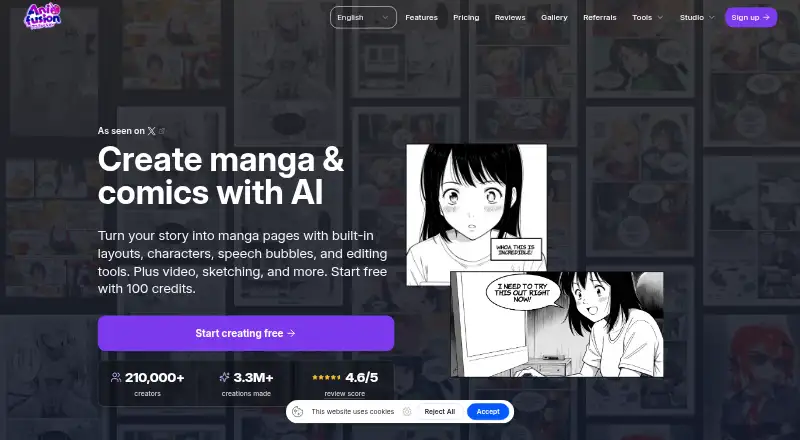
What Anifusion is
Anifusion is an online AI manga and comics studio for turning stories into illustrated pages. Users can generate panels, arrange layouts, maintain character consistency, add speech bubbles and text, and edit pages on a built-in canvas. Large language models support text and story generation, while image models such as Stable Diffusion create artwork. Other tools include text-to-image generation in more than 50 styles, batch generation, image-to-video animation with HD output, sketch-to-art, character sheets, an infinite canvas, asset management, reusable comic presets, and custom LoRA training. Image generation consumes 5–100 credits depending on the model. The free plan includes 100 credits and one workspace; Creator is $9 a month and Pro is $24 a month. Unused subscription credits do not expire. Paid plans include commercial use, subject to service and model-provider terms and users’ rights to their inputs. The service supports desktop devices only. Unpublished work is stored and processed online, and AI-provider data may be logged or retained depending on provider and configuration.
Good
- Includes panel generation, layouts, and speech bubbles.
- Offers text-to-image generation in 50+ styles.
- Unused subscription credits do not expire.
- Paid plans include commercial use, subject to terms.
- Exports include PNG, JPEG, WebP, PSD, PDF, and ZIP.
Watch out
- Supports desktop devices only; no mobile version.
- Image generation uses 5–100 credits per image.
- Unpublished work is stored and processed online.
- AI-provider data may be logged or retained.
Who it suits
Anifusion suits desktop users making manga or comics who want AI-assisted page, character, and image tools. Paid plans may suit users who need commercial use, subject to the stated terms and input rights.
Verdict
Anifusion brings comic-page creation, image generation, and editing tools together in a desktop-oriented web service. Users should account for its credit-based generation and the stated handling of unpublished work and AI-provider data.
Plans and prices
From Anifusion's own pricing page, checked 20 Sep 2026.
| Plan | Price | What it gives you |
|---|---|---|
| 2,000-credit pack | $15, paid once | 2,000 credits |
| 5,000-credit pack | $30, paid once | 5,000 credits |
| 12,000-credit pack | $60, paid once | 12,000 credits |
| 30,000-credit pack | $120, paid once | 30,000 credits |
| Free | Free | 100 free credits · 1 workspace · monthly |
| Creator | $9 a month | 2,000 credits/month · unused credits never expire · subscriber models · high-resolution exports · commercial use · gallery publishing · REST API/MCP · monthly |
| Credit pack 2,000 | $15, paid once | 2,000 credits · credits never expire · one-time |
| Credit pack — 2,000 credits | $15, paid once | 2,000 credits · One-time pack for subscribers · Unused credits never expire · $15 |
| Pro | $24 a month | 10,000 credits/month · unused credits never expire · priority newest models · maximum resolution · commercial use · gallery publishing · priority support · REST API/MCP · monthly |
| Credit pack 5,000 | $30, paid once | 5,000 credits · credits never expire · one-time |
| Credit pack — 5,000 credits | $30, paid once | 5,000 credits · One-time pack for subscribers · Unused credits never expire · $30 |
| Credit pack — 12,000 credits | $60, paid once | 12,000 credits · One-time pack for subscribers · Unused credits never expire · $60 |
| Credit pack 12,000 | $60, paid once | 12,000 credits · credits never expire · one-time |
| Credit pack 30,000 | $120, paid once | 30,000 credits · credits never expire · one-time |
| Credit pack — 30,000 credits | $120, paid once | 30,000 credits · One-time pack for subscribers · Unused credits never expire · $120 |
The facts
Each one read from Anifusion's own pages, with the date it was checked.
What it does
- AI data handling
- CodeConda’s privacy policy says data sent to AI providers may be logged or retained and may or may not be used to train or improve provider models, depending on provider and configuration.checked 30 Sep 2026
- API access requirement
- REST API and hosted MCP access require an active Creator or Pro subscription and share the account credit balance.checked 15 Oct 2026
- API limits
- The API allows 120 reads and 20 writes per rolling minute, with account and service concurrency limits that can return HTTP 429.checked 15 Oct 2026
- Character sheets
- Character sheets create multiple views, poses and expressions for reusable references.checked 15 Oct 2026
- Comic generation
- The comic tool generates complete pages, maintains character references, supplies layouts and templates, and exports print-ready files.checked 15 Oct 2026
- Comic tools
- Its comic creator offers AI panel generation, character consistency, layouts and templates, speech bubbles, text integration, and print-ready exports.checked 30 Sep 2026
- Commercial use
- Commercial use is included with paid plans subject to Anifusion’s terms, model provider terms, and the user holding the necessary rights to inputs.checked 30 Sep 2026
- Content restrictions
- The September 2026 content policy requires users to be at least 18 and prohibits pornography, sexualized minors, non-consensual intimate imagery, hate, violent wrongdoing and infringement.checked 15 Oct 2026
- Credits
- Image generation costs 5–100 credits depending on the model, and unused subscription credits carry over indefinitely.checked 30 Sep 2026
- Documentation depth
- The help center covers workspaces, generation, comic editing, models, billing, publishing and troubleshooting, and provides llms.txt exports.checked 15 Oct 2026
- Enterprise
- Anifusion offers tailored plans for studios, agencies, and commercial teams with higher volume needs or unique licensing requirements.checked 30 Sep 2026
- Gallery licence
- Publishing to the gallery keeps user ownership but grants Anifusion a worldwide royalty-free licence to host and organically promote the public post.checked 15 Oct 2026
- Generation
- The service uses large language models for text and story generation and image models such as Stable Diffusion for artwork, with a built-in canvas editor for editing generated pages.checked 30 Sep 2026
- Hosted service
- CodeConda terms grant a limited, nonexclusive, revocable license to use hosted SaaS and prohibit copying, reverse engineering and extracting models or datasets.checked 15 Oct 2026
- Image and video
- Features include text-to-image generation with 50+ styles, batch generation, and image-to-video animation with HD video output.checked 30 Sep 2026
- Image generation
- The image generator offers more than 50 anime and manga styles, prompt controls, high-resolution output and batch generation.checked 15 Oct 2026
- Infinite canvas
- The canvas workspace supports an expanding surface, zooming, panning, visual project organization and layers.checked 15 Oct 2026
- Limit: consistency and editing
- AIgregator and ToolWorthy say character or style consistency can require manual correction, and lettering and layouts still need hands-on editing.checked 15 Oct 2026
The company
- Company founding
- CodeConda says it was founded in 2023 and operates 11 web apps used by more than 30,000 people monthly.checked 15 Oct 2026
- Company legal name
- The maker is CodeConda LLC, an Arizona limited liability company that operates Anifusion.checked 15 Oct 2026
- Company profile
- Crunchbase lists Code Conda, LLC as an active for-profit software and web-app company with headcount of 1–10.checked 15 Oct 2026
- Company size
- LinkedIn lists CodeConda as privately held with 2–10 employees.checked 15 Oct 2026
- Founded
- 2023checked 28 Sep 2026
- Headquarters
- Arizona, United Stateschecked 28 Sep 2026
The full review of Anifusion
Anifusion is a web-based studio for generating and assembling manga and comic pages. It is best for creators who want AI artwork and page-editing tools in one desktop workspace. Its breadth is useful, but credit costs vary by model and unpublished work is processed online.
Overview
Anifusion combines story and text generation with image generation and a canvas editor for refining pages. Its comic workflow brings generated panels, layouts, dialogue, and text together, rather than leaving creators to assemble separate outputs elsewhere. Exports include PNG, JPEG, WebP, PSD, PDF, and ZIP, giving the service options for both image sharing and further editing.
The toolkit also includes text-to-image generation in more than 50 styles, batch generation, image-to-video animation with HD output, sketch-to-art, character sheets, an infinite canvas, asset management, reusable comic presets, and custom LoRA training. That range can support more than page production, but experimentation draws from credits: image generation costs 5–100 credits depending on the model.
Key features
Comic creation and editing
AI panel generation, character consistency, layouts, templates, speech bubbles, and text integration address the core steps of turning a story into readable comic pages. The built-in canvas lets creators edit generated pages, while character and asset tools help organize material for continued work. This is a strong fit for creators seeking an integrated generation-to-page workflow; those who mainly want a conventional drawing app may not need its AI-oriented breadth.
Generation beyond comic pages
More than 50 image styles and batch generation give users room to explore visual directions, while image-to-video animation adds HD video output. Sketch-to-art and custom LoRA training extend the creative options. These tools broaden the service, though model-dependent credit use makes frequent generation harder to budget than a fixed output allowance might suggest.
Pricing
The Free plan costs nothing and includes 100 free credits and one workspace. It is a practical starting point, but the small credit allowance limits how far a creator can explore generation. The monthly Creator plan costs $9 a month and includes 2,000 credits per month, subscriber AI models, high-resolution exports, commercial use, community gallery publishing, and team support. Pro costs $24 a month and raises the monthly allowance to 10,000 credits while retaining those listed benefits. Both paid plans carry unused subscription credits over indefinitely.
Subscribers can also buy one-time credit packs: 2,000 credits for $15, paid once, 5,000 for $30, paid once, 12,000 for $60, paid once, or 30,000 for $120, paid once. These packs are for subscribers, and unused pack credits do not expire. They add capacity without changing the monthly plan, but the 5–100-credit cost per image means actual output varies with model choice.
Paid-plan commercial use is subject to Anifusion’s terms, model-provider terms, and the user having the rights to their inputs. Studios, agencies, and commercial teams with higher volume needs or unusual licensing requirements can seek tailored enterprise plans with custom pricing.
Platforms
Anifusion runs on the web and supports desktop devices only; it has no mobile version. That makes it a poor choice for creators who need to work from a phone or tablet. Unpublished work is not shown on public profiles or community feeds, but it is stored and processed by the online service. Data sent to AI providers may be logged or retained and may or may not be used to train or improve provider models, depending on provider and configuration. CodeConda describes security measures designed to protect personal information while acknowledging that no system is completely secure.
Who it's for
Anifusion suits desktop-based comic creators who value AI-assisted panel and image generation, page editing, and multiple export formats in one service. Creator is the lower-cost paid fit for moderate monthly use; Pro is better suited to users who need a substantially larger credit allowance. Mobile-first creators and people who do not want unpublished work processed online should look elsewhere.
Pros and cons
- Pro: Comic generation, page editing, speech bubbles, layouts, character consistency, and print-ready exports sit within one workflow.
- Pro: Unused paid subscription credits carry over indefinitely, and subscribers can add one-time packs that do not expire.
- Con: The free plan has only 100 credits, and the 5–100-credit generation cost makes the number of images those credits buy dependent on model choice.
- Con: Desktop-only access excludes mobile workflows.
- Con: Unpublished projects are stored and processed online, and provider data handling can include logging or retention.
Alternatives
Comic Creation Software and AI Comic Generators are useful starting points for comparing tools by category.
- GenToon is worth considering for cross-device access: it supports Android, iOS, and web, and its free plan includes 150 credits per month and 20 characters. Its Lite plan is $10 a month for 800 credits per month and 20 characters.
- BlankComic is a better match for someone seeking a free, no-account option: its free offering has no subscription, no watermark, and no hidden paid tiers, and it works on Android, iOS, and web.
- ComicsAI offers a free Hobby plan with one free credit for new users, basic art styles, and standard-resolution output; it is limited to the first 1,000 users each day and requires no credit card.
- StoryComic AI may suit creators who want scripts, previews, and character sheets free, with starting credits included in its free plan.
- Clip Studio Paint is an option for concept artists, illustrators, and designers seeking drawing software across mobile, desktop, and web platforms; it is paid and has a free trial.
- MediBang Paint is a cross-platform freemium option for Windows, macOS, iOS, and Android users.
- LlamaGen.ai offers a free plan with 1,000 credits; its Standard plan includes 15,000 credits per month, 20 panels per prompt, and 10 custom comic characters for $18 a month.
- Comic Life is a paid alternative for Android, iOS, macOS, and Windows.
Verdict
Choose Anifusion if you create comics on desktop and want generation, page assembly, and editing tools in one workspace, with paid plans that let unused credits carry over. Look elsewhere if mobile access or keeping unpublished work off an online service is essential; the free allowance is also modest for sustained generation.
Getting started
- Open https://anifusion.ai/ on a desktop device.
- Start with the Free plan, which includes 100 credits and one workspace.
- Choose Creator at $9 a month or Pro at $24 a month for subscription features.
- Use a credit pack if you are a subscriber and need additional credits.
Limits worth knowing
The Free plan includes 100 credits and one workspace. Image generation costs 5–100 credits depending on the model; Creator includes 2,000 credits per month and Pro includes 10,000 credits per month.
Questions
Is there a free plan?
Yes. The Free plan costs nothing and includes 100 credits and one workspace.
How much do paid plans cost?
Creator costs $9 a month and Pro costs $24 a month.
Which platforms does Anifusion support?
Anifusion is available on the web and supports desktop devices only; it does not offer a mobile version.
Can I use work commercially?
Commercial use is included with paid plans, subject to Anifusion’s terms, model-provider terms and the user holding the necessary rights to inputs.
Who makes Anifusion?
The site identifies Anifusion as a CodeConda product. CodeConda LLC describes itself as an Arizona limited liability company in the United States.
Do subscription credits expire?
Unused subscription credits carry over indefinitely. Image generation costs 5–100 credits depending on the model.
Alternatives to Anifusion
- 1
LlamaGen.ai
Free planAndroidiOSWebAPI8.2From $13.99 a month - 2

ComicsAI
Free planAndroidiOSWebExtension8.0From $15.90 a month - 3

GenToon
Free planAndroidiOSWeb7.5From $10 a month - 4

BlankComic
Free planAndroidiOSWebLinux7.4Free plan - 5

Clip Studio Paint
AndroidiOSWebmacOS7.4From $10.99 a year - 6

Manga Editor Desu
Free planOpen sourceWebLinuxmacOSSelf-hosted7.4Free plan