Sumo Paint
Sumo Paint is a browser-based drawing tool and image editor for creating pictures or combining images with filters, text, and symbols.
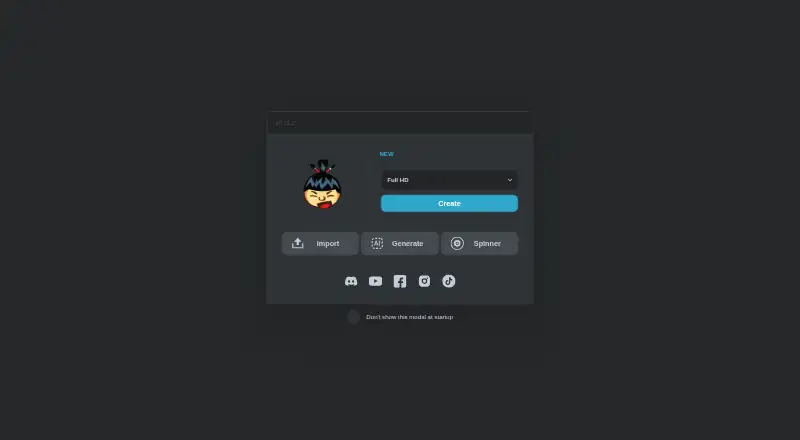
What Sumo Paint is
Sumo Paint is a browser-based drawing tool and image editor for creating pictures or combining images with filters, text, and symbols. It offers more than 300 brushes, brush customization, layers, pressure sensitivity, and additional tools and effects. Color management is basic. Sumo apps run in a browser and require an internet connection, with support intended for desktop and mobile devices, including phones and tablets. You can use Sumo without an account; signing up adds app and community features. Finished work can be exported in standard formats or saved as a .sumo project for reopening later or combining with other Sumo apps. The wider suite supports sharing work, receiving community feedback, and moving projects between apps, such as using images for 3D models. An API supports embedding Paint with an iframe, opening images, setting dimensions and masks, and sending saved image data to a server. The Basic plan is free with limited features. Pro monthly and Pro lifetime plans provide full access to all Sumo apps and features, with lifetime access on the latter.
Good
- More than 300 brushes
- Layers and pressure sensitivity
- Works on desktop and mobile browsers
- No account required
- Exports standard formats and .sumo projects
Watch out
- Requires an internet connection
- Color management is basic
- Basic plan has limited features
Who it suits
Sumo Paint fits beginners and professionals who want browser-based drawing and image editing on desktop or mobile devices. It also suits users who want account-free access or projects that move between Sumo apps.
Verdict
Sumo Paint provides broad drawing and editing tools without installation, plus project exports and suite integration. Its browser and internet requirements, basic color management, and limited free tier shape the choice.
Plans and prices
From Sumo Paint's own pricing page, checked 15 Oct 2026.
| Plan | Price | What it gives you |
|---|---|---|
| Basic | Free | All apps with limited features · ads may appear |
| Pro monthly | $4 a month | Full access to all Sumo apps and features · no ads · monthly |
| Pro lifetime | $89, paid once | Full access to all Sumo apps and features · access retained permanently · one-time |
The facts
Each one read from Sumo Paint's own pages, with the date it was checked.
What it does
- Account
- The FAQ says Sumo can be used without an account, while signing up adds app and community features.checked 10 Oct 2026
- Account requirement
- Users can work without an account, while signing up adds community and other features.checked 15 Oct 2026
- API examples
- Documentation includes PHP examples for decoding posted base64 PNG data and saving it on a server.checked 15 Oct 2026
- Brushes and effects
- The product page says Sumopaint has over 300 brushes and many unique tools and effects.checked 10 Oct 2026
- Brush library
- The editor provides more than 300 brushes, including customizable brush behavior.checked 15 Oct 2026
- Chrome listing status
- The extension listing identifies Sumo Apps Oy, version 12.4, last updated October 13, 2022, with in-app purchases.checked 15 Oct 2026
- Chrome privacy disclosure
- The Chrome listing says the extension handles personally identifiable information, user activity and website content, and declares that data is not sold outside approved uses.checked 15 Oct 2026
- Chrome rating
- The Chrome Web Store lists Sumo Paint at 3.1 out of 5 from 1.9K ratings.checked 15 Oct 2026
- Clone stamp
- A clone-stamp tool is included with brush diameter, opacity, flow, scattering and random-rotation controls.checked 15 Oct 2026
- Education
- The FAQ says schools can contact Sumo for educational licenses and students receive unique access codes for home use under Sumo Edu licensing.checked 10 Oct 2026
- Education support
- The FAQ says schools can obtain educational licences with separate infrastructure and student access codes.checked 15 Oct 2026
- Embedding
- The API documentation shows iframe embedding and POSTing image data to a customer's endpoint.checked 15 Oct 2026
- Embedding and API
- The Sumopaint API page describes embedding Paint with an iframe and parameters for opening images, setting dimensions, masks, and sending saved image data to a server.checked 10 Oct 2026
- Export and project format
- Users can export standard formats or save projects in Sumo's .sumo format for later opening and cross-app use.checked 15 Oct 2026
- Filters
- The application lists 20 filters and effects covering blur, distortion, noise, pixelation, sharpening, posterization and threshold adjustments.checked 15 Oct 2026
- Funding
- Crunchbase lists Sumo Apps at seed stage with two funding rounds, while amounts are obscured on the public profile.checked 15 Oct 2026
Where it runs
- Browser based
- Sumo says its apps run in a browser and require an internet connection rather than an installation.checked 10 Oct 2026
- Browser compatibility
- The FAQ says Sumo apps are intended to work in browsers on desktop and mobile devices.checked 15 Oct 2026
- Browser delivery
- Sumo says its applications require only an internet connection and no device installation.checked 15 Oct 2026
- Cross-app integration
- Sumo describes moving content between its Paint, music, video, 3D and other creative applications.checked 15 Oct 2026
- Devices
- The FAQ says Sumo apps are intended to work in browsers on desktop or mobile devices, including phones and tablets.checked 10 Oct 2026
The company
- Company founded
- LinkedIn states that Sumo Apps was founded in Helsinki in 2008.checked 15 Oct 2026
- Company headquarters and size
- LinkedIn lists Helsinki, Finland as headquarters and a company size of 2–10 employees.checked 15 Oct 2026
Money
- Free plan
- Yeschecked 20 Sep 2026
Alternatives to Sumo Paint
- 1

ibisPaint
Free planAndroidiOSmacOSWindows8.1From $27.99 a year - 2

Concepts
Free planAndroidiOSWindows8.0Free plan - 3

Drawpile
Free planOpen sourceAndroidiOSWebAPI7.9Free plan - 4
FireAlpaca
Free planLinuxmacOSWindows7.6$39.99 one-time - 5
Sketchbook
Free planAndroidiOSmacOSWindows7.5Free plan - 6

Clip Studio Paint
AndroidiOSWebmacOS7.4From $10.99 a year