
Drawpile
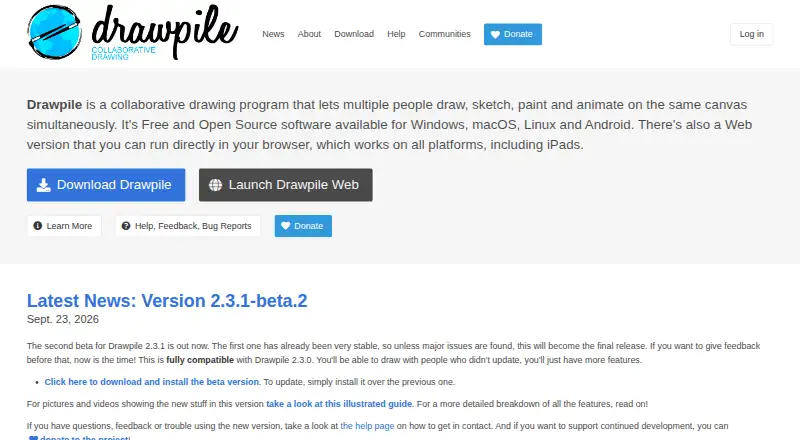
Drawpile is a free drawing, painting, sketching, and animation program for people working together on a shared canvas; it can also be used offline.
What Drawpile is
Drawpile is a free drawing, painting, sketching, and animation program for people working together on a shared canvas; it can also be used offline. Its tools include more than 200 built-in brushes, multiple brush engines, a brush editor, and stroke stabilization. Artists can organize work with layers and groups, using blend modes, alpha preservation, clipping, masking, and alpha lock. Animation tools include a timeline and onion skins. Canvases can be saved as OpenRaster or PSD, and images can be pasted in from files or other programs. Users can join official community servers without arranging hosting themselves, or operate their own server. Drawpile says it only transfers information to other networked systems when a user or operator specifically requests it. It is available on Windows, macOS, Linux, Android, and the web; on iPhone and iPad, the browser version works but there is no native iOS app. Support is available through Discord, IRC web chat, Matrix, GitHub issues, and documentation.
Good
- More than 200 built-in brushes.
- Supports layers, groups, and masking.
- Animation timeline with onion skins.
- Can save canvases as OpenRaster or PSD.
- Official community servers are available free.
Watch out
- No native iOS application.
- Built-in server is not recommended for hosting sessions.
Who it suits
Drawpile suits artists who want to make work together on one canvas, including people who need animation or offline use. Its server options also suit groups that want to choose between official community hosting and self-hosting.
Verdict
Drawpile combines shared-canvas drawing with layered artwork and animation tools. iPhone and iPad users can use its browser version, but there is no native iOS app.
Plans and prices
From Drawpile's own pricing page, checked 1 Oct 2026.
| Plan | Price | What it gives you |
|---|---|---|
| Drawpile | Free | Free and open source under GPLv3 · official community servers available free |
| Free | Free | Collaborative drawing, painting, sketching, animation and offline use · desktop, mobile and browser access |
The facts
Each one read from Drawpile's own pages, with the date it was checked.
Where it runs
- Android distribution limitation
- Drawpile is not currently distributed through Google Play; the project directs users to F-Droid or APK downloads.checked 15 Oct 2026
- iOS availability
- The browser version works on iPad and iPhone, while a native iOS application is unavailable because Apple does not allow Drawpile in its store.checked 1 Oct 2026
- Limit: browser timelapse
- Timelapse creation is unavailable in the web browser and is limited to desktop and mobile clients.checked 15 Oct 2026
What it does
- Animation
- Animation tools include a timeline and onion skins, and users can animate collaboratively on a shared canvas.checked 15 Oct 2026
- Authentication integration
- External authentication lets users log in to potentially untrusted third-party servers without sending their password to those servers, and lets site owners integrate existing accounts.checked 1 Oct 2026
- Autorecovery
- Desktop and mobile applications automatically save recovery data and can restore work after an unexpected exit; browser autorecovery is disabled by default.checked 15 Oct 2026
- Brushes
- Drawpile includes over 200 built-in brushes, multiple brush engines, a brush editor and a stroke stabilizer.checked 1 Oct 2026
- Brush library
- The program includes more than 200 built-in brushes, several brush engines, a custom brush editor and stroke stabilization.checked 15 Oct 2026
- Build documentation
- Source-building instructions cover Linux, macOS, Windows, Android, WebAssembly and other operating systems, with package dependencies and CMake presets documented.checked 15 Oct 2026
- Code integrity
- Windows binaries are signed through SignPath.io, dependencies are pinned to known-good versions, and SHA384 checks are performed for each build's retrieved dependency source.checked 1 Oct 2026
- Collaboration servers
- Official community servers let users host sessions for free without setting up server infrastructure themselves.checked 1 Oct 2026
- Community hosting
- Official community servers provide public sessions, and users can host password-protected sessions for invited collaborators.checked 15 Oct 2026
- Developer architecture
- The architecture documentation covers the client, paint engine, dedicated server, command-line tools, list server, web admin interfaces, abuse-report relay and Docker package.checked 15 Oct 2026
- Developer tools
- The project distributes dprectool, drawpile-cmd and drawpile-timelapse command-line utilities alongside the dedicated server.checked 15 Oct 2026
- Documentation scope
- The help center includes drawing tools, animation, hosting, Docker, WebSockets, authentication, troubleshooting, packaging, architecture, source builds and protocol material.checked 15 Oct 2026
- External authentication
- The ext-auth mechanism lets third-party servers authenticate Drawpile accounts with signed tokens without receiving the user's password.checked 15 Oct 2026
- File interoperability
- OpenRaster and Drawpile formats are supported, and the documentation discusses PSD support and exporting to other editors such as Krita.checked 15 Oct 2026
- Hosting limitation
- The built-in server is not recommended because browsers cannot connect to sessions hosted that way and exposing a home computer creates security and privacy implications.checked 1 Oct 2026
- Latest release news
- The project announced Drawpile 2.3.1-beta.2 on September 23, 2026 and described it as compatible with 2.3.0.checked 15 Oct 2026
- Layers
- Layer groups, blend modes, alpha preservation, clipping groups, masks and alpha lock are supported.checked 15 Oct 2026
- Licence
- Drawpile is distributed as free and open-source software under GPLv3 or later.checked 15 Oct 2026
- Limit: built-in hosting
- The official help warns that the built-in server can expose a host's home IP, may require difficult network configuration, cannot serve browser users and goes offline if the host computer or application stops.checked 15 Oct 2026
The company
- Company legal entity
- The legal notice identifies Drawpile gemeinnützige UG (haftungsbeschränkt), registered in Wiesbaden, Germany, with Carsten Hartenfels as managing director.checked 15 Oct 2026
- Company location
- The maker's listed address is Adolfstraße 1, 65185 Wiesbaden, Germany.checked 15 Oct 2026
The full review of Drawpile
Overview
Drawpile brings live, shared-canvas drawing together with tools for layered artwork and animation. It is best suited to artists who want to create with others without paying for the software; its extensive brush and layer controls also make it a capable offline option for solo work.
The free, open-source model is a clear advantage, and official community servers remove the need to arrange hosting for a session. The trade-off is that browser-based iPhone and iPad use is the only iOS route, and hosting your own sessions takes care: the built-in server is not recommended.
For more options in this category, browse our Digital Painting Software list.
Key features
Brushes and layers
More than 200 built-in brushes, multiple brush engines, a brush editor and stroke stabilization give artists meaningful control over how marks look and behave. Pressure sensitivity is supported. Layers and groups include blend modes, alpha preserve, clipping groups, masking and alpha lock, so Drawpile is more than a bare shared sketchpad. That depth will matter to artists building complex compositions; anyone seeking only quick, informal doodling may not need it.
Animation and file exchange
A timeline and onion skins support animation, while OpenRaster and PSD export and the ability to paste images from files or other programs help fit Drawpile into an existing art workflow. Advanced color management is another useful capability for artists who need control over color. These features broaden its appeal beyond collaborative sketching, though the available animation and file details do not establish how it compares with specialist tools.
Collaboration, hosting and security
Official community servers let users start sessions without managing server infrastructure. Artists who want more control can operate their own Drawpile server, and external authentication can connect existing accounts while keeping passwords away from potentially untrusted third-party servers. The software does not send information to other networked systems unless a user or the person operating it specifically requests it.
Self-hosting carries a real caveat: the built-in server cannot accept browser connections, and exposing a home computer has security and privacy implications. For browser-accessible sessions, the official community servers are the more practical choice. Windows binaries are signed through SignPath.io, dependencies are pinned to known-good versions, and retrieved dependency sources receive SHA384 checks for each build. Support is available through Discord, IRC web chat, Matrix, GitHub issues and documentation.
Pricing
Drawpile costs nothing. The free plan is also free and open source under GPLv3, with official community servers available at no charge. There are no paid tiers or seat limits in the plan details, making it a straightforward fit for individual artists and groups that want shared sessions without a software subscription.
Platforms
Drawpile supports web, Windows, macOS, Linux and Android, as well as self-hosting. On iPhone and iPad, the browser version works, but there is no native iOS app because Apple does not allow Drawpile in its store. That makes it less suitable for people who specifically want an installed iOS drawing app.
Who it's for
Choose Drawpile if you want to draw or animate with other people on a shared canvas, need detailed brush and layer controls, or value free software that can also work offline. It is particularly appealing to groups that can use official community hosting or are comfortable operating their own server. Look elsewhere if native iOS support is essential or if you need a self-hosted setup that works in browsers without the stated server limitation.
Pros and cons
- Pros: Free, open source and usable offline, with no paid plan required for access.
- Pros: More than 200 brushes, customizable brush behavior, stabilization, pressure sensitivity and a detailed layer system suit serious illustration as well as group drawing.
- Pros: Animation tools and OpenRaster and PSD export extend its usefulness beyond a live sketch session.
- Pros: Free official community servers avoid the work of arranging session hosting.
- Cons: There is no native iPhone or iPad app, only browser access.
- Cons: The built-in server is not recommended; browser users cannot connect to sessions hosted that way, and exposing a home computer has security and privacy risks.
Alternatives
- ibisPaint is worth considering for iOS users who want a native app; its free version includes unlimited usage time and 64MB of cloud storage, with advertisements.
- Krita is another free, open-source choice for solo painting on Linux, macOS or Windows, without subscriptions or trials.
- Sketchbook offers a free mobile application with brushes, layers, guides, rulers and stroke tools for artists who want those tools on iOS as well as Android.
- FireAlpaca is a free option for Linux, macOS and Windows that includes customizable brushes, layered artwork, animation tools and CMYK display.
- MediBang Paint supports iOS and Android as well as desktop platforms; its Premium plans include cloud storage, with the 20GB plan priced at ¥300 a month with auto renewal at the web price.
- MyPaint is a free alternative for Linux, macOS and Windows.
- Concepts may suit users looking for a mobile-oriented alternative on Windows, iOS or Android; its Pro monthly subscription is $4.99 a month.
- HEAVYPAINT is another freemium option available on web, desktop and mobile platforms.
Verdict
Drawpile is an easy recommendation for artists and groups who want a genuinely capable shared canvas without a subscription. Its combination of brush depth, layers, animation and free community hosting is the main reason to choose it. Look elsewhere if you need a native iOS app or browser access to a self-hosted session.
Getting started
- Open https://drawpile.net/ to get started.
- Choose the web version or use the app on Windows, macOS, Linux or Android.
- Use the browser version on iPhone or iPad.
- Join an official community server for a session without setting up server infrastructure.
- Alternatively, set up and operate your own Drawpile server.
Questions
Is Drawpile free?
Yes. The listed plan is free, and Drawpile is free and open source under GPLv3.
Which platforms can I use?
Drawpile supports Windows, macOS, Linux, Android and the web. Its browser version works on iPhone and iPad, where a native iOS app is unavailable.
Can I use Drawpile offline?
Yes. Drawpile can be used offline as well as for shared-canvas sessions.
Can I host or join collaborative sessions?
You can join official community servers without arranging server infrastructure, or set up and operate your own server.
Which canvas file formats does it support?
Canvas files can be saved as OpenRaster or PSD. Images can also be pasted from files or other programs.
What support options are available?
Support is available through Discord, IRC web chat, Matrix, GitHub issues and the documentation.
Alternatives to Drawpile
- 1
ibisPaint
Free planAndroidiOSmacOSWindows8.1From $27.99 a year - 2

Concepts
Free planAndroidiOSWindows8.0Free plan - 3
FireAlpaca
Free planLinuxmacOSWindows7.6$39.99 one-time - 4
Sketchbook
Free planAndroidiOSmacOSWindows7.5Free plan - 5
Clip Studio Paint
AndroidiOSWebmacOS7.4From $10.99 a year - 6
Sumo Paint
Free planWebExtension7.3From $4 a month