
Class Manager
Class Manager provides class management software for dance studios and other class-based businesses.
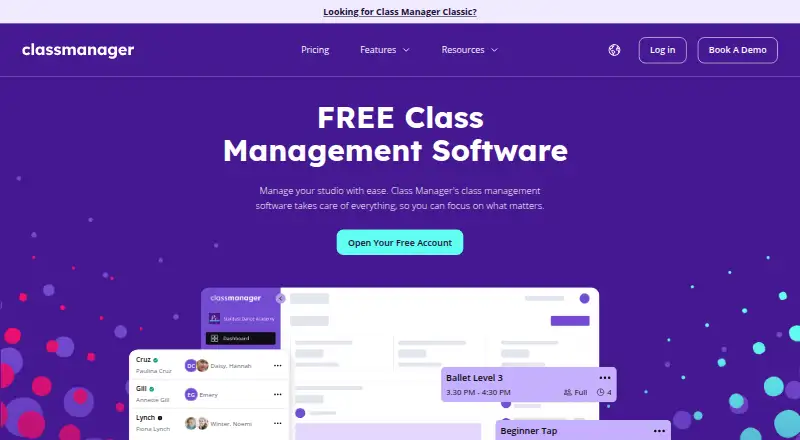
What Class Manager is
Class Manager provides class management software for dance studios and other class-based businesses. Businesses can clone classes, arrange seasons, and customize schedules with images and color codes. Parents and students can use a self-service portal to view schedules, book classes, and make payments. The software tracks attendance digitally and supports recurring billing with automated reminders for overdue payments. Listed payment options include Stripe AutoPay, Apple Pay, and Google Pay. Staff roles and permissions let businesses control which features team members can access. Class Manager describes dedicated Android and iOS apps with views for owners, staff, and families, alongside web access. Some advanced admin tasks, including detailed reporting and creating classes, require the web version. Its help guide describes a Zapier integration with triggers for customer, student, invoice, order, lead, booking, and payment events. The Free plan is free with no monthly subscription, but online payments carry a flat service charge; tailored pricing is available for high volumes. The terms describe Class Manager as a data processor that maintains technical and organizational security measures for personal data.
Good
- Supports recurring classes and instructor management.
- Offers attendance tracking and waitlist management.
- Parents and students can book through a self-service portal.
- Automates overdue payment reminders.
- Dedicated Android and iOS apps are available.
Watch out
- Some advanced admin tasks require the web version.
- Online payments carry a flat service charge.
- Tailored pricing applies for high payment volumes.
Who it suits
Class Manager suits dance studios and other businesses that run classes and need scheduling, attendance, billing, and member booking tools. It may fit owners, staff, and families who want dedicated mobile app views, while administrators should note that some tasks require the web version.
Verdict
Class Manager combines class scheduling, attendance, billing, and self-service booking for class-based businesses. The plan has no monthly subscription, but online-payment charges and web-only advanced tasks are important considerations.
Plans and prices
From Class Manager's own pricing page, checked 29 Sep 2026.
| Plan | Price | What it gives you |
|---|---|---|
| Free | Free | No monthly subscription · flat service charge for online payments · tailored pricing available for high volumes |
The facts
Each one read from Class Manager's own pages, with the date it was checked.
Where it runs
- App limitation
- The admin and staff app guide says some advanced tasks, including detailed reporting and creating classes, require the web version.checked 29 Sep 2026
- Mobile apps
- Class Manager says it has dedicated apps for iOS and Android, with views tailored to owners, staff, and families.checked 29 Sep 2026
What it does
- Attendance
- The software offers digital attendance tracking without paper registers.checked 29 Sep 2026
- Enrollment
- Parents and students can use a self-service portal to view schedules, book classes, and make payments.checked 29 Sep 2026
- Integrations
- The help guide describes a Zapier integration with triggers for customer, student, invoice, order, lead, booking, and payment events.checked 29 Sep 2026
- Payments
- Class Manager lists Stripe AutoPay and Apple Pay and Google Pay as supported payment options.checked 29 Sep 2026
- Privacy and security
- The terms describe Class Manager as a data processor and state it will maintain technical and organizational security measures for personal data.checked 29 Sep 2026
- Purpose
- Class Manager provides class management software for dance studios and other class-based businesses.checked 29 Sep 2026
- Scheduling
- Users can clone classes, set up seasons, and customize schedules with images and color codes.checked 29 Sep 2026
- Staff access
- Staff roles and permissions let businesses control which features staff members can access.checked 29 Sep 2026
- Support
- The prices page lists free training and premium support among the offered features.checked 29 Sep 2026
- Who it serves
- The company says its software is used by dance studios and business owners in the UK, United States, Australia, and elsewhere.checked 29 Sep 2026
Money
- Billing
- Class Manager supports recurring billing and automated overdue payment reminders.checked 29 Sep 2026
The full review of Class Manager
Overview
Class Manager is a management platform for dance studios and other businesses that run classes. It suits operators who want to combine class administration with family self-service rather than handle every booking and payment themselves. Its wide operational scope is balanced by a meaningful caveat: some administrative work still requires the web version.
Businesses can organize seasons, duplicate classes, and distinguish schedules with images and color coding. Families can view schedules, book places, and pay through a portal, while staff can manage attendance and recurring charges. See Dance Studio Management Software and Class Scheduling Software for category comparisons.
Key features
Scheduling, booking, and attendance
Recurring classes, room and instructor management, and waitlists cover core scheduling needs. Cloning classes and setting up seasons should help studios reuse arrangements rather than rebuild them each time. The member portal puts schedule viewing and booking in parents’ and students’ hands, a practical fit for businesses that want to reduce staff involvement in routine enrollment. Digital attendance tracking replaces paper registers, keeping attendance within the same system.
Billing and payments
Recurring billing and automated overdue-payment reminders address routine collections. Stripe AutoPay, Apple Pay, and Google Pay are supported, giving families multiple ways to pay. The trade-off in the Free plan is that online payments carry a flat service charge, so the lack of a monthly subscription does not mean payment processing is cost-free.
Staff, integrations, and security
Staff roles and permissions let owners restrict which features individual staff can access, a useful control for businesses with several employees. Zapier triggers cover customer, student, invoice, order, lead, booking, and payment events, allowing these workflows to connect with other services. Class Manager’s terms describe it as a data processor and commit it to technical and organizational measures to secure personal data.
Pricing
The Free plan costs nothing and has no monthly subscription. It includes recurring classes, attendance tracking, waitlist management, room scheduling, instructor management, and a member booking portal. The plan’s stated terms include a flat service charge for online payments, with tailored pricing available for high volumes.
This structure may suit a studio that wants the core class-management workflow without a recurring software bill, especially if its online payment volume is modest. Businesses processing high volumes should weigh the service charge against tailored pricing. Free training and premium support are among the offered features. No other plan prices or seat, booking, or attendance-history caps are given.
Platforms
Class Manager is available on Android, iOS, and the web. Its dedicated mobile apps provide views for owners, staff, and families, but the apps are not a complete substitute for the web version: detailed reporting and class creation are among the advanced tasks that require web access. Owners who need to handle those jobs away from a computer should factor in that limitation.
Who it's for
Class Manager is a strong fit for dance studios and other class-based businesses that need recurring schedules, attendance, billing, and self-service family bookings in one system. The company says businesses in the UK, United States, Australia, and elsewhere use it, making it relevant across those markets. It is less suited to administrators who expect to complete all advanced management work from a phone.
Pros and cons
- Broad class operations: Scheduling, rooms, instructors, waitlists, attendance, and member booking sit alongside recurring billing.
- Family self-service: Parents and students can view schedules, book classes, and pay without staff handling every step.
- No monthly subscription: The Free plan avoids a recurring software charge, though online payments incur a flat service charge.
- Mobile administration has limits: Detailed reports and class creation require the web version, which can constrain owners and staff working away from a computer.
Alternatives
Choose Kananas if a free tier capped at 50 contacts is enough, or if a paid annual plan starting at $99 a year for 250 contacts better matches your scale. Stepsi offers a Plus plan at €30 a year for up to 100 active members and a Grow plan at €60 a year for up to 250, for studios comparing member-based tiers.
StudioPartner is another option for businesses that can work within its free plan’s 30-student limit, four membership plans, and 90 days of attendance history. DanceBiz is a paid alternative with a free trial and apps for Android, iOS, macOS, web, and Windows.
Experience Dance is worth considering if a web-only platform and a Pro plan at $50 a month fit your needs; that plan includes a registration portal, Stripe billing and tuition management, and agreements and waivers. ClassJuggler has a paid plan for emerging schools at $44.95 a month and a separate customer-portal add-on at $10 a month.
OttoDance is an alternative with a free plan and an organization-funded option priced according to transaction volume. The Studio Director offers paid plans with a free trial.
Verdict
Class Manager is a sound choice for class-based businesses, particularly dance studios, that want scheduling, attendance, family booking, and recurring billing under one roof without a monthly subscription. Its main drawback is that online payments carry a service charge and some advanced administration remains web-only. Choose it if those compromises fit your workflow; look elsewhere if full mobile administration is essential.
Getting started
- Visit https://classmanager.com/.
- Use the web version or install the dedicated Android or iOS app.
- Set up classes, seasons, and schedules, including rooms and instructors.
- Configure staff roles and permissions.
- Use the portal for parents and students to view schedules, book, and pay.
Limits worth knowing
The Free plan is free with no monthly subscription, but online payments have a flat service charge. High-volume pricing may be tailored.
Questions
Is Class Manager free?
Its Free plan is free, with no monthly subscription. Online payments have a flat service charge.
Which platforms does Class Manager support?
It is available on web, Android, and iOS. Dedicated mobile apps have views for owners, staff, and families.
Can families book classes themselves?
Yes. Parents and students can use a self-service portal to view schedules, book classes, and make payments.
Which payment options are listed?
Class Manager lists Stripe AutoPay, Apple Pay, and Google Pay.
Does it integrate with Zapier?
The help guide describes Zapier triggers for customer, student, invoice, order, lead, booking, and payment events.
Can staff permissions be controlled?
Yes. Staff roles and permissions let businesses control which features staff members can access.
Alternatives to Class Manager
- 1

Kananas
Free planAndroidiOSWebAPI8.1From $366 a year - 2

Stepsi
Free planAndroidiOSWeb8.1From €30 a month - 3
ThunderTix
AndroidiOSWebAPI7.2$0.65 usage-based - 4

DanceStudio-Pro
AndroidiOSWeb7.0From $49 a month - 5

DANZ
AndroidiOSWebmacOS6.7From €49 a month - 6

Artifax
WebAPI5.6