CKAN
CKAN is a free, open-source metadata repository and toolset for finding, installing, and managing Kerbal Space Program mods.
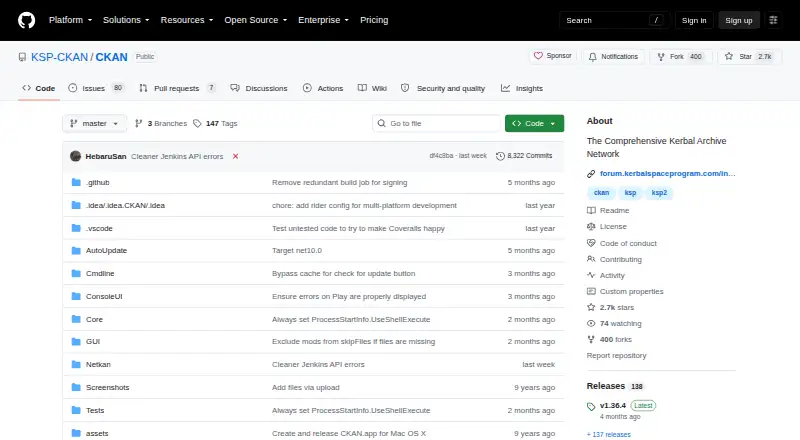
What CKAN is
CKAN is a free, open-source metadata repository and toolset for finding, installing, and managing Kerbal Space Program mods. Its client lets players refresh an online registry and search by mod name, identifier, author, or relationship, then download, install, and update selected mods. CKAN uses metadata to match mods to game versions, install dependencies, and detect conflicts or incompatibilities. By default, it requires a mod to be marked compatible with the exact game version, though users can choose additional compatible versions. The client offers graphical, console, and command-line interfaces. It runs on Windows, macOS, and Linux, with release options for several Linux distributions. On macOS 10.15 and later, the console interface is the default because the graphical interface depends on a 32-bit WinForms application in Mono. CKAN can manage game installations from any folder; placing it in the game folder allows portable use. Mod authors can contribute or correct metadata, and the project provides troubleshooting documentation, GitHub issues, and Discord for help.
Good
- Find and update mods through an online registry.
- Installs dependencies and checks for conflicts.
- Supports Windows, macOS, and Linux.
- Offers graphical, console, and command-line interfaces.
Watch out
- macOS 10.15 and later default to the console interface.
- Exact game-version compatibility is required by default.
Who it suits
CKAN suits Kerbal Space Program players who want to discover and manage mods while checking game-version compatibility and dependencies. Mod authors can also contribute or correct metadata.
Verdict
CKAN brings mod discovery, installation, updates, and compatibility checks into one tool. Its default interface on newer macOS versions is the console, rather than the graphical client.
Plans and prices
From CKAN's own pricing page, checked 10 Oct 2026.
| Plan | Price | What it gives you |
|---|---|---|
| CKAN | Free | Open source · MIT-licensed |
The facts
Each one read from CKAN's own pages, with the date it was checked.
What it does
- Automatic updates
- Yeschecked 20 Sep 2026
- Code signing
- The project credits SignPath.io and the SignPath Foundation for providing free code signing service and a code signing certificate.checked 9 Oct 2026
- Compatibility
- CKAN identifies incompatible mods, and users can choose to display them using the All filter.checked 9 Oct 2026
- Conflict detection
- Yeschecked 20 Sep 2026
- Dependency handling
- CKAN installs mods with their dependencies and checks for conflicts and compatibility with the game version.checked 10 Oct 2026
- Deployment method
- copychecked 20 Sep 2026
- Download formats
- The latest release includes installation options for Windows, macOS, Debian and Ubuntu derivatives, Fedora and openSUSE, and Arch-based systems.checked 9 Oct 2026
- Game version handling
- By default, CKAN requires a mod to be marked compatible with the exact game version, and users can choose additional compatible versions.checked 10 Oct 2026
- Help
- Users can seek help through troubleshooting documentation, GitHub issues, and the project Discord server.checked 9 Oct 2026
- Installation recovery
- If an installation goes wrong, CKAN reverts the GameData directory to its previous state.checked 10 Oct 2026
- Install safety
- CKAN uses mod metadata to install mods for the correct game version, include dependencies, and avoid conflicts.checked 9 Oct 2026
- Integrations
- The project lists connections on Internet Archive, Coveralls, NuGet, Crowdin, and Docker Hub.checked 10 Oct 2026
- Intended users
- The project describes CKAN as useful to players seeking mods and modders seeking to avoid installation problems and outdated versions.checked 10 Oct 2026
- Interfaces
- The client offers a graphical interface, a console interface, and a command line.checked 10 Oct 2026
- License
- The project describes CKAN as open source and MIT-licensed.checked 9 Oct 2026
- Metadata validation
- The project provides a JSON Schema and a validator for CKAN metadata files.checked 10 Oct 2026
- Mod author support
- Mod authors can contribute or correct metadata, and the project asks authors to help ensure it is accurate.checked 9 Oct 2026
- Mod discovery
- Users can search the mod list by identifiers and names, with additional search options including relationships and authors.checked 10 Oct 2026
- Mod source access
- built-inchecked 20 Sep 2026
- Notable limitation
- On macOS 10.15 and later, the console interface is the default because the Mono GUI depends on a 32-bit WinForms application.checked 10 Oct 2026
- Player features
- Players can download, install, and update mods, and discover content through the client.checked 9 Oct 2026
- Portable use
- The executable can manage KSP installations from any folder and defaults to the game folder when placed there.checked 10 Oct 2026
Where it runs
- macOS interface limitation
- On macOS 10.15 and later, the console UI is the default because the GUI relies on WinForms apps in Mono, whose 32-bit support Apple sunset.checked 9 Oct 2026
- Platforms
- The CKAN client is built for .NET using Mono and runs on Windows, macOS, and Linux.checked 10 Oct 2026
The full review of CKAN
For Kerbal Space Program players building a modded setup, CKAN is a focused manager that handles discovery, dependencies and compatibility in one workflow. Its strongest advantage is safer, reversible installation; its main drawback is that macOS 10.15 and later default to a console interface.
Overview
CKAN combines a searchable mod registry with tools to install and maintain mods. Refresh the registry and search by name, identifier, author or relationships to find content without tracking down each download separately. That is particularly useful as a mod setup grows: CKAN uses metadata to install dependencies and check for conflicts and game-version compatibility.
Those safeguards depend on accurate metadata. CKAN defaults to mods marked compatible with the exact game version, though users can enable additional compatible versions. It identifies incompatible mods, which can still be shown with the All filter. If an installation goes wrong, CKAN reverts the GameData directory to its previous state—a meaningful recovery option, not a guarantee that every mod is compatible or correctly described.
Key features
- Dependency and conflict handling: CKAN installs dependencies alongside a mod and checks for conflicts. This reduces manual coordination for players assembling a larger setup, while metadata accuracy remains essential.
- Discovery and updates: The client supports registry refreshes, targeted searches and mod updates. That gives players one place to find and maintain content rather than manage every mod separately.
- Compatibility controls: Exact game-version matching is the default, and users can opt into additional compatible versions. Incompatible entries can be viewed through the All filter, useful when investigating a setup but not a reason to ignore a conflict warning.
- Flexible interfaces and installation: CKAN has graphical, console and command-line interfaces. Its executable can manage game installations from any folder; placing it in the game folder creates a portable instance suitable for a thumb drive.
- Metadata contribution: Mod authors can add or correct metadata, and the project encourages them to help keep it accurate. The project also provides a JSON Schema and validator for CKAN metadata files.
Pricing
CKAN is free: its sole CKAN plan costs nothing and is open source under the MIT license. There is no paid tier or trial to weigh against a feature-limited entry plan. For players, that means access to its mod-management workflow without a subscription; the trade-off is that keeping metadata accurate also relies on contributions from mod authors.
Platforms
CKAN runs on Windows, macOS and Linux. The latest release offers installation options for Windows, macOS, Debian and Ubuntu derivatives, Fedora and openSUSE, and Arch-based systems. On macOS 10.15 and later, the console UI is the default because the graphical client relies on WinForms in Mono, whose 32-bit support Apple sunset. Users who specifically want a graphical-first experience on newer macOS should factor in that limitation.
Who it's for
CKAN suits Kerbal Space Program players who want to find, install and update multiple mods while reducing the work of tracking dependencies and game-version compatibility. It is also relevant to mod authors willing to contribute or correct metadata, since the accuracy of the installation checks depends on that shared information. Players who prefer to manage mods manually, or who require a graphical interface on newer macOS, have a clearer reason to look elsewhere.
Pros and cons
- Pros: Dependency and conflict checks. CKAN handles dependencies and flags conflicts, reducing manual setup work.
- Pros: Recovery after a failed installation. It restores the GameData directory to its previous state if an installation goes wrong.
- Pros: Free and open source. The MIT-licensed tool has no paid plan to outgrow.
- Cons: Metadata-dependent safeguards. Checks are only as useful as the mod metadata they rely on, which authors may need to contribute or correct.
- Cons: Console by default on newer macOS. The graphical interface is not the default on macOS 10.15 and later.
Alternatives
CKAN is purpose-built for Kerbal Space Program mods. The alternatives below are focus-stacking software, so choose among them for that separate image-processing task rather than for CKAN's mod-management workflow.
- Game Mod Managers is the relevant directory category for comparing software focused on managing game mods.
- Focus Stacking Software is the category to browse for tools aimed at combining focused images.
- Focus Stacking Online is a free online focus-stacking option with Android, iOS, Linux, macOS, web and Windows support.
- ImageFocus Alpha is free software designed for compatible Euromex camera models, with Android, iOS, Linux, macOS and Windows support.
- focus-stack is free focus-stacking software for Linux, macOS and Windows.
- PlaneFuse is free for personal and commercial use, has no tiers and is MIT licensed; it supports API, Linux, macOS, self-hosted, web and Windows.
- ChimpStackr is free, multi-platform focus-stacking software under GPL-3.0.
- ForgePix is free software under the MIT license for Linux, macOS and Windows.
- Open Galileo is a free Windows option.
- OpenFocus is free and MIT licensed, with a GUI for Windows and macOS and a CLI for Windows, macOS and Linux.
Verdict
Choose CKAN if you want a free, open-source way to discover and maintain Kerbal Space Program mods with dependency handling, compatibility checks and rollback on failed installation. Look elsewhere if a graphical-first experience on macOS 10.15 or later is essential, or if your task is focus stacking rather than game-mod management.
Getting started
- Open the CKAN project website on GitHub.
- Choose the release option for Windows, macOS, or your Linux distribution.
- Place or copy the executable where you want to use it.
- To use a portable instance, place the executable in the game folder.
- Refresh the online registry, then search for mods in the client.
Limits worth knowing
On macOS 10.15 and later, the console interface is the default because the graphical interface depends on 32-bit WinForms in Mono. By default, CKAN requires mods to be marked compatible with the exact game version, though users can select additional compatible versions.
Questions
How much does CKAN cost?
CKAN is free. The project describes it as open source and MIT-licensed.
Which systems does CKAN support?
CKAN runs on Windows, macOS, and Linux. Release options include Windows, macOS, Debian and Ubuntu derivatives, Fedora and openSUSE, and Arch-based systems.
What does CKAN do with mods?
It helps users find, install, and update Kerbal Space Program mods. It also installs dependencies and checks game-version compatibility and conflicts.
Does CKAN have a graphical interface?
Yes. It also offers console and command-line interfaces. On macOS 10.15 and later, the console interface is the default.
Can mod authors contribute to CKAN?
Mod authors can contribute or correct metadata. The project provides a JSON Schema and a validator for CKAN metadata files.
Can CKAN be used portably?
Yes. The executable can manage game installations from any folder, and placing it in the game folder enables a portable instance.
Alternatives to CKAN
- 1
Modrinth
Free planOpen sourceWebAPILinuxmacOS9.1From $4.99 a month - 2
CurseForge
Free planWeb8.0Free plan - 3
Mod Organizer 2
Free planOpen sourceWindows7.7Free plan - 4
G3M
Free planLinuxmacOSWindows7.5Free plan - 5
Zephyr
Free planLinuxmacOSWindows7.5Free plan - 6

GitHub CodeQL
Free planWebExtensionLinuxmacOS7.5From $30 a month