ForgePix
ForgePix is free beta software for focus stacking and computational photography, designed for macro, astrophotography, and long-exposure image series.
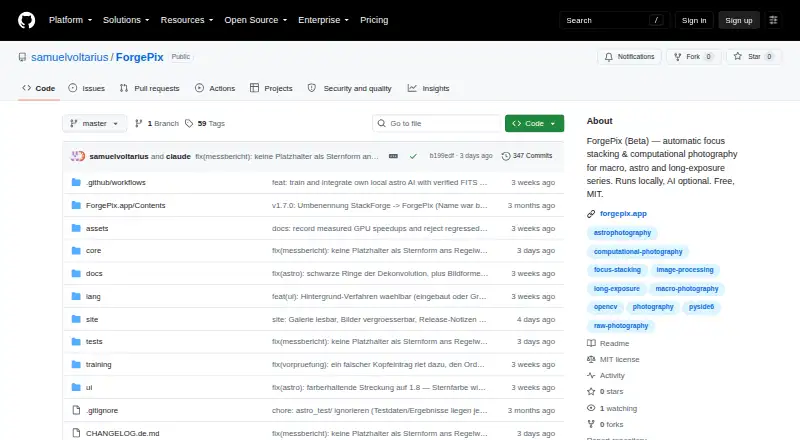
What ForgePix is
ForgePix is free beta software for focus stacking and computational photography, designed for macro, astrophotography, and long-exposure image series. Its Macro, Astro, Hybrid, and Long Exposure modules support different workflows. Automatic mode chooses usable frames, aligns and merges them, then applies sharpening. Focus merge methods include Laplacian pyramid, depth map, weighted average, à-trous wavelet, and halo fix. Astro features include calibration-frame detection, star alignment, rejection methods, drizzle, multi-session stacking, and FITS export. Editing tools include a Camera-Raw editor, retouch brush, batch processing, watch folder, and export presets. ForgePix says it processes images locally without requiring AI, a server, or external astronomy software. Optional language assistants and external tools are available. The local AI image models are experimental and may change faint structures, flux, or star shapes; they are not enabled automatically. Prebuilt downloads are listed for Linux, macOS, and Windows. The interface includes German and English, and ForgePix is distributed under the MIT license. Its v1.28.0-beta is marked as a prerelease.
Good
- Automatic mode selects, aligns, and merges frames
- Multiple focus merge methods are included
- Astro tools include drizzle and FITS export
- Batch processing and retouching tools are included
- Free under the MIT license
Watch out
- The software is beta, not a release candidate
- Local AI image models are experimental
- AI models may alter faint structures or star shapes
Who it suits
ForgePix may suit photographers working with macro, astrophotography, or long-exposure series who want stacking and editing tools for desktop systems. Its specialized Astro tools may also interest users processing multi-session star images.
Verdict
ForgePix offers dedicated workflows for focus stacking and astrophotography, alongside local processing and editing tools. Its beta status and experimental AI image models are important considerations.
Plans and prices
From ForgePix's own pricing page, checked 29 Sep 2026.
| Plan | Price | What it gives you |
|---|---|---|
| Free (MIT) | Free | Free software under the MIT license |
The facts
Each one read from ForgePix's own pages, with the date it was checked.
What it does
- AI data handling
- For its optional language assistant, the setup states that preview frames, sharpness profile, basic EXIF data, and the user's wish are sent, while original files and location data are not.checked 29 Sep 2026
- AI integrations
- Optional language-assistant connections include OpenAI-compatible servers such as Ollama, llama.cpp, LM Studio, and vLLM, as well as OpenAI and OpenRouter.checked 29 Sep 2026
- Astrophotography
- Astro features include calibration-frame detection, star alignment, rejection methods, drizzle, multi-session stacking, and FITS export.checked 29 Sep 2026
- Automatic workflow
- Its one-click Automatic mode selects usable frames, aligns and merges them, and applies gentle sharpening.checked 29 Sep 2026
- Editing and export
- Built-in tools include a Camera-Raw editor, retouch brush, batch processing, watch folder, and export presets.checked 29 Sep 2026
- Experimental AI limits
- The local AI image models are experimental, are never enabled automatically, and may alter faint structures, flux, or star shapes.checked 29 Sep 2026
- External tools
- Optional external tools include Siril, GraXpert, StarNet++, and Cosmic Clarity.checked 29 Sep 2026
- Focus stacking
- Focus merge methods include Laplacian pyramid, depth map, weighted average, à-trous wavelet, and halo fix.checked 29 Sep 2026
- Languages
- The interface includes German and English, and users can add languages by translating a language file.checked 29 Sep 2026
- License
- ForgePix is distributed under the MIT license.checked 29 Sep 2026
- Local processing
- ForgePix says it works fully locally without AI, a server, or external astronomy software.checked 29 Sep 2026
- Modules
- The app includes Macro, Astro, Hybrid, and Long Exposure modules.checked 29 Sep 2026
- Purpose
- ForgePix is beta software for automatic focus stacking and computational photography for macro, astrophotography, and long-exposure series.checked 29 Sep 2026
- Release status
- The GitHub releases page labels v1.28.0-beta a prerelease and says it is a beta version rather than a release candidate.checked 29 Sep 2026
- Supported desktop systems
- Prebuilt downloads are listed for macOS, Windows, and Linux.checked 29 Sep 2026
The full review of ForgePix
Overview
ForgePix is a free desktop app for focus stacking and computational photography, with workflows for macro, astrophotography, and long-exposure series. It suits photographers who want stacking, editing, and export tools in one application. Its breadth is compelling for a free tool, but its beta status and experimental image models call for care.
Key features
Stacking and editing
Automatic mode selects usable frames, aligns and merges them, then applies gentle sharpening. That offers a convenient starting point for a series, while five focus-merge methods—Laplacian pyramid, depth map, weighted average, à-trous wavelet, and halo fix—give users options when they want to choose the merging approach. RAW support, automatic alignment, batch processing, and manual retouching extend the workflow beyond a single merge.
Macro, Astro, Hybrid, and Long Exposure modules separate the app's main use cases. A Camera-Raw editor and retouch brush handle image adjustments; a watch folder and export presets are useful for recurring jobs. Output formats include JPG, TIFF, layered Photoshop TIFF, and FITS.
Astrophotography and integrations
The Astro module includes calibration-frame detection, star alignment, rejection methods, drizzle, multi-session stacking, and FITS export. Together, those functions make ForgePix relevant to users combining astronomy images as well as photographers stacking focus series. It says its core processing runs locally, without AI, a server, or external astronomy software.
Optional connections broaden the setup: language assistants can connect through OpenAI-compatible servers such as Ollama, llama.cpp, LM Studio, and vLLM, or through OpenAI and OpenRouter. The assistant setup sends preview frames, a sharpness profile, basic EXIF data, and the user's request; original files and location data are not sent. That distinction may suit users who want help without uploading originals, but the preview and related data still leave the device. External tools such as Siril, GraXpert, StarNet++, and Cosmic Clarity are also optional.
The local AI image models are experimental, are never enabled automatically, and may change faint structures, flux, or star shapes. They are best treated cautiously, especially when those details matter to the finished image. ForgePix is a beta prerelease, not a release candidate, so users who need mature release status should look elsewhere.
Pricing
ForgePix's Free (MIT) plan costs nothing. It is free software under the MIT license, with no free trial. That makes it a low-cost way to access the listed stacking, editing, batch-processing, and export workflows; there are no paid tiers or quotas stated for this plan. Its main trade-off is beta maturity rather than a paid-plan feature restriction.
Platforms
Prebuilt downloads are listed for macOS, Windows, and Linux. The interface is available in German and English, and users can add languages by translating a language file. Distribution under the MIT license permits use under that license's terms.
Who it's for
ForgePix is a strong fit for macro photographers and astrophotographers who want a free, locally processed stacking workflow with editing tools in the same app. Its Astro module is particularly relevant for multi-session work and calibration frames, while batch processing and a watch folder help with repeated tasks. It is less suitable for anyone who requires a non-beta release or wants to rely on experimental AI output for faithful fine detail.
Pros and cons
- Pros: A broad set of focus-merge methods gives users alternatives when a single automatic merge is not enough.
- Pros: Astro features include calibration-frame detection, drizzle, multi-session stacking, and FITS export, supporting astronomy workflows in the same application.
- Pros: Local core processing, RAW support, batch tools, retouching, and multiple export formats make the free MIT-licensed app useful beyond stacking alone.
- Cons: The current release is a beta prerelease, not a release candidate, which may put off users seeking a mature release.
- Cons: Experimental local AI models may alter faint structures, flux, or star shapes, so they are not a safe default for detail-critical images.
- Cons: Optional language-assistant use sends preview frames, sharpness profile, basic EXIF data, and the user's request, which privacy-minded users may prefer to avoid.
Alternatives
Focus Stacking Software is a useful category page for comparing options. Consider ImageFocus Alpha if you need Android or iOS support, or if you use compatible Euromex camera models; it is also free. PlaneFuse is another free MIT-licensed option for personal and commercial use, with web, API, and self-hosted platforms in addition to desktop support. Choose Shine Stacker if you want a free open-source stacking tool for Windows, Mac OS, or Linux.
Aduku Stacker is a free alternative for macOS and Windows. PICOLAY is worth considering for Windows users who need a free option for non-commercial purposes. For a paid product with a free trial, Helicon Focus supports macOS and Windows. PhotoAcute Studio is another paid, trial-available option for Linux, macOS, and Windows. Zerene Stacker may suit eligible students seeking a one-time Student Edition license at $39, paid once.
Verdict
Choose ForgePix if you want a free, locally processed toolkit for macro stacking or astrophotography, especially when its dedicated Astro features and editing tools appeal. Its main draw is the breadth of workflows available without requiring AI or external astronomy software. Look elsewhere if beta status is a deal-breaker or if experimental image models are central to your workflow.
Alternatives to ForgePix
- 1
Focus Stacking Online
Free planAndroidiOSWebLinux7.3Free plan - 2
OpenFocus
Free planOpen sourceLinuxmacOSSelf-hostedWindows7.1Free plan - 3
CKAN
Free planLinuxmacOSWindows6.9Free plan - 4
ImageFocus Alpha
Free planAndroidiOSLinuxmacOS6.6Free plan - 5
focus-stack
Free planLinuxmacOSWindows6.5Free plan - 6
CombineZP
Free planWindows6.4Free plan