Mod Organizer 2
Mod Organizer 2 is a free, open-source Windows tool for installing and uninstalling mod collections.
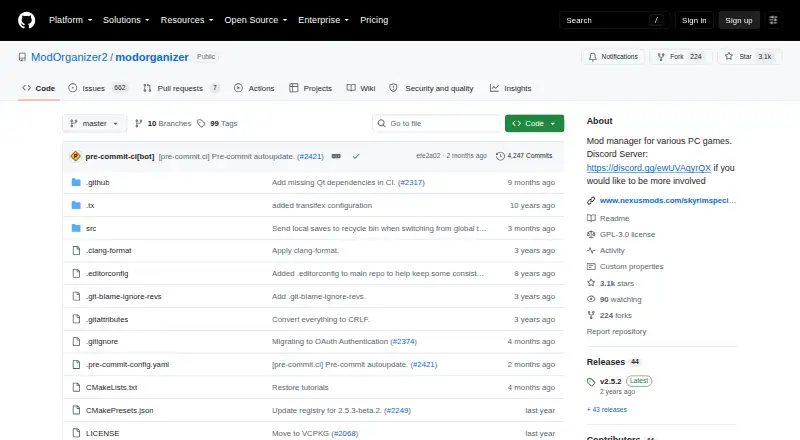
What Mod Organizer 2 is
Mod Organizer 2 is a free, open-source Windows tool for installing and uninstalling mod collections. It uses virtualized mod management for Bethesda games and supports 64-bit titles such as Skyrim Special Edition and Fallout 4, as well as 32-bit games supported by Mod Organizer 1. The tool is designed for people who experiment with mods and can manage collections of arbitrary size. Its basic games plugin can detect games installed through Steam, GOG, Origin, Epic Games or Legendary, and EA Desktop. A mod data checker can inspect archive layouts and fix them for automatic installation. Downloads are available through GitHub Releases and Nexus Mods; the installer can also create a portable installation. Version 2.5.0 requires Windows 10 1809 or newer, or Windows 11. The virtual filesystem is incompatible with Windows Store and Gamepass packaging, so those versions of supported games cannot be used. The community-maintained project is licensed under GPL-3.0.
Good
- Manages mod collections of arbitrary size.
- Supports 64-bit and certain 32-bit games.
- Detects games from several listed launchers.
- Installer can create a portable installation.
Watch out
- Requires Windows 10 1809+ or Windows 11.
- Windows Store and Gamepass versions are unsupported.
- Project documentation is described as sparse.
Who it suits
It is for Windows users who experiment with mods for supported PC games and want to manage mod collections. Windows Store and Gamepass game versions are not supported.
Verdict
Mod Organizer 2 offers virtualized mod management for supported Windows games, with profiles and conflict detection among its listed features. Check the Windows requirement and game-version limitation before choosing it.
Plans and prices
From Mod Organizer 2's own pricing page, checked 30 Sep 2026.
| Plan | Price | What it gives you |
|---|---|---|
| Mod Organizer 2 | Free | Windows 10 1809+ or Windows 11 · Windows Store/Gamepass versions unsupported |
The facts
Each one read from Mod Organizer 2's own pages, with the date it was checked.
What it does
- Automatic updates
- Yeschecked 20 Sep 2026
- Build instructions
- Build instructions are provided through the Modorganizer2/mob project.checked 28 Sep 2026
- Collection size
- It supports mod collections of arbitrary size.checked 28 Sep 2026
- Community project
- Mod Organizer 2 is an open project maintained by the community and is seeking developers and contributors.checked 30 Sep 2026
- Community support
- Users can join the open development Discord server for information and involvement.checked 28 Sep 2026
- Completion status
- The project was not completed and was left with many issues.checked 28 Sep 2026
- Conflict detection
- Yeschecked 20 Sep 2026
- Deployment method
- virtualchecked 20 Sep 2026
- Development workflow
- The Discord is used to test dev builds, investigate bugs, and discuss suggestions.checked 28 Sep 2026
- Documentation
- The project states that its documentation is sparse and points users to a Mod Organizer 1 wiki for general information with caution about differences.checked 30 Sep 2026
- Downloads
- The project provides downloads through GitHub Releases and Nexus Mods, with the installer usually preferred for ease of installation.checked 30 Sep 2026
- Download sources
- Downloads are available on GitHub.com and NexusMods.com.checked 28 Sep 2026
- Game launcher integrations
- The basic games plugin can detect games installed through Steam, GOG, Origin, Epic Games or Legendary, and EA Desktop.checked 30 Sep 2026
- Game support
- Mod Organizer 2 supports 64-bit games such as Skyrim Special Edition and Fallout 4, as well as the 32-bit games supported by MO1.checked 30 Sep 2026
- Issue reporting
- Issues can be reported on GitHub or the open Discord server.checked 28 Sep 2026
- Mod installation
- The basic games plugin includes a mod data checker that can check and fix different mod archive layouts for automatic installation.checked 30 Sep 2026
- Mod management
- It provides an easy and reliable way to install and uninstall mods.checked 28 Sep 2026
- Mod profiles
- Yeschecked 20 Sep 2026
- Mod source access
- built-inchecked 20 Sep 2026
- Open source
- The Mod Organizer repository is public and licensed under GPL-3.0.checked 30 Sep 2026
- Portable installation
- The installer can also be used to create a portable Mod Organizer 2 installation.checked 30 Sep 2026
Money
- Billing details
- No pricing or billing terms are stated in the provided pages.checked 28 Sep 2026
- Free plan
- Yeschecked 20 Sep 2026
Where it runs
- Platform scope
- It is described as a mod manager for various PC games.checked 28 Sep 2026
The full review of Mod Organizer 2
Overview
MO2’s profile-based setup makes it easier to keep experimental mod combinations separate rather than committing to one arrangement. Its virtual deployment is a practical fit for players who want to manage mods without placing them directly in game files, though that design rules out Windows Store and Gamepass copies.
It is an open-source, community-maintained project that remains unfinished and has unresolved issues. That trade-off matters: MO2 offers a focused toolkit for supported PC games, but sparse documentation and active community support may be part of the ownership experience.
Key features
Profiles, conflicts and virtual deployment
Profiles let users maintain distinct mod configurations, a useful safeguard when experimenting with collections of arbitrary size. Conflict detection helps surface clashes between mods, while virtual deployment keeps MO2’s managed setup separate from direct changes to game files. The approach is especially aligned with Bethesda games, for which the project describes MO2 as a virtualized manager.
Installation and game detection
MO2 handles mod installation and removal, and its basic games plugin can recognize installations from Steam, GOG, Origin, Epic Games or Legendary, and EA Desktop. A mod data checker can inspect and fix different archive layouts for automatic installation, reducing the need to correct package structure by hand. Recent releases also added BSA archive preview when the relevant plugin supports it.
Downloads and support
Downloads are available through GitHub Releases and Nexus Mods. The installer is the preferred route for a simpler setup and can also create a portable installation. Documentation is sparse; the project points users to the Mod Organizer 1 wiki for general guidance, while warning that MO2 may differ. GitHub and the open Discord server are the routes for reporting issues, and Discord also supports development builds, bug investigation, suggestions and community translation.
Pricing
MO2 is free: its plan costs nothing, with no free trial. The project uses the GPL-3.0 license and is open source, so the free plan is the full available product rather than a time-limited preview. No paid tier or billing commitment is stated.
The main cost is not monetary but practical: an unfinished project with sparse documentation can require more patience from users than a product with settled support materials. For mod experimenters comfortable with a community-maintained tool, that may be a reasonable exchange for free access and open development.
Platforms
MO2 runs on Windows. Version 2.5.0 requires Windows 10 version 1809 or newer, or Windows 11. The virtual filesystem is incompatible with the packaging of Windows Store and Gamepass games, so supported titles from those stores are not usable with MO2.
Game coverage includes 64-bit titles such as Skyrim Special Edition and Fallout 4, plus the 32-bit games supported by the original Mod Organizer. The basic games plugin can detect titles installed through several major PC launchers, but launcher detection does not remove the Windows Store and Gamepass restriction.
Who it's for
MO2 suits Windows players who regularly try different mod combinations, especially those working with supported Bethesda games and who value separate profiles, conflict detection and virtual deployment. Its arbitrary-size collection support leaves room for extensive setups, while the open project and Discord give technically engaged users a way to follow development or contribute.
It is a poor fit for players on other operating systems, users with Windows Store or Gamepass installs, or anyone who needs polished documentation and a finished, issue-free project. The Mod Organizer 1 wiki can help with general concepts, but MO2 differences mean it is not a complete substitute for current documentation.
Pros and cons
- Pros: Profiles and conflict detection support experimentation without forcing users into one mod configuration.
- Pros: Virtual deployment and broad game-launcher detection make it a capable option for supported Windows installations.
- Pros: Free, open-source access has no stated trial cutoff or billing terms.
- Cons: Windows Store and Gamepass versions are incompatible with its virtual filesystem.
- Cons: The project remains unfinished with many issues, and its sparse documentation can make setup and troubleshooting harder.
- Cons: Windows-only support excludes players managing mods on Linux or macOS.
Alternatives
Game Mod Managers is the broader category to compare if MO2’s Windows and game-version limits do not fit.
Choose Vortex instead if you want another free, open-source option that supports Windows and extension platforms. Limo is a free, open-source alternative for Linux users. Modrix is another free option if you need Windows, Linux or macOS support. G3M covers Windows, macOS and Linux. RimSort is a free option across those same three platforms. Gale Mod Manager offers a free choice for Windows and Linux, while Wrye Bash is another free Windows/Linux option.
Alternative Mod Launcher is worth considering for its specific supported games, XCOM 2 (WotC) or XCOM Chimera Squad, when Steam, 64-bit Windows and .NET Framework 4.7.2 or later are available.
Verdict
Choose MO2 if you want free, open-source virtual mod management with profiles and conflict detection for supported Windows games, particularly Bethesda titles. Its strongest reason to choose it is the combination of experimentation-friendly organization and virtual deployment; its clearest reasons to look elsewhere are Windows Store/Gamepass incompatibility, sparse documentation and an unfinished project with many issues.
Alternatives to Mod Organizer 2
- 1
Modrinth
Free planOpen sourceWebAPILinuxmacOS9.1From $4.99 a month - 2
CurseForge
Free planWeb8.0Free plan - 3
CKAN
Free planLinuxmacOSWindows7.6Free plan - 4
G3M
Free planLinuxmacOSWindows7.5Free plan - 5
Zephyr
Free planLinuxmacOSWindows7.5Free plan - 6

GitHub CodeQL
Free planWebExtensionLinuxmacOS7.5From $30 a month