G3M
G3M is a free desktop manager for GameMaker mods, distributed under the GPL-3.0 license.
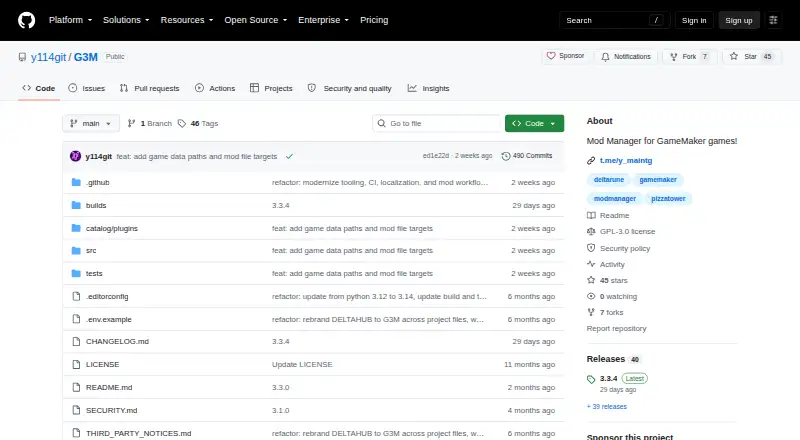
What G3M is
G3M is a free desktop manager for GameMaker mods, distributed under the GPL-3.0 license. It provides a place to find, install, organize, and launch mods for supported games. Its built-in game entries cover DELTARUNE, DELTARUNE Demo, UNDERTALE, UNDERTALE Yellow, Pizza Tower, Sugary Spire, and FRICKBEARS3; users can add other GameMaker games in the in-app Game Manager. Mod installs can come from supported GameBanana games, external URLs, local archives, or one-click links.
Separate library profiles can keep their own active mod selections and settings. The Mod Editor combines patches, file replacements, and archive contents, while other tools create or apply patches, merge patch sets, compare files, export diff reports, and convert supported mod formats. Games can launch directly or through Steam where available. Linux users can use PortProton for compatible Windows games, and normal launch mode restores game files after a game closes. The Catalog contains plugins and themes, including plugins for DELTARUNE save management and custom save locations. G3M has downloads for Windows, Linux, and macOS on x86_64 and ARM64 computers.
Good
- Manages mods for seven built-in GameMaker game entries.
- Accepts mods from GameBanana, URLs, archives, and one-click links.
- Profiles keep separate mod selections and settings.
- Includes patch creation, comparison, merging, and diff reports.
- Available for Windows, Linux, and macOS on x86_64 and ARM64.
Watch out
- Built-in entries cover a specific set of GameMaker games.
- Security fixes for older releases are unsupported.
- Linux PortProton use applies to compatible Windows games.
Who it suits
G3M suits GameMaker players who want to manage mods and keep different mod selections in separate profiles. It is also relevant to users who work with patch sets or mod formats, and to players who want access to GameBanana discovery and community support through Discord or Telegram.
Verdict
Choose G3M if you want a free, GPL-3.0 manager for GameMaker mods with profiles, editing tools, and multiple install routes. Look elsewhere if you need security fixes for older releases, since support is best-effort for the main branch and latest release only.
Plans and prices
From G3M's own pricing page, checked 12 Oct 2026.
| Plan | Price | What it gives you |
|---|---|---|
| G3M | Free | GPL-3.0 desktop application |
The facts
Each one read from G3M's own pages, with the date it was checked.
What it does
- Catalog
- The Catalog offers plugins and themes, including plugins for managing DELTARUNE saves and choosing custom save folders.checked 11 Oct 2026
- Conflict detection
- Yeschecked 20 Sep 2026
- Custom games
- Users can add custom GameMaker games through the in-app Game Manager.checked 11 Oct 2026
- Deployment method
- copychecked 20 Sep 2026
- Game file handling
- The normal launch mode restores game files after the game closes.checked 12 Oct 2026
- Game launch
- Supported games can launch directly or through Steam where available, and Linux users can use PortProton for compatible Windows games.checked 11 Oct 2026
- Integrations
- G3M integrates with GameBanana and can launch supported games through Steam where available; Linux users can use PortProton for compatible Windows games.checked 12 Oct 2026
- License
- The application is distributed under GPL-3.0.checked 12 Oct 2026
- Mod discovery
- The app browses supported GameBanana games and can install mods from GameBanana, external URLs, local archives, or one-click install links.checked 12 Oct 2026
- Mod editing
- The Mod Editor combines patches, file replacements, and archive contents, and supports exporting mods to share.checked 12 Oct 2026
- Mod profiles
- Yeschecked 20 Sep 2026
- Mod source access
- built-inchecked 20 Sep 2026
- Mod tools
- G3M can create and apply patches, merge patch sets, compare files, export diff reports, and convert mods between supported formats.checked 11 Oct 2026
- Patching tools
- Built-in tools create and apply patches, merge patch sets, compare files, and export diff reports.checked 12 Oct 2026
- Plugins
- The Catalog offers plugins including DR Save Manager for DELTARUNE saves and Custom Saves Folders for selecting save locations.checked 12 Oct 2026
- Profiles
- Users can create multiple library profiles with separate active mod selections and profile-scoped settings.checked 12 Oct 2026
- Purpose
- G3M is a desktop manager for GameMaker mods that can browse, install, organize, and launch supported games with mods.checked 11 Oct 2026
- Security support
- Security fixes are provided on a best-effort basis for the main branch and latest release; older releases are unsupported.checked 11 Oct 2026
- Support
- The project links to community help on Discord and Telegram.checked 12 Oct 2026
- Supported games
- Built-in game entries cover DELTARUNE, DELTARUNE Demo, UNDERTALE, UNDERTALE Yellow, Pizza Tower, Sugary Spire, and FRICKBEARS3, and users can add custom games.checked 12 Oct 2026
- Themes and languages
- G3M supports installed or imported themes and ships with English, Russian, Spanish, Korean, Japanese, Simplified Chinese, and Traditional Chinese language packs.checked 12 Oct 2026
Where it runs
- Download platforms
- Release downloads are available for Windows, Linux, and macOS on x86_64 and ARM64 computers.checked 12 Oct 2026
- Platforms
- Release packages are available for Windows, Linux, and macOS on x86_64 and ARM64 computers.checked 11 Oct 2026
- Supported platforms
- multi-platformchecked 20 Sep 2026
The full review of G3M
G3M is a free, open-source desktop manager for mods in GameMaker titles. It is best suited to players and mod creators who want profiles, patching tools, and several installation methods across Windows, Linux, and macOS. Its focused game catalog and unusually deep editing workflow make it a specialist choice rather than a universal mod manager.
Overview
G3M brings mod discovery, installation, organization, editing, and launching into one application. Built-in entries cover DELTARUNE, DELTARUNE Demo, UNDERTALE, UNDERTALE Yellow, Pizza Tower, Sugary Spire, and FRICKBEARS3. The in-app Game Manager can add custom GameMaker games, so the fixed catalog is not an absolute boundary, but the software remains centered on GameMaker rather than games across every engine.
It integrates with GameBanana and accepts mods from external URLs, local archives, and one-click install links. That combination suits users who alternate between browsing a catalog and managing files obtained from elsewhere.
Key features
Profiles and conflict control
Multiple library profiles keep active mod selections and profile-scoped settings separate. This is useful when maintaining different playthroughs, testing combinations, or sharing a computer. Conflict detection flags overlapping changes before they become a harder-to-diagnose launch problem, although it does not remove the need to decide which mod should take priority.
Editing and patching
The Mod Editor combines patches, file replacements, and archive contents, and can export a finished mod for sharing. Separate tools create and apply patches, merge patch sets, compare files, export diff reports, and convert mods between supported formats. Those capabilities give creators and curators a practical workflow for refining and distributing changes; players who only install finished mods may find this depth unnecessary.
Launching and extensions
Games can launch directly or through Steam where available. On Linux, PortProton can be used for compatible Windows games, extending the practical reach beyond native builds. Normal launch mode restores game files after the game closes, an important safeguard when experimenting with replacements.
The Catalog adds plugins and themes. DR Save Manager targets DELTARUNE saves, while Custom Saves Folders lets users choose save locations. Installed or imported themes and language packs for English, Russian, Spanish, Korean, Japanese, Simplified Chinese, and Traditional Chinese make the interface more adaptable without changing its core GameMaker focus.
Pricing
| Plan | Price | What you get |
|---|---|---|
| G3M | free | GPL-3.0 desktop application |
There is no paid tier, trial period, seat quota, or renewal term. The free GPL-3.0 distribution fits anyone who wants the complete desktop feature set without a subscription. The trade-off is project support rather than commercial service guarantees: security fixes are best-effort for the main branch and latest release, while older releases are unsupported.
Platforms
G3M runs on Linux, macOS, and Windows. Release downloads target x86_64 and ARM64 computers, giving current desktop hardware a straightforward path. Linux users also have the PortProton route for compatible Windows games, while Steam launching is available where supported.
Who it's for
Choose G3M if your library is mainly GameMaker games and you want profile switching, conflict visibility, built-in source access, and tools for making or sharing patches. It is especially compelling for mod authors and maintainers who need comparisons, diff reports, format conversion, and combined replacements. It is less suitable if you need a broad manager for unrelated engines or depend on long-term security maintenance for old versions.
Pros and cons
- Pros: Free GPL-3.0 distribution with no usage limits stated; works on Windows, Linux, and macOS; supports GameBanana, URLs, archives, and one-click installs; profiles and conflict detection make larger mod setups easier to control; editing and patch tools support creation as well as installation; file restoration after launch reduces the risk of leaving a game altered.
- Cons: The built-in catalog is concentrated on seven GameMaker games; custom-game support still requires adding entries yourself; the advanced editor may be more than a casual installer needs; older releases do not receive security support.
Alternatives
Browse the Game Mod Managers category for a wider comparison. Modrinth is the better pick for a freemium, web-and-desktop ecosystem with a creator-support subscription and API access. CurseForge suits readers focused on Minecraft mods and modpacks through its web catalog and free plan. Vortex is a free, open-source Windows extension-based manager from Nexus Mods. Modrix offers a free, open-source option across extension, Linux, macOS, and Windows. CKAN is a free, MIT-licensed manager for its supported ecosystem. Irony Mod Manager targets supported Paradox games. RimModManager is a free, open-source choice with no stated price or usage limits. FlairX Mod Manager is a free Windows-only open-source alternative.
Verdict
G3M is the right recommendation for GameMaker players and creators who value profiles, conflict detection, flexible installs, and serious patch and comparison tools at no cost. Look elsewhere for a manager built around other engines, a broader general-purpose catalog, or supported security maintenance on older releases.
Getting started
- Open the G3M GitHub project page.
- Download a release for Windows, Linux, or macOS on x86_64 or ARM64.
- Launch G3M and choose a built-in game or add a custom one in Game Manager.
- Browse supported GameBanana games or install a mod from a URL, local archive, or one-click link.
- Create a library profile to manage active mods and profile-specific settings.
Limits worth knowing
G3M is free, and the listed plan is the GPL-3.0 desktop application. Security fixes are best-effort for the main branch and latest release; older releases are unsupported.
Questions
Is G3M free?
Yes. G3M is listed as a free desktop application under the GPL-3.0 license.
Which operating systems can run it?
Release downloads are available for Windows, Linux, and macOS on x86_64 and ARM64 computers.
Which games does it support?
Built-in entries cover DELTARUNE, DELTARUNE Demo, UNDERTALE, UNDERTALE Yellow, Pizza Tower, Sugary Spire, and FRICKBEARS3. Users can also add custom GameMaker games.
Where can mods come from?
G3M browses supported GameBanana games and can install from GameBanana, external URLs, local archives, and one-click install links.
Does it integrate with other tools?
G3M integrates with GameBanana and can launch supported games through Steam where available. Linux users can use PortProton for compatible Windows games.
How is security support handled?
Security fixes are provided on a best-effort basis for the main branch and latest release. Older releases are unsupported.
Alternatives to G3M
- 1
Modrinth
Free planOpen sourceWebAPILinuxmacOS9.1From $4.99 a month - 2
CurseForge
Free planWeb8.0Free plan - 3
Mod Organizer 2
Free planOpen sourceWindows7.7Free plan - 4
CKAN
Free planLinuxmacOSWindows7.6Free plan - 5
Zephyr
Free planLinuxmacOSWindows7.5Free plan - 6
Vortex
Free planExtensionWindows7.4Free plan