
Civitas Advising
Civitas Advising is a student-success platform for colleges and universities, bringing student information, advising workflows, and planning tools together.
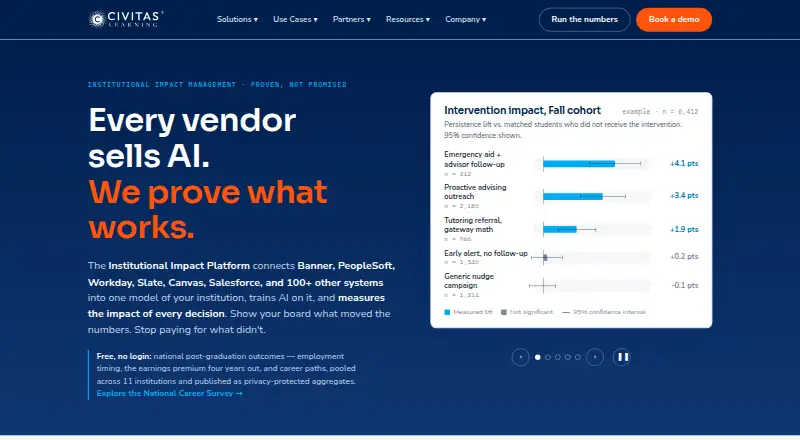
What Civitas Advising is
Civitas Advising is a student-success platform for colleges and universities, bringing student information, advising workflows, and planning tools together. Advisors can view student profiles with academic information, advising notes, and alerts, and identify students for outreach based on factors such as changes in persistence likelihood or unfinished schedules. Teams can coordinate through shared notes, alerts, dynamic student lists, and outreach. Advisors and students can work together on degree plans and class schedules; students can also arrange appointments and message advisors in a portal. The platform lists integrations with more than 100 systems, including Banner, PeopleSoft, Workday Student, Canvas, Blackboard, Moodle, and Salesforce. Advising is accessed through a mobile website, while the separate Inspire student app is native for phones. Civitas says it supports institutional single sign-on, does not sell data to third parties, and acts as an institution-designated FERPA school official. Pricing is by request, with scope and integrated systems affecting the quote; additional integrations may carry fees.
Good
- Profiles include academic details, notes, and alerts.
- Outreach can be prioritized using student factors.
- Students can schedule appointments and message advisors.
- Lists integrations with more than 100 systems.
Watch out
- Pricing is available only by request.
- Additional integrations may carry added fees.
- Advising uses a mobile website, not a native app.
Who it suits
Civitas Advising suits colleges and universities whose advising, faculty, and student-success teams need shared student records, coordinated outreach, and degree planning.
Verdict
Civitas Advising combines student outreach, case management, and student planning for institutional teams. Institutions should account for quote-based pricing and possible integration fees when considering it.
Plans and prices
From Civitas Advising's own pricing page, checked 15 Oct 2026.
| Plan | Price | What it gives you |
|---|---|---|
| Civitas Learning platform subscription | Priced on request | no per-student or per-seat charge · no token metering · no per-agent purchase · implementation and integration included · multi-year typical · annual; scaled to institution size, scope and integrated systems |
The facts
Each one read from Civitas Advising's own pages, with the date it was checked.
What it does
- Academic alerts
- The platform supports academic alerts and commendations that flag students for advisor or faculty attention.checked 15 Oct 2026
- Accessibility
- Civitas states a commitment to WCAG 2.0 Level AA and offers accessibility conformance reports on request.checked 15 Oct 2026
- Advising workflow
- Civitas Advising combines configurable workflow tools with data-driven insights for advisors, faculty and staff.checked 15 Oct 2026
- AI assistance
- The platform offers AI-generated next actions, AI workflow agents and an AI Notetaker that summarizes advisor conversations.checked 15 Oct 2026
- API
- The Bulk Outreach Extract API delivers email and nudge outreach records through a secure message queue for integration with systems such as Salesforce.checked 15 Oct 2026
- API access method
- API setup requires IP whitelisting, staging credentials and a client that consumes an Amazon MQ queue; each message is retrievable once.checked 15 Oct 2026
- Calendars
- Students can schedule appointments, RSVP to events and use advisor calendars with configurable appointment and drop-in features.checked 15 Oct 2026
- Case management
- Advising teams can use dynamic student lists, shared notes, alerts, and coordinated outreach.checked 29 Sep 2026
- Compliance
- The Trust Center lists FERPA, GDPR, SOC 2 Type 2, TX-RAMP Level 2, and VPAT under compliance.checked 29 Sep 2026
- Documentation
- The public documentation site reports 123 articles across seven capabilities, including 37 Advising articles.checked 15 Oct 2026
- Funding news
- TechCrunch reported on September 28, 2015 that Warburg Pincus committed up to $60 million, bringing reported total funding to $88.9 million.checked 15 Oct 2026
- Initiative measurement
- Initiative Analysis measures student-success initiatives against matched comparison groups using prediction-based propensity score matching.checked 15 Oct 2026
- Integrations
- Civitas lists integrations with Banner, PeopleSoft, Workday Student, Canvas, Blackboard, D2L, Moodle, Slate, Salesforce, Element451, CollegeVine, TargetX and more than 100 systems.checked 15 Oct 2026
- Intended customers
- Civitas describes the advising solution for colleges and universities and their advising, faculty, and student-success teams.checked 29 Sep 2026
- Licence and hosting
- Public pages describe an annual cloud platform subscription and do not publish an open-source licence or self-hosting package.checked 15 Oct 2026
- Limit: Capterra implementation and support
- Capterra reviewers report over-promised implementation, costly customization for expected features, long ticket waits and difficulty getting issues resolved.checked 15 Oct 2026
- Limit: Capterra reliability
- One Capterra reviewer reports clunky components, integration problems, delayed or duplicated notes, recurring errors and frequent downtime.checked 15 Oct 2026
- Messaging
- Advising includes two-way messaging between students, advisors and instructors, plus email and SMS outreach.checked 15 Oct 2026
- Mobile access
- Civitas Advising uses a mobile website; the separate Inspire student app is native and available on phones.checked 29 Sep 2026
The company
- Company founded and headquarters
- LinkedIn lists Civitas Learning as founded in 2011 with headquarters in Austin, Texas.checked 15 Oct 2026
- Company legal name
- Crunchbase identifies the company as Civitas Learning, Inc.checked 15 Oct 2026
- Company size
- LinkedIn lists a company size of 51–200 employees.checked 15 Oct 2026
- Founded
- 2011checked 23 Sep 2026
Money
- Degree planning
- Academic Planning provides drag-and-drop degree paths that students can share with advisors.checked 15 Oct 2026
The full review of Civitas Advising
Overview
Civitas Advising is a student-success platform for colleges and universities, built for advising, faculty, and student-success teams. It is strongest for institutions that want outreach, case management, and planning in one system. Custom pricing and potential integration fees make it a considered institutional purchase rather than a straightforward budget option.
Key features
Advisors get student profiles that bring academic information, advising notes, and alerts together. That shared context can help staff prepare for conversations without piecing together a student’s situation across separate records.
Outreach prioritization can surface students based on signals such as changes in persistence likelihood or unfinished schedules. Teams can then use dynamic lists, shared notes, alerts, and coordinated outreach to manage follow-up. This combination suits institutions that need a repeatable way to identify students who may need attention; it does not, by itself, establish how accurate or effective those signals are.
Student planning links degree plans and class schedules with a portal where students can message advisors and schedule appointments. Degree audit, degree planning, early alerts, and intervention workflows round out the advising toolkit, making Civitas broader than a scheduling or degree-planning tool alone.
The platform integrates with more than 100 systems, including major student information, learning management, admissions, and engagement products such as Banner, PeopleSoft, Workday Student, Canvas, Blackboard, Moodle, Salesforce, and Slate. That breadth may help institutions connect existing systems, but unusual or unsupported integrations can expand scope and cost.
Pricing
Civitas Learning platform subscription: custom pricing, by annual subscription, with a quote required. Pricing scales with institution size and depends on scope and integrated systems; multi-year terms are typical. Additional SIS, LMS, or data integrations may carry added fees, so institutions should account for both the initial scope and the systems they need connected when evaluating a quote.
There is no lower-cost published tier or free plan to compare. The subscription is aimed at institutions seeking the broader platform, while schools wanting only a single advising function may find the custom, institution-scaled commitment difficult to justify.
Platforms
Civitas Advising is available on Android, iOS, and the web. Its advising access is through a mobile website; the separate Inspire student app is native for phones. Institutions prioritizing a native mobile experience for advisors should weigh that distinction.
Civitas says it supports institutional single sign-on, acts as an institution-designated FERPA school official, and does not sell data to third parties. Its Trust Center lists FERPA, GDPR, SOC 2 Type 2, TX-RAMP Level 2, and VPAT. Each partner has a named customer development lead, and product documentation directs users to the support team.
Who it's for
Civitas is best suited to colleges and universities whose advising, faculty, and student-success teams need shared student context, prioritized outreach, coordinated case management, and collaborative planning. Its integration range and institutional security posture are relevant to organizations connecting advising work with existing campus systems.
It is less compelling for individuals or small teams seeking a published per-user price, a free entry point, or a native advisor app. Institutions should also be prepared to scope integrations and consider a typical multi-year term.
Pros and cons
- Pros: Student profiles, alerts, outreach prioritization, case management, and planning sit in one advising platform, supporting a connected workflow for institutional teams.
- Pros: More than 100 integrations and support for institutional single sign-on can fit complex campus environments.
- Pros: A named customer development lead for each partner provides a defined relationship for institutional customers.
- Cons: Custom annual pricing, institution-dependent scope, and typical multi-year terms make cost and commitment harder to compare upfront.
- Cons: Additional integration fees can raise the cost, especially where systems are unusual or unsupported.
- Cons: Advising uses a mobile website rather than a native advisor app.
Alternatives
Consider EAB Navigate360 if an enterprise license covering all staff and students, without per-user or per-office license fees, better fits the institution’s purchasing model; its pricing still depends on enrollment and technology scope.
Ellucian Degree Works is another paid alternative, with pricing based on full-time equivalent students according to a 2024 Ellucian document. Choose it for that degree-works option rather than Civitas’s combined outreach and advising workflow.
CoreCampus may suit schools seeking a cloud-based platform priced by average annual FTE students, with a monthly fee and a preliminary quote. FlightPath is the free, self-hosted web alternative for institutions prepared to install and run its Community Edition on a web server with MySQL and PHP.
Stellic, Watermark Student Success & Engagement, and Ellucian Advising are also paid alternatives. uAchieve Planner offers a custom institutional subscription that includes 40 hours of support, monitoring, backup and disaster recovery, and cyclical upgrades.
Browse Academic Advising Software and Student Engagement Software for more category options.
Verdict
Civitas Advising is a strong fit for colleges and universities that want one institutional platform for student context, targeted outreach, case management, and planning. Its broad integrations and connected workflows are the main reasons to choose it. Look elsewhere if predictable published pricing, a short commitment, or a native advisor mobile app matters more.
Getting started
- Open the Civitas Advising website
- Request a subscription quote from Civitas
- Choose an annual platform subscription scaled to institution size and scope
- Connect the required SIS, LMS, and other listed systems
- Configure institutional single sign-on
- Provide advisors and students access through the web portal or Inspire phone app
Limits worth knowing
The subscription is quote-based, with scope and integrated systems affecting the price. Unusual or unsupported integrations can increase scope, and additional SIS, LMS, or data integrations may carry extra fees.
Questions
Who is Civitas Advising for?
Civitas describes it for colleges, universities, and their advising, faculty, and student-success teams.
What platforms can access it?
The listed platforms are Android, iOS, and web. Advising uses a mobile website, while the separate Inspire student app is native on phones.
Does it support degree planning and alerts?
Yes. Degree audit, degree planning, early alerts, intervention workflows, and a student planning portal are listed.
How is Civitas Advising priced?
The platform subscription is an annual plan requiring a quote. Pricing depends on institution size, scope, and integrated systems; multi-year terms are typical.
What integrations are available?
Civitas lists more than 100 integrations, including Banner, PeopleSoft, Workday Student, Canvas, Blackboard, Moodle, Slate, and Salesforce.
What privacy and compliance commitments are listed?
Civitas says it supports institutional single sign-on, does not sell data to third parties, and acts as an institution-designated FERPA school official. Its Trust Center lists FERPA, GDPR, SOC 2 Type 2, TX-RAMP Level 2, and VPAT.
Alternatives to Civitas Advising
- 1

Synap
AndroidiOSWebExtension7.4From £1,200 a year - 2
Salesforce Education Cloud
AndroidiOSWebAPI7.1From $87 a month - 3
Edsby
AndroidiOSWebAPI7.0From $2 a year - 4
Enflux
Free planWebExtension6.8Free plan - 5
ExamSoft
iOSWebmacOSWindows6.6 - 6
HelioCampus Course Evaluations & Surveys
AndroidiOSWebAPI6.3