CallFire IVR
CallFire IVR provides inbound and outbound interactive voice response for businesses and organizations handling calls for surveys, polls, appointment reminde…
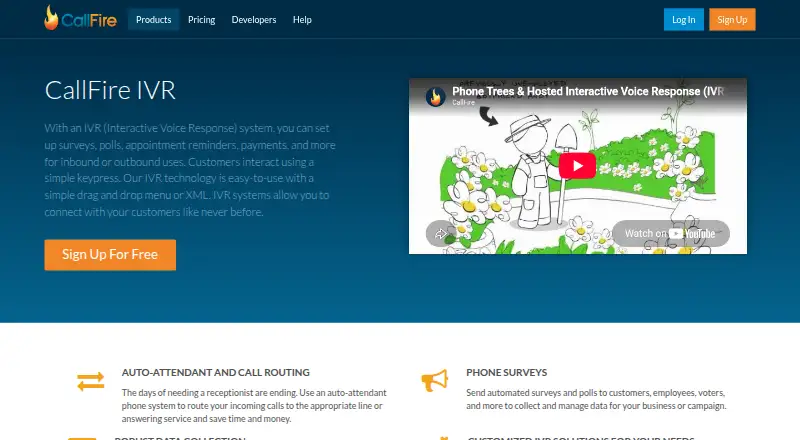
What CallFire IVR is
CallFire IVR provides inbound and outbound interactive voice response for businesses and organizations handling calls for surveys, polls, appointment reminders, payments, and other purposes. Its auto-attendant routes incoming callers to a suitable line or answering service. Users can create call flows with a visual drag-and-drop designer or an XML editor, then record calls and responses, track results, export data, and analyze metrics. CallFire says users can configure unlimited extensions that forward to phone numbers, and its IVR guide lists Zapier integrations. Developers can assist with custom applications built using CallFire APIs. The service is available on the web and through an API. It accepts touch-tone input only; voice recognition is not available. There is no free plan. Pay as you go has no monthly fee, with optional monthly rentals, while monthly plans include Lite at $99 a month, Startup at $199 a month, Grow at $299 a month, and Pro at $599 a month. Calls and texts stop at zero credits, and monthly allowances expire at each cycle’s end.
Good
- Routes callers to a line or answering service
- Builds flows with drag-and-drop or XML
- Records calls and responses, with exportable data
- Offers unlimited extensions, according to CallFire
- API and Zapier integration options are listed
Watch out
- No free plan
- Voice recognition is not offered
- Calls and texts stop at zero credits
- Monthly allowances expire each cycle
Who it suits
CallFire IVR suits organizations that need automated call routing or touch-tone phone interactions for surveys, reminders, payments, polling, or emergency information. It may suit teams that want to design flows visually or with XML and analyze recorded call responses.
Verdict
CallFire IVR combines call routing, configurable voice flows, and tools to collect and analyze responses. Before choosing it, note its touch-tone-only input and the credit and monthly allowance limits.
Plans and prices
From CallFire IVR's own pricing page, checked 15 Oct 2026.
| Plan | Price | What it gives you |
|---|---|---|
| Pay as you go | Free | optional monthly rentals · $10 phone numbers · $25 keywords · 6¢ per minute/text; no monthly fee |
| Lite | $99 a month | 2,500 minutes/texts · optional monthly rentals · $2.50 phone numbers · $20 keywords · monthly |
| Startup | $199 a month | 5,500 minutes/texts · optional monthly rentals · $2.25 phone numbers · $15 keywords · monthly |
| Grow | $299 a month | 10,000 minutes/texts · optional monthly rentals · $2.00 phone numbers · $13 keywords · monthly |
| Pro | $599 a month | 20,000 minutes/texts · optional monthly rentals · $1.75 phone numbers · $10 keywords · monthly |
The facts
Each one read from CallFire IVR's own pages, with the date it was checked.
What it does
- Allowance limit
- When plan credits reach zero, calls and texts stop until the customer upgrades or buys additional credits.checked 15 Oct 2026
- API authentication
- API requests require generated username/password credentials sent with HTTP Basic Authentication.checked 15 Oct 2026
- API scope
- Documented API resources cover calls, broadcasts, contacts, numbers, reports, texts, media, billing and webhooks, including IVR number configuration.checked 15 Oct 2026
- Auto attendant
- The IVR product routes incoming callers to selected lines or answering services as an automated receptionist.checked 15 Oct 2026
- Call routing
- Its auto-attendant can route incoming calls to an appropriate line or answering service.checked 30 Sep 2026
- Custom development
- CallFire developers can assist with building custom apps using its APIs.checked 30 Sep 2026
- Data collection
- CallFire supports call recording, response collection, result tracking, data export and metric analysis.checked 15 Oct 2026
- Documentation depth
- Developer learning materials include quick starts, API guides, use cases, Swagger schemas, webhooks, XML references and code samples.checked 15 Oct 2026
- Extensions
- CallFire says users can set up an unlimited number of extensions that route to forwarding numbers.checked 30 Sep 2026
- Geographic limit
- Included calling covers the US and Canada, while international texting is not supported.checked 15 Oct 2026
- Integration
- CallFire's IVR guide lists Zapier integrations as an additional feature.checked 30 Sep 2026
- Integrations
- Zapier lists CallFire connections with services including GetResponse, AWeber, ClickFunnels, Typeform, ActiveCampaign, Twilio and Google Ads.checked 15 Oct 2026
- Intended uses
- CallFire describes IVR uses including auto-attendants, customer surveys, political polling, and emergency information hotlines.checked 30 Sep 2026
- IVR design
- Users can build IVR flows with a drag-and-drop designer or XML editor.checked 30 Sep 2026
- IVR designer
- Users create IVR messages and logic with a drag-and-drop designer, then upload contacts for campaigns.checked 15 Oct 2026
- IVR limitation
- CallFire's help page says its IVR operates on a touch-tone basis and does not offer voice recognition.checked 30 Sep 2026
- Licence and hosting
- CallFire's terms grant a limited license to use its web services and prohibit copying or reverse engineering, indicating proprietary hosted software.checked 15 Oct 2026
- Limit: support and dropped calls
- Software Advice reviews report nonexistent or unresponsive support, account lockouts, roughly 30% dropped calls and limited IVR support.checked 15 Oct 2026
- Limit: Trustpilot complaints
- Recent Trustpilot reviews allege business shutdown concerns, failed payment updates, bot-only support and nonworking phone assistance; another alleges calls were sent at the wrong time.checked 15 Oct 2026
- Limit: TrustRadius reviewers
- Reported limitations include confusing credits, difficult IVR setup, sparse API support, limited report customization, missing social integrations and no fax.checked 15 Oct 2026
Where it runs
- App availability
- CallFire Inc's Apple developer listing shows an EZ Texting app but no dedicated CallFire IVR app; TechJockey states CallFire has no mobile app and is accessed through the web.checked 15 Oct 2026
- Limit: call quality and browser issues
- G2 reviewers report junk or robot calls consuming minutes, weak filtering, Safari problems and a somewhat high cost.checked 15 Oct 2026
Money
- Billing rules
- Calls are billed in 60-second increments from pickup to hang-up, and unused monthly minutes expire at cycle end.checked 15 Oct 2026
The company
- Company facts
- LinkedIn lists CallFire as a privately held telecommunications company founded in 2004, headquartered in Santa Monica, with 51–200 employees.checked 15 Oct 2026
The full review of CallFire IVR
Overview
CallFire IVR is a paid phone-workflow service for businesses handling inbound calls or placing outbound calls. It is a stronger fit for teams that need touch-tone routing, reminders, surveys, or polling with response reporting than for services that depend on callers speaking their answers. The visual builder and API access make it adaptable, but credit limits and the lack of speech input narrow its appeal.
Key features
Teams can assemble call flows with a drag-and-drop designer or define them in XML. An auto-attendant routes incoming calls to a suitable line or answering service, and unlimited extensions can forward to chosen numbers. These tools suit structured call handling, but callers must use keypad tones; voice recognition is not supported.
CallFire supports inbound and outbound workflows for appointment reminders, surveys, political polling, payments, and emergency information hotlines. It can record calls and responses, track results, export data, and analyze metrics, which makes it useful when teams need to review campaign outcomes rather than simply route calls. Zapier integrations and API access provide ways to connect workflows, and CallFire developers can assist with custom applications.
SSL protects customer data, and configurable in-service security features are offered. Customer support hours are 6am–5pm PT across all plans. A key operational constraint is the credit balance: calls and texts stop when it reaches zero, while monthly allowances expire at the end of each billing cycle. Teams need to plan usage around those limits rather than assume unused capacity will carry over.
Pricing
CallFire has no free plan. Pay as you go has no monthly fee, with optional monthly rentals, $10 phone numbers, and $25 keywords; its price per call or text is not given. It may suit irregular usage better than a recurring allowance, but buyers should weigh the per-use costs against their expected volume.
Lite costs $99 a month, billed $99/month, and includes 2500 minutes/texts, optional monthly rentals, $2.50 phone numbers, and $20 keywords. It is the lowest fixed-price option, but its allowance can be restrictive for sustained calling or texting. Startup costs $199 a month, billed $199/month, for 5500 minutes/texts, optional rentals, $2.25 phone numbers, and $15 keywords; it fits teams needing more capacity without moving to a larger plan.
Grow costs $299 a month, billed $299/month, and includes 10000 minutes/texts, optional rentals, $2.00 phone numbers, and $13 keywords. Pro costs $599 a month, billed $599/month, and includes 20000 minutes/texts, optional rentals, $1.75 phone numbers, and $10 keywords. The higher allowances and lower listed phone-number and keyword prices make these plans more suitable for heavier usage, though all plans share the zero-credit cutoff and expiring monthly allowances. Support hours are 6am–5pm PT on every plan.
Platforms
CallFire IVR is available on the web and through an API. That combination supports browser-based setup and custom integration, but it is not a listed mobile app offering.
Who it's for
CallFire is best for businesses that need configurable touch-tone call routing or outbound phone workflows and want to capture and analyze responses. It can also suit teams building custom applications around its APIs. It is a poor fit when callers need to answer naturally by voice or when monthly usage is difficult to keep within a defined credit allowance.
Pros and cons
- Pros: Visual and XML flow design give teams two ways to build IVR workflows.
- Pros: Call recording, response tracking, exports, and metric analysis support follow-up and campaign evaluation.
- Pros: Unlimited forwarding extensions and API support accommodate call routing and custom development needs.
- Cons: Touch-tone-only interaction excludes voice recognition, making it unsuitable for speech-led menus.
- Cons: Calls and texts stop at zero credits, and monthly allowances expire each cycle, so usage needs active management.
- Cons: There is no free plan, and the fixed monthly plans may be excessive for occasional or low-volume use.
Alternatives
For a broader category comparison, see IVR Software; teams focused on text campaigns can also compare SMS Marketing Software.
- Momo Business IVR is worth considering if a free plan and Linux, macOS, web, or Windows access matter; its pay-as-you-go plan has no monthly fee.
- Teloz IVR may suit teams seeking a free plan, free trial, and Android or iOS apps, with 100 minutes of US/Canada calling and 50 SMS segments in its Free plan.
- Voicent offers a free plan with 100 minutes/texts and may suit buyers who want to start with a free allowance.
- JVoiceXML is a free VoiceXML interpreter for Java for readers seeking that specific software approach.
- KloudTalk offers a free trial and a paid SOLO plan with five users, a free DID number, a web dashboard, mobile apps, and an IP phone.
- Agent Voice Response is a free, self-hosted alternative for personal or commercial use.
- Genesys Workforce Engagement Management is a paid alternative for readers considering workforce engagement software.
- Avaya Aura Private Cloud is a paid alternative with pay-per-user pricing and scalable user capacity.
Verdict
Choose CallFire IVR if your business needs configurable touch-tone call routing or outbound workflows, plus tools to capture and review responses. Its flow designer, reporting capabilities, and API support are the main reasons to choose it. Look elsewhere if voice recognition is essential, you need a free plan, or credit cutoffs and expiring allowances are a poor fit for your calling pattern.
Getting started
- Open the CallFire IVR website
- Choose Pay as you go or a monthly plan
- Build an IVR flow with the drag-and-drop designer or XML editor
- Configure forwarding numbers and extensions
- Connect through the API or listed Zapier integration
Limits worth knowing
Calls and texts stop when the account reaches zero credits. Monthly plan allowances expire at the end of each cycle; listed allowances run from 2,500 minutes/texts on Lite to 20,000 on Pro.
Questions
Is there a free plan?
No. CallFire IVR is listed as a paid service.
What plans are available?
Pay as you go has no monthly fee, while Lite costs $99 a month, Startup $199 a month, Grow $299 a month, and Pro $599 a month.
Which platforms does it support?
CallFire IVR is available through the web and an API.
Does it support voice recognition?
No. The IVR operates on a touch-tone basis and does not offer voice recognition.
Can I build custom applications?
Yes. CallFire developers can assist with custom apps using its APIs.
When is support available?
Customer support hours are listed as 6am–5pm PT for all plans.
Alternatives to CallFire IVR
- 1
CallHub
Free planAndroidiOSWebAPI8.2Free plan - 2

Textmagic
Free planAndroidiOSWebAPI8.2Free plan - 3

SMSPortal
Free planWebAPI7.4Free plan - 4
Sinch Engage
AndroidiOSWebAPI7.2From $99 a month - 5

EZ Texting
AndroidiOSWebAPI7.1From $20 a month - 6

Textedly
AndroidiOSWeb7.1From $29 a month