Browshot
Browshot is a web service for taking real-time screenshots of live websites through a dashboard or API.
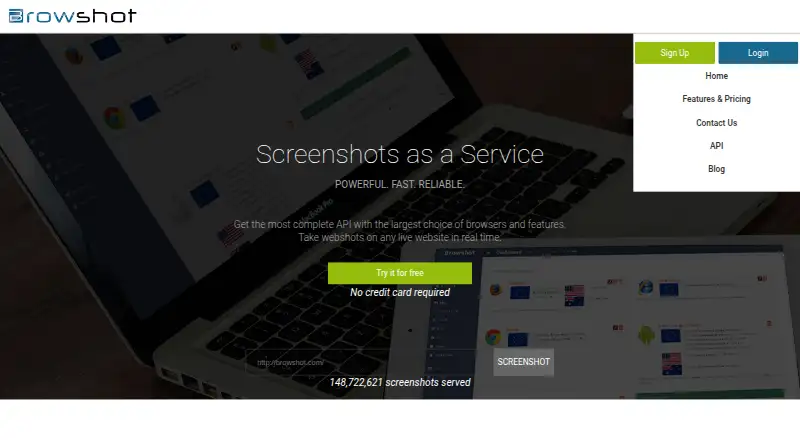
What Browshot is
Browshot is a web service for taking real-time screenshots of live websites through a dashboard or API. It supports more than 30 virtual browsers, including mobile and desktop choices, and can capture screen or full-page views as well as thumbnails. Output can be PNG or JPEG, with requested viewport dimensions and thumbnail size and aspect ratio. Browshot uses real desktop and mobile browsers that support HTML5, CSS3, JavaScript, image loading, and redirects. Its REST API is authenticated with an API key; open-source libraries are available for Perl, PHP, Python, Ruby, and C#, alongside Swagger specifications for creating clients in other languages. Premium and private browsers can perform actions such as navigation, clicking, typing, JavaScript execution, and screenshots. Trackers can extract page values, and screenshots can be sent to Amazon S3 or hosted by Browshot over HTTPS. The free plan provides 100 screenshots per month, with reduced browser and resolution choices and shared browsers. The average screenshot completion time, including page load, is about 15 seconds; pages taking more than two minutes are aborted without charge for failed screenshots.
Good
- Captures screen and full-page screenshots.
- Supports more than 30 virtual browsers.
- Offers REST API and open-source client libraries.
- Can upload screenshots directly to Amazon S3.
- Free plan includes 100 screenshots per month.
Watch out
- Free plan uses shared browsers.
- Free plan has reduced browser and resolution choices.
- Pages taking more than two minutes are aborted.
Who it suits
Browshot suits developers and teams that need to capture live webpages through a dashboard, API, or command-line tools. Its browser automation and data extraction features also suit workflows that need more than a static screenshot.
Verdict
Browshot offers screenshot capture through a dashboard, API, and command-line tools, with automation and extraction options for more involved workflows. The free plan is limited in browser and resolution choices, and long-running pages are aborted.
Plans and prices
From Browshot's own pricing page, checked 20 Sep 2026.
| Plan | Price | What it gives you |
|---|---|---|
| 10 credits | $1 a month | 10 credits · Pay-as-you-go |
| 60 credits | $2 a month | 60 credits · Pay-as-you-go |
| 300 credits | $5 a month | 300 credits · Pay-as-you-go |
| 1,000 credits | $10 a month | 1,000 credits · Pay-as-you-go |
| 3,000 credits | $25 a month | 3,000 credits · Pay-as-you-go |
| 8,000 credits | $50 a month | 8,000 credits · Pay-as-you-go |
| 20,000 credits | $100 a month | 20,000 credits · Pay-as-you-go |
| 45,000 credits | $200 a month | 45,000 credits · Pay-as-you-go |
| 125,000 credits | $500 a month | 125,000 credits · Pay-as-you-go |
| Free | Free | 100 screenshots per month · reduced browser and resolution choices · shared browsers |
| Premium credits | $500, paid once | 125,000 credits · pay-as-you-go |
| 300,000 credits | $1,000 a month | 300,000 credits · Pay-as-you-go |
The facts
Each one read from Browshot's own pages, with the date it was checked.
What it does
- API
- The service provides a REST API, currently documented as API version 1.31, authenticated with an API key.checked 28 Sep 2026
- Automation
- Premium and private browsers support automation steps such as clicking, typing, JavaScript execution, sleeping, navigation and screenshots.checked 28 Sep 2026
- Command line
- Screenshots and thumbnails can be requested from Linux, Mac OS X, BSD and Windows using tools such as wget, curl, fetch or browshot-cmd.exe.checked 28 Sep 2026
- Data extraction
- Trackers can extract values such as search rank, prices, delivery dates and page titles from rendered pages.checked 28 Sep 2026
- Deployment
- cloudchecked 20 Sep 2026
- Export formats
- PNG,JPEGchecked 20 Sep 2026
- Geographic IPs
- The service offers IP locations in Germany, the UK, the USA and Australia, with other countries available on request.checked 28 Sep 2026
- Integrations
- Amazon S3checked 20 Sep 2026
- Key features
- Real-time screenshots of web pages · Screen and full-page capture modes · Desktop and mobile virtual browsers · Custom browser viewport dimensions · Thumbnails with cropping, scaling, and PNG or JPEG output · REST API and open-source client libraries · JavaScript execution and browser automation steps · Batch, multiple-URL, and domain-crawl screenshot requestschecked 20 Sep 2026
- Performance limit
- The average screenshot completion time including page load is about 15 seconds, and pages taking more than two minutes are aborted without charging for failed screenshots.checked 28 Sep 2026
- Reliability
- Browshot says its databases, cache and distributed file systems are redundant, and that services are actively and third-party monitored.checked 28 Sep 2026
- Screenshot formats
- Users can request screen or full-page screenshots and thumbnails of any size and aspect ratio.checked 28 Sep 2026
- Scrolling capture
- Yeschecked 20 Sep 2026
- SDKs
- Open-source libraries are available for Perl, PHP, Python, Ruby and C#, with Swagger specifications for generating clients in other languages.checked 28 Sep 2026
- Shareable links
- Yeschecked 20 Sep 2026
- Storage integration
- Browshot can upload screenshots and thumbnails directly to a customer’s Amazon S3 bucket or host them on Browshot over HTTPS.checked 28 Sep 2026
- Support
- Browshot accepts questions, comments and bug reports through its contact form and [email protected].checked 28 Sep 2026
- What it does
- Browshot is a web service for taking real-time screenshots of live websites through a dashboard or API.checked 28 Sep 2026
Where it runs
- Browser technology
- Browshot uses real desktop and mobile browsers and supports HTML5, CSS3, JavaScript, image loading and redirects.checked 28 Sep 2026
- Device coverage
- It supports more than 30 virtual browsers, including iOS, Android, iPhone, Nexus, iPad and PC browsers.checked 28 Sep 2026
- Supported platforms
- web,windows,macos,linux,apichecked 20 Sep 2026
Money
- Free plan
- Yeschecked 20 Sep 2026
The company
- Headquarters
- Campbell, California, USAchecked 28 Sep 2026
The full review of Browshot
Browshot is a cloud service for capturing live web pages through a dashboard, API, or command-line tools. It suits developers and teams automating screenshots or extracting information from rendered pages. Its range of real desktop and mobile browsers is useful, but a two-minute cutoff and limited free browser choices make it a poor fit for pages that load slowly or need broad access at no cost.
Overview
Browshot captures screen or full-page images and thumbnails, with options to set viewport dimensions and crop or scale output. It supports PNG and JPEG, and can host results over HTTPS or send them directly to an Amazon S3 bucket. Shareable links make it possible to pass captures along without building separate delivery around each image.
The service uses real desktop and mobile browsers, supporting HTML5, CSS3, JavaScript, image loading, and redirects. More than 30 virtual browser options cover devices including iPhone, iPad, Nexus, Android, and PC browsers. This breadth is more relevant to checking how a site renders across devices than to ordinary desktop screenshot capture.
Key features
The REST API, authenticated with an API key, supports integration into custom workflows. Open-source client libraries are available for Perl, PHP, Python, Ruby, and C#; Swagger specifications can help generate clients for other languages. Linux, Mac OS X, BSD, and Windows users can also request screenshots or thumbnails with tools such as wget, curl, fetch, or browshot-cmd.exe.
Premium and private browsers can run automation steps including clicking, typing, JavaScript execution, pauses, navigation, and screenshots. Trackers can extract rendered-page values such as prices, search rankings, delivery dates, and page titles. Those features make Browshot more capable than a simple capture endpoint, though they are geared toward users who can define and maintain an automated workflow.
Scrolling capture supports longer pages, but it does not remove the service’s time limit: pages taking more than two minutes are aborted. Browshot says failed captures are not charged, which limits the cost of a timeout but does not make the service suitable for pages that routinely take that long to load or render. Average completion time, including page load, is about 15 seconds.
Pricing
The free plan costs nothing and allows 100 screenshots per month. It uses shared browsers and reduces browser and resolution choices, so it is best for light trials or simple capture needs, not consistent access to the full device range.
Paid credit plans are billed pay-as-you-go per month: 10 credits cost $1 a month; 60 cost $2 a month; 300 cost $5 a month; 1,000 cost $10 a month; 3,000 cost $25 a month; 8,000 cost $50 a month; 20,000 cost $100 a month; 45,000 cost $200 a month; 125,000 cost $500 a month; and 300,000 cost $1,000 a month. These tiers let users scale credit volume, from occasional paid capture to larger workloads.
A separate Premium credits option costs $500, paid once, billed pay-as-you-go, for 125,000 credits. The free tier is the only plan with a stated screenshot quota and browser restrictions; the paid tiers are presented in credits. Browshot has no free trial, so the free plan is the way to evaluate it before buying credits.
Platforms
Browshot is a cloud service accessible on the web, with API support and command-line options for Linux, Mac OS X, BSD, and Windows. Its browser coverage spans desktop and mobile virtual browsers. Geographic IP locations are offered in Germany, the UK, the USA, and Australia, with other countries available on request.
Who it's for
Browshot is a strong fit for developers, site operators, and data teams that need repeatable screenshots across browser types, automated interactions, or extraction from rendered pages. Its API, client libraries, command-line access, and S3 delivery give technical users several ways to fit captures into existing processes.
It is less suited to someone who only wants to take and annotate occasional screenshots on a personal device, or to a workflow that depends on unrestricted free access to browsers and resolutions. The shared-browser free tier and two-minute abort rule are meaningful constraints.
Pros and cons
- Pros: More than 30 real desktop and mobile browser options help cover varied device renderings.
- Pros: API, language libraries, command-line tools, automation, and page-value extraction support workflows beyond one-off captures.
- Pros: S3 upload and HTTPS hosting provide direct delivery paths for captured files.
- Cons: The free plan caps usage at 100 screenshots monthly and restricts browser and resolution choices.
- Cons: Captures taking over two minutes are aborted, so slow-loading pages can interrupt a workflow even with scrolling enabled.
- Cons: The average capture takes about 15 seconds including page load, making it less appropriate for use cases that require very rapid results.
Alternatives
For a broader screenshot-software comparison, see Screenshot Software. Choose Gyazo if its free plan of 10 latest images and short video and replay recordings better matches a sharing-focused need. Monosnap offers a free tier for one user with 2 GB storage, a 100 MB single-file upload limit, and five minutes of video recording, making it a more storage-and-recording-oriented option.
Awesome Screenshot may suit users seeking browser and device capture with a free allowance of up to 100 screenshots and 20 recordings, with recordings up to six hours at 720p. For an API-first alternative, ApiFlash has a free plan of 100 screenshots and a Lite plan at $7 a month for 1,000 screenshots.
Zight is another option for users whose priority is recording and sharing on iOS, macOS, or Windows. Windows users looking for a free capture and annotation tool can consider Greenshot. Screenpresso offers Windows image capture and HD video capture on its free plan, with branding and a limited editor. Mac users can also consider Shottr, which offers an indefinitely usable free plan with most features available.
Verdict
Choose Browshot if you need cloud-based web captures that can span real desktop and mobile browsers and feed into an API, automation, or extraction workflow. Its broad browser coverage and integration options are its strongest case. Look elsewhere if you need desktop capture and annotation, unrestricted free browser choices, or reliable completion for pages that can exceed two minutes.
Getting started
- Open https://browshot.com/.
- Choose the free plan or a paid credit plan.
- For API use, authenticate with an API key.
- Use the dashboard, REST API, or command-line tools to request captures.
- Choose a browser and request a screen capture, full-page screenshot, or thumbnail.
Limits worth knowing
The free plan allows 100 screenshots per month and has shared browsers with reduced browser and resolution choices. Pages that take more than two minutes are aborted without a charge for failed screenshots.
Questions
Is Browshot free?
Yes. Its free plan includes 100 screenshots per month, shared browsers, and reduced browser and resolution choices.
Which platforms does Browshot support?
Its listed platforms are API, Linux, macOS, web, and Windows. Command-line screenshot requests are supported from Linux, Mac OS X, BSD, and Windows.
Does Browshot have an API?
Yes. It provides a REST API documented as version 1.31 and authenticated with an API key.
Is Browshot open source?
Open-source client libraries are available for Perl, PHP, Python, Ruby, and C#. Browshot itself is described as a web service.
Does Browshot integrate with Amazon S3?
Yes. It can upload screenshots and thumbnails directly to a customer’s Amazon S3 bucket.
Alternatives to Browshot
- 1
 7.5From $7 a month
 - 2
CaptureKit
Free planWebAPIExtension7.3From $7 a month - 37.3From $1.99 a month
- 47.3From $17 a month
- 5
 7.2From $8.99 a month
 - 67.2From $19 a month