
ApiFlash
ApiFlash is a cloud API for generating website screenshots, including full-page and mobile captures.
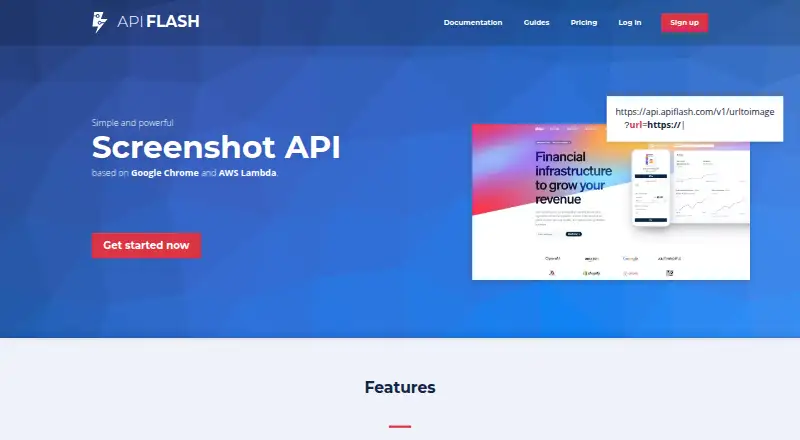
What ApiFlash is
ApiFlash is a cloud API for generating website screenshots, including full-page and mobile captures. It uses Google Chrome rendering and offers controls for viewport size, CSS-element capture, JavaScript injection, headers, cookies, and time zones. Requests go to a unique HTTPS endpoint using GET or POST and require an access key. Captures can be returned as PNG, JPEG, or WebP, or exported to AWS S3 and compatible storage. The service runs on AWS Lambda, and each screenshot uses an isolated Chrome instance that is discarded with its temporary data. ApiFlash supports a free plan with 100 screenshots. The API allows 20 requests per second, with bursts up to 400. Strict bot protection may block a capture, and ApiFlash recommends supplying a proxy in those cases. Custom enterprise plans include managed proxies and IP geolocation.
Good
- Full-page and mobile screenshot controls
- PNG, JPEG, and WebP output
- Exports to AWS S3 or compatible storage
- Isolated Chrome instance for each capture
Watch out
- Requests require an access key
- Strict bot protection may block captures
- IP geolocation is enterprise-only
Who it suits
ApiFlash suits developers and teams that need to capture web pages through an API, with controls for page dimensions, rendering, and export. Its free plan offers a way to start, while paid plans list higher screenshot volumes.
Verdict
ApiFlash combines configurable website capture with several image formats and S3 export. Check the listed screenshot volume and whether target sites' bot protection could interfere with captures.
Plans and prices
From ApiFlash's own pricing page, checked 28 Sep 2026.
| Plan | Price | What it gives you |
|---|---|---|
| Lite Plan | $7 a month | 1,000 screenshots · PNG / JPEG / WebP · full page screenshots · mobile screenshots · block ads · hide cookie banners · export to S3 · basic support · monthly |
| Medium Plan | $35 a month | 10,000 screenshots · PNG / JPEG / WebP · full page screenshots · mobile screenshots · block ads · hide cookie banners · export to S3 · priority support · monthly |
| Large Plan | $180 a month | 100,000 screenshots · PNG / JPEG / WebP · full page screenshots · mobile screenshots · block ads · hide cookie banners · export to S3 · premium support · monthly |
| Custom Enterprise Plan | Priced on request | custom number of screenshots · all Large Plan features · top priority support · managed proxies · IP geolocation |
| Free Plan | — | 100 screenshots · PNG / JPEG / WebP · full page screenshots · mobile screenshots · block ads · hide cookie banners · export to S3 · monthly |
The facts
Each one read from ApiFlash's own pages, with the date it was checked.
What it does
- API access
- The API provides a unique HTTPS endpoint supporting both GET and POST requests and requires an access key.checked 28 Sep 2026
- Capture controls
- The API supports full-page screenshots, mobile screenshots, viewport control, CSS-element capture, JavaScript injection, headers, cookies, and time zones.checked 28 Sep 2026
- Capture limitation
- Strict bot-protection systems such as some Cloudflare configurations may block captures, in which case ApiFlash recommends supplying a proxy.checked 28 Sep 2026
- Deployment
- cloudchecked 22 Sep 2026
- Enterprise proxying
- Custom enterprise plans include managed proxies and IP geolocation, while the ip_location parameter is enterprise-only.checked 28 Sep 2026
- Export formats
- PNG,JPEG,WebPchecked 22 Sep 2026
- Image formats
- The API supports PNG, JPEG, and WebP output formats.checked 28 Sep 2026
- Infrastructure
- The service is built on AWS Lambda for scalability and stability under heavy workloads.checked 28 Sep 2026
- Integrations
- Amazon S3checked 22 Sep 2026
- Key features
- Full-page website screenshots · Mobile screenshots and responsive viewport control · Chrome-based rendering · Automatic capture timing after page loading · PNG, JPEG, and WebP output · CSS and JavaScript injection · Ad blocking and cookie-banner hiding · Amazon S3 exportchecked 22 Sep 2026
- OCR text extraction
- Nochecked 22 Sep 2026
- Rate limit
- The API uses a leaky-bucket limit of 20 requests per second with a burst size of 400 requests.checked 28 Sep 2026
- Rendering engine
- ApiFlash uses up-to-date Google Chrome instances to support modern web features and pixel-perfect rendering.checked 28 Sep 2026
- Screenshot privacy
- Each screenshot is processed in a new isolated Chrome instance that is destroyed with its temporary data.checked 28 Sep 2026
- Scrolling capture
- Yeschecked 22 Sep 2026
- Security
- ApiFlash states that all plans use HTTPS endpoints, and its privacy policy describes encryption, firewalls, SSL, and restricted employee access.checked 28 Sep 2026
- Shareable links
- Yeschecked 22 Sep 2026
- Storage integration
- Screenshots can be exported to AWS S3 or a custom S3-compatible storage provider.checked 28 Sep 2026
- Support
- Support is available through email and live chat, and the site says it usually responds pretty quickly.checked 28 Sep 2026
Money
- Billing provider
- Credit-card data does not pass through ApiFlash servers; Stripe handles billing operations.checked 28 Sep 2026
- Free plan
- Yeschecked 22 Sep 2026
The company
- Founded
- 2017checked 28 Sep 2026
- Headquarters
- Montpellier, Francechecked 28 Sep 2026
Where it runs
- Supported platforms
- web,apichecked 22 Sep 2026
The full review of ApiFlash
ApiFlash is a cloud screenshot API for developers and teams that need repeatable website captures rather than a manual screen-grabbing app. It is best suited to automated publishing, monitoring, documentation, and other workflows requiring full-page or mobile images and direct S3 delivery. The main appeal is fine-grained Chrome-based capture control; the main qualification is quota-based billing and possible interference from strict bot protection.
Overview
ApiFlash turns web pages into PNG, JPEG, or WebP files through an HTTPS API. A unique endpoint accepts GET and POST requests with an access key, making integration straightforward for software that already handles HTTP calls. Current Google Chrome instances support modern web features and aim for pixel-accurate rendering, while AWS Lambda infrastructure is designed to absorb heavy workloads.
This is a cloud deployment, not an open-source or self-hosted package. Screenshots are processed in a fresh, isolated Chrome instance whose temporary data is destroyed after capture. HTTPS is used on every plan, and ApiFlash describes encryption, firewalls, SSL, and restricted employee access in its privacy policy. Stripe handles billing, so card details do not pass through ApiFlash's servers.
Key features
Capture controls are unusually broad for an API: full-page and mobile screenshots, responsive viewport settings, CSS-element targeting, JavaScript injection, custom headers, cookies, and time zones. Automatic timing after page load helps produce consistent results, while ad blocking and cookie-banner hiding reduce unwanted page furniture in recurring jobs. Scrolling capture is supported, but OCR text extraction is not, so this is an image-generation service rather than a document-reading tool.
Output in PNG, JPEG, and WebP covers lossless, compressed, and modern web-image workflows. Export to Amazon S3 or a compatible provider is useful when screenshots must land directly in an existing storage pipeline, and shareable links support simple distribution. The rate limit uses a leaky bucket of 20 requests per second with bursts up to 400: suitable for substantial automation, but not an unlimited firehose.
Strict bot-protection systems can prevent a capture. Some Cloudflare configurations are specifically cited as blockers, and supplying a proxy is the recommended remedy. Managed proxies and IP geolocation are reserved for the custom enterprise tier, so protected targets may require an upgrade.
Pricing
ApiFlash is freemium, with no free trial. The Free Plan costs $0.00 per month and includes 100 screenshots, enough for evaluation or occasional low-volume jobs but easy to exhaust in a production workflow.
The Lite Plan is $7.00 per month for 1,000 screenshots. It includes PNG, JPEG, and WebP, full-page and mobile screenshots, ad blocking, cookie-banner hiding, S3 export, and basic support. It is the sensible entry point for a small application that needs a predictable monthly allowance.
The Medium Plan costs $35.00 per month for 10,000 screenshots and adds priority support to the Lite feature set. Large costs $180.00 per month for 100,000 screenshots and premium support, targeting high-volume services where the lower quotas would be restrictive.
Custom Enterprise pricing provides custom screenshot volume, managed proxies, IP geolocation, and top-priority support. The enterprise-only ip_location parameter matters when regional rendering or difficult network conditions are central requirements.
Platforms
ApiFlash runs in the cloud and is accessed through its web and API interfaces. It is designed for server-side or application workflows rather than a native desktop or mobile client.
Who it's for
Choose ApiFlash for a modern company of any size that needs automated, repeatable website images, responsive or full-page coverage, and storage handoff to S3. It is particularly appropriate for developers building screenshot features into a product or pipeline. It is a weaker fit for users wanting local annotation, OCR, or an unlimited manual capture utility, and for projects targeting heavily protected sites without proxy budget.
Pros and cons
Pros
- Detailed capture control: viewport, mobile, CSS, JavaScript, headers, cookies, and time zones support precise page states.
- Modern rendering: current Chrome instances handle contemporary web features and full-page captures.
- Useful automation plumbing: GET/POST access, shareable links, multiple image formats, and S3 export fit production workflows.
- Clear scaling path: quotas rise from 100 free captures to 100,000 on Large, with enterprise proxy options.
Cons
- Quota limits: the free allowance is small for recurring jobs, and paid plans are monthly commitments.
- Bot-protection risk: some Cloudflare setups can block captures unless a proxy is supplied.
- No OCR: screenshots cannot also serve as extracted text.
Alternatives
Gyazo is the better choice for cross-platform desktop and mobile screen sharing, with Android, iOS, Windows, macOS, Linux, web, and extension access plus a free trial.
Browshot suits buyers who prefer pay-as-you-go screenshot credits through an API and broad desktop platform support.
GrabzIt is worth considering when a free trial and options including self-hosting are more important than ApiFlash's specific quota tiers.
Monosnap is aimed at desktop capture, recording, and storage rather than an API-first pipeline.
Awesome Screenshot fits browser-extension and recording workflows with a capped free tier.
Apowersoft Free Screen Capture is a free web-based option for unlimited screenshots after installing its launcher on Windows or Mac.
Zight focuses on sharing recordings, GIFs, and hosted media across iOS, macOS, and Windows.
Ksnip is the alternative for free, copylefted desktop screenshot software on Linux, macOS, and Windows.
Verdict
ApiFlash is a strong choice for developers who need controlled, scalable website screenshots with modern Chrome rendering and S3 export. Pick it when automation and capture fidelity matter more than local editing; look elsewhere if OCR, native screen capture, or reliable access to aggressively protected sites is essential without paying for enterprise proxying.
Alternatives to ApiFlash
- 17.7Free plan
- 2
CaptureKit
Free planWebAPIExtension7.3From $7 a month - 37.3From $1.99 a month
- 47.3From $17 a month
- 5
 7.2From $8.99 a month
 - 67.2From $19 a month