
BoardSpot
BoardSpot is a board portal for organizing board activities in one place.
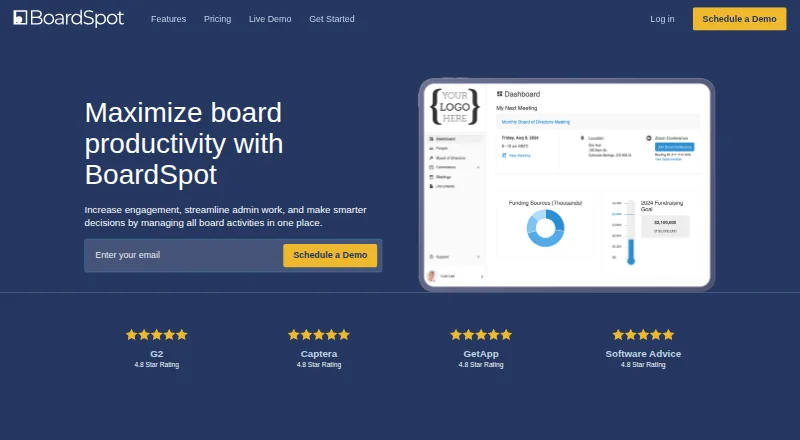
What BoardSpot is
BoardSpot is a board portal for organizing board activities in one place. Its meeting tools include an agenda builder, a minutes builder for motions and presenter assignments, attendance tracking, and quorum calculations based on attendance. Users can create votes, control who is eligible to vote, and display results. The portal also manages organization, board, and meeting documents, with unlimited document storage listed across plans. Members can be notified to sign documents and manage signatures within BoardSpot. Meeting packets combine agendas, locations, and other meeting details into downloadable files. Integrations with Zoom, Microsoft Teams, and Google Meet can create meeting spaces with user authorization. Calendar invitations and iCal feeds let members sync meetings with personal calendars. BoardSpot is available on Android, iOS, macOS, web, and Windows. A 14-day trial is listed, but there is no free plan. Essentials costs $95.00 per year, Standard $225.00 per year, and Professional $330.00 per year; Enterprise pricing is by quote. The company is headquartered in Colorado Springs.
Good
- Combines agendas, minutes, attendance, and voting
- Unlimited document storage across plans
- Supports Zoom, Microsoft Teams, and Google Meet
- Available on mobile, desktop, and web
Watch out
- No free plan is listed
- Enterprise pricing requires a quote
- Professional charges $95 per board per month for additional boards
Who it suits
BoardSpot suits boards that need tools for meetings, voting, minutes, document handling, and member signatures. Essentials is described for smaller nonprofits, while Professional is designed for large boards.
Verdict
BoardSpot focuses on the meeting and document workflows of boards, with voting, minutes, signatures, and calendar support. Its 14-day trial gives organizations a way to evaluate it before choosing a paid plan.
Plans and prices
From BoardSpot's own pricing page, checked 28 Sep 2026.
| Plan | Price | What it gives you |
|---|---|---|
| Essentials | $105 a month | Unlimited document storage · Unlimited committees · $0 additional cost per user · paid monthly |
| Standard | $250 a month | Unlimited document storage · Unlimited committees · $0 additional cost per user · paid monthly |
| Professional | $365 a month | Unlimited document storage · Unlimited committees · $0 additional cost per user · Additional boards $105/board/mo · paid monthly |
| Essentials | $1,140 a year | Unlimited document storage · Unlimited committees · $0 additional cost per user · paid yearly; $1,140 per year |
| Standard | $2,700 a year | Unlimited document storage · Unlimited committees · $0 additional cost per user · paid yearly; $2,700 per year |
| Professional | $3,960 a year | Unlimited document storage · Unlimited committees · $0 additional cost per user · Additional boards $95/board/mo · paid yearly; $3,960 per year |
| Enterprise | Priced on request | Unlimited document storage · Unlimited committees · Additional boards included · Get a Quote |
The facts
Each one read from BoardSpot's own pages, with the date it was checked.
What it does
- Agenda and minutes
- The agenda builder structures meeting agendas, and the minutes builder supports motions and presenter assignments.checked 28 Sep 2026
- Attendance and quorum
- BoardSpot tracks attendance and bases quorum on member attendance.checked 28 Sep 2026
- Calendar integration
- BoardSpot supports calendar invitations and iCal calendar feeds for syncing meetings with personal calendars.checked 28 Sep 2026
- Data hosting
- Essentials and Standard accounts are hosted in the United States on AWS, while Enterprise accounts can be hosted in any AWS region worldwide.checked 28 Sep 2026
- Document management
- Users can upload and manage organization, board, and meeting documents; document storage is listed as unlimited across plans.checked 28 Sep 2026
- eSignatures
- Members can be notified to sign documents and add and manage signatures within BoardSpot.checked 28 Sep 2026
- Intended customers
- The Essentials plan is described as a board portal for smaller nonprofits, and the Professional plan is designed for large boards.checked 28 Sep 2026
- Meeting management
- The product provides meeting management tools to help organize meetings and keep members engaged.checked 28 Sep 2026
- Meeting packets
- BoardSpot combines meeting agendas, locations, and other details into downloadable meeting packets.checked 28 Sep 2026
- Purpose
- BoardSpot is a board portal for managing board activities in one place.checked 28 Sep 2026
- Security
- BoardSpot says documents are encrypted with AES-256 on AWS S3 and transmitted over secure connections; it also describes optional multifactor authentication and HTTPS with TLS 1.3 or later.checked 28 Sep 2026
- Support
- The pricing comparison lists email support for Essentials, priority support for Standard and Professional, and dedicated support for Enterprise.checked 28 Sep 2026
- Video integrations
- The pricing page lists Zoom, Microsoft Teams, and Google Meet integrations; the privacy policy says these integrations create meeting spaces with user authorization.checked 28 Sep 2026
- Voting
- Users can create votes, manage who can vote, and display results.checked 28 Sep 2026
The company
- Headquarters
- Colorado Springs, Colorado, USAchecked 28 Sep 2026
The full review of BoardSpot
BoardSpot is a board portal for organizing meetings, documents, and member decisions. It suits organizations that want meeting workflows and unlimited document storage in one place, especially smaller nonprofits and larger boards choosing their respective plans. The main trade-off is a paid-only model, though a 14-day trial offers a window to assess it.
Overview
BoardSpot brings board activity into a shared portal, from agenda preparation and meeting packets to attendance, quorum, votes, minutes, and signatures. That breadth makes it a credible fit for organizations that want board work managed in one system rather than scattered across separate meeting and document workflows.
Its strongest practical advantage is unlimited document storage across plans, alongside unlimited committees and no additional cost per user on the three priced plans. Those terms can make it easier to accommodate a broad membership, but the plan prices rise substantially from Essentials to Professional, and Professional adds a separate monthly charge for additional boards.
Key features
The agenda and minutes builders support meeting structure, motions, and presenter assignments. Attendance tracking ties quorum to member attendance, while voting tools let administrators control who can vote and display results. Together, these features address the preparation, conduct, and record-keeping stages of board meetings, not just file sharing.
BoardSpot can assemble agendas, locations, and other meeting details into downloadable packets. Members can also be notified to sign documents and manage signatures in the portal. Calendar invitations and iCal feeds help sync meetings with personal calendars. Video integrations include Zoom, Microsoft Teams, and Google Meet; creating meeting spaces through these integrations requires user authorization.
BoardSpot describes AES-256 encryption for documents stored on AWS S3, secure connections, optional multifactor authentication, and HTTPS with TLS 1.3 or later. Essentials and Standard accounts are hosted in the United States on AWS; Enterprise accounts can use any AWS region worldwide. That regional choice is useful for organizations whose hosting location matters, while the named hosting flexibility is reserved for Enterprise.
Pricing
There is no free plan. BoardSpot offers a 14-day trial, then paid plans billed yearly:
- Essentials: $95 a year (billed paid yearly; $1,140 per year). It includes unlimited document storage, unlimited committees, and $0 additional cost per user. Described as a portal for smaller nonprofits, it is the entry point for organizations that do not need the higher-tier support.
- Standard: $225 a year (billed paid yearly; $2,700 per year). It keeps unlimited storage, committees, and users, and adds priority support over Essentials’ email support. It fits organizations prepared to pay more for faster support.
- Professional: $330 a year (billed paid yearly; $3,960 per year). It includes the same unlimited storage, committees, and $0 additional cost per user, with priority support; additional boards cost $95/board/mo. Designed for large boards, it is the priced option for that audience, but organizations adding boards should account for the extra monthly charge.
- Enterprise: custom pricing (“Get a Quote”). It includes unlimited document storage and committees, additional boards included, and dedicated support. Its worldwide AWS hosting option may also matter to organizations with regional hosting needs.
Essentials keeps the entry price lower but gives up the priority support included with Standard and Professional. Enterprise is the only plan with additional boards included and dedicated support; its price is custom pricing.
Platforms
BoardSpot supports Android, iOS, macOS, web, and Windows. Mobile apps are available for iOS and Android, giving members a way to access the portal on those devices as well as through desktop platforms and the web.
Who it's for
Smaller nonprofits have a plan explicitly aimed at them, while Professional is designed for large boards. Organizations that need unlimited document storage, committees, and user access without per-user charges will find those terms across the three priced plans. BoardSpot is less suited to buyers seeking a free tier, or to teams that do not need a board-specific meeting workflow.
Pros and cons
- Pro: Unlimited document storage, unlimited committees, and no additional per-user cost on Essentials, Standard, and Professional reduce common capacity and membership constraints.
- Pro: Agendas, minutes, voting, attendance and quorum, packets, calendar syncing, and signatures cover multiple stages of board meetings in one portal.
- Pro: Enterprise includes additional boards and dedicated support, with AWS hosting available in any region worldwide.
- Con: There is no free plan, and the 14-day trial is the only no-cost way to evaluate the product.
- Con: Professional charges $95/board/mo for additional boards, despite including unlimited committees and users.
- Con: Essentials includes email support rather than the priority support on Standard and Professional.
Alternatives
Board Portal Software and Nonprofit Board Management Software are useful starting points for comparing options by category.
- Stellar Library suits not-for-profit boards considering a paid annual plan at $1,800 a year (billed annually; +gst), with agenda and board-pack builders, live minutes, annotations, actions, and voting.
- Admincontrol Board Portal is another paid board-portal option, with pricing customised to organisational needs through sales.
- Aprio Board Portal is worth considering for buyers seeking a paid per-user license with all features included, unlimited committees and administrators, and a free trial.
- Boardable has a free trial and an Essentials plan starting at $20.99 /user/mo, billed annually at $251.88, with stated caps including 1,000 files, 5 meeting guests, and 10 groups; it may fit buyers who prefer a per-user plan with defined usage limits.
- Boardtrac offers a Silver plan with a choice among Minutes & Tasks, Boardpack PDF, Download Audit, or a shared content library, plus phone and email support and live training webinars.
- Diligent Audit is a paid alternative for buyers seeking an audit-focused product.
- Board Management is a web-based option with a free plan.
- Sherpany offers a free trial and plans including Executive, with 20+ users, up to 5 rooms, meeting preparation, conduct and follow-up, and task tracking.
Verdict
Choose BoardSpot if your organization wants board meeting preparation, decisions, records, signatures, and document storage under one roof, with unlimited storage and no per-user charges on its priced plans. Its 14-day trial helps assess the workflow before committing. Look elsewhere if you need a free tier, or if Professional’s additional-board fee and the jump to higher annual pricing do not suit your organization.
Getting started
- Open the BoardSpot website
- Choose a paid plan or start the 14-day trial
- Select Essentials, Standard, Professional, or Enterprise
- Use the web, desktop, or mobile platform that fits your organization
- Connect calendar feeds or invitations and authorized video integrations
Limits worth knowing
There is no free plan, and access is provided through paid plans or a 14-day trial. Professional lists an additional-board charge of $105 per board per month, while Enterprise pricing is quote-based.
Questions
Is BoardSpot free?
No. BoardSpot has no free plan, but it offers a 14-day trial.
How much do the listed plans cost?
Essentials is $105 a month, Standard is $250 a month, and Professional is $365 a month. Enterprise uses quote-based pricing.
Which platforms support BoardSpot?
BoardSpot is available on Android, iOS, macOS, web, and Windows.
Does BoardSpot integrate with video services?
The pricing page lists Zoom, Microsoft Teams, and Google Meet integrations. These integrations create meeting spaces with user authorization.
Is document storage limited?
Unlimited document storage is listed across plans for organization, board, and meeting documents.
Where is BoardSpot hosted?
Essentials and Standard accounts are hosted in the United States on AWS. Enterprise accounts can be hosted in any AWS region worldwide.
Alternatives to BoardSpot
- 1

Boardable
AndroidiOSWebLinux7.8From $20.99 a month - 2
Board Management
Free planWebmacOSWindows7.7From $49 a month - 3
Admincontrol Board Portal
AndroidiOSWebmacOS7.5From €500 a month - 4
BoardBook Premier
AndroidiOSWebmacOS7.4From $3,100 a year - 5

BoardPro
AndroidiOSWeb7.2From $1,650 a year - 6
eSCRIBE
AndroidiOSWebAPI6.9