Stellar Library
Stellar Library is document distribution and meeting management software for boards and organizations that need to work with papers and make decisions in a s…
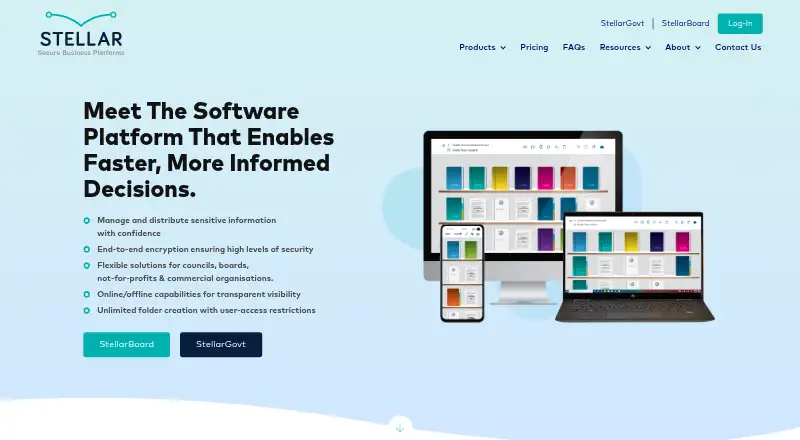
What Stellar Library is
Stellar Library is document distribution and meeting management software for boards and organizations that need to work with papers and make decisions in a secure environment. It handles Microsoft Office files, PDFs, images, video, and audio, with online and offline access. Meeting tools include agenda and board-pack creation, live minutes, annotations, signing, voting, and comments. Usage logs and real-time reports show activity by username, including who read or downloaded a file and for how long. The cloud platform has encryption and document- and folder-level access controls. Stellar says its AWS servers are hosted in Sydney, mirrored to a second server in another region, and ISO 27001 certified on AWS. Subscriptions include training, phone and email support, implementation, and a dedicated account manager. Supported organizations include councils, boards, health boards, trusts, foundations, iwi, partnership boards, and educational institutes. Apps are available for Android, iOS, macOS, web, and Windows.
Good
- Online and offline document access
- Meeting tools include agendas, minutes, annotations, and voting
- Activity reports show who read or downloaded documents
- Subscriptions include implementation and a dedicated account manager
- Available on Android, iOS, macOS, web, and Windows
Watch out
- No free plan
- Subscriptions start with a 12-month term
Who it suits
Stellar Library suits councils, boards, trusts, health organizations, and educational institutes managing documents and meetings. It is also aimed at organizations that need offline document access and activity records.
Verdict
Stellar Library combines document handling, meeting workflows, access controls, and activity reporting for boards and similar organizations. Its annual subscription starts at 1,800.00 USD plus GST, with no free plan listed.
Plans and prices
From Stellar Library's own pricing page, checked 30 Sep 2026.
| Plan | Price | What it gives you |
|---|---|---|
| Not-for-Profit Boards | $1,800 a year | Agenda Builder · Board Pack Builder · Live Minutes · Annotations · Actions · Voting · Circular Resolutions · Interest Register · Decision Register · Restrict User Access Controls · billed annually; +gst |
| Commercial Boards | $4,000 a year | Agenda Builder · Board Pack Builder · Live Minutes · Annotations · Actions · Voting · Circular Resolutions · Interest Register · Decision Register · Restrict User Access Controls · billed annually; +gst |
| Local Government | $6,000 a year | Import Papers from Third-Party Software · Central Repository System · Personal & Public Annotations · Restrict User Access Controls · Dashboard · SplitView · Interest Register · Circular Resolutions · Hyperlinking · Action & Voting Tasks · billed annually; +gst |
The facts
Each one read from Stellar Library's own pages, with the date it was checked.
What it does
- Access
- It supports online and offline access to documents, including when users do not have an internet connection.checked 30 Sep 2026
- Audit trail
- A usage log and real-time reporting show interactions in the platform by username, and document activity visibility includes who downloaded or read files and for how long.checked 30 Sep 2026
- Backups and hosting
- Stellar says its servers are hosted in Sydney, Australia via AWS and backed up through mirroring to a second server in another region.checked 30 Sep 2026
- Compliance
- The FAQ states that the platform is ISO certified on AWS to ISO 27001.checked 30 Sep 2026
- File types
- The platform works with documents created using Microsoft Office, PDFs, images, videos and sound files.checked 30 Sep 2026
- Integrations
- The Local Government package includes importing papers from third-party software; the pricing page does not name those systems.checked 30 Sep 2026
- Meeting tools
- Features include agenda creation, board pack building, live minutes, annotations, signing, voting and private or public commenting.checked 30 Sep 2026
- Pricing
- The pricing page lists three packages with annual starting prices and says customers can request a tailor-made quote.checked 30 Sep 2026
- Product
- Stellar Secure Business Platforms is document distribution and meeting management software for making faster, more informed decisions in a secure environment.checked 30 Sep 2026
- Security
- The FAQ says the cloud-based platform is fully encrypted and provides access controls at document and folder level.checked 30 Sep 2026
- Subscription term
- The EULA defines a subscription as an initial 12-month term with additional renewed 12-month terms.checked 30 Sep 2026
- Support
- All subscriptions include unlimited training, phone and email support, free implementation and a dedicated account manager.checked 30 Sep 2026
- Who it serves
- The FAQ lists local government councils, corporate and not-for-profit boards, district health boards, trusts and foundations, iwi, partnership boards and educational institutes as users.checked 30 Sep 2026
The company
- Founded
- 2012checked 28 Sep 2026
Where it runs
- Platforms
- The release history lists web access through Chrome or Microsoft Edge, plus apps for iOS, Android, Windows and macOS.checked 30 Sep 2026
The full review of Stellar Library
Overview
Stellar Library is a board portal for organizing documents and running meetings, aimed at councils, boards, trusts and other organizations that need controlled access to decision materials. Its broad meeting toolkit and document-level controls make it a strong fit for formal governance; organizations seeking a general-purpose collaboration app may find its board-centered focus a poor match.
Key features
Stellar handles Office documents, PDFs, images, video and audio, with online and offline access. That breadth suits board members who need to consult papers on the move or without a connection. Agenda building, board packs, live minutes, annotations, signing, voting, resolutions and comments cover much of a meeting’s preparation and follow-up in one system.
Document and folder access controls, encryption, and activity records give administrators tools to limit access and see who read or downloaded files and for how long. The usage log and real-time reporting are particularly useful when accountability matters. Stellar says its servers are hosted in Sydney through AWS, mirrored to a second region for backup, and ISO 27001 certified on AWS. These are meaningful governance credentials, though organizations should assess whether the stated hosting arrangement fits their own requirements.
All subscriptions include unlimited training, phone and email support, free implementation and a dedicated account manager. That substantial onboarding and support package can help organizations adopting a formal board workflow, rather than leaving setup and training entirely to internal staff.
Pricing
Stellar sells three annual packages, with a tailor-made quote available. The subscription starts with a 12-month term and renews in additional 12-month terms. Prices are per year and plus GST:
| Plan | Price | Best fit |
|---|---|---|
| Not-for-Profit Boards | $1,800 a year + GST | Not-for-profit boards needing core agenda, pack, minutes and decision workflows. |
| Commercial Boards | $4,000 a year + GST | Commercial boards seeking the same listed core feature set at a higher starting price. |
| Local Government | $6,000 a year + GST | Councils that need paper imports, a central repository and additional document and task tools. |
The Not-for-Profit and Commercial packages list the same features: agenda and pack builders, live minutes, annotations, actions, voting, circular resolutions, interest and decision registers, and restricted user access controls. The higher Commercial starting price does not come with a different feature list in these packages, so organizations should weigh the quoted fit against their own requirements.
Local Government trades those board-oriented tools for a package that adds third-party paper imports, a central repository, dashboard, SplitView, hyperlinking, personal and public annotations, and action and voting tasks. The systems supported for importing papers are not named. No free plan is offered, and seat counts or usage quotas are not given for these packages, so larger organizations should request a tailor-made quote before comparing total costs.
Platforms
Stellar supports Android, iOS, macOS, web and Windows. Mobile apps are available for iOS and Android, and offline document access helps members who need papers away from a network connection.
Who it's for
The product is aimed at local government councils, corporate and not-for-profit boards, district health boards, trusts and foundations, iwi, partnership boards and educational institutes. It is best suited to organizations whose work revolves around secure board papers, meetings and recorded decisions. Teams looking primarily for broad project collaboration rather than governance workflows should consider other categories.
Pros and cons
- Pros: A joined-up meeting workflow covers agendas, packs, minutes, annotations and voting, reducing the need to piece those board tasks together across separate tools.
- Pros: Document-level and folder-level controls, activity visibility and offline access address practical needs for sensitive board materials.
- Pros: Unlimited training and support, implementation and a dedicated account manager are included with every subscription.
- Cons: The annual plans start at 1,800.00 USD plus GST and require a 12-month initial term, making it a substantial commitment for smaller groups.
- Cons: Not-for-Profit and Commercial list the same feature set despite different starting prices; buyers should confirm what justifies the higher quote.
- Cons: Local Government imports papers from third-party software, but the package does not identify which systems are supported.
Alternatives
For a wider category comparison, browse Board Portal Software.
- BoardSpot is worth comparing if a free trial, unlimited document storage and committees, and no extra per-user cost are priorities; its listed Essentials plan is $95 a year.
- BoardPAC is another paid board portal to consider if its platform options, including self-hosted deployment, better suit your organization.
- Admincontrol Board Portal uses custom pricing tailored to organizational needs, making it an option for buyers who prefer a sales-led quote.
- Aprio Board Portal may suit organizations that want a free trial and pay-per-user licensing, with unlimited committees and administrators.
- Boardable offers a free trial and an Essentials tier with stated file, guest, group and survey limits; compare those caps against your meeting workload.
- Boardtrac offers a Silver plan centered on a choice of one core tool, such as minutes and tasks or a board-pack PDF, with phone and email support and live training webinars.
- Diligent Audit is a paid alternative to consider for an audit-focused workflow.
- Sherpany offers Executive and Board tiers for meeting preparation, conduct and follow-up; its Board tier is capped at 20 users.
Verdict
Choose it for governance rather than general collaboration, and compare the Commercial quote carefully against the lower-priced package’s identical listed feature set. If the annual commitment or package fit is hard to justify, a trial-based or more narrowly priced alternative may be the better place to start.
Alternatives to Stellar Library
- 1

Boardable
AndroidiOSWebLinux7.8From $20.99 a month - 2
Board Management
Free planWebmacOSWindows7.7From $49 a month - 3
Admincontrol Board Portal
AndroidiOSWebmacOS7.5From €500 a month - 4
BoardBook Premier
AndroidiOSWebmacOS7.4From $3,100 a year - 5

BoardPro
AndroidiOSWeb7.2From $1,650 a year - 6

BoardSpot
AndroidiOSWebmacOS7.1From $1,140 a year