
Bango
Bango is free software for automating abstract screening in systematic literature reviews.
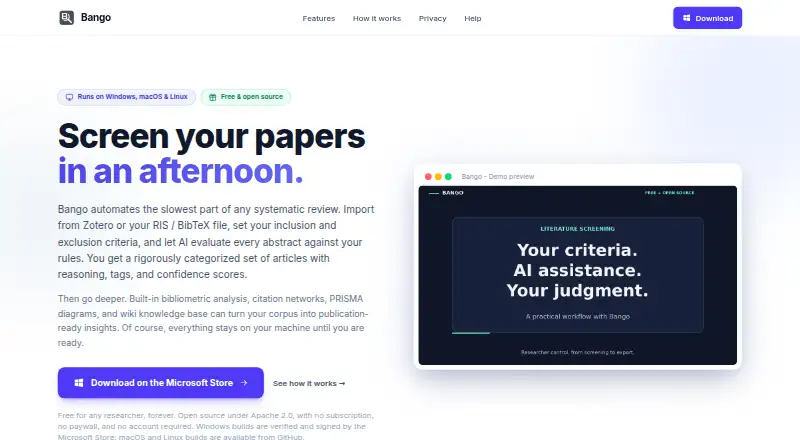
What Bango is
Bango is free software for automating abstract screening in systematic literature reviews. It evaluates articles against criteria set by the user and returns decisions with reasoning, matched rules, suggested tags, and confidence scores. It imports RIS and BibTeX files as well as Zotero collections, and supports up to 10,000 articles per project. Analysis tools cover co-authorship networks, citation graphs, keyword maps, publication timelines, author rankings, and co-citation analysis. Bango can produce PRISMA 2020 flow diagrams from record counts and export them as SVG or PNG. The maker says project data stays on the user's computer, without cloud uploads, login, or an account. The README describes local AES-256-GCM encryption for API keys and says backups exclude credentials. Listed AI connections include hosted services and local or OpenAI-compatible endpoints. It runs on Linux, macOS, and Windows, though macOS builds support Apple Silicon only; Intel Macs are not supported. The Free plan is free, with no subscription, paywall, or limits.
Good
- Imports RIS, BibTeX, and Zotero collections
- Handles up to 10,000 articles per project
- Creates PRISMA 2020 diagrams with SVG or PNG export
- No account or cloud upload is required
- Free plan has no subscription or paywall
Watch out
- Intel Macs are not supported
- Support replies depend on availability
Who it suits
Bango is aimed at researchers, including academics, PhD students, and professional analysts conducting systematic reviews. It may suit users who want screening and bibliometric tools while keeping project data on their computer.
Verdict
Bango brings screening, analysis, and PRISMA diagram generation together for systematic review work. Its macOS builds are limited to Apple Silicon.
Plans and prices
From Bango's own pricing page, checked 30 Sep 2026.
| Plan | Price | What it gives you |
|---|---|---|
| Free | Free | Free for any researcher · no subscription, paywall, or limits |
The facts
Each one read from Bango's own pages, with the date it was checked.
What it does
- AI integrations
- The README lists hosted integrations with OpenAI, Anthropic, Google Gemini, Mistral AI, and z.ai, plus llama.cpp, Ollama, LM Studio, and other OpenAI-compatible endpoints.checked 30 Sep 2026
- Analysis
- Its bibliometric tools include co-authorship networks, citation graphs, keyword maps, publication timelines, author rankings, and co-citation analysis.checked 30 Sep 2026
- Audience
- The maker describes Bango as free software for researchers, including academics, PhD students, and professional analysts.checked 30 Sep 2026
- Data handling
- Bango says project data stays on the user’s computer, with no cloud uploads, login, or account required.checked 30 Sep 2026
- Imports
- It imports RIS and BibTeX files and Zotero collections, and supports up to 10,000 articles per project.checked 30 Sep 2026
- Limits
- The maker says macOS builds are for Apple Silicon only; Intel Macs are not supported.checked 30 Sep 2026
- PRISMA
- Bango generates PRISMA 2020 flow diagrams from record counts and exports them as SVG or PNG.checked 30 Sep 2026
- Purpose
- Bango automates abstract screening for systematic literature reviews by evaluating articles against user-defined criteria with AI.checked 30 Sep 2026
- Research integrations
- Bango supports Zotero import and export and can generate Boolean search strings for PubMed, Scopus, Web of Science, Cochrane Library, EBSCOhost, JSTOR, ScienceDirect, and arXiv.checked 30 Sep 2026
- Screening
- AI screening returns decisions, reasoning, matched rules, suggested tags, and confidence scores.checked 30 Sep 2026
- Security
- The maker says API keys are encrypted locally with AES-256-GCM using a machine-derived key, and project backups omit credentials.checked 30 Sep 2026
- Support
- The README asks users to report issues on GitHub and says responses depend on availability.checked 30 Sep 2026
The full review of Bango
Bango is a free desktop workspace for systematic literature reviews, best suited to researchers who want AI-assisted screening, bibliometric exploration, and reporting in one application. Its local-first design is particularly attractive for privacy-conscious work, while Intel Mac owners and teams expecting cloud collaboration should look elsewhere.
Overview
Bango evaluates imported papers against criteria you define and returns more than an inclusion label: each result includes a decision, rationale, matched rules, suggested tags, and a confidence score. That audit-friendly output can speed an initial pass and make borderline records easier to revisit, but the AI’s explanation remains an aid to protocol-based judgment rather than a substitute for it.
A project can contain up to 10,000 articles. RIS and BibTeX files, as well as Zotero collections, can be brought in, with reference deduplication, data extraction, full-text storage, and protocol support included for systematic-review workflows. This focused scope is useful when the review process is the priority; it is not positioned as a broad reference-management suite.
Key features
Screening and evidence work
Screening results expose the rules and confidence behind each recommendation, giving reviewers material to check and refine instead of forcing them to trust a black-box verdict. Support for Zotero import and export helps users who already organize citations there. Bango can also produce Boolean search strings for PubMed, Scopus, Web of Science, Cochrane Library, EBSCOhost, JSTOR, ScienceDirect, and arXiv, which is useful when translating a review question into database-specific searches.
Bibliometrics and reporting
Co-authorship networks, citation graphs, keyword maps, publication timelines, author rankings, and co-citation analysis extend the product beyond triage. They give researchers ways to see structure and trends in a substantial corpus before writing synthesis. For documentation, Bango creates PRISMA 2020 flow diagrams from record counts and exports them as SVG or PNG, formats that suit editing and publication.
AI and privacy
The application connects to hosted OpenAI, Anthropic, Google Gemini, Mistral AI, and z.ai services, and also supports local options including llama.cpp, Ollama, and LM Studio alongside other OpenAI-compatible endpoints. Project data stays on the user’s computer, with no cloud upload, login, or account requirement. API keys are described as locally encrypted with AES-256-GCM using a machine-derived key, and backups exclude credentials. That architecture reduces account and repository exposure, although any hosted model still involves the provider selected by the user.
Pricing
Bango’s Free plan costs nothing and is free for any researcher, with no subscription, paywall, or stated limits. There is no trial because the product is already free. It is an unusually straightforward fit for students, independent reviewers, and professional analysts who need a complete systematic-review workflow without per-seat charges or renewal terms.
The absence of a paid tier means there is no upgrade path for additional seats or service levels. Users who need managed collaboration, account-based administration, or vendor support should compare products with those offerings rather than assuming Bango provides them.
Platforms
Bango runs on Linux, macOS, and Windows. The macOS build supports Apple Silicon only; Intel Macs are not supported. Its desktop, local-storage model suits researchers who want work kept on their own machines, but it is less convenient for browser-first teams moving between devices. Issue reports go through GitHub, with response timing dependent on availability.
Who it's for
Bango is a strong match for academics, PhD students, and professional analysts conducting systematic reviews who want screening, extraction, analysis, and PRISMA output together. It is especially sensible for privacy-sensitive projects, users already working with Zotero, and anyone who can choose between hosted and local AI back ends. It is a weaker choice for Intel-Mac users, teams requiring built-in cloud collaboration, or groups that need guaranteed support commitments.
Pros and cons
Pros
- Full free access: the 0.00 USD plan has no subscription, paywall, or stated limits.
- Inspectable AI screening: decisions include reasoning, matched rules, tags, and confidence rather than a bare label.
- Large project capacity: support for up to 10,000 articles fits substantial reviews.
- Useful reporting breadth: bibliometric views and editable SVG/PNG PRISMA exports cover analysis through documentation.
- Local control: no account or cloud project storage, with locally encrypted keys and credential-free backups.
Cons
- Apple Silicon requirement: Intel Mac owners cannot run the macOS build.
- Support is availability-dependent: help is requested through GitHub rather than a stated service channel.
- AI still needs oversight: confidence and rationale do not replace checking decisions against the review protocol.
- No built-in paid collaboration tier: organizations seeking managed seats or service guarantees may need another platform.
Alternatives
Choose ReviewAid if open-source Apache 2.0 software with Linux, macOS, Windows, web, and self-hosted deployment is more important than Bango’s integrated desktop workflow.
RevMan is the better comparison for readers who want a freemium product with a free trial and web access alongside desktop platforms.
Pick Universal SLR Assistant for MIT-licensed open source; cloud AI provider API fees may apply.
ASReview suits users wanting free, open-source software across API, desktop, web, and self-hosted environments, with hardware or server costs possible.
Choose Rayyan for browser and mobile access, while accepting free-plan limits of three active reviews, two free reviewers, one sample, and limited mobile access.
Parsifal is a web alternative with optional AI using your own Anthropic or OpenAI key.
Pick Silvi if unlimited reviews and transparent extraction are priorities, with paid Rapid features available.
Covexe is another freemium web option with an AI co-pilot.
See the Systematic Review Software list for the wider category.
Verdict
Bango is an excellent choice for researchers who want a no-cost, locally stored systematic-review workflow that combines explainable AI screening, bibliometrics, and PRISMA output. Look elsewhere if you use an Intel Mac, require browser-based team administration, or need support and collaboration commitments beyond GitHub availability.
Alternatives to Bango
- 1
RevMan
Free planWebLinuxmacOSWindows7.8From £80 a year - 2

ASReview
Free planOpen sourceWebAPILinuxmacOS7.7Free plan - 3
LASER AI
AndroidiOSWeb7.6From $3,000 a year - 4

Rayyan
Free planAndroidiOSWebAPI7.5From $4.99 a month - 5
Sysrev
Free planWebAPISelf-hosted7.5From $50 a month - 6
Universal SLR Assistant
Free planOpen sourceWebAPILinuxmacOS7.5Free plan