
Auxy Studio
Auxy Studio is a music and beat-making app for creating electronic music, from initial sketches to complete tracks.
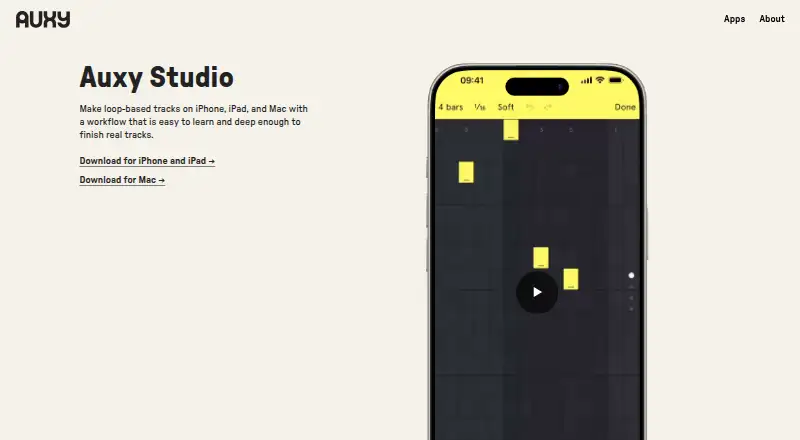
What Auxy Studio is
Auxy Studio is a music and beat-making app for creating electronic music, from initial sketches to complete tracks. It runs on iOS and macOS. Users draw notes to make melodies and drum patterns, then arrange loops into tracks. The app offers thousands of instruments and drum hits, and imported samples can be used for custom kits and melodic sounds. Reverb, delay, distortion, and automation tools provide options for shaping sound. Finished tracks can be exported as high-quality audio, stems, MIDI, or project files for Ableton Live, Bitwig Studio, and Studio One; users can also upload tracks directly to SoundCloud. The free plan includes a selection of demo sounds, while a 7-day free trial unlocks everything. The Monthly Subscription costs $5.99 a month, and the Yearly Subscription costs $49.99 a year; both unlock everything. Auxy AB, based in Skarpnäck, Sweden, says it has made the app since 2014. The company describes its audience as ranging from first-time beat makers to touring artists and professional producers.
Good
- Available on iOS and macOS.
- Includes thousands of instruments and drum hits.
- Supports imported samples and custom kits.
- Exports audio, stems, MIDI, and project files.
Watch out
- Free plan includes only demo sounds.
- Full access requires a subscription after the 7-day trial.
- Monthly Subscription costs $5.99 a month.
Who it suits
Auxy Studio suits people who want to build electronic tracks by drawing melodies and drum patterns, then arranging loops. Its sample import and export options also suit users working with custom sounds or compatible project files.
Verdict
Auxy Studio offers a note-and-loop workflow with sample import and several export formats. The free plan is limited to demo sounds, so check the trial and subscription terms if you need everything unlocked.
Plans and prices
From Auxy Studio's own pricing page, checked 7 Oct 2026.
| Plan | Price | What it gives you |
|---|---|---|
| Free | Free | Selection of demo sounds |
| Monthly Subscription | $5.99 a month | Unlock everything · Monthly Subscription $5.99 |
| Yearly Subscription | $49.99 a year | Unlock everything · Yearly Subscription $49.99 |
The facts
Each one read from Auxy Studio's own pages, with the date it was checked.
What it does
- Audience
- Auxy says it is used by first-time beat makers, touring artists, and professional producers.checked 7 Oct 2026
- Effects
- Sound shaping includes reverb, delay, distortion, and automation tools.checked 7 Oct 2026
- Export
- Tracks can be exported as high-quality audio, stems, or native project files for Ableton Live, Bitwig Studio, and Studio One.checked 7 Oct 2026
- Privacy
- Apple’s listing says the developer may collect coarse location, user ID, and product interaction data for analytics that is not linked to the user.checked 7 Oct 2026
- Product
- Auxy Studio is a music and beat maker for creating modern beats and electronic music, from sketches to full tracks.checked 7 Oct 2026
- SoundCloud
- Users can upload finished tracks straight to SoundCloud.checked 7 Oct 2026
- Sounds
- The app offers thousands of instruments and drum hits and lets users import samples for custom kits and melodic sounds.checked 7 Oct 2026
- Support
- The listing directs users to contact [email protected] for support.checked 7 Oct 2026
- Workflow
- Users draw notes to make melodies and drum patterns, then arrange loops into full tracks.checked 7 Oct 2026
The company
- Founded
- 2014checked 28 Sep 2026
- Headquarters
- Skarpnäck, Swedenchecked 28 Sep 2026
- Maker
- Auxy says it has made Auxy Studio since 2014 and identifies Auxy AB as the company behind the app.checked 7 Oct 2026
Where it runs
- Platforms
- Auxy’s website offers downloads for iPhone, iPad, and Mac.checked 7 Oct 2026
Money
- Trial
- The App Store listing offers a 7-day free trial to unlock everything.checked 7 Oct 2026
The full review of Auxy Studio
Auxy Studio is a focused beat-making and electronic-music app for iOS and macOS. It suits beginners who want a visual pattern workflow as well as producers developing ideas into arranged tracks. Its strongest advantage is the path from drawn notes to professional project exports, while the free tier is mainly an audition of the sound library.
Overview
Auxy Studio, made by Auxy AB since 2014 in Skarpnäck, Sweden, is built around creating modern beats and electronic music. You draw notes for melodies and drum patterns, turn those patterns into loops, and arrange the loops into full tracks. That structure keeps composition direct and visual, making it a good fit for first-time beat makers and for experienced producers who prefer pattern-led work over a traditional keyboard-first setup.
The app is more than a sketch tool when you use its sample import, MIDI support, effects, and project exports. However, the free plan contains only demo sounds, so anyone expecting the full instrument and drum collection without paying will find the free experience restrictive.
Key features
Pattern-based composition
Drawing notes makes melody and drum programming immediate and keeps attention on rhythm and arrangement. Loops can then be organized into a complete track, giving a clear route from a short idea to a structured production. MIDI support provides an additional way to handle musical material, although the defining workflow remains note drawing and loop arrangement.
Sounds, samples, and effects
Thousands of instruments and drum hits give subscribers a substantial starting palette. Importing samples lets you build custom kits or add your own melodic material, which is valuable when stock sounds do not match a project. Reverb, delay, distortion, and automation tools provide practical control over space, character, and changes over time. These strengths are also why the free plan feels limited: its demo-only sounds do not represent the breadth available after unlocking everything.
Export and sharing
Auxy exports high-quality audio, stems, and MIDI, plus native project files for Ableton Live, Bitwig Studio, and Studio One. Those options make it a credible front end for producers who finish or mix in one of those applications, rather than a closed sketchpad. Direct uploads to SoundCloud are useful for publishing a finished track without a separate transfer step.
Pricing
The Free plan costs nothing and includes a selection of demo sounds. It is suitable for learning the workflow and deciding whether drawing patterns fits your process, but the sound limitation makes it a poor choice for regular production.
The Monthly Subscription costs $5.99 a month and unlocks everything. It is the flexible choice for a short project or for users who do not want an annual commitment. The Yearly Subscription costs $49.99 a year and also unlocks everything; it costs less than twelve monthly payments, so it is the more economical option for anyone planning to use Auxy throughout the year. The App Store listing provides a 7-day free trial that unlocks everything, allowing a full evaluation before subscription billing begins. Check the renewal terms in your App Store account before the trial ends.
Platforms
Auxy Studio runs on iOS and macOS. That limited platform range suits Apple-device users who want the same music-making option across those systems, but it excludes Android, Windows, and Linux users.
Who it's for
Choose Auxy if you want to sketch beats by drawing notes, arrange loops into complete electronic tracks, and retain the option to export audio, stems, MIDI, or native projects for major desktop production environments. Its audience can reasonably include newcomers, touring artists, and professional producers because the workflow scales from quick ideas to handoff-ready files.
Look elsewhere if you need a free library rather than demo sounds, or if you work outside Apple platforms. Users wanting broad cross-platform access could consider Koala Sampler, which runs on Android, iOS, Linux, macOS, and Windows. For a completely free, open-source desktop option, Giada is available on Linux, macOS, and Windows. MilkyTracker is another free choice for Linux, macOS, and Windows, with optional donations.
Pros and cons
- Pro: Drawing notes and arranging loops creates a direct, pattern-focused path from idea to full track.
- Pro: Sample import, MIDI, automation, and core effects support both custom sound design and detailed arrangement.
- Pro: Audio, stems, MIDI, SoundCloud upload, and native Ableton Live, Bitwig Studio, and Studio One exports make handoff practical.
- Con: The free plan is limited to demo sounds, so serious use generally requires a subscription.
- Con: iOS and macOS are the only supported platforms.
Alternatives
Beat Making Software is the broader category to browse when you want to compare several beat-production tools. Serato Studio is worth choosing instead if you prefer a feature-limited free desktop tier with one audio track, four decks, and four scenes, and need macOS or Windows support. Drum Pads 24 fits Android and iOS users seeking a free app with optional paid sound packs or advanced features. MPC Beats is a free macOS and Windows beat-making application. Blocs Wave is an iOS alternative with optional one-time purchases for audio import and pro features. Groovebox is another iOS freemium option with in-app sound-pack purchases.
Verdict
Auxy Studio is a strong choice for Apple users who want a visual, loop-based route from beat sketches to transferable production files. Subscribe when the extensive sound library and complete export workflow matter; choose another app when demo-only free sounds, Apple-only support, or a fully free desktop environment are deal-breakers.
Alternatives to Auxy Studio
- 1

Koala Sampler
Free planAndroidiOSLinuxmacOS8.1$2.99 one-time - 2
Serato Studio
Free planmacOSWindows6.9From $9.99 a month - 3

Beatmaker 3
iOSmacOSWindows6.7$49 one-time - 4

Blocs Wave
Free planiOS6.6$5.99 one-time - 5
Groovebox
Free planiOS6.6$1.99 one-time - 6

Groovepad
AndroidiOS6.6From $9.99 a year