Serato Studio
Serato Studio is beat-making software for producers creating beats and custom DJ edits, with a workflow designed for DJ users.
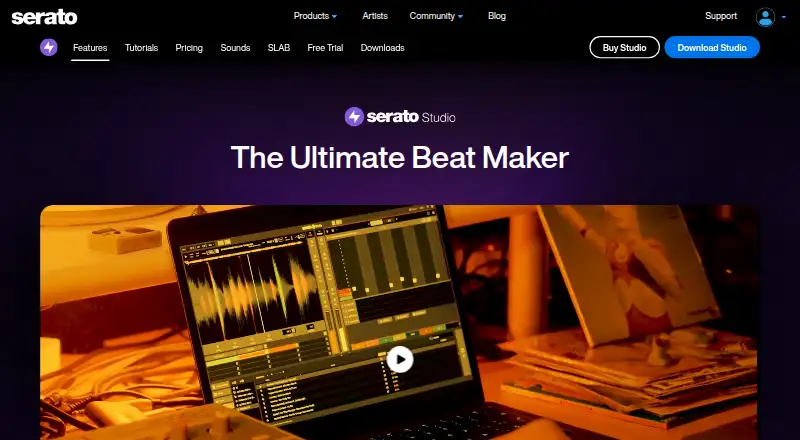
What Serato Studio is
Serato Studio is beat-making software for producers creating beats and custom DJ edits, with a workflow designed for DJ users. Its Sample Deck can sync samples to a project’s BPM and key, separate stems, chop samples, and apply time stretching, key shifting, reverse, and effects. It can also separate acapella, melody, bassline, and drum stems from a track in real time. A step sequencer and more than 190 instruments cover bass, keys, synths, pads, percussion, guitars, and orchestral sounds. Studio supports VST3 and Audio Unit plugins, MIDI hardware mapping, Serato DJ crates, and FX plugins. Audio exports can be split into files for each track, the mix, loops, or individual drum pads. It runs on macOS and Windows and requires a Serato.com account. The free mode allows one audio track, four decks, and four scenes, with automation disabled. Subscribe costs $9.99 a month; the separate Buy plan is listed at $149 a month.
Good
- Syncs samples to project BPM and key
- Separates four stem types in real time
- Includes more than 190 instruments
- Exports tracks, mixes, loops, or drum pads separately
Watch out
- Free mode allows one audio track
- Free mode limits projects to four scenes and decks
- Automation is disabled in free mode
- Requires a Serato.com account
Who it suits
It suits producers and DJ users who want to make beats or custom edits, especially those working with samples, stems, and MIDI hardware. The free mode may suit users who can work within its track, deck, scene, and automation limits.
Verdict
Serato Studio brings sampling, stem separation, sequencing, instruments, and DJ-focused integrations into one beat-making tool. Check the free-mode limits and paid plan terms against the way you plan to work.
Plans and prices
From Serato Studio's own pricing page, checked 30 Sep 2026.
| Plan | Price | What it gives you |
|---|---|---|
| Free | Free | Feature-limited Studio · selected sound packs · 1 audio track · 4 decks · 4 scenes · limited recording |
| Subscribe | $9.99 a month | Producer Suite: Serato Studio, Serato Sample, Serato Hex FX · all sound packs · cancel anytime · unlimited recording, audio tracks and decks · 32 scenes |
| Buy | $149, paid once | Serato Studio · all sound packs · unlimited recording, audio tracks and decks · 32 scenes |
The facts
Each one read from Serato Studio's own pages, with the date it was checked.
What it does
- Account requirement
- Using Studio requires signing in to a Serato.com account.checked 30 Sep 2026
- Drums and instruments
- The product page lists a step sequencer and more than 190 instruments, including bass, keys, synths, pads, percussion, guitars and orchestral sounds.checked 30 Sep 2026
- Integrations
- Studio integrates with Serato DJ crates and FX plugins and supports MIDI hardware mapping; the downloads page also lists native control for AlphaTheta SLAB.checked 30 Sep 2026
- Intended users
- Serato describes Studio as beat-making software with a DJ-friendly workflow for producers and users making DJ edits.checked 30 Sep 2026
- Paid from
- 9.99checked 20 Sep 2026
- Plugins and exports
- Studio supports VST3 and Audio Unit effects and instrument plugins and can export each track, mix, loop or individual drum pad as separate audio files.checked 30 Sep 2026
- Privacy and security
- Serato says it uses security technologies and procedures, stores personal information on systems with limited access in controlled facilities, and encrypts data in transit using TLS or SSL.checked 30 Sep 2026
- Purpose
- Serato Studio is beat-making software for creating album-quality beats and custom DJ edits.checked 30 Sep 2026
- Sampling
- Its Sample Deck can sync samples to project BPM and key, separate stems, chop samples and apply time stretching, key shifting, reverse and effects.checked 30 Sep 2026
- Stem separation
- Studio can separate acapella, melody, bassline and drum stems from a track in real time.checked 30 Sep 2026
- Support
- Serato lists 24/7 support with the subscription plan, and its Studio support section offers help requests and product guides.checked 30 Sep 2026
The company
- Company history
- Serato says it launched its first product in 1999 and released Serato Studio in June 2019.checked 30 Sep 2026
- Founded
- 1999checked 28 Sep 2026
- Headquarters
- Auckland, New Zealandchecked 28 Sep 2026
Money
- Free mode limits
- Free mode is limited to four scenes, four decks and one audio track, and automation is disabled.checked 30 Sep 2026
- Free plan
- Yeschecked 20 Sep 2026
- Free trial
- The full-functionality trial lasts 14 days, starts when activated in the application, and does not require a credit card.checked 30 Sep 2026
Where it runs
- Platforms
- Serato describes Studio as a desktop application, and its current downloads page offers Mac and Windows installers.checked 30 Sep 2026
The full review of Serato Studio
Overview
Serato Studio is desktop software for building beats and making custom DJ edits. It is best suited to producers and DJs who want sample-focused tools alongside Serato-oriented workflows; the free mode’s small project limits make it a poor fit for unrestricted production.
Serato launched its first product in 1999 and released Studio in 2019. The Auckland-based maker requires a Serato.com account to use the software. It says personal information is held with restricted access and that data in transit is encrypted using TLS or SSL.
Key features
Sampling and stem separation
The Sample Deck syncs imported samples to project tempo and key, and supports chopping, stretching, pitch changes, reversal and effects. That flexibility is useful when shaping source audio into a beat or edit, rather than relying only on ready-made sounds. Real-time separation into vocal, melody, bassline and drum stems can make an existing track more workable for a remix or DJ edit.
Sequencing, instruments and export
A step sequencer and more than 190 instruments cover bass, keys, synths, pads, percussion, guitars and orchestral sounds. VST3 and Audio Unit support lets users bring compatible effects and instruments into the workflow. Studio can export tracks, mixes, loops and individual drum pads as separate audio files, with MP3, WAV and stem export formats also supported.
DJ and hardware connections
Integration with Serato DJ crates and FX plugins, MIDI mapping and native control for AlphaTheta SLAB are particularly relevant to DJs who want production and set preparation to connect. These integrations are a more distinctive reason to choose Studio than its general-purpose instrument list.
Pricing
The Free plan costs nothing. It includes selected sound packs and limited recording, but caps projects at one audio track, four decks and four scenes, with automation disabled. That is enough to explore the workflow, not a comfortable setup for larger arrangements.
Subscribe costs $9.99 a month and bundles Serato Studio, Serato Sample and Serato Hex FX, all sound packs, unlimited recording, tracks and decks, and 32 scenes; it can be cancelled anytime. This is the clearest fit for regular producers who also want the companion tools. The 14-day trial offers a time-limited way to assess the paid workflow.
Buy is shown at $149 a month and includes unlimited audio tracks and decks with 32 scenes. Unlike Subscribe, the stated package does not include the Producer Suite, all sound packs or unlimited recording. Compare those differences carefully before choosing; the plan names alone do not make the trade-off clear.
Serato also offers 24/7 support with the subscription plan, while its Studio support section provides help requests and product guides.
Platforms
Studio runs on macOS and Windows. Use requires signing in to a Serato.com account.
Who it's for
Studio makes most sense for beat-makers and DJs who will use its sample reshaping, real-time stem separation or Serato DJ connections. The paid plans suit ongoing work better than Free because they lift the track and deck caps. Those who need more than a small scene-based sketch in a no-cost setup should look elsewhere.
Pros and cons
- Pro: Tempo/key syncing, chopping, stretching, pitch shifting and effects give imported samples several useful routes into a beat.
- Pro: Real-time vocal, melody, bass and drum separation supports edits and remixes built around existing tracks.
- Pro: Separate exports for tracks, loops and drum pads help when a project needs to be handed off as individual audio parts.
- Con: Free mode’s single audio track, four decks and four scenes restrict it to limited work, and automation is unavailable.
- Con: A Serato.com sign-in is required, so the software is not account-free.
- Con: The Buy plan’s $149 a month price is a substantial commitment beside the $9.99 a month subscription; its stated inclusions also omit several subscription benefits.
Alternatives
Koala Sampler is another freemium option with a free plan and builds across Android, iOS, Linux, macOS and Windows, making it worth considering for broader platform coverage.
Giada is a free, open-source GPL alternative for Linux, macOS and Windows.
MPC Beats is a free beat-making option for macOS and Windows.
DAWG is a free option spanning Android, Linux, macOS and Windows, with a 5.00 USD or more one-time payment plan.
Beatmaker 3 is a paid alternative with a free trial and genre-focused drum instrument options, including a 17-instrument bundle.
MASCHINE is a paid macOS and Windows alternative; its listed plans include an update-only option for Maschine 2 users and a package with Maschine Central.
Ableton Live is a paid desktop alternative. Live 12 Intro is a one-off purchase at 99.00 USD and includes 16 audio and MIDI tracks, eight software instruments, four Packs and more than 5 GB of presets, samples and loops.
FL Studio is another paid macOS and Windows option. Its Fruity Edition is a lifetime license at 99.00 USD, with 82 instruments and effects but no audio recording or stem separation.
Browse more options in Beat Making Software or Audio Editing Software.
Verdict
Choose Serato Studio if you make beats or DJ edits and will benefit from sample manipulation, real-time stems and Serato integrations in one desktop workflow. The main reason to look elsewhere is the gap between its restrictive free mode and the paid plans, especially if you need a broader project without a subscription.
Alternatives to Serato Studio
- 1

Koala Sampler
Free planAndroidiOSLinuxmacOS8.1$2.99 one-time - 2

Auxy Studio
Free planiOSmacOS6.8From $49.99 a year - 3

Beatmaker 3
iOSmacOSWindows6.7$49 one-time - 4

Blocs Wave
Free planiOS6.6$5.99 one-time - 5
Groovebox
Free planiOS6.6$1.99 one-time - 6

Groovepad
AndroidiOS6.6From $9.99 a year