
Giada
Giada is free, open-source music production software for DJs, live performers and electronic musicians, available on Linux, macOS and Windows.
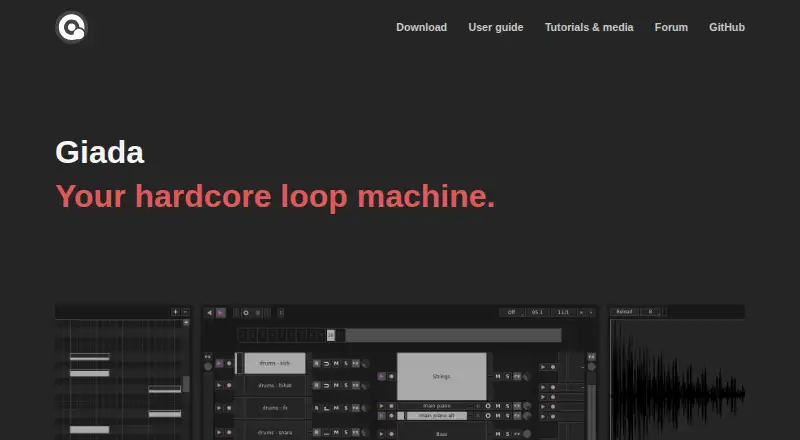
What Giada is
Giada is free, open-source music production software for DJs, live performers and electronic musicians, available on Linux, macOS and Windows. Its sequencer layers audio tracks or MIDI events to build performances in real time, and its sample player can trigger loaded sounds from a computer keyboard or MIDI controller. The Action Editor lets users create songs from scratch or edit live recordings. Giada can record sounds and MIDI events from external devices or other applications, and supports VST3 and LV2 plugins, MIDI input and output, and VST instruments for processing samples or audio and MIDI input. It can also control other software and synchronize physical MIDI devices as a MIDI master sequencer. Version 1.6.0 adds elastic sample time-stretching, which adjusts playback speed independently from pitch. Giada is distributed under the GNU General Public License and is developed by monocasual laboratories. The site links to a user guide, tutorials, media and a community forum. Its privacy policy says the website uses Google Analytics cookies and IP-address log files for traffic monitoring.
Good
- Free and distributed under the GNU General Public License.
- Supports VST3, LV2 and MIDI input/output.
- Records audio and MIDI from external devices or apps.
- Available for Linux, macOS and Windows.
Watch out
- The website uses Google Analytics cookies.
- Traffic log files contain IP addresses.
Who it suits
Giada suits DJs, electronic musicians and live performers who want to build performances with samples, audio tracks or MIDI. Its plugin and MIDI support may also suit musicians working with external devices or other software.
Verdict
Giada brings a sequencer, sample player, recording and song editing into one open-source tool. Its MIDI and plugin support, alongside its live-performance focus, make it a fit for musicians building or controlling performances.
Plans and prices
From Giada's own pricing page, checked 4 Oct 2026.
| Plan | Price | What it gives you |
|---|---|---|
| Giada | Free | Open-source GPL software · latest page-listed downloads: Linux Flatpak, Windows x86-64, macOS arm64 |
The facts
Each one read from Giada's own pages, with the date it was checked.
The company
- Company attribution
- The site says Giada is developed by monocasual laboratories.checked 4 Oct 2026
What it does
- Latest release
- The site lists version 1.6.0, Mavka, released September 22, 2026, with elastic sample time-stretching that adjusts playback speed and pitch independently.checked 4 Oct 2026
- License
- Giada is distributed under the GNU General Public License; the maker describes it as 100% open-source GPL.checked 4 Oct 2026
- Live performance
- The maker describes Giada as designed for live performances and featuring a multi-threaded audio engine.checked 4 Oct 2026
- Live recording
- It records real-world sounds and MIDI events from external devices or other apps.checked 4 Oct 2026
- MIDI control
- Giada can control other software and synchronize physical MIDI devices as a MIDI master sequencer.checked 4 Oct 2026
- Open source
- The site describes Giada as 100% open-source GPL software.checked 4 Oct 2026
- Plugins and MIDI
- It supports VST3, LV2, and MIDI I/O, and can process samples or audio/MIDI input with VST instruments.checked 4 Oct 2026
- Plug-in support
- It processes samples and audio or MIDI input with VST instruments, and the site lists VST3 and LV2 support.checked 4 Oct 2026
- Privacy
- The website privacy policy says it uses Google Analytics cookies and log files containing IP addresses for traffic monitoring.checked 4 Oct 2026
- Privacy choices
- The privacy policy says visitors can opt out of Google Analytics and request correction or erasure of personal data the site holds.checked 4 Oct 2026
- Privacy contact
- The privacy policy lists [email protected] for privacy questions and says the policy was last modified in May 2018.checked 4 Oct 2026
- Product
- Giada is an open-source music production tool designed for DJs, live performers, and electronic musicians.checked 4 Oct 2026
- Recent feature
- Version 1.6.0 adds elastic sample time-stretching, allowing playback speed and pitch to be adjusted independently.checked 4 Oct 2026
- Recording
- It records real-world sounds and MIDI events from external devices or other apps.checked 4 Oct 2026
- Sample player
- It loads samples and plays them with a computer keyboard or MIDI controller.checked 4 Oct 2026
- Song editing
- The Action Editor can be used to write songs from scratch or edit existing live recordings.checked 4 Oct 2026
- Song editor
- Its Action Editor can create songs from scratch or edit live recordings.checked 4 Oct 2026
- Support
- The site links to a user guide, tutorials and media, and a GitHub forum for community discussion.checked 4 Oct 2026
Where it runs
- Loop machine
- It builds performances in real time by layering audio tracks or MIDI events driven by its main sequencer.checked 4 Oct 2026
- Platforms
- The maker lists Linux, Windows, and macOS, with Linux Flatpak, Windows x86-64, and macOS arm64 downloads shown.checked 4 Oct 2026
The full review of Giada
Giada suits DJs and electronic musicians who want to build performances from sequenced audio, MIDI, and samples. Its open-source approach and live focus are compelling; its appeal is narrower for musicians seeking a general-purpose studio workflow.
Overview
Giada brings together live sequencing and song editing: its main sequencer layers audio tracks or MIDI events, while the Action Editor can shape a song from scratch or edit a live recording. That gives performance-led musicians a route from spontaneous material to a more deliberate song structure.
Version 1.6.0, Mavka, adds elastic sample time-stretching, allowing playback speed and pitch to be adjusted independently. For sample-based work, that separation makes it possible to change timing without forcing a corresponding pitch change.
Key features
- Sequencer and loop machine: Giada layers audio and MIDI in real time. Its multi-threaded audio engine and live-performance focus make it a natural fit for building sets and performances, rather than a tool centered on conventional recording workflows.
- Sample playback: Load samples and trigger them from a computer keyboard or MIDI controller. That gives performers a direct way to launch sounds, with hardware control as an option.
- Recording and editing: Record real-world sounds and MIDI from external devices or other apps, then use the Action Editor to create songs or edit live recordings. This links performance capture to editing without requiring the initial material to be a finished studio recording.
- Plugins and MIDI: Giada supports VST3 and LV2, processes samples and audio or MIDI input with VST instruments, and can control other software or synchronize physical MIDI devices as a MIDI master sequencer. That breadth is useful for a setup built around plugins and external MIDI gear.
Pricing
Giada costs nothing. The Giada plan is open-source GPL software, with no free trial because the software is already free. It suits musicians who want to use and modify an open-source tool without a subscription or purchase cost.
The trade-off is that Giada's strengths are concentrated in live performance, sequencing, and MIDI control. Musicians whose priority is a broader studio workflow may be better served by another kind of music production tool.
Platforms
Giada supports Linux, macOS, and Windows. The latest page-listed downloads are Linux Flatpak, Windows x86-64, and macOS arm64, so the stated download options cover those three desktop platforms.
Who it's for
Choose Giada if you are a DJ, live performer, or electronic musician who wants to sequence audio and MIDI, trigger samples, and work with external MIDI devices. Its recording and Action Editor also suit performers who want to turn captured material into songs.
Look elsewhere if you need a tool whose main emphasis is a conventional, general-purpose studio workflow. Giada is built around performance and control, and its particular mix of features is most valuable when those are central to the work.
Pros and cons
Pros
- Free and open source: The GPL license makes it a no-cost option for musicians who value open-source software.
- Live-focused audio and MIDI: Real-time layering, MIDI master sequencing, and control of other software support performance-centered setups.
- Independent speed and pitch adjustment: Elastic sample time-stretching adds flexibility when adapting samples.
- Capture-to-edit workflow: Recording external audio and MIDI and editing live recordings in the Action Editor can connect performance to song-making.
Cons
- Narrower focus: Its live-performance orientation makes it a less direct fit for musicians seeking a conventional studio-first workflow.
- Desktop-only platform coverage: Giada supports Linux, macOS, and Windows, not Android or iOS.
Alternatives
Koala Sampler is an option to consider if you want a sampler with a freemium plan and support across Android, iOS, Linux, macOS, and Windows.
MilkyTracker is another free option for Linux, macOS, and Windows, with optional donations.
Serato Studio may suit readers who prefer a freemium option with a limited free plan that includes one audio track, four decks, four scenes, and limited recording.
MPC Beats is a free alternative for macOS and Windows.
DAWG is a free option with a $5, paid once plan.
Remixlive may suit those who want a subscription option with a sample library and weekly Sample Pack, at $9.99 a month for Premium.
Beatmaker 3 is a paid alternative, with individual genre-focused drum instruments at $49, paid once or a bundle at $99.50, paid once.
Loopz is a freemium option for iOS and macOS, with a premium plan offering access to its full sounds library.
For a broader category comparison, see Beat Making Software and Audio Editing Software.
Verdict
Giada is a strong choice for performers who want a free, open-source sequencer that brings sample playback, recording, song editing, and MIDI control together. Its defining advantage is a live-first workflow with plugin and hardware MIDI support; musicians looking for a conventional studio-centered tool should choose an alternative better aligned with that priority.
Getting started
- Visit the Giada website.
- Choose a download for Linux, macOS, or Windows.
- Install and open Giada.
- Consult the user guide or tutorials and media for guidance.
- Use the Action Editor, sequencer, or sample player to begin creating.
Questions
How much does Giada cost?
Giada is listed as free, at no cost. Its plan is open-source GPL software.
Which operating systems does Giada support?
Giada is available for Linux, macOS, and Windows. The latest page-listed downloads include Linux Flatpak, Windows x86-64, and macOS arm64.
Is Giada open source?
Yes. Giada is distributed under the GNU General Public License, and its maker describes it as 100% open-source GPL software.
Does Giada support plug-ins and MIDI?
Yes. It supports VST3 and LV2 plug-ins, MIDI input and output, and VST instruments for processing samples or audio and MIDI input.
Can I use Giada to record and edit songs?
Yes. It records sounds and MIDI events from external devices or other apps. Its Action Editor can create songs from scratch or edit live recordings.
Who makes Giada?
Giada is developed by monocasual laboratories. Its website links to a user guide, tutorials, media, and a community forum.
Alternatives to Giada
- 1

Koala Sampler
Free planAndroidiOSLinuxmacOS8.1$2.99 one-time - 2
Serato Studio
Free planmacOSWindows6.9From $9.99 a month - 3

Auxy Studio
Free planiOSmacOS6.8From $49.99 a year - 4
Beatmaker 3
iOSmacOSWindows6.7$49 one-time - 5

Blocs Wave
Free planiOS6.6$5.99 one-time - 6
Groovebox
Free planiOS6.6$1.99 one-time