
Drum Pads 24
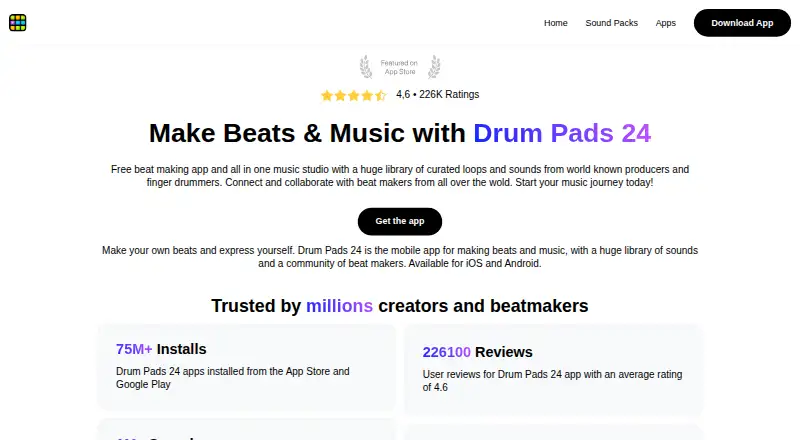
Drum Pads 24 is a beat-making app for Android and iOS, with tools for building rhythms, recording tracks, and sharing music.
What Drum Pads 24 is
Drum Pads 24 is a beat-making app for Android and iOS, with tools for building rhythms, recording tracks, and sharing music. Its sound library has more than 15,000 sounds across genres, and new packs are added every week. Packs are made by the company’s music team or with producers and DJs. The project editor lets users import audio, sample audio from video, record vocals or instruments, combine material with app sounds, and share sound packs. Its pattern editor offers a 16-by-4 step grid for each pad and four pattern slots for arranging rhythms. Users can record tracks, turn them into videos, and share them. A community feed supports publishing sound packs and collaborating with friends; beats can also be shared through messengers or to SoundCloud, YouTube, and Instagram. The maker describes AI-powered sound search and AI features for sound classification in the pack editor. After downloading the app and the sound packs needed, users should be able to create beats offline, though downloading content and online sharing may require internet access. The app is free to download and use, but some packs or advanced features may require in-app purchases or subscriptions.
Good
- Library includes more than 15,000 sounds.
- New sound packs arrive every week.
- Editor supports audio import and video sampling.
- Tracks can be recorded and turned into videos.
- Can create beats offline after downloads.
Watch out
- Some sound packs may require in-app purchases.
- Some advanced features may require subscriptions.
- Downloading content and online sharing may require internet.
Who it suits
It suits beginners and experienced beatmakers who want to build rhythms, record tracks, and share them from a phone or tablet. Offline beat-making is an option after downloading the app and needed sound packs.
Verdict
Drum Pads 24 combines sound-pack browsing with rhythm editing, recording, and sharing on Android and iOS. The core app is free, but check whether the packs or advanced features you want require payment.
Plans and prices
From Drum Pads 24's own pricing page, checked 8 Oct 2026.
| Plan | Price | What it gives you |
|---|---|---|
| Free | Free | Free to download and use; some sound packs or advanced features may require in-app purchases or subscriptions |
The facts
Each one read from Drum Pads 24's own pages, with the date it was checked.
What it does
- AI features
- The maker describes AI-powered sound search on its home page and AI features for sound classification in the sound-pack editor on its about page.checked 8 Oct 2026
- Community
- Users can publish sound packs to a feed, collaborate with friends, and share beats through messengers or to SoundCloud, YouTube, and Instagram.checked 8 Oct 2026
- History
- The about page says the first app version was released in July 2013, with Android as the first available version.checked 8 Oct 2026
- Offline use
- The app page says users should be able to create beats offline after downloading the app and necessary sound packs; downloading content and online sharing may need internet access.checked 8 Oct 2026
- Pack editor
- The project editor lets users import audio, sample audio from video, record vocals or instruments, use app sounds, and share sound packs.checked 8 Oct 2026
- Privacy data
- The privacy policy says the company and service providers collect technical information and user-provided profile or contact information, while billing information for purchases is handled by third parties such as app stores or PayPal.checked 8 Oct 2026
- Purpose
- Drum Pads 24 is a music-making app for creating beats and tracks, designed for beginners and experienced beatmakers.checked 8 Oct 2026
- Recording
- Users can record tracks, turn them into videos, and share them.checked 8 Oct 2026
- Security
- The privacy policy lists physical access controls, brute-force-resistant staff passwords, encryption of stored data, and TLS for connections containing data.checked 8 Oct 2026
- Sequencer
- The pattern editor provides 16-by-4 steps for each pad and four pattern slots for setting rhythms.checked 8 Oct 2026
- Sound library
- The app page describes a library of more than 15,000 sounds across genres, with new sound packs every week.checked 8 Oct 2026
- Sound packs
- Sound packs are produced by the company’s music team or in collaboration with producers and DJs.checked 8 Oct 2026
- Support
- The maker says users can contact its support team or write directly from the app, and links to a help center.checked 8 Oct 2026
The company
- Founded
- 2013checked 28 Sep 2026
- Headquarters
- Yerevan, Armeniachecked 28 Sep 2026
- Maker identity
- The privacy policy identifies Beat Squad LLC as the company and gives its registered address as G. Nzde 17, Yerevan, Armenia.checked 8 Oct 2026
The full review of Drum Pads 24
Drum Pads 24 is a mobile beat-making app for Android and iOS built around playable pads, sample-driven projects, and quick sharing. It suits newcomers who want a deep catalogue of ready-made sounds and experienced beatmakers who need to sketch ideas with their own recordings. The main reason to choose it is the combination of a substantial sound library and a genuinely useful mobile editor; the main caveat is that the free download does not include every pack or advanced function.
Overview
Beat Squad LLC first released Drum Pads 24 for Android in July 2013 and is registered in Yerevan, Armenia. The app is designed for creating beats and complete tracks rather than merely triggering loops. Its workflow stays focused on pads, patterns, recording, and publishing, making it approachable for first projects while still accommodating imported material and MIDI.
Key features
The library contains more than 15,000 sounds across genres, with new packs arriving weekly. Packs are made by the company’s music team or with outside producers and DJs, so the catalogue offers a broad set of starting points for different styles. That scale is valuable for exploration, although users should not assume every pack is included in the free experience.
The project editor accepts imported audio, can sample audio from video, and records vocals or instruments. It also combines those sources with the app’s own sounds and lets users publish their resulting packs. Sample import and MIDI support give the pad-based workflow a route into personal recordings instead of limiting production to stock clips. AI-powered sound search is described on the home page, while the editor is described as using AI for sound classification; those tools should help with a large library, but they do not replace deliberate sound selection.
Rhythm construction uses a 16-by-4 step pattern for each pad and four pattern slots. This is a clear, bounded arrangement system: it is well suited to building and varying loops, but less appropriate for users who expect a full-length timeline with extensive track management. Tracks can be recorded, converted into videos, and shared. A community feed supports publishing packs and collaborating with friends, while beats can be sent through messengers or to SoundCloud, YouTube, and Instagram.
After the app and required packs are downloaded, beat creation is intended to work offline. Downloading additional content and online sharing can still require an internet connection. Support is offered through the app or the maker’s support team, with a help center for assistance.
Pricing
Free — free. The app is free to download and use. Some sound packs and advanced features may require in-app purchases or subscriptions, so the no-cost tier is best for trying the workflow and using included material rather than assuming unrestricted access to the catalogue. No seat limits, usage quotas, trial duration, or renewal terms are stated for this plan.
Platforms
Drum Pads 24 runs on Android and iOS. Its mobile-first design makes it a practical companion for capturing ideas away from a computer, while the 16-step-per-pad structure may feel restrictive to producers who need desktop-style arrangement depth.
Who it's for
Choose it if you want a fast way to explore genres, tap out patterns, record a vocal or instrument, and publish a beat from a phone or tablet. Beginners benefit from the ready-made packs and simple pattern limits; experienced beatmakers benefit from sample import, MIDI, custom pack creation, and the ability to work offline after downloading content. Look elsewhere if your priority is a large-screen, timeline-based production environment or guaranteed access to a complete sound catalogue without additional purchases.
Pros and cons
- Pros: More than 15,000 sounds with weekly pack additions gives experimentation real breadth.
- Pros: Audio import, video sampling, recording, MIDI, and custom pack publishing support personal workflows.
- Pros: Recording-to-video export and direct sharing to major social and music services suit quick publishing.
- Pros: Offline creation is possible after packs are downloaded.
- Cons: The 16-by-4 pattern layout and four pattern slots favor loop construction over complex arrangements.
- Cons: Some packs and advanced features can add in-app purchase or subscription costs beyond the free download.
- Cons: Community publishing and online sharing depend on connectivity when content has not already been downloaded.
Alternatives
Koala Sampler is the better comparison for users wanting a freemium sampler across Android, iOS, Linux, macOS, and Windows, including a free desktop build.
Giada suits producers who want free, 100% open-source GPL software on Linux, macOS, or Windows rather than a mobile pad app.
MilkyTracker is a free Linux, macOS, and Windows option for tracker-based production, with optional donations.
Serato Studio is the stronger choice for desktop users who want a limited free tier with one audio track, four decks, and four scenes, or a paid macOS and Windows edition.
Auxy Studio is an alternative for iOS and macOS users seeking a freemium workflow with demo sounds on its free plan.
MPC Beats is a free macOS and Windows beat-making package for readers who prefer desktop software.
Blocs Wave is an iOS alternative with free downloading and one-time purchases for audio import and pro features.
Groovebox is another iOS freemium option centered on in-app sound-pack purchases.
Browse more options in Beat Making Software.
Verdict
Drum Pads 24 is a strong choice for mobile beatmakers who value a large, frequently refreshed sound pool, custom sampling, and fast social sharing. Its free entry point and offline creation make experimentation easy. Choose another tool if you need a full desktop arrangement workspace or want every sound and advanced feature covered without possible extra purchases.
Alternatives to Drum Pads 24
- 1

Koala Sampler
Free planAndroidiOSLinuxmacOS8.1$2.99 one-time - 2
Serato Studio
Free planmacOSWindows6.9From $9.99 a month - 3
Auxy Studio
Free planiOSmacOS6.8From $49.99 a year - 4
Beatmaker 3
iOSmacOSWindows6.7$49 one-time - 5

Blocs Wave
Free planiOS6.6$5.99 one-time - 6
Groovebox
Free planiOS6.6$1.99 one-time