AntiMicroX
AntiMicroX is a free desktop application for Linux and Windows that maps gamepad controls to keyboard keys, mouse actions, scripts, and macros.
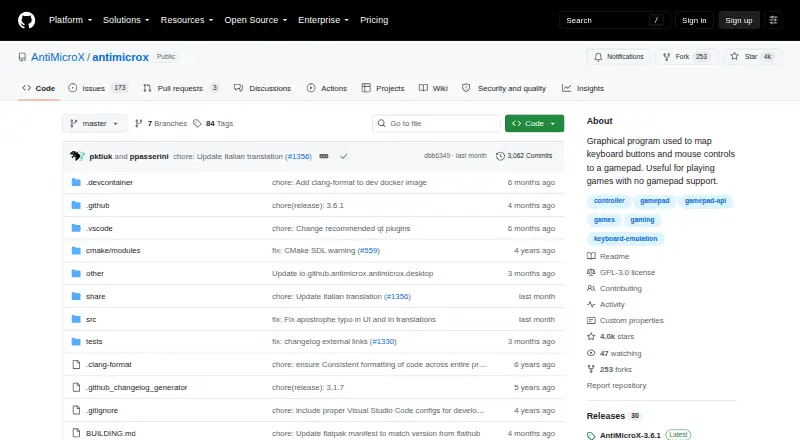
What AntiMicroX is
AntiMicroX is a free desktop application for Linux and Windows that maps gamepad controls to keyboard keys, mouse actions, scripts, and macros. It can be used to control desktop applications or play games without gamepad support. Users can assign several mapping sets to one gamepad and switch between them. Auto profiles can select a profile for the active application window, though this feature is unavailable in Wayland. AntiMicroX can generate SDL2 configuration to map atypical gamepads to generic controllers such as Xbox 360 controllers. The project says it supports X.org and Wayland, but warns that the Flatpak package may not work correctly with Wayland. Downloads include Windows installers and Linux options such as Flatpak, AppImage, and distribution packages for Debian or Ubuntu, Fedora, openSUSE, and Arch. It is licensed under GPL version 3 and offers a D-Bus service for some functions, including selecting the active control set. The project is seeking a new maintainer and expects limited support, with no new features planned unless external contributors provide them.
Good
- Maps controls to keyboard, mouse, scripts, and macros.
- Supports multiple switchable mapping sets.
- Can generate SDL2 controller configuration.
- Available for Linux and Windows.
- Licensed under GPL version 3.
Watch out
- Auto profiles are unavailable in Wayland.
- Flatpak may not work correctly with Wayland.
- Project expects limited support and no planned new features.
Who it suits
AntiMicroX suits Linux or Windows users who want to map gamepad controls to desktop inputs, scripts, or macros. It may also help users adapting games without built-in gamepad support.
Verdict
AntiMicroX offers configurable gamepad-to-desktop mapping on Linux and Windows, with several package options. Consider the Wayland caveats and limited maintenance expectations before depending on it.
Plans and prices
From AntiMicroX's own pricing page, checked 3 Oct 2026.
| Plan | Price | What it gives you |
|---|---|---|
| AntiMicroX | Free | GPL v3 desktop application |
The facts
Each one read from AntiMicroX's own pages, with the date it was checked.
What it does
- Automatic profiles
- Auto profiles can assign a profile to the active application window; this feature is not available in Wayland.checked 3 Oct 2026
- Auto profiles
- Auto profiles can assign a profile to the active application window, but this feature is unavailable in Wayland.checked 2 Oct 2026
- Display support
- The project says it supports X.org and Wayland, while warning that the Flatpak package may not work correctly with Wayland.checked 3 Oct 2026
- Display systems
- The project says it supports X.org and Wayland, while warning that the Flatpak package may not work correctly with Wayland.checked 2 Oct 2026
- Distribution
- The project lists Windows installer, Flatpak, AppImage, Debian or Ubuntu packages, and installation options for Fedora, openSUSE, and Arch Linux.checked 3 Oct 2026
- Downloads
- The project lists Windows installers and Linux distribution packages, including Flatpak, AppImage, Debian/Ubuntu, Fedora, openSUSE, and Arch options.checked 2 Oct 2026
- Help and contributions
- The project directs users to GitHub issues and welcomes code contributions; translation is handled through Weblate.checked 3 Oct 2026
- Integration
- AntiMicroX provides a D-Bus service that can control some application functions, including selecting the active control set.checked 3 Oct 2026
- License
- The project states that AntiMicroX is licensed under GPL v3.checked 3 Oct 2026
- Maintenance
- The project says it is seeking a new maintainer and currently expects limited support and no new features unless external contributors provide them.checked 2 Oct 2026
- Operating systems
- The project describes the application as usable on Linux and Windows.checked 3 Oct 2026
- Purpose
- AntiMicroX maps gamepad keys to keyboard, mouse, scripts, and macros so a gamepad can control desktop applications.checked 3 Oct 2026
- Recent release
- The latest release page opened identifies version 3.6.1, dated 2026-05-22, as a minor release mainly addressing Flatpak issues.checked 3 Oct 2026
- SDL2
- AntiMicroX can generate SDL2 configuration to map atypical gamepads to generic ones such as Xbox 360 controllers.checked 2 Oct 2026
- SDL2 configuration
- The program can generate SDL2 configuration for mapping atypical gamepads to generic ones such as Xbox 360 controllers.checked 3 Oct 2026
- Security
- GitHub's project security page says no security policy is set up and no security advisories are published.checked 2 Oct 2026
- Support
- The project points users to GitHub issues and discussions for help, bug reports, questions, and suggestions.checked 2 Oct 2026
- Support status
- The project is looking for a new maintainer and says support will be limited and no new features are planned unless external contributors code them.checked 3 Oct 2026
- Use case
- The project describes it as useful for playing games without gamepad support.checked 2 Oct 2026
Where it runs
- Mapping sets
- Users can assign multiple switchable sets of mappings to a gamepad.checked 2 Oct 2026
- Multiple mappings
- Users can assign multiple switchable sets of mappings to a gamepad.checked 3 Oct 2026
The full review of AntiMicroX
AntiMicroX is a controller remapper for Linux and Windows that translates gamepad input into desktop actions. It suits people who want one controller to operate games or applications built for keyboard and mouse. Its switchable mappings are useful, but Wayland limitations and an uncertain maintenance outlook temper the recommendation.
Overview
AntiMicroX fills a clear gap: it can make a gamepad usable with games that lack controller support, as well as desktop applications. Multiple mapping sets let a controller take on different roles without rebuilding its assignments for each task. That flexibility makes it a practical choice for users willing to configure their own layouts.
The main concern is long-term support. The project is seeking a new maintainer and expects limited support and no new features unless outside contributors provide them. A release page identifies version 3.6.1, dated 2026-05-22, as a minor release focused mainly on Flatpak issues; that release does not resolve the stated uncertainty about future development.
Key features
Remapping and profiles
Gamepad inputs can be assigned to keyboard keys, mouse actions, scripts, and macros. Users can switch among multiple mapping sets, which is useful when a single controller serves different games or desktop tasks. Auto profiles can apply a mapping to the active application window, reducing manual changes between apps, but this feature is unavailable on Wayland.
SDL2 and application control
AntiMicroX can generate SDL2 configuration to make atypical gamepads appear as generic controllers such as Xbox 360 models. That can help with compatibility where a game expects a more familiar controller type. A D-Bus service also exposes some application functions, including selection of the current control set.
Pricing
AntiMicroX is free: the AntiMicroX plan costs nothing and is a GPL v3 desktop application. There is no paid tier or free trial. The free plan includes the mapping, profiles, macros, and keyboard-and-mouse remapping described above, with no stated seat or usage cap. Its trade-off is not a lower feature tier but the project's limited maintenance expectations.
Platforms
AntiMicroX runs on Linux and Windows. Linux distribution options include Flatpak, AppImage, Debian and Ubuntu packages, and installation options for Fedora, openSUSE, and Arch; Windows installers are also offered. The project says it supports X.org and Wayland, but warns that the Flatpak package may not work correctly with Wayland. Auto profiles are unavailable on Wayland, so users who rely on app-specific switching should take that limitation into account.
Who it's for
AntiMicroX is best for Linux or Windows users who want a free, configurable way to use a gamepad with games that lack controller support or with desktop software. It is less suitable for people who need automatic per-app profiles on Wayland, expect consistent project support, or require a clear promise of future features.
Pros and cons
Pros
- Maps gamepad input to keys, mouse actions, scripts, and macros, covering more than simple button remapping.
- Multiple switchable sets and per-app profiles support distinct uses, though the latter are unavailable on Wayland.
- Free under GPL version 3, with Linux and Windows distribution options.
- SDL2 configuration generation can help atypical gamepads work as generic models in compatible contexts.
Cons
- Auto profiles do not work on Wayland, removing a useful convenience for users of that display system.
- The Flatpak package may not work correctly with Wayland, despite the project's stated display-system support.
- The project is seeking a new maintainer and anticipates limited support and no new features without external contributions.
- No security policy is set up and no security advisories are published, leaving users without a stated project security policy.
Alternatives
For another free Linux and Windows option, ControllerBuddy is also GPL-licensed; JoyShockMapper is free as well, with Linux users able to build it from source. Windows-only users can consider Joystick Gremlin, DS4Windows, or JoyToKey; JoyToKey has a free trial and a listed license price of $7.50 a month.
If you want broader platform coverage, PadLink has a free plan and supports Android, iOS, macOS, and Windows. OmniControl is a Windows alternative with a no-time-limit free plan that needs no account, alongside a paid Insider plan. Steam Input is another free option across Linux, macOS, and Windows.
For category-wide comparisons, browse Controller Mapping Software or Game Controller Mapper Software.
Verdict
Choose AntiMicroX if you want a free Linux or Windows remapper with flexible, switchable gamepad mappings and SDL2 configuration generation. Its strongest reason to choose is the range of desktop actions it can map without a paid tier. Look elsewhere if Wayland app-specific profiles or dependable ongoing maintenance are essential.
Getting started
- Visit the AntiMicroX GitHub project website.
- Choose a Windows installer or a Linux installation option for your distribution.
- Install and launch the application on Linux or Windows.
- Assign gamepad inputs to keyboard keys, mouse actions, scripts, or macros.
- Create and switch between mapping sets as needed.
Limits worth knowing
Auto profiles cannot assign a profile to the active application window in Wayland. The project expects limited support and no new features unless external contributors provide them; the Flatpak package may also not work correctly with Wayland.
Questions
How much does AntiMicroX cost?
The listed plan is free, and the application is free under GPL version 3.
Which platforms does it support?
It is available for Linux and Windows. The project says it supports X.org and Wayland, with a warning about the Flatpak package on Wayland.
Can it switch profiles for different applications?
It supports multiple switchable mapping sets. Auto profiles can assign one to the active application window, but that feature is unavailable in Wayland.
What can it map gamepad controls to?
It maps them to keyboard keys, mouse actions, scripts, and macros. It can also generate SDL2 configuration for mapping atypical gamepads to generic controllers.
Where can I get help?
The project directs users to GitHub issues and discussions for help, bug reports, questions, and suggestions. It is seeking a new maintainer and expects limited support.
Alternatives to AntiMicroX
- 1
Monect PC Remote Play
Free planAndroidiOSWebmacOS7.6Free plan - 2
GameFlow
Free planOpen sourceWebLinuxmacOSSelf-hosted7.4Free plan - 3

OmniControl
Free planWindows7.3From $59.99 a year - 4

ControllerBuddy
Free planOpen sourceLinuxmacOSWindows7.2Free plan - 5
JoyShockMapper
Free planOpen sourceLinuxSelf-hostedWindows7.2Free plan - 6
reWASD
AndroidiOSWindows7.1$14.99 one-time